


Blog

A social media agency's org chart should be built around how many clients move through the team at once, not around headcount, and it should name three things explicitly: who creates, who approves, and who's accountable when quality slips. Most agencies never sit down and design this. It gets inherited instead: someone got hired, then someone else, and a few years later nobody remembers who's actually supposed to catch a mistake before it goes live.
If that sounds familiar, it's not a hiring problem. You likely already have good people. What's missing is the structure part: unclear approval, unclear ownership of quality, and a bottleneck nobody has named out loud.
This piece isn't another "here are 7 roles you might need" checklist. It maps team structure to the variable that actually predicts where things break: how many clients are moving through the team at once, not how many people are on payroll. Three client-portfolio bands, one named bottleneck per band, one specific fix per bottleneck. No aspirational chart of a "dream team" here, just what actually holds at each stage and what tends to snap first.
Scope note: this is about roles and reporting lines inside the social team itself: who creates, who approves, who's accountable for quality. It's a different question from how you organize client workspaces, calendars, or file storage across accounts, which is covered separately in How Social Media Agencies Manage Content for Multiple Clients (Without Losing Their Mind). That piece answers "how do I keep clients from bleeding into each other." This one answers "who has the authority to say yes."
{{form-component}}
Why Are Most Social Media Agency Org Charts Already Outdated?
Most agency org charts were drawn for a world without AI-assisted production and without remote-first teams. That assumption is gone, but the chart usually isn't redrawn to match it. Two shifts explain why:
- AI changed who drafts content, not who approves it. Production work (first-pass captions, visuals, reporting) increasingly starts with AI. The review step didn't shrink to match. It moved.
- Unclear ownership has a measurable cost, not just a frustrating one. Teams that never named who owns what pay for it in hours, every week, whether they track it or not.
On the first point: Atlassian's 2025 survey of 12,000 knowledge workers and 200 executives found that teams waste 25% of their time just searching for answers. A meaningful share of that, in a social team, is spent on exactly the two questions this piece is about: who owns this, and who's supposed to sign off on it. A team that never explicitly mapped its own org chart pays that tax daily, usually without naming it.

On the second: AI hasn't removed the need for a human review step, and current data suggests the opposite. Sociality's 2026 survey (this survey covers roughly 40 marketing professionals, so treat it as a directional read, not and industry-wide figure) of marketing professionals (mostly at agencies and companies with 11 to 50 employees, a close match for this piece's reader) found AI adoption is now near-universal, yet 78.4% still apply moderate or extensive editing to AI-assisted content before it publishes. AI changed who drafts. It didn't remove the approval step.
Marketing operators are starting to say the underlying point outright, not just the data. Eric Siu, founder of Single Grain, published a LinkedIn article arguing that agencies built around fixed, task-based handoffs (a request passing from strategist to creative to SEO to account manager before anyone actually builds anything) are being replaced by a structure built around one operator plus an AI agent fleet, who owns a request end to end. His framing: "the old org chart was built around tasks"; the new one is built around who owns the outcome. His proposed structure is more aggressive than what most 5-50 person agencies need today, especially agencies serving external clients who still expect a named human accountable for what ships. The diagnosis, though, that task-based, function-first org charts are the wrong mental model now, matches what shows up across ZoomSphere's own agency customers.
What Should a Social Media Agency Org Chart Actually Show?
A useful org chart for a social team answers three questions. Most charts only answer the first:
- Who creates? The person or people producing drafts, visuals, or first-pass copy.
- Who approves? The named person whose sign-off makes a post go live, and no one else's.
- Who's accountable when quality slips? Not "the team." One name.
The org chart isn't a list of job titles. It's a map of handoffs: where content physically moves from one person to the next, and where it's allowed to stop and wait for a decision. If you can't point to the exact moment a post is either approved or bounced back, you don't have an org chart. You have a job board.
Team size is also the wrong axis to organize this around. Two agencies can both have 8 people and be in completely different situations: one serving 4 clients with deep, complex scopes, the other serving 20 small retainer clients. Same headcount, different bottleneck entirely. The variable that actually predicts where things break is how many clients are moving through the team at once, which is why the three structures below are organized by client portfolio size, not team size.

What Team Structure Fits a Social Media Agency With 3-5 Clients?
At 3-5 clients, the right structure separates "creates" from "approves" as two named roles, even if the same two people fill both.
The most common failure at this stage is a single person acting as creator, approver, and client contact all at once, usually the founder or first hire. It works fine early. It breaks quietly: quality stays high because one person touches everything, but that same person becomes the only one who can say "yes, this goes live," which puts every client's publishing schedule at the mercy of one calendar. Client feedback tends to route through that same person by default too, so a sick day or a packed call schedule means several clients' worth of content sits waiting, not because anyone dropped the ball, but because nobody separated the two roles on paper.
✅ The fix: name a second approver now, even part-time, even a co-founder who only reviews and never creates. The goal isn't more headcount. It's making sure two named roles exist (creator, approver) instead of one blended one, before the agency grows past the point where that's an easy fix.
What Team Structure Fits a Social Media Agency With 8-15 Clients?
At 8-15 clients, the right structure adds a second-tier reviewer between "creates" and "final approves," so the person with final sign-off authority is only making the last call, not the first one.
The most common failure at this stage is approval volume outpacing a single reviewer's bandwidth, which shows up as slower turnaround, not worse content. The founder or lead strategist is usually still the only approver, but now reviewing for 8-15 accounts instead of 3-5. Nothing about the work itself got harder; there's just more of it moving through the same one-person checkpoint. Atlassian's finding that teams lose a quarter of their time to unclear ownership is at its most visible exactly here: content sitting in a queue, clients asking "did you see what I sent Tuesday," and creators waiting on sign-off instead of starting the next brief.
✅ The fix: insert a named team lead or senior creator role whose job is to check brand fit and quality before anything reaches the final approver. Who Should Approve Social Media Posts? (And Why Nobody in Your Agency Agrees) goes deeper into exactly how to split that decision between the two roles.
What Team Structure Fits a Social Media Agency With 20+ Clients?
At 20+ clients, the right structure treats internal quality review and client sign-off as two separate, named checkpoints instead of one shared "pending" status.
The most common failure at this stage isn't approval volume, it's approval ambiguity: a post typically needs to clear an internal reviewer before a client ever sees it, then clear the client separately. If both stages share one vague label, nobody can tell whether a stuck post is waiting on the team or waiting on the client, which makes it impossible to diagnose where things are actually slow. This is a different problem from the one solved by workspace separation (covered in our multi-client content piece); this is about naming who holds decision rights at each of the two stages, not about keeping client content physically separated.
✅ The fix: give each stage of the handoff its own name. Visibility SK, a Bratislava-based agency with 60+ specialists managing social content for clients including Ford Slovakia, Toyota Material Handling Slovakia, Geberit, and Hörmann, structures this inside ZoomSphere as a sequence of named roles, not a single "pending" bucket:
- Assigned to Team Leader
- Rework from the Team Leader, or Approved by Team Leader
- Assigned to Graphic Designer, then Done by Graphic Designer
- Assigned to Client
- Rework from Client, or Approved by Client
- Published Manually
(ZoomSphere case study: Back to Clarity, Why Visibility SK Came Home to ZoomSphere.) The point isn't the specific labels; it's that internal quality control (Team Leader) and client sign-off (Client) are two distinct, visible decision points instead of one blurred one.
{{cta-component}}
The scale is worth naming directly: across 2024 and the first half of 2025, Visibility SK published 4,335 posts for 25-27 client brands through this exact role sequence, run across 85 team members. Worth being upfront about scale here: at 85 people, Visibility SK is larger than the 5-50 person agencies this piece is mostly written for. The mechanism doesn't change at a smaller size, though. A 20-client agency with 15 people runs the same two named checkpoints; there are just fewer people filling more of the named boxes, sometimes the same person holding both the "creates" and "Team Leader approves" roles for different clients. The structure is the same. The headcount behind it isn't.

How Is AI Changing Roles on a Social Media Team in 2026?
AI is changing who drafts content. It is not removing the need for a named human approver; for most agencies, it's making that role more important, not less.
In the same 2026 survey, AI use skews heavily toward drafting-stage work rather than final decisions:
- 59.5% use AI for content ideation and trend research
- 59.5% use AI for analytics and reporting
- 10.8% use AI for automation
- 5.4% use AI for anything close to autonomous execution
In plain terms: AI is doing first-draft work, not final-call work, for most teams right now. The org chart box labeled "approves" doesn't disappear because AI writes the caption. It just reviews a different kind of first draft than it used to.
This is worth stating plainly because a lot of 2026 commentary assumes AI collapses org charts down to nothing. Among the mostly 5-50 person agencies ZoomSphere works with, serving external clients who still expect a named human to be accountable for what goes out under their brand, that hasn't been the pattern. Production speed changes. The requirement that someone, by name, makes the final call does not.
{{form-component}}
FAQ
What is a social media agency org chart?
It's a map of who creates content, who approves it, and who's accountable for quality and client sign-off inside a social media team, distinct from how client accounts or workspaces are organized.
How many clients can one social media manager handle before the team needs restructuring?
There's no fixed number, but the pattern that shows up repeatedly is a bottleneck around 8-15 clients, when a single approver's review capacity, not the team's production capacity, becomes the limiting factor.
Does AI reduce the need for approval roles in a social media agency?
No. Current data shows AI is used mainly for drafting, ideation, and reporting rather than autonomous publishing: 78.4% of teams still apply moderate or extensive editing to AI-assisted content before it goes live (Sociality.io, 2026).
What's the difference between internal approval and client approval in an agency org chart?
Internal approval checks brand fit and quality before a client ever sees a post. Client approval is a separate, external sign-off. Agencies that label both stages the same way, for example one generic "pending" status, lose the ability to tell which side a delay is actually coming from.
Should a social media agency organize its team by headcount or by client portfolio size?
By client portfolio size. Two teams with the same headcount can face completely different bottlenecks depending on how many client accounts move through them at once, which is why this piece organizes structure around 3-5, 8-15, and 20+ client bands rather than team size.
Putting a second person on a client account does not automatically make that account more reliable, because access and ownership stop being the same thing the moment more than one person can act on the same task.
Quick answer: if you run a social media agency and staff your bigger accounts with two people for backup, the redundancy itself isn't the problem. What causes small tasks to drop is leaving every individual task unassigned to "the account" instead of naming one owner for it. Fixing that costs nothing and doesn't touch how many people you keep on the account.
Here's what that looks like in practice. Illustrative scenario, not a real client: a social media manager and a junior teammate are both formally assigned to a mid-sized retail account, split deliberately for coverage during time off. A follower asks a product question in the comments. The senior assumes the junior is monitoring engagement that week. The junior assumes anything client-facing defaults to the senior. Two days later, the client notices the unanswered comment before either of them does, and it lands on your desk as a "why didn't anyone catch this" question. Neither teammate missed a checklist. There was no checklist for "who answers this specific comment, right now," only a shared, general sense that both of them cover the account.
{{form-component}}
Why Does Adding a Second Person to a Client Account Make Tasks Less Reliable?
This has a name outside marketing, and it isn't specific to agencies.
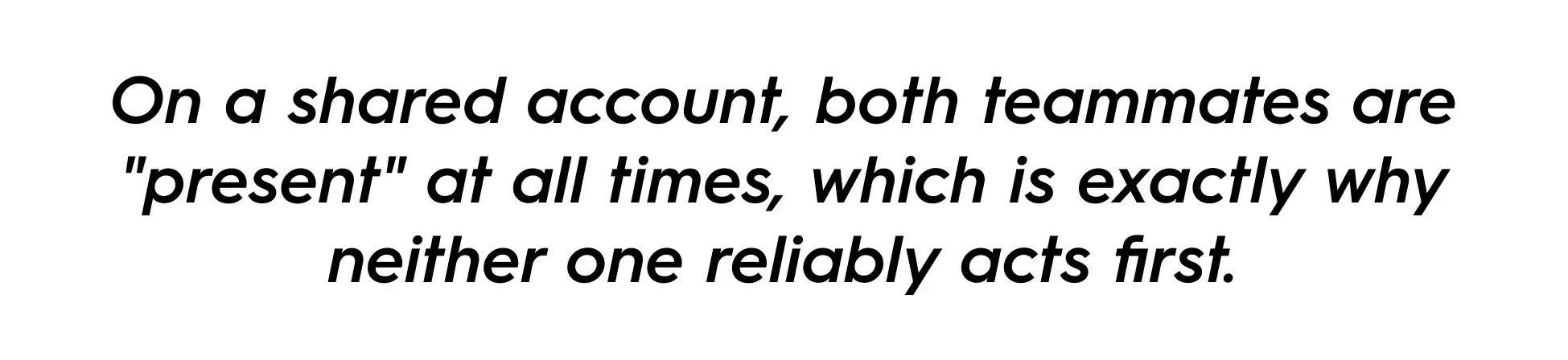
Behavioral researchers call this diffusion of responsibility: when a task is assigned to multiple people, each person assumes someone else will act, and the more people nominally responsible for an outcome, the weaker each individual's sense of accountability becomes (SHRM, 2026). It's a close cousin of the bystander effect: the well-documented pattern where a person is less likely to act precisely because other capable people are visibly present. On a shared account, both teammates are "present" at all times, which is exactly why neither one reliably acts first.
Evrim Aslan, writing for ConsultEvo, draws the practical line:
"Shared responsibility means several people contribute to the work, but one person still owns the outcome. No real owner means several people are involved, but none of them is clearly accountable for what happens next."
Having two people on an account answers the first sentence. Whether anyone owns any single task on it answers the second, and that doesn't happen automatically just because the first one did.
Worth saying plainly: this doesn't mean the redundancy was a mistake. Two people covering one account for capacity reasons is still a reasonable structure. What's missing isn't the second person. It's a separate decision about who owns each specific task.
Liane Davey, a team-effectiveness advisor who writes for Harvard Business Review, locates the same trap on the manager's side: the fix isn't tighter policing of who's slacking, it's "clear expectations and then frequent, low-impact coaching and feedback to give your team members assistance without ever transferring ownership." Skip the expectation-setting step, and a second person on the account just means two people who were never told, explicitly, which of them owns which task. She's still making the same point in real time, not just in a 2023 magazine piece:
Two mechanisms this is easy to confuse it with, briefly: it isn't the same as one person holding all the undocumented context on an account (that's a concentration risk, solved by adding a backup, which is the opposite fix). And it isn't the same as too many approvers stalling a single decision, where too many hands are actively arguing over one call. What's happening here is a task nobody is actively holding at all, because everyone assumed someone else already had it. Same visible symptom (something didn't move), two different, opposite causes.
What's the Difference Between Account Coverage and Having a Task Owner?
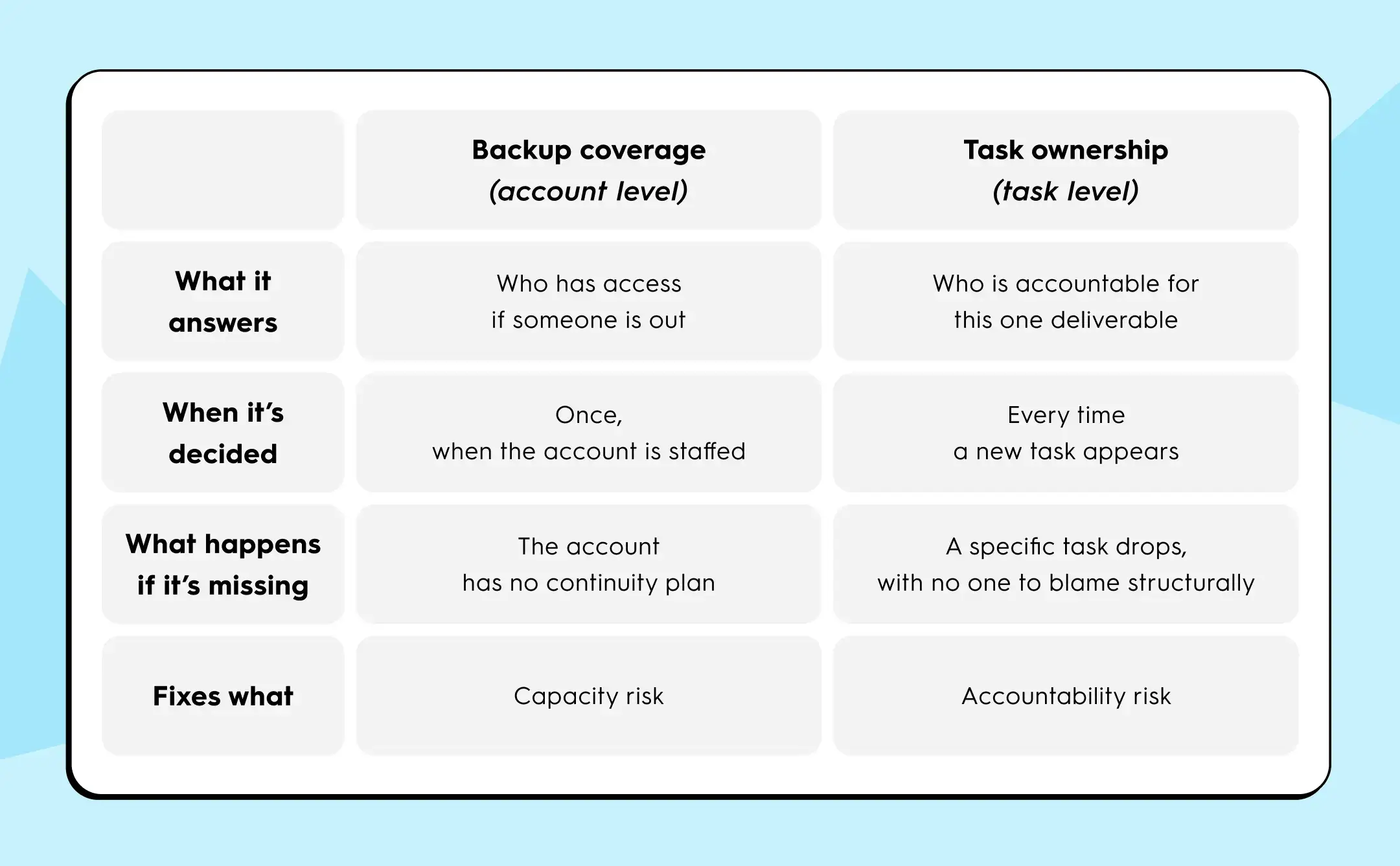
Backup coverage and task ownership are two separate decisions:
- Coverage means two people can work on an account so the agency isn't exposed if one is out.
- Ownership means one specific person is accountable for one specific deliverable.
Deciding the first does not decide the second.
ConsultEvo names three distinct roles that get blurred in exactly this situation:
- The task assignee, the person doing the work
- The process owner, accountable for the workflow working correctly
- The decision owner, who makes the call when judgment is required
"A task assignee is not always the same as the process owner or the decision owner," and confusing the three is listed as one of the most common causes of accountability breakdowns.
This is also why the fix isn't "remove the redundancy." Marc Mapes, Chief Revenue Officer at Kapta, argues the opposite direction for large enterprise accounts (that account management should move toward team-based coordination, not away from it), and still insists that "roles remain defined, but information flows freely," so nobody has an "I didn't know that was happening" moment. Whether an agency leans toward one owner per account or a shared model, clarity at the task level is the constant across both positions. What breaks it is skipping that step because the account already has two names attached to it.
Is a Dropped Task a Sign Someone on Your Team Isn't Doing Their Job?
No. A dropped task on a shared account is usually a predictable structural outcome, not evidence that the senior or the junior on it wasn't paying attention.
Whoever notices the gap first (often the client) tends to assume it was a person's mistake, because that's the visible moment. But the actual cause sits earlier: nobody ever named who owned that specific comment, reply, or update, so both people had a legitimate reason to assume the other had it. Treating the drop as an individual performance issue misses the fix entirely. The same two people, with the same workload, will drop the next one too, unless the account changes how it names ownership at the task level, not how hard either person is working.
What Does Task-Level Ownership Look Like in Practice?
Agencies that avoid the scenario above don't remove the second person from the account. They name an owner at the task level, every time, regardless of who else has access.
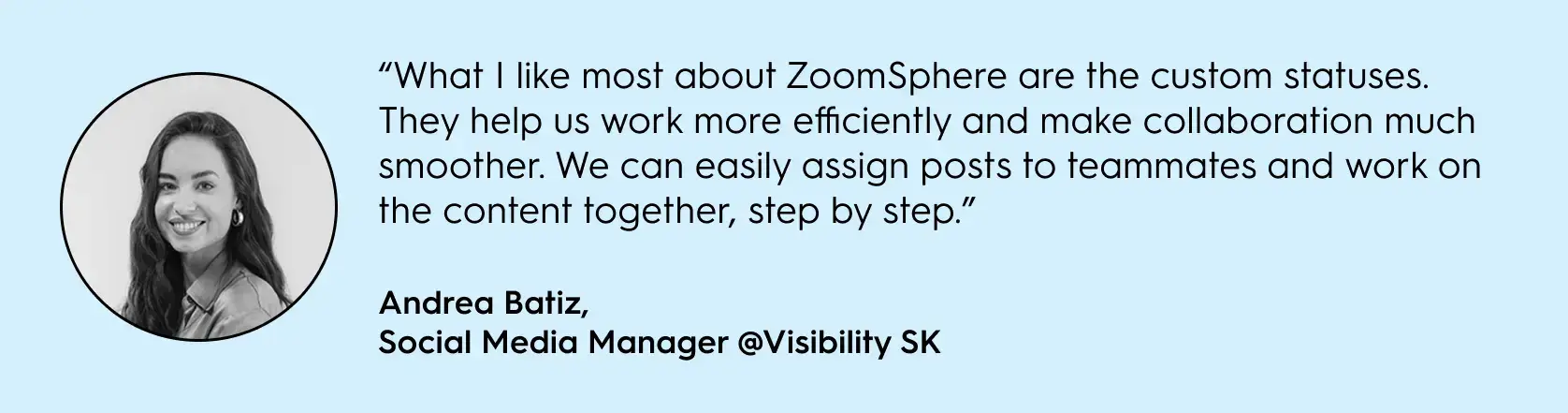
Visibility SK is a Bratislava agency of around 60 people managing Ford Slovakia, Toyota Material Handling, and Geberit. The principle they landed on doesn't depend on headcount, and it isn't a metaphor: it's built on Scheduler's custom statuses, a real, named ZoomSphere feature that lets an account holder replace a generic "In Progress" label with stages like "Assigned to Team Leader" and "Assigned to Graphic Designer Jane / John," each carrying its own Owner, Editor, Client, and Admin read/write permissions. Visibility SK's own workflow runs on exactly that: every post carries a specific person's name at every stage, not just a client's name at the top, because the status itself won't move until someone with the right permission moves it. Andrea Batiz, a Social Media Manager at the agency, credits this custom-status setup specifically with tightening team collaboration on their content workflow. Since returning to that setup, the agency published 4,335 posts in one year across dozens of brands, spanning 2024 into the first half of 2025. The volume itself doesn't prove the mechanism on its own, but a feature that names an owner at every single stage of every single post is the direct, checkable version of separating "who has access" from "who owns this step," and it scales down to a two-person account just as easily as it scales up to 27 brands.
How Do You Keep Account Coverage Without Losing Task Ownership?
You keep the backup by leaving account-level access untouched, and fix ownership by naming one person on every individual task the moment it's created. The two decisions don't have to move together, and treating them as one is what causes the drop described above.
Back to the illustrative scenario: the fix isn't removing the junior teammate from the account, and it isn't a new meeting about "who covers what."
Here's what actually changes, step by step:
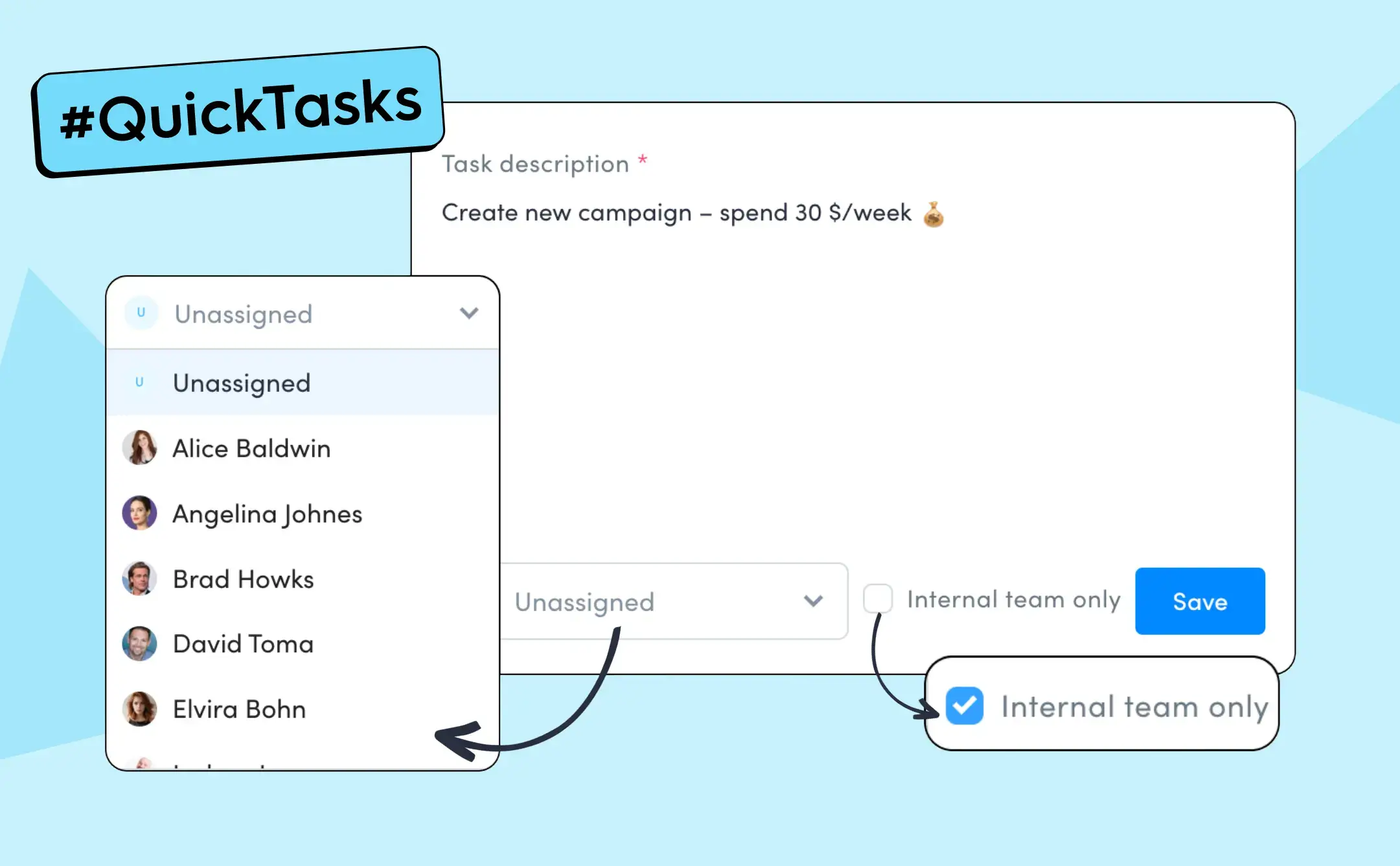
The moment the comment appears, one of them opens it as a Quick Task and assigns it to a name, not to "the account." That single action is the whole fix: the reply now has exactly one person accountable for it, and the other teammate can see, at a glance, that it's already spoken for, instead of guessing whether it's already been handled.
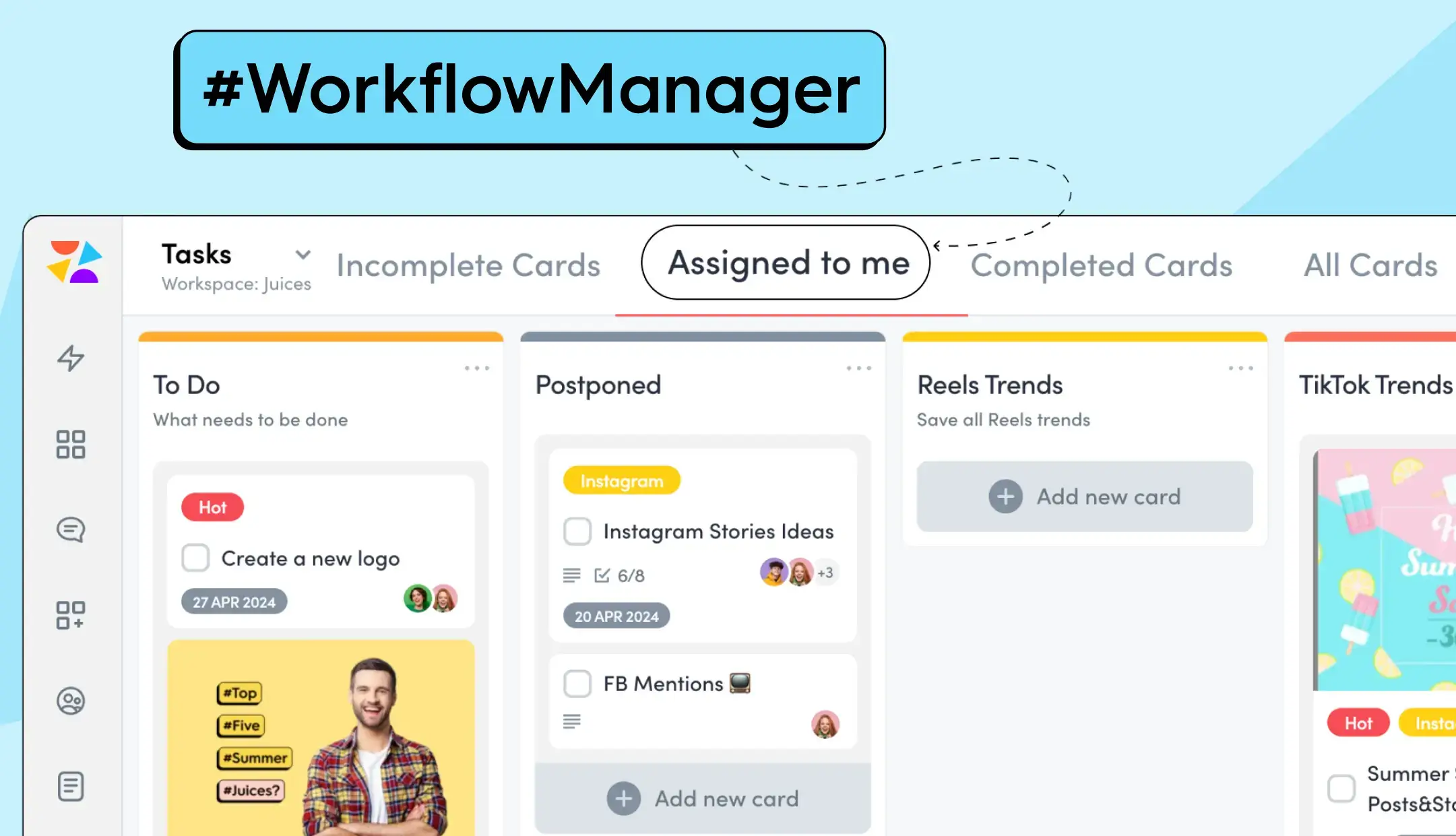
If the same gap shows up as a recurring job rather than a one-off comment, a Workflow Manager card with a named assignee and the "Assigned to me" filter does the identical job for ongoing work.
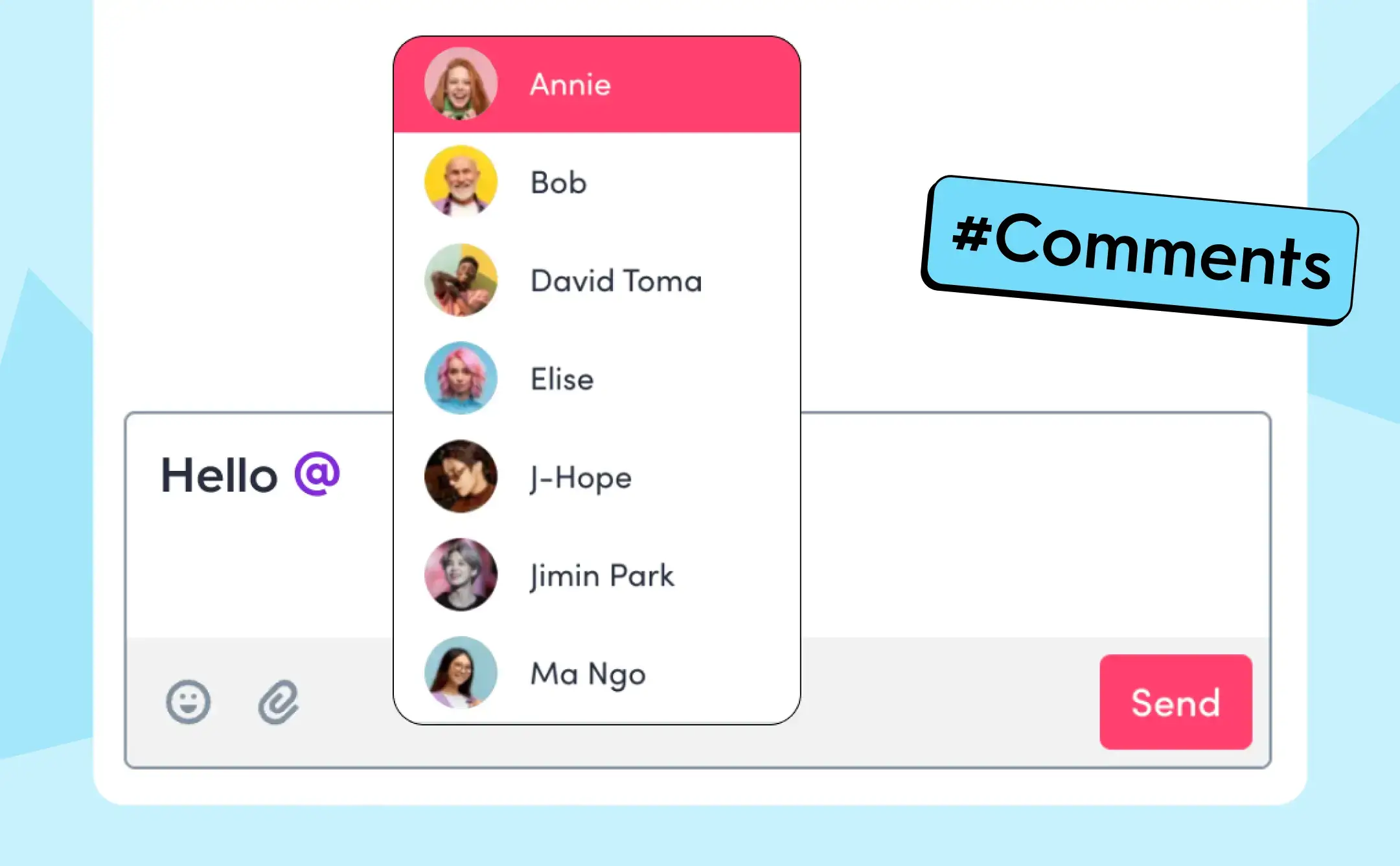
And for a reply that specifically needs one teammate's voice mid-thread, Comment Collaboration @mentions route the notification to that one inbox, not a shared one nobody feels obligated to check first.
None of this happens automatically, and that's worth being honest about: Quick Tasks let a task sit "Unassigned" exactly as easily as they let it get a name. That's the same limit Evrim Aslan already named earlier:
"tools do not solve ambiguity on their own... they only work well when process ownership is already defined."
The product doesn't make the decision for the team. It's the place the decision becomes visible and trackable once someone's actually made it, the same role Scheduler's custom-status permissions play for Visibility SK above, at post level instead of task level.
This doesn't touch capacity. If the account genuinely doesn't have enough hours between two people, naming an owner on each task makes that shortage visible faster. It doesn't add hours to the week. ZoomSphere's own reporting on Gen Z-led agency teams makes the same point from a different angle: "explicit process ownership, visible status at every stage, and feedback at the point of work" is what lets a team member act independently. It's a fix for ambiguity, not a fix for being short-staffed.
{{cta-component}}
FAQ: Shared Account Ownership and Task Accountability
What is diffusion of responsibility in team accountability?
Diffusion of responsibility is what happens when a task is assigned to multiple people and each one assumes someone else will act on it. The more people nominally responsible for an outcome, the weaker each individual's sense of accountability becomes, making the task more likely to be missed than if one person owned it outright (SHRM).
Is having two people on a client account a bad practice?
No. Assigning two people to an account for capacity backup and continuity is a normal, sound agency practice. The risk isn't the second person. It's leaving every individual task unassigned because the account already has two names on it. Redundancy protects capacity; it doesn't by itself protect accountability for any one task.
Is diffused task ownership the same as one person holding all the knowledge about an account?
No. A knowledge silo is a concentration problem: one person holds undocumented context, and the account stalls if they're unavailable. Diffused task ownership is a distribution problem: multiple people hold the same access, and the task still drops because everyone assumes someone else with equal access will act.
What's the difference between a task assignee and a task owner?
A task assignee is the person doing the work; ownership means one person is accountable for whether that specific piece of work gets done and done correctly. ConsultEvo separates this further into task assignee, process owner, and decision owner: three roles that often collapse into one undefined blur when nobody names them explicitly.
How do you assign task ownership without removing account backup?
Keep both people's access to the account as-is, and name one person on every individual task at the moment it's created, rather than leaving it assigned to "the account" or "the team." In ZoomSphere, this happens through Quick Tasks for one-off jobs, Workflow Manager assignees for recurring work, and @mentions in Comment Collaboration for anything that needs one specific person's response.
This isn't a debate confined to agency ops either. People strategy practitioners are having the same argument about accountability right now, from a different angle:
Closing
If you staffed a client account with two people on purpose, that decision was sound. It just isn't the same decision as who owns the reply sitting in the comments right now. The next time a task drops on that account, it isn't a sign that either teammate wasn't paying attention. It's the predictable result of a structure that never separated "who can act" from "who is acting," and it's worth checking whether that gap exists on every shared account your agency runs, not just the one that dropped something this week. Fix that, and the backup coverage you already built stops costing you anything.
An unapproved post reaching the feed isn't evidence that your team was careless. It's evidence that somewhere in your approval workflow, a step existed without a backstop behind it. If you're the agency owner, or the account lead who has to answer for it, that's the sentence worth holding onto before you go looking for who clicked publish: audit the chain first, then talk to the person.
What Should You Do in the First Hour After an Unapproved Post Goes Live?
Before any process conversation, handle the post itself.
- Pull it or fix it. Decide fast whether the post needs to come down entirely or can be corrected in place. A wrong number is often fixable; a client confidentiality breach usually isn't.
- Loop in the client or stakeholder before they find it themselves. A short, factual heads-up ("we caught X, here's what we're doing about it") lands very differently than the client screenshotting it back to you first.
- Freeze the trail, don't erase it. Resist the urge to delete comments or edit history to tidy things up. You'll need that record for the audit below, and erasing it just moves the same failure into your blind spot.
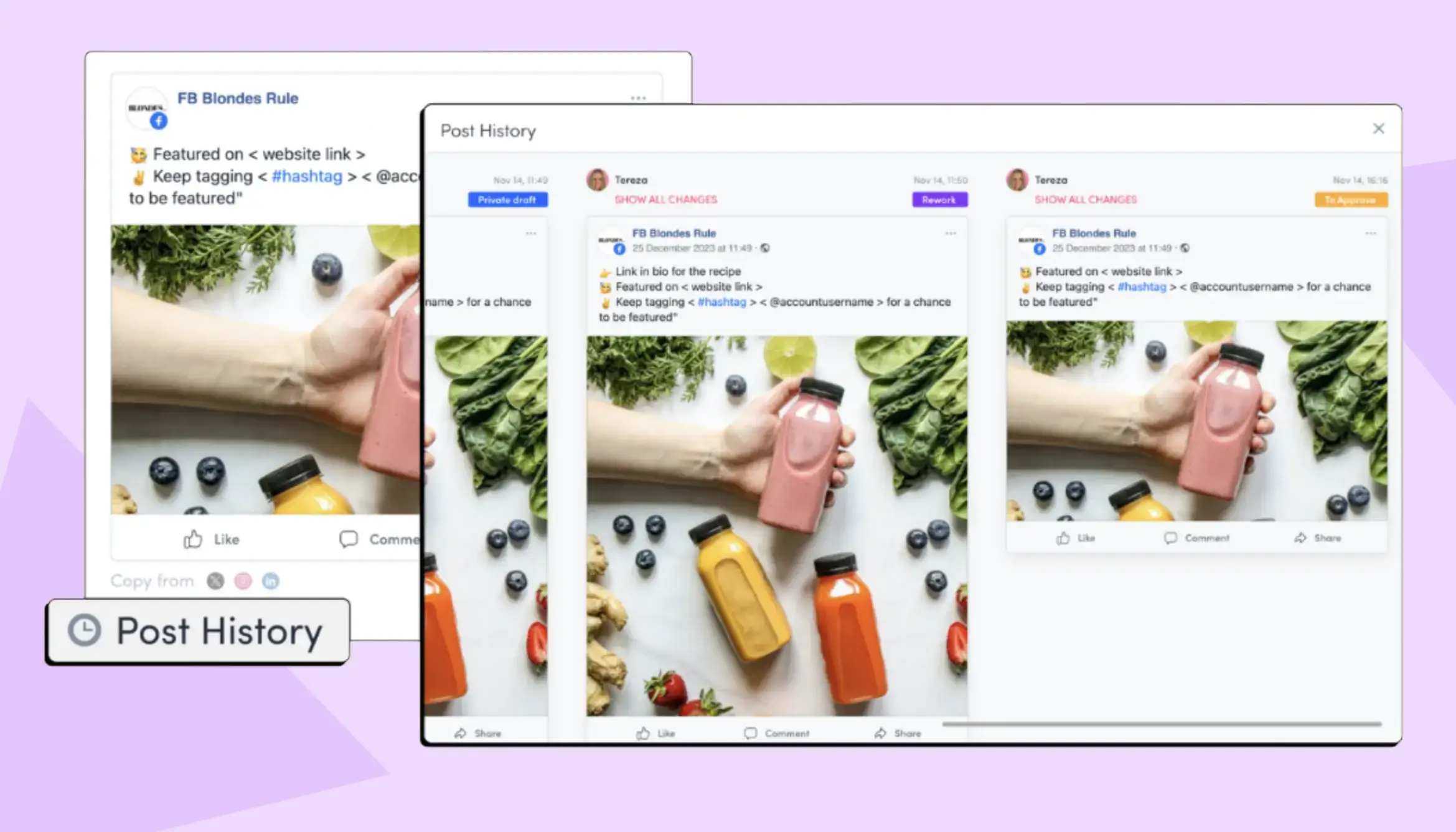
Only after that is handled does the diagnostic work start, and it's worth doing even once this particular fire is out. Find the uninsured point, and you've fixed something. Find a person to blame, and the same gap is still sitting there, waiting for the next account on your roster.
This isn't a one-agency problem. In 2026 benchmark data covering more than 1,000 content-ops teams, manual approval routing (Slack threads, email chains, doc comments, no automation) runs a median of 4.7 days from final draft to publish-ready, versus 1.8 days for teams with an automated routing layer (Digital Applied, Content Operations Statistics 2026). Separately, 65% of marketers say they lose more than a day a week just chasing feedback and sign-off (Ziflow, 2023). If you're running five, ten, or thirty client accounts through the same process, that gap multiplies by every account on the roster, not just the one that happened to go wrong first.
SocialPilot made a version of this argument earlier this year, writing that when one person is the only node in the approval chain, "it's not a people problem. It's a design problem." They're right, and their fix (naming a backup approver) solves one specific failure mode: what happens when the one person who approves everything is unreachable. It doesn't touch what happens when the approver was reachable, said yes, and the post that went live wasn't the post they approved.
Where's the Uninsured Point in Your Approval Workflow?
Call it the uninsured point: any step in a social media approval workflow where a post can move forward without anyone, or anything, actually checking it, even though the process looks complete on paper. A chain can have a fully staffed, fully available approver at every stage and still have one of these sitting in it. That's a different problem than the one SocialPilot solved. Coverage answers "is someone available to say yes." An uninsured point answers "does the chain hold once they do."
It's also different from what we've written about in What Gen Z Reveals About Broken Agency Workflows in 2026: that piece covers a chain that never had a clear signal to begin with. This one assumes the signal existed, an approval genuinely happened, and asks whether it survived everything that happened to the post afterward.
Here's how to find yours.
What Does an Uninsured Point Look Like in Practice?
The following is a hypothetical example used to illustrate the audit, not a real client incident.
A 20-person agency runs client social media through a standard flow: draft, internal review, client sign-off in a shared doc, then scheduling. One Friday, a caption for a retail client goes live advertising a discount that ended the week before. Nobody skipped a step. The client had approved the post, in a comment thread, three days earlier, referencing an earlier draft. Between that approval and publishing, someone updated the caption to fix a typo and never re-sent it for a second sign-off, because nothing in the process required it. The approval was real. The post that went live wasn't the post that was approved.
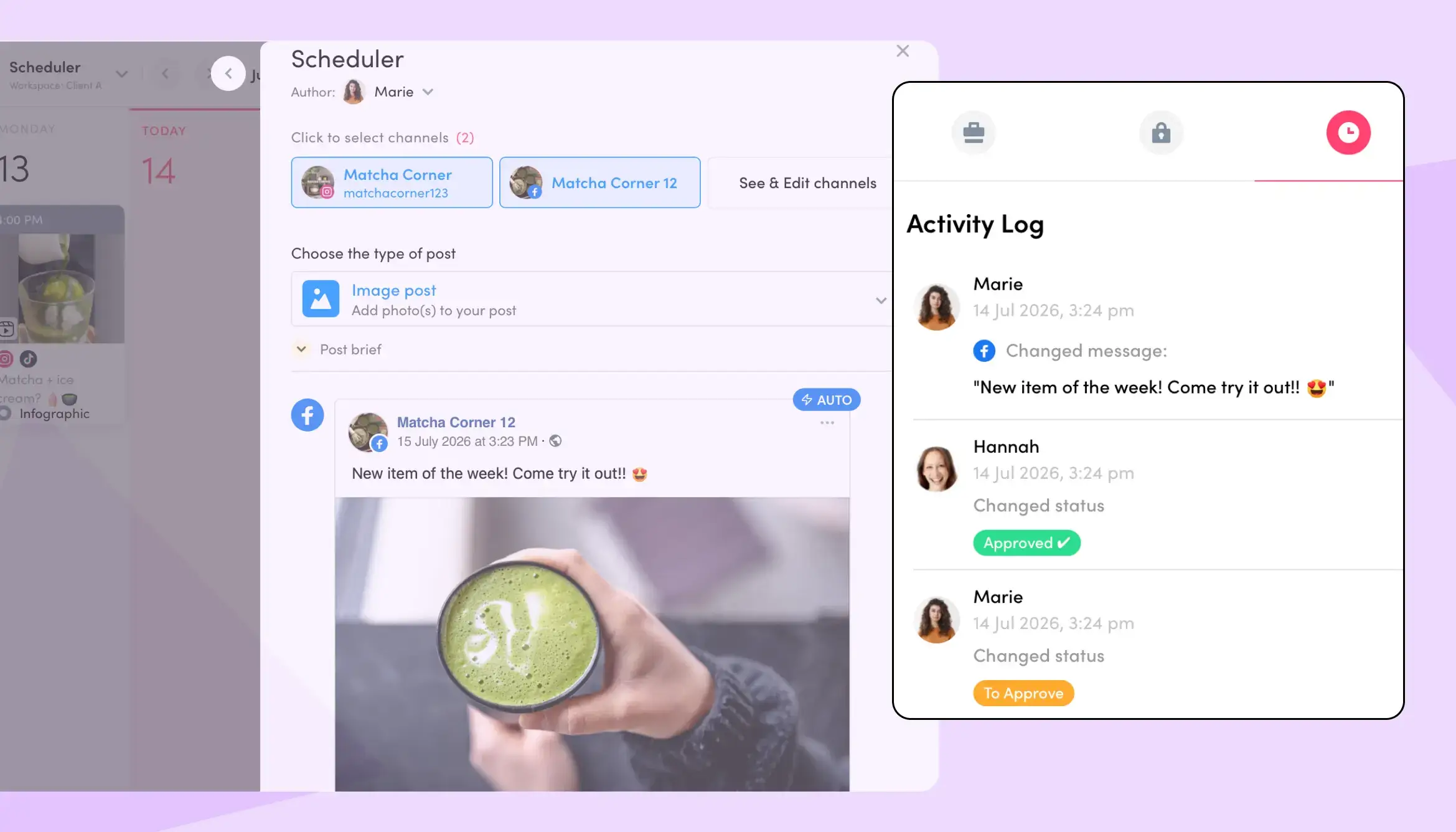
This is exactly where the agency above would have caught the unlogged edit, if they'd looked into ZoomSphere's Activity Log.
Ask "who published this" and you get an honest, unhelpful answer: whoever scheduled it followed the process exactly as it existed. Ask "where in the chain was this allowed to happen" and you get an answer you can fix.
{{cta-component}}
The Three-Point Social Media Approval Workflow Audit
Run this against your current setup, whatever tool you use. Each question targets a different uninsured point, and none of them are about whether someone was available to approve.
1. Who can edit a post after it's been signed off?
If the answer is "anyone with access to the post," that's your first uninsured point. It doesn't need to be a hard lock. It can be as simple as a visible status change, a required re-approval trigger on edit, or a team rule that any edit after sign-off gets flagged in a comment before it moves further. What matters is that "approved" and "editable by anyone, unnoticed" can't both be true for the same post at the same time.
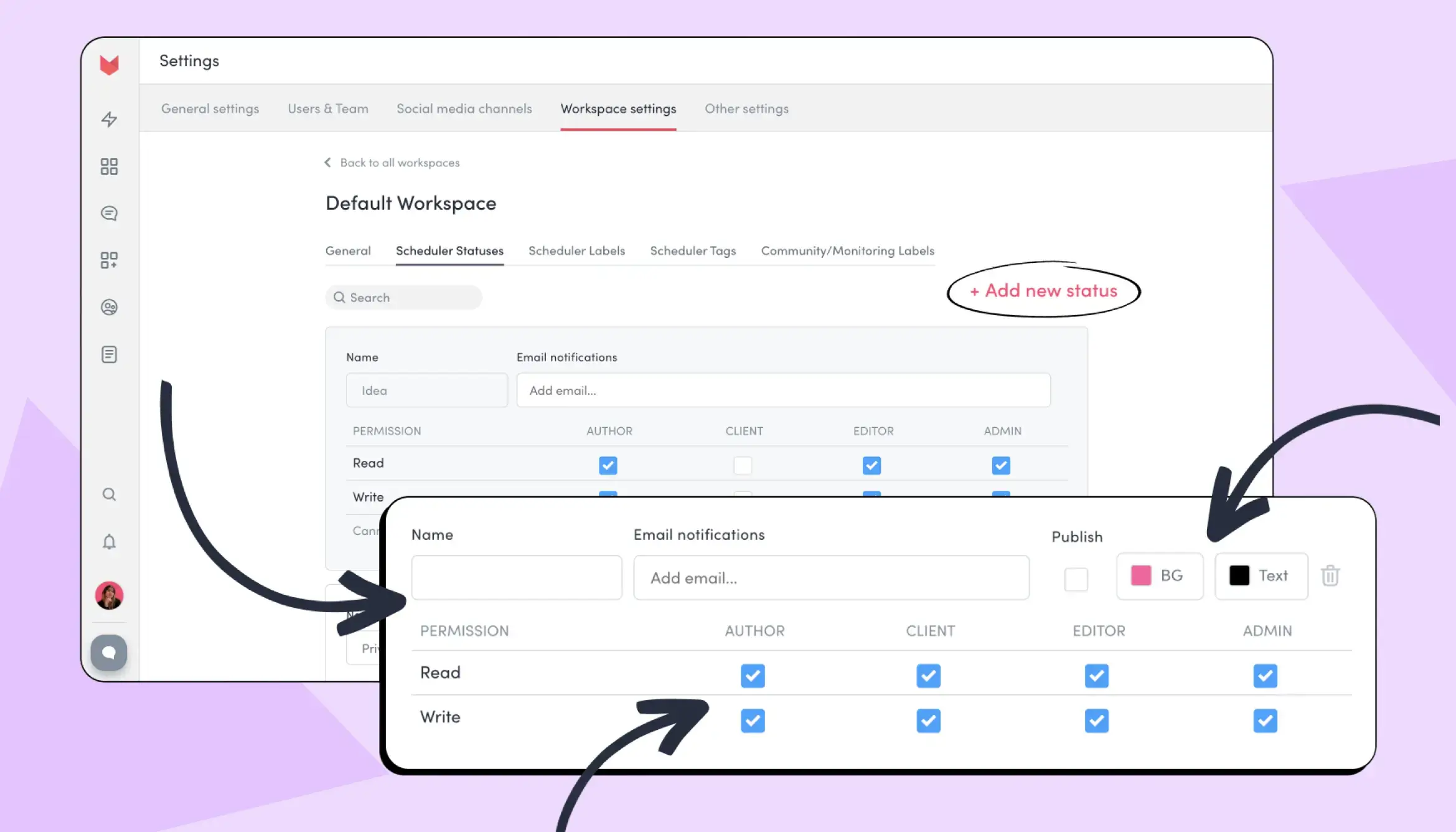
This is the stronger version of the answer: in ZoomSphere, every role gets its own Read/Write permission per status, configured per social channel, not just per person. Once a post moves into a status like Approved, a role without Write access on that status genuinely can't edit it. If "the post is in some status you don't have permission to edit," the change simply doesn't go through. That's a real answer to "who can edit a post after it's been signed off," not a status label someone could ignore.
2. Where does the record of that decision actually live?
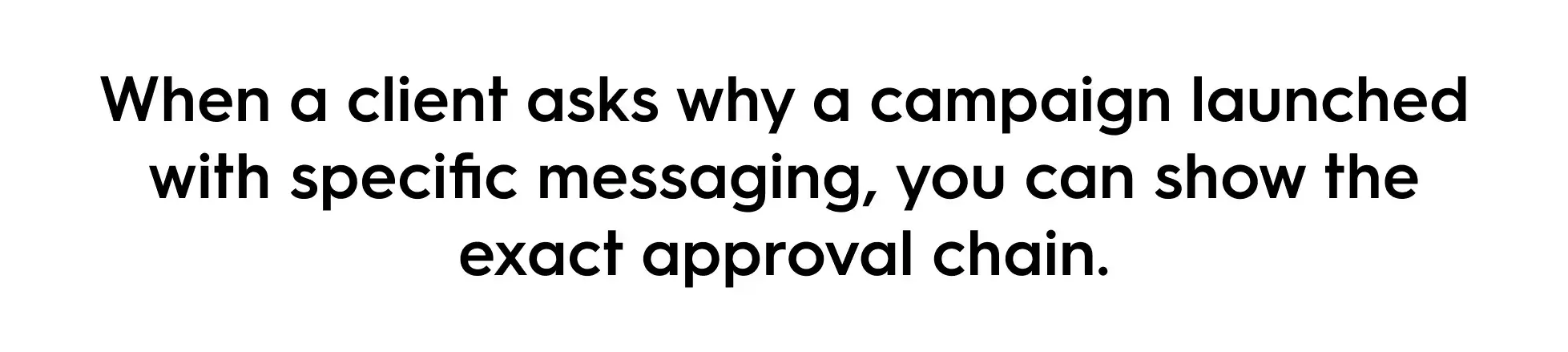
If the answer is "in someone's inbox" or "a Slack DM that scrolled past," the decision has no institutional memory. It exists in one person's head and is one deleted thread away from unfindable. CampaignSwift makes a similar point about its own audit trail feature in their complete guide: "when a client asks why a campaign launched with specific messaging, you can show the exact approval chain." That's the bar: not "we're pretty sure someone approved it," but a record you can pull up in seconds.
ZoomSphere's Activity Log works the same way inside the Scheduler App (right next to your post 😉): every change, comment, and status move is timestamped and attributed, so the decision history isn't a matter of memory.
We've made the same case on the client-reporting side of an agency's month: capture the reasoning when it happens instead of reconstructing it when someone asks. In Social Media Reporting for Agencies, the missing piece was decision context in a monthly report. Here it's decision context in an approval chain. Same pattern, different place it shows up.
3. If a Post Is Sitting in "Pending Approval," Does Anyone Find Out Before It's Too Late?
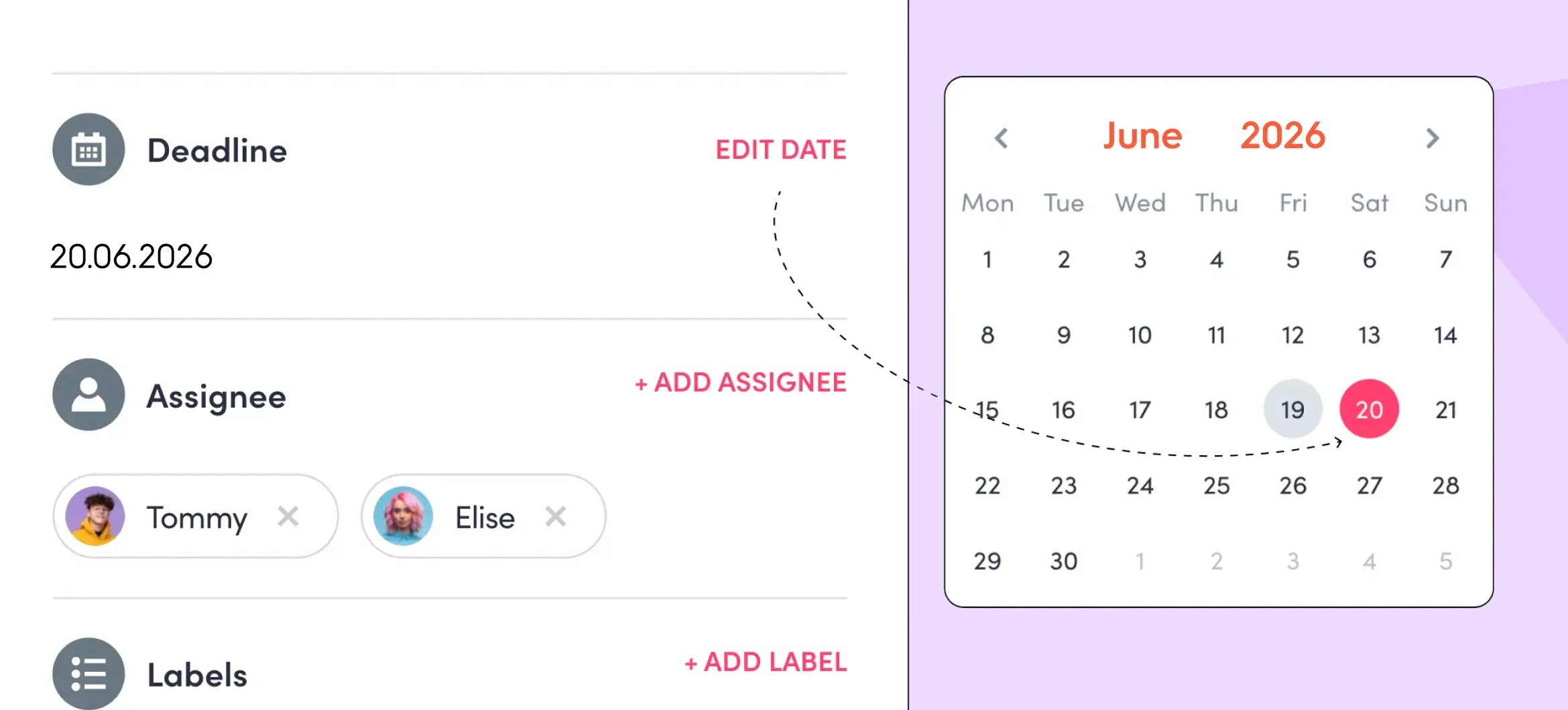
A queue nobody's watching is just a place where posts go to become unapproved by omission. If a reviewer misses a notification, does the post wait indefinitely, get auto-published, or quietly slip through a backlog nobody double-checks? Inside ZoomSphere, this is what the Comments feature in Scheduler and deadline-based notifications in Workflow Manager are built to prevent:
- tagging a reviewer with @name sends both an email and an in-app alert
- cards with a set deadline notify the assignee before and after it expires
The mechanism matters less than the guarantee: a pending approval should surface itself, not depend on someone remembering to check a board.
If your setup passes all three, you've actually audited the chain. If your team has a designated backup approver at every stage and still fails one of these three, that tells you the two problems are related but not the same.
How Do You Talk About It Without Turning It Into a Blame Session?
Once the audit tells you where the gap was, there's still a conversation to have with whoever was closest to the incident. Blameless language earns its keep here not as a culture statement, but as an interview technique for getting an honest answer out of someone who currently expects to be in trouble.
The shift is smaller than it sounds. Amy Edmondson, the Harvard Business School professor whose research underpins most of this field, frames it as changing the question itself. Instead of "how did this happen," which sounds like an accusation even when it isn't meant as one, ask something closer to "thanks for that insight, how can we help?", a question that assumes the person acted reasonably given what they knew and invites them to fill in the part you're missing (Harvard Business Impact's recap of Edmondson's research).
If you're the account lead rather than the agency owner, this conversation is still yours to run, even if the fix isn't yours to approve alone. "Here's the exact point in the chain with no insurance behind it, and here's what closing it would take" is a stronger thing to bring upward than a headcount request or a vague complaint about a difficult client.
When Should You Run This Audit?
Now, while it's quiet. The three-point audit takes an afternoon, and summer is a genuinely good window: client rosters are lighter, fewer campaigns are in flight, and there's room to sit with the chain without a launch breathing down your neck. Wait until the autumn client ramp-up and you'll be running this same audit for the first time in the middle of exactly the pressure it's meant to catch.
If your team runs approvals through ZoomSphere, the pieces are already there:
- Activity Log for decision history
- Comments
- Deadline notifications
- Shared board where clients and managers review inside the same card instead of a separate email thread
The tool doesn't replace the audit. It means the answers to the three questions above are something you can point to, not something you have to reconstruct after the fact.
Frequently Asked Questions
Is having a single approver the actual root cause of unapproved posts going live?
Sometimes, but not always. A single point of approval failure (one person, unreachable, nothing moves) is real and well documented by SocialPilot's research on backup approvers. But plenty of unapproved posts go live with a fully available, fully engaged approver in place. Those cases point to an uninsured point in the chain's design (post-approval edits, missing decision records, silent pending queues), not a staffing gap.
Should every edit after client approval require a full re-approval?
Not necessarily every edit, but every edit that changes what the client actually saw and signed off on. A useful rule of thumb: if the change would alter what you'd need to explain if the client asked "is this what I approved," it needs a fresh sign-off. Typo fixes to already-approved copy are the most common place this gets skipped, and the most common place it causes a problem.
How is a blameless conversation different from just being nice about a mistake?
Being nice is a tone. A blameless post-incident conversation is a specific technique: asking what the process made reasonable at the time, instead of asking why someone made the choice they did. The goal isn't comfort, it's information. A person who isn't bracing for blame gives you a more complete and accurate account of what happened.
How do you prevent unapproved content from going live in the first place?
Prevention and this audit are the same exercise, just run before the fact instead of after. Every uninsured point the three-point audit finds (an editable post after sign-off, a decision with no record, a pending approval nobody's watching) is a place a future post can slip through, not just an explanation for the one that already did. Running the audit proactively, before an incident forces it, is prevention. Waiting for a client screenshot to run it is the reactive version of the same fix.
Is the person who published the post responsible for the mistake?
Usually not in the way it first feels. If someone followed the process exactly as it existed, scheduled a post that had a real (if outdated) approval attached to it, or acted on a status that told them it was fine to move forward, they made a reasonable decision inside a process that let them down. Responsibility only sits with a person when they bypassed a step that existed and worked. Most of the time, the step that would have caught it didn't exist yet.
What should you tell a client right after an unapproved post goes live?
Something short, factual, and proactive: what happened, what you're doing about it right now, and that you're already looking into why. "We caught an issue with today's post and pulled it down. We're reviewing how it got published and will follow up with what we're changing" lands better than an explanation of internal process, and far better than saying nothing and hoping they don't notice.
How do you find out who approved a post that later caused a problem?
Only if you have a real decision record: a timestamped log of who approved what, and when, not a memory of a conversation. This is exactly what audit point two in the three-point checklist above is testing. If the answer requires asking around or digging through old email, the chain has no institutional memory, and "who approved this" is unanswerable by design, not by accident.
When a client asks if a post was written by AI, the answer that works is procedural, not defensive: name what a human changed and who's accountable for it, don't deny AI use, and don't over-explain the tool. That's the short version of this entire piece.
You probably haven't been asked that outright yet. What you've gotten is smaller:
- a comment that a caption "feels a bit generic"
- an approval that took three extra days for no clear reason
- a client casually mentioning they tried an AI tool themselves over the weekend
None of that is a confrontation. All of it is the beginning of one.

Clients are noticing AI-written content faster than most agencies built a process to answer for it, and that gap, not the AI itself, is what turns a passing comment into a real trust problem. Almost every marketing team now uses AI somewhere in its work, and agencies are no exception. Meanwhile, half of U.S. consumers say they'd rather give their business to brands that skip GenAI in customer-facing content altogether. Somewhere between those two numbers sits every account manager who has started hearing "this doesn't sound like us."
This piece covers why that's happening now, the three specific moments it actually shows up (a direct question, a slower approval, a client with their own AI tool), a concrete answer for each, and what "human oversight" needs to mean in practice so the answer doesn't have to be reinvented every time.
{{form-component}}
Why Are Clients Noticing AI-Written Content Now?
Clients are noticing because they've been trained to look, not because agencies got sloppier. 68% of consumers say they frequently wonder whether the content and information they see is real, according to a Gartner survey of 1,539 U.S. consumers published in March 2026.
The scrutiny isn't limited to obviously bad content. That habit of second-guessing doesn't switch off when someone becomes a client instead of a follower. It follows them straight into the approval process.

It compounds with a separate, related trend. The Reuters Institute's 2026 Digital News Report measures news consumption specifically, not social captions, but it found that trust in news sits at a record low of 37% globally, and trust in answers from AI chatbots is even lower, at 20%. It's adjacent evidence, not a direct measurement of caption skepticism, but it points at the same shift: people are extending less automatic trust to anything they can't verify the source of, and that instinct doesn't stay confined to news feeds.
Most of this data is American or global rather than EU-specific, worth flagging directly rather than implying otherwise. European agencies do have one genuinely regional signal, though, and it's a legal one. Starting 2 August 2026, with parts of the rule extending to 2 December 2026, the EU AI Act's Article 50 requires certain AI-generated content, including deepfakes and AI-generated text published on matters of public interest, to be machine-readably marked or disclosed. Most day-to-day agency captions won't fall under that narrow scope, but the law is shifting the general expectation: clients across the EU are reading about AI disclosure requirements right now, whether or not those requirements apply to their own content.
This isn't only an agency problem. In-house teams feel the same tension from a different angle: no client to reassure, but internal stakeholders, brand, or legal asking the same question about the company's own channels. Gartner's 2026 CMO Spend Survey of 401 marketing leaders found that while 70% of CMOs say becoming an AI leader is a critical goal for 2026, only 30% report mature AI readiness capabilities. That's a budget and governance survey, not a direct measure of internal scrutiny, but it's a useful proxy: readiness lags ambition at the leadership level too, and that gap between ambition and governance is exactly where both agencies and in-house teams get caught.
It also helps to know what's actually being checked, and what isn't. Platform-level AI labels, the kind YouTube, Meta, and TikTok already enforce, cover realistic synthetic video, images, and voice, not written captions or copy. A client asking "is this AI?" about a caption isn't triggering any platform rule. There's no label to point to either way, which is exactly why the answer has to come from the agency's own process, not a compliance checkbox.
None of this means AI is the problem. 86.4% of marketing teams now use AI in at least a few areas of their work, per HubSpot's 2026 State of Marketing report, and only 1.7% have no plans to start, a pattern that holds across the ways agencies are already using AI for content creation. Client suspicion isn't a referendum on the tool. It's a referendum on whether the agency, or the in-house team, can show its work.
What Does It Mean When a Client Asks "Is This AI?"
A client asking if a post is AI-written is rarely asking about the tool. They're asking whether a human still owns the outcome. 62.7% of marketers say brands need more unique, human-centered content to compete with AI-generated content, which suggests the anxiety runs in both directions: clients feel it, and so do the people producing the content.
It helps to know what actually tips a client off, since "sounds like AI" is rarely one dramatic tell. It's usually a cluster of small ones:
- an overly enthusiastic opener
- a structure that reaches for three examples every time
- a transition like "in today's fast-paced world"
- a caption that's grammatically clean but says nothing a real person at the brand would actually say out loud
None of these give away an AI tool by themselves. Together, without a human pass to cut them, they read as generic, which is the actual complaint underneath "is this AI?"
This is also where agencies most often reach for the wrong fix: even more editing. In most teams the editing already happens. What's missing is proof of it: nothing in the deliverable shows the client that a human made a call, and no client can distinguish a well-edited AI draft from an unedited one just by reading the finished post.
When Does This Actually Come Up With Clients?
It comes up in three specific moments and each one needs a different answer:
- when a client asks directly
- when they go quiet and start approving content more slowly
- when they show up with their own AI tool
What to Say When a Client Asks If a Post Is AI-Written
Answer the process question, not the accusation. The most useful response names what changed and who is accountable for it: "We use AI to draft options faster. [Name] reviews and adjusts every post before it reaches you, and that step doesn't get skipped." That's a factual claim about your workflow, not a defense of AI as a category, and it keeps the conversation procedural instead of personal.
Avoid two common instincts here:
- denying AI use outright, which is easy to disprove and worse for trust than the original question
- over-explaining the tooling, which the client didn't ask for
Most teams that get this question don't actually struggle with the disclosure itself. They struggle with not having rehearsed the answer, so write yours down once and share it with every account manager.
What to Do When a Client Approves Content More Slowly Without Saying Why
This is the harder scenario, because there's no question to answer, only a behavior change: longer approval cycles, more rounds of small edits, less trust extended by default. Treat slower approvals as a data point, not an inconvenience. It usually means the client has started reading more carefully, which is worth acting on before it becomes a direct question.
The fix is proactive visibility, not reassurance. Attach a short, standing note to submissions stating what a human changed in this batch and why, even when the answer is "kept the AI draft as is because it matched brand tone." In practice that note can be one line: "AI draft used for posts 2 and 4, tightened the opening line on both, kept the rest as generated." That single habit does more than a defensive conversation later, because it puts evidence in front of the client before they go looking for it. ZoomSphere's approval workflows are built around exactly this kind of visible sign-off, where every post carries a record of who touched it and when, instead of that context living in a Slack thread nobody can find later.

If this scenario already feels familiar, it's worth reading alongside how to stop endless client revision rounds in agency content workflows, since slower approvals and endless revisions are usually the same underlying symptom.
What to Say When a Client Asks What the Agency Adds Over Their Own AI Tool
This is the hardest scenario, and for a different reason: it isn't a trust question, it's a value question. If the client can generate captions themselves, what exactly is the agency for? The honest answer has three parts, and none of them is "we have better prompts."
- Judgment: knowing which draft actually fits the brand and which one is generic but plausible-sounding. It's the call that separates output that's technically fine from output that's actually good.
- Context a generic tool doesn't hold: what actually worked for this specific client's audience last quarter, not what works for content in general.
- Accountability: someone on the agency side owns the outcome if a post underperforms or causes a problem, which a self-serve tool never will.
Say it plainly: the tool produces drafts. The agency owns outcomes. That line survives a client who has an AI tool open in another tab, because it doesn't compete with the tool. It explains what sits on top of it.

This isn't a defensive line agencies are inventing under pressure. The EU AI Act draws the same line. Under Article 50(4), AI-generated text published to inform the public on matters of public interest has to be disclosed, unless it has gone through human review or editorial control and a person or company holds editorial responsibility for publishing it. In other words, the law treats a human owning the outcome as the thing that matters, which is exactly what an agency sells.
What Does Human Oversight Actually Look Like in an AI Workflow?
Human oversight in an AI workflow means four specific, checkable points spread across the process, not one review step bolted onto the end. Agencies that hold up well under client scrutiny can point to each of the four when asked.
1. A voice source, not a memory
Relying on someone "knowing the brand voice" doesn't scale past one person and doesn't survive turnover. The fix is an actual voice bank: a maintained set of posts that represent the brand's best tone, fed into every AI prompt as a reference, rather than left to a writer's memory of a call from three months ago. This is close to how ZoomSphere's own AI Copywriter handles it in practice: a Persona set once in the Scheduler gets applied to every caption it drafts afterward, so the voice doesn't reset every time someone new writes a prompt. It removes one specific failure mode, brand voice drifting because nobody wrote it down, not the need for a human to still make the final call. This is the single most concrete fix for the "doesn't sound like us" complaint, because it addresses the cause, not the symptom. If the caption quality itself, not the client conversation, is the part you're stuck on, why AI captions across different brands tend to sound the same, and what actually fixes it goes deeper into that half of the problem.

2. Risk tiering, not blanket review
Not every piece of content carries the same risk, so it shouldn't get the same review. In practice, that means splitting content into two lanes before it ever reaches AI. Low-risk (evergreen captions, idea generation, tone variations) moves from AI draft to a single reviewer to approval. High-risk (anything with a number, a claim, a name, a promise, or a reaction to breaking news) requires a second named reviewer and a specific check against the source or fact being referenced, not just a tone read. Treating both lanes the same either wastes senior time reviewing low-stakes content, or, more dangerously, lets the content that actually needed scrutiny move at the same speed as a caption about a coffee break.
3. A visible sign-off, not silent editing
Editing that happens invisibly protects nothing, because the client can't see it. The fix isn't more editing, it's making the existing editing visible: a named reviewer attached to each post before it moves to approval, not evidence buried in an internal thread. Who actually approves social content, and why teams disagree on it, is worth resolving internally before it becomes a client-facing question.
4. A short audit trail, not a full paper trail
This doesn't need to be a compliance exercise. A one-line note per batch, what a human changed and why, is enough to answer "what did you actually do here" with evidence instead of a promise. The principle scales down from enterprise content governance: every AI-assisted asset needs an owner and a rationale that can be reconstructed later, not just invented at the moment it's questioned.
How Do You Make an AI Content Workflow Visible to Clients?
Client trust in AI-assisted content gets rebuilt by making the human layer visible before someone has to ask where it is, not by using less AI. That single shift, visibility over restriction, is what actually closes out a direct question, a slower approval, or a client's own AI tool comparison, the three moments this piece has walked through. In-house teams can substitute "stakeholder" for "client" throughout this section; the mechanics don't change. Agencies that already struggle with slow approvals and endless revision rounds are the most exposed here, because the same missing visibility produces both problems: clients don't trust the content, and they don't trust the process behind it.
This is also where the AI conversation and the reporting conversation start to overlap. Clients increasingly want to see what actually happened to a piece of content, not just how it performed, and that same appetite for visibility applies upstream, to how a post was made, not only how it did afterward. An approval flow that shows drafting, review, and sign-off as distinct, visible steps, rather than one black box between "idea" and "published", answers the AI question before it gets asked. It's part of why ZoomSphere's Scheduler pairs a built-in AI copywriter with an approval layer instead of treating them as separate tools: the draft and the human decision made on top of it live in the same place, visible to whoever needs to see it.
None of this requires slowing down. Agencies that answer well aren't the ones using less AI. They're the ones who can point to exactly where a human made a call, without having to reconstruct it under pressure. That's a process question, and process questions have answers.
How Do You Prove a Human Approved Every AI-Assisted Post?
With a record, not a promise. In ZoomSphere the human layer described above is part of the approval flow itself, so the evidence already exists when a client asks for it:
- Approval stages you define per workspace. Every post moves from draft through internal review to client approval, and nothing skips a step.
- Internal comments the client never sees. The writer notes what changed in the AI draft and mentions the reviewer, who gets an email the moment they are tagged.
- One batch, one click for the client. Send the whole week for approval by email or into ZoomSphere chat instead of one notification per post. The client is a free user, so approving never costs you a seat.
- An Activity log on every post. It records who created the post, who changed the copy or the visual and who moved it to Approved, with a timestamp.
- AI agents play by the same rules. Posts an AI assistant drafts through ZoomSphere MCP land in the same calendar and go through the same approval stages as everything else.
That log is the simplest way to show the human review and editorial responsibility the AI Act talks about, and it answers "is this AI?" before anyone has to ask. See how the stages, comments and log fit together on the approval workflows page.
#Approvals that prove a human was there
Try ZoomSphere free for 14 days, no credit card: approval stages, internal comments, one-click batch approval for clients and an Activity log on every post. Support is real people by phone and chat, in English and Czech. No chatbot.
Frequently Asked Questions
Should agencies tell clients when content is AI-assisted?
There's no blanket legal requirement for routine social captions, though EU AI Act Article 50 requires disclosure for specific categories like deepfakes and AI-generated text on matters of public interest, starting August 2026. Independent of legal requirements, half of consumers say they'd rather do business with brands that skip GenAI in customer-facing content altogether, which makes a visible, explainable workflow more valuable than either full disclosure or silence.
How can an agency prove a human approved an AI-assisted post?
Keep the proof in the approval flow, not in someone's inbox: named approval stages, an internal note on what a human changed in the AI draft, and a log that records who changed the copy or visual and who approved it, with a timestamp. In ZoomSphere every post carries that Activity log, and the client approves the whole batch as a free user.
Why do clients say AI content "doesn't sound like us"?
Usually because the AI draft wasn't grounded in a documented brand voice and went out with light or no human adjustment. That's a workflow gap, not a limit of the AI tool itself. A maintained voice bank and a named human sign-off step address the root cause.
What happens if a brand ignores AI content transparency altogether?
A third of customers say they'll stop interacting with a brand once they discover its content is AI-generated rather than human-made, according to Adobe's 2026 AI and Digital Trends Consumer Report, based on a survey of 4,000 customers. The risk isn't using AI. It's being found out without a ready answer.
Does the EU AI Act require agencies to label AI-written social captions?
Not as a blanket rule. Article 50(4) requires disclosure for AI-generated text published to inform the public on matters of public interest, but not when the text has gone through human review or editorial control and a person or company holds editorial responsibility for it. A documented approval step is how agencies show that review happened. Check specific cases with your legal advisor.
The agencies that handle this well in 2026 won't be the ones who used the least AI. They'll be the ones who stopped treating AI as a shortcut and started treating it as a layer that needs a visible human decision on top, every time. That shift, from output to oversight, is the whole difference between a client who asks once and a client who asks twice.
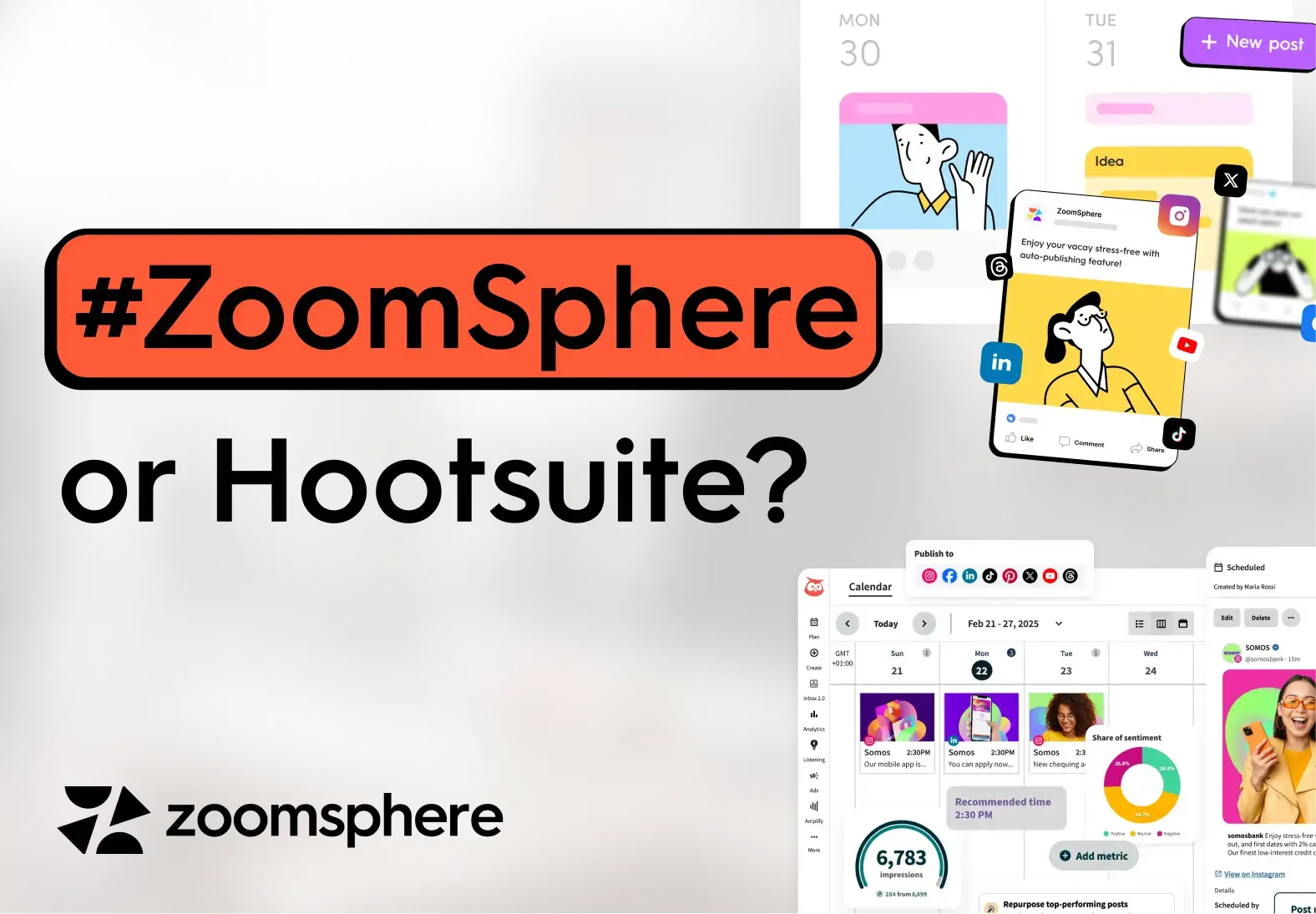
For agencies that need content approval before publishing, the cost difference between Hootsuite and ZoomSphere is significant. A 6-person agency on Hootsuite Advanced pays $28,728 per year. The same team on ZoomSphere pays €1,788.(yearly billing). This figure applies specifically to teams that need approval workflows built into their social media management tool , if your team works without a formal approval step, Hootsuite Standard or Professional is a different conversation.

This article compares both tools on pricing, content approval, and multi-client management. Where Hootsuite leads, we say so. Where ZoomSphere has a real advantage, we back it with data and named customer references.
{{form-component}}
Is Hootsuite Too Expensive for Agencies With Multiple Team Members?
Whether Hootsuite is too expensive depends on which plan your agency actually needs. For a team of one or two managing social accounts without a client approval step, the Standard plan at $99/user/month is competitive. The problem begins when an agency adds approval to its social media management workflow, that requires the Advanced plan at $399/user/month, and the cost scales by headcount.

A 3-person agency needing approval features pays $1,197/month on Hootsuite Advanced, $14,364 per year. A 5-person team pays $1,995/month. These numbers follow directly from Hootsuite's published pricing, verified June 30, 2026.
Based on G2 user feedback, the second largest disadvantage of Hootsuite is its expensive pricing structure, making high cost a major downside for social media managers.

How Much Does Hootsuite Actually Cost for a 5-Person Agency?
For a 5-person agency that needs content approval, Hootsuite Advanced costs $1,995/month or $23,940/year. Teams that can work without the approval feature have two cheaper options:
- Standard at $495/month for 5 users
- Professional at $995/month for 5 users
ZoomSphere's pricing does not scale by user count. A 3-person team and a 30-person team pay the same €149/month, with the same feature set.


Does Hootsuite Have a Client Approval Feature?
Hootsuite has a content approval feature on its Advanced plan, and for some teams it works well. One G2 reviewer described it: "The approval workflow is very helpful because our content, design and support teams collaborate smoothly before anything goes live." That is a legitimate use case Hootsuite handles.

The limitation that surfaces in agency contexts is post expiry. Kelsey H., a Program Director who reviewed Hootsuite on G2 in May 2026, described the issue directly: posts that enter the approval flow can expire before a client responds, forcing the team to recreate and resubmit the content from scratch. For agencies where client review timelines are unpredictable, this creates avoidable rework, and how approval speed affects content performance matters more than most teams account for upfront.

ZoomSphere's approval workflow keeps posts in the queue until the client acts, with no expiry on pending approvals. It is included on all ZoomSphere plans, not reserved for a top-tier price point.

What Social Media Tool Lets Clients Approve Posts Without Paying for a Seat?
In ZoomSphere a client is a free user. They get an email with real previews of the scheduled posts and approve in one click. The client opens the email, sees the post in context, leaves a comment or clicks approve. This is how the workflow functions at Performante, a remote-first digital marketing agency with offices in Warsaw and Bogota, where 48 users across 12 client brands use ZoomSphere to manage content approval across time zones without paying a seat for every client contact. See the full case study here.
Whites Agency, a Polish digital marketing agency with 177 users across 36 brands, describes their workflow: when a post is ready for review, a comment mention triggers an automatic email to the client with a direct link to the post. They don't need to log in daily or manually check anything. They just click the button in their inbox and land right on the post. This workflow has supported over 12,900 published posts across their ZoomSphere account since 2021. See the full case study here.

Hootsuite's approval flow requires all reviewers to be users within the organization's workspace. Reviewers can either approve, edit or reject the content. But there's option to leave any feedback in comments. Hootsuite's approval workflow is also only available in its Advanced plan (which costs $399/month per user).
How Do You Manage Multiple Social Media Clients in One Tool?
ZoomSphere handles multiple clients through Workspaces: each client gets an isolated environment with its own content calendar, social media accounts, team member assignments, and approval flow. Team members only see the clients they are assigned to. For a deeper look at how agencies set up content approval across their client portfolio, the structure of that approval chain determines how well any tool fits the workflow.
Visibility SK, a Bratislava-based agency managing clients including Ford Slovakia, Toyota Material Handling, and Geberit across two countries, runs 40 active workspaces with 85 teammates and 98 connected social media channels through this structure. Their team published 4,335 posts in approximately 18 months while managing custom approval statuses for each client separately. (Full case study)
Hootsuite manages multiple brands through profile groups within a shared organization view. For smaller portfolios of 3 to 4 clients, this works without major friction. As the client count grows, filtering becomes a more active part of the workflow, since the calendar and inbox are shared at the organization level rather than separated by client.
ZoomSphere vs. Hootsuite: Side-by-Side Feature Comparison for Agencies
ZoomSphere and Hootsuite diverge most on two things: pricing structure and access to approval workflows. ZoomSphere includes content approval, free client approvals in one click, and built-in team chat on all plans from €149/month, regardless of team size. Hootsuite reserves its approval feature for the Advanced plan at $399/user/month, and client reviewers must hold a paid seat in the workspace. Where Hootsuite leads: advanced analytics, social listening, and Pinterest, features ZoomSphere does not currently offer.

Where Hootsuite Is Still the Better Choice
Hootsuite leads ZoomSphere in four areas that matter for specific agency types.
Analytics and reporting
Hootsuite's reporting suite is more advanced than ZoomSphere's. For agencies selling monthly performance reports with custom metrics and export-ready dashboards, this is a genuine advantage. Viktorija K., a Co-CEO who has used ZoomSphere for 7 years (Capterra, August 2025), calls the platform easy to use with strong support, but does not cite analytics as a standout. That matches ZoomSphere's current position: strong on collaboration and approval workflow, less advanced on reporting depth.
Social listening
Hootsuite includes brand mention tracking, keyword monitoring, and competitor analysis. ZoomSphere has no social listening feature.
ZoomSphere does not support Pinterest. For agencies serving lifestyle or e-commerce clients where Pinterest is an active channel, this is a hard constraint. Hootsuite covers it.
Brand recognition
Hootsuite has 7,109 reviews on G2 (4.3/5 average). ZoomSphere has 18 (4.7/5 average, G2; 22 reviews, 4.7/5, Capterra). Review volume reflects market position, not product quality. In conversations with new clients who ask what social media management tool you use, Hootsuite is a recognized name in most Western European markets.
Where ZoomSphere Is the Stronger Choice
ZoomSphere leads Hootsuite in three areas that matter specifically for agency teams managing multiple clients with structured content workflows.
Pricing model for teams with approval
ZoomSphere covers up to 50 users and 50 social accounts for a single monthly fee from €149/month, with approval included. Hootsuite charges per user, and approval requires the Advanced plan at $399/user/month. For a 5-person agency team, that difference is $1,846/month.
Content approval built for agencies
ZoomSphere's approval workflow is available on all plans, does not expire while a client is reviewing, and lets clients approve posts for free as users, straight from their inbox. Hootsuite's approval feature is plan-gated and requires all reviewers to hold a paid workspace seat.
Multi-client workspace isolation
ZoomSphere separates each client into a fully independent workspace with its own calendar, social accounts, permissions, and approval flow. Team members only see the clients they are assigned to. Agencies including Visibility SK (40 workspaces, 85 users) and Whites Agency Poland (36 workspaces, 177 users) run their full client portfolio through this structure. Hootsuite manages multiple brands within a shared organization view, which works better for brands within one company than for independent client portfolios.
EU-based platform
ZoomSphere is operated by a Czech company under EU data regulations. For EU agencies with GDPR requirements, this matters in client contracts in a way that a Canadian-headquartered platform does not cover by default.
How Much Can an Agency Save by Switching from Hootsuite to ZoomSphere?
A 6-person agency managing 10 clients with a content approval workflow on Hootsuite Advanced pays $28,728 per year. The same agency on ZoomSphere pays €1,788 per year. The annual difference is approximately $26,760 at mid-2026 exchange rates.
This figure applies to agencies where client approval is standard before publishing. A 6-person team on Hootsuite Standard without approval pays $5,940 per year, which is much closer to ZoomSphere's price point. The decision point is whether content approval is part of the service.
For agencies where it is, the cost case is clear. Zaraguza, a Slovak creative agency using ZoomSphere since 2016, with clients including Slovenská sporiteľňa and BMW Motorrad, runs their full content approval and publishing workflow through ZoomSphere across nearly a decade. (Full case study)

Should Your Agency Switch from Hootsuite to ZoomSphere?
ZoomSphere is the stronger fit for EU agencies where content goes through multiple people and requires client approval before publishing. Hootsuite is the stronger fit for agencies where analytics depth, social listening, or Pinterest are core to the service.
Switch to ZoomSphere if:
- Your team has 3 or more people who all need calendar and approval access
- Client approval before publishing is standard, not occasional
- You manage 5 or more clients and need clean separation between them
- Hootsuite Advanced at $399/user/month does not fit your budget model
- You are based in the EU and prefer EU data practices
Stay on Hootsuite if:
- Detailed analytics reports are a core client deliverable
- Social listening is part of what you sell
- Pinterest is a significant channel for your clients
- Your team has 1 to 2 people without a multi-stage approval flow
- Brand name recognition matters in your client conversations
Compare both tools side by side here. And start a free trial.
{{cta-component}}
Frequently Asked Questions
Is Hootsuite too expensive for small agencies?
It depends on which plan the agency needs. For a team without approval workflows, Hootsuite Standard at $99/user/month is competitive, a 3-person team pays $297/month. For a team that needs social media management with approval before publishing, Hootsuite Advanced at $399/user/month brings that 3-person team to $1,197/month ($14,364/year). ZoomSphere covers up to 50 users and 50 social accounts from €149/month on the annual plan, with approval included.
What is the best Hootsuite alternative for EU agency teams?
For EU agencies managing multiple clients with structured content approval, ZoomSphere is a well-used alternative to Hootsuite. Agencies including Visibility SK (40 workspaces, 85 teammates), Whites Agency Poland (177 users, 36 brands), and Performante (offices in Warsaw and Bogota, 48 users) use ZoomSphere for exactly this workflow. For agencies that need advanced analytics, social listening, or Pinterest, Hootsuite or a combination of tools may be a better match.
Does Hootsuite have a client approval workflow?
Yes, on the Advanced plan at $399/user/month on annual billing. A limitation noted in G2 reviews is that posts can expire during the approval process if a client does not respond in time, requiring the content to be recreated. ZoomSphere includes approval on all plans via one-click email approval; posts do not expire while awaiting client action.
Can clients approve social media posts in ZoomSphere for free?
Yes. A client is a free user who gets an email with the scheduled posts and approves them in one click, and every decision is recorded in the activity log. Agencies like Whites Agency manage client feedback this way: the client receives an automated email when a post is ready, clicks a link, and lands directly on the post to comment or approve. Hootsuite's approval flow requires all reviewers to be workspace users at the same per-seat price as team members.
How do I manage multiple social media clients without mixing up their content?
ZoomSphere uses a Workspaces model where each client has an isolated environment: separate calendar, social media accounts, team permissions, and approval flow. Team members only see the clients they are assigned to. Hootsuite uses profile groups within a shared organization view, which requires more active filtering as the number of clients grows past 5 or 6.
What platforms does ZoomSphere support?
ZoomSphere supports Facebook, Instagram (including Reels and Stories), LinkedIn, X (Twitter), TikTok, YouTube, and Threads (via supported social channels and content formats). If Pinterest is a core channel for your clients, Hootsuite covers it; ZoomSphere does not.
Is ZoomSphere GDPR-compliant and EU-based?
Yes. ZoomSphere is operated by a Czech company, operating under EU data regulations. EU-based companies with a valid VAT number are not charged VAT on ZoomSphere invoices. For EU agencies with GDPR data residency requirements, this is a practical advantage over social media management tools headquartered outside the EU.
Some social media posts go viral because they trigger a strong emotional response that compels sharing. Others don't, not because they lack quality, but because the production process removed precisely the elements that would have triggered that response. The research is consistent on this: emotional reaction, not strategic messaging, is the strongest predictor of sharing behavior.
Every agency social media manager has a version of the same story. The post you agonized over: multiple rounds of copy, visual revisions, client sign-off, legal check. It lands quietly. Days later, someone publishes a raw photo from a shoot or a quick reaction to something that happened that morning, written without a brief and posted in ten minutes. It becomes the best-performing piece of content that month. In smaller teams running social for five or ten clients simultaneously, this pattern repeats with unsettling regularity.
The instinct is to call it luck. But if it keeps happening, it isn't luck. It's a signal.
This article defends one specific thesis: posts that "accidentally" work aren't accidents. They're symptoms of content that escaped over-correction, and thereby preserved exactly what makes people share. Understanding the mechanism doesn't just satisfy professional curiosity. It should change how you think about your production workflow.
{{form-component}}
Why Do Some Social Media Posts Perform Better Than Others?
The most direct answer comes from peer-reviewed research published in MIS Quarterly in 2026. Dr. Jeffrey Mullins, Dr. Syed Shuva, and Dr. Patrick Stewart at the University of Arkansas analyzed sharing behavior across social platforms (289 participants evaluating social content, using multilevel modeling to isolate key variables) and found that emotional response, not the content itself, is the strongest predictor of sharing behavior. Content triggering a high-arousal emotional reaction is dramatically more likely to be shared, regardless of how strategically crafted or production-polished it is.
The finding cuts against a common assumption in agency content work: that better strategy, more careful messaging, and cleaner execution compound toward better performance. The research suggests the opposite dynamic is possible. The same optimization process driving clarity and brand consistency can simultaneously degrade the emotional impact that actually drives distribution.
This doesn't mean strategy doesn't matter. It means strategy optimized exclusively for message quality, at the expense of emotional experience, produces content that communicates well but doesn't travel. These are different outputs, and conflating them is the single most common mistake the researchers identified.
The practical implication: emotional response is what the audience brings to the post, not what the brand puts into it. Two people can have entirely different reactions to the same content. This means "designing for emotion" isn't a one-step creative brief. It requires understanding the specific emotional landscape of a specific audience, and then not editing it out of the content before it reaches them.
What Is the Psychology Behind Viral Content?
Social media posts spread when they give people two things:
- a strong emotional charge
- a reason to pass it on
The emotional charge element is well-established in behavioral research. In foundational work on social transmission, Jonah Berger at the Wharton School of Business demonstrated that high-arousal emotions (awe, excitement, humor, anger, anxiety) cause content to spread significantly faster than low-arousal emotions like sadness or contentment. The mechanism is physiological before it's social: high-arousal states activate us toward action, and sharing is an action. This research, published in the early 2010s, has since been replicated and extended across platforms and content types, and continues to underpin how researchers and practitioners understand virality.
The second element, the reason to pass it on, is what Berger calls social currency. People share content that makes them look good, informed, or perceptive within their network. A post that carries a surprising observation, a counterintuitive take, or a piece of insider knowledge gives the sharer something to offer. This is why the specific, unrehearsed observation outperforms the polished brand message: specificity signals genuine perspective, and genuine perspective is worth sharing. A generalized brand statement offers nothing the sharer couldn't have said themselves.
In 2026, this dynamic has a new layer of urgency. According to the HubSpot 2026 State of Marketing Report, 56% of marketers say social feeds are now flooded with AI-generated content, and 65% report that consumers are getting better at identifying and ignoring it. Sprout Social's Q1 2026 Pulse Survey (2,000 respondents across the US, UK, and Australia) found that consumers named human-generated content as the single most important thing they want brands to prioritize on social. Posting AI-generated content without disclosure was ranked the top behavior consumers want brands to stop entirely.
In a feed saturated with algorithmically optimized content, what cuts through is what looks and sounds genuinely unoptimized. The scarcity of authentic human voice in 2026 social media has made it a performance differentiator, not just an ethical preference.
In January 2026, Ryanair CEO Michael O'Leary publicly clashed with Elon Musk on X. Within hours, Ryanair's social team turned the feud into a "Big Idiot Seat Sale," a cheeky promotional post that offered Musk a free ticket and went viral across TikTok and Instagram. No brief, no approval chain, no agency sign-off. Just a specific response to a real moment, posted in the brand's own voice while the story was still live.
This is what the Mullins et al. research looks like in practice: humor as a high-arousal emotional trigger, combined with a culturally specific moment that gave every person who shared it something to say. The post generated press coverage, drove a measurable spike in ticket searches, and cost the social team roughly ten minutes.
Why Does Authentic Content Outperform Planned Content?
Put yourself on the receiving end of a social media feed for a moment. You scroll past a branded carousel with clean design and three polished copy points. Then you stop at a post where someone from a company you follow is clearly reacting to something in real time: specific, slightly rough around the edges, and unmistakably written by a person. You engage with the second one. Most people do.
This isn't a preference for low production value. It's a preference for specificity and genuine human presence, qualities that planned, approval-heavy content systematically optimizes away.
The data on this is unusually consistent across sources. Edelman's 2025 Trust Barometer Special Report found that 73% of people say their trust in a brand increases when it authentically reflects today's culture. That's not brand love or affinity. That's trust, which Edelman found now equals price and quality as a purchase consideration. The implication for content teams: authenticity isn't a tone-of-voice choice. It's a business performance variable.
JoinBrands' Social Media Trends Report for 2026 puts performance data behind this: user-generated content (unplanned and creator-led by definition) influences 79% of purchase decisions, and 92% of consumers trust UGC and word-of-mouth recommendations more than any other form of advertising. According to Part 2 of the same report, 85% of consumers say they will unfollow accounts that seem fake or over-polished. Brands are not moving toward authentic content because of ideological preference. They're moving because the performance gap is now wide enough to be measurable in results.
HubSpot's 2026 State of Marketing Report finds the same pattern from the marketer side: 76% of marketers say authentic content outperforms highly produced content for their brand. When the report asked marketers to describe their highest-performing posts, three qualities appeared consistently: funny, real, and specific.
The through-line across all of this is the word specific. Not raw, not lo-fi, not unproduced. Specific. A post that says something particular about a particular moment, in a particular voice. That's what travels. And specificity is exactly what disappears first when content goes through extended approval.
During the 2026 FIFA World Cup, tournament rules required organizers to cover all non-sponsor branding, including the Levi's logo on Levi's Stadium in San Francisco. A giant white tarp over the stadium name became one of the most widely shared images of the opening week. Levi's responded the same day: updated their social profile picture to a mockup of their covered logo, posted a video using the viral "Nobody's Gonna Know" sound, and leaned into the absurdity rather than issuing a statement.
The post is a textbook case of specificity winning over production. Levi's didn't plan this. No campaign brief existed for "what to do if FIFA covers our building." But because someone on their team recognized the moment and moved immediately, it became arguably the sharpest brand social moment of the tournament.
How Does the Content Approval Process Affect Social Media Performance?
This is the question the industry avoids, because the honest answer is uncomfortable for anyone who runs or manages an approval workflow.
When content moves through multiple rounds (from copywriter to strategist, strategist to account manager, account manager to client, client to legal or comms) each iteration optimizes predictably for safety. If the question is who actually holds sign-off authority in your agency, and whether that structure is fit for reactive content, this article goes into the specifics. The specific observation becomes a general statement. The unusual phrasing gets corrected into brand-compliant language. The cultural reference that was timely on Tuesday becomes slightly dated by Friday's sign-off. The voice that read like a specific person gets smoothed into sounding like a brand.
By the time the content publishes, it has been improved by every measure except the one that predicts sharing: does this feel like something a real person would say, right now, to someone they trust?
There is no dataset that directly measures the correlation between approval rounds and engagement rates. What the data does show is the output pattern: the platforms and content types performing best in 2026 are dominated by specific, conversational, human-feeling content. Buffer's 2026 State of Social Media Engagement report, analyzing over 52 million posts across 10 platforms, found LinkedIn carousels hitting a 21.77% median engagement rate (the strongest format result in the dataset, roughly three times the rate of video or image posts on the same platform). Instagram, which has moved furthest toward polished visual production as its dominant content mode, saw a 26% drop in engagement year-over-year.
The mechanism connecting approval process to this pattern can be stated as a hypothesis: approval rounds systematically remove the qualities that behavioral research identifies as sharing drivers, while adding time that degrades contextual relevance. Both effects are more severe for reactive, time-sensitive content than for evergreen campaign material.
This is what might be called approval latency: the gap between when a piece of content is at its most contextually alive and when it actually reaches its audience. A reaction to something that happened yesterday lands differently than the same reaction posted a week later, once the moment has passed. The approval process doesn't create the latency problem. But when it's slow, it amplifies it at exactly the moments when speed matters most.
None of this is an argument against approval itself. Approval processes exist for legitimate reasons: legal compliance, brand consistency, client relationship management. They matter more, not less, in regulated industries or politically sensitive categories. The operational question is whether your approval structure distinguishes between content that has a short contextual shelf life and content that stays relevant regardless of timing. Most agency workflows don't make this distinction. They treat a reactive post responding to a breaking cultural moment and a planned evergreen explainer with the same process, the same timeline, and the same number of revision rounds. That's where performance is being left on the table.

ZoomSphere's approval workflow moves posts through clear status stages, so reactive content doesn't get stuck waiting in an email chain. See how approval workflows work in ZoomSphere.
What Should Agencies Do Differently to Protect Content Performance?
Measuring approval latency as a performance variable is the starting point most agencies skip. If you don't know how many days pass between first draft and publication, and you don't correlate that with post-level engagement, you're flying blind on a variable the data suggests matters.
A few structural observations that follow from the evidence:
Not all content ages at the same rate
Reactive content (posts responding to a moment, a trend, a client event, a cultural reference) loses relevance with every hour it spends in a queue. Evergreen campaign content doesn't. Separating these into different approval tracks, with lighter and faster sign-off for time-sensitive material, preserves the contextual specificity that reactive content depends on, without removing oversight from content that genuinely needs it.
What gets removed in approval rounds is data
If you track the substantive changes between draft and published version (phrasing removed, opinions softened, specific references generalized) and then correlate those edits with engagement performance over time, you'll start to see patterns. That data gives you a factual basis for client conversations about what "brand voice consistency" costs in distribution. It changes the conversation from aesthetic preference to measurable trade-off.
Speed in the approval tool is a content performance variable, not just an operational one
Most social media tools send a separate email for every single post that needs approval. With a standard monthly content plan, that's 40 or more individual approval emails, each requiring a separate click, a separate login, and a separate decision. The same friction shows up differently when the team running that workflow is younger: how email-based approval chains break down for Gen Z agency workers is a separate problem with the same structural cause. The cumulative friction doesn't just slow down your ops: it means reactive content sits in an inbox while the moment passes.
ZoomSphere's bulk email approval lets you send up multiple posts in a single email, with previews built in, so the client approves the whole batch in one click as a free user. When approval compresses from days to minutes, content reaches audiences closer to the moment it was created. In an environment where the research consistently shows human, specific, and timely content outperforming polished brand messaging, that timing gap is a structural performance variable. Treating it as a workflow detail undersells it.
{{cta-component}}
Frequently Asked Questions
Why do some social media posts go viral while others don't?
Posts go viral primarily because they trigger strong emotional reactions (humor, awe, surprise, or outrage) that compel sharing. Research from the University of Arkansas (MIS Quarterly, 2026) identified emotional response, not content quality or strategy, as the strongest predictor of sharing behavior. A secondary driver is social currency: people share content that makes them look informed or current to their network.
Why does planned content often underperform spontaneous posts in agencies?
Each approval round optimizes for safety, systematically removing the specific voice, timely references, and emotional directness that behavioral research identifies as sharing drivers. The result is content that meets every brand standard but lacks the specificity that triggers shares. Spontaneous posts skip this process and retain those qualities, which is why they often outperform campaigns that took weeks to produce.
How does the content approval process affect social media performance?
Through two mechanisms: approval rounds remove elements that predict sharing (specific voice, emotional directness, timely framing), and approval latency degrades contextual relevance, especially for reactive content that responds to a moment. Both effects are worse for time-sensitive posts than for evergreen material, which suggests routing different content types through different approval tracks as a structural fix.
Why do rushed posts sometimes outperform content that took weeks to produce?
Not because speed improves quality, but because content published quickly retains the specific, unrehearsed elements (a real reaction, a particular observation, moment-specific framing) that slow production tends to edit out. These qualities are what the research identifies as sharing drivers. Longer production cycles don't improve them; they optimize toward their opposite.
What makes social media content authentic in 2026?
Authenticity is not a production quality. It's whether content reads as if a specific person created it for a specific moment. According to Edelman's 2025 Trust Barometer, 73% of people say their trust in a brand increases when it authentically reflects today's culture. HubSpot's 2026 research found the highest-performing posts share three qualities: funny, real, and specific (all of which approval-heavy workflows tend to edit away).
{{form-component}}
Conclusion
The "accidental viral post" isn't accidental. It was published fast enough, or with few enough revision rounds, to reach the audience before the production process optimized out what makes content shareable: a specific voice, a real moment, an observation that hadn't yet been corrected into a brand statement.
This is not an argument against planning or approval. It's an argument for understanding what your production process does to content at each stage, and for building workflows that actively protect the qualities the research identifies as the actual drivers of performance.
The posts that explode aren't flukes. They're the control group.
Don’t #miss out


