How to Stop Endless Client Revision Rounds in Agency Content Workflows


The problem isn't that clients change their mind about content. The problem is that your process gives them nothing to check before they do.
When "approved" exists only as a feeling from last Thursday, not as a timestamped record tied to a specific version, there's no friction on reopening it. No version to compare against. No documented decision to return to. The conversation starts from the same blank space it started from in round one.
This is a different failure mode from slow approval. Slow approval is a visibility problem: neither side can see where content is, so things stall. Revision relapse is a memory problem: a decision was made, but the process didn't record it anywhere permanent. You can solve the first and still experience the second every single week.
{{form-component}}
A Revision Round Isn't a Quality Gate. It's a Memory Test.
Most agencies treat revision rounds as a way to improve content. The client reviews, the team adjusts, the post gets better. That model works when rounds actually close.
When a client in round three is reconsidering something they agreed to in round one, content quality isn't the issue. What's being tested is whether anyone can produce a shared reference to what was actually decided and when. Usually, nobody can.
A revision round that doesn't produce a locked version doesn't close. It pauses. The next time someone has a doubt (a new stakeholder appears, the brief gets reinterpreted, a CEO asks to review before publishing), every previous decision becomes renegotiable, because there's no record showing it was already made.
StoryChief put it plainly: "This happens because there is no defined process on how feedback is collected, who owns the final call, and what 'approved' actually means." The absence of a record isn't a technology gap. It's a process design gap. The question of who owns the final call is one most agencies leave unresolved. Here's a framework for settling it.
Why Round Three Relitigates Round One: A Concrete Example
Here's a scenario that plays out in agencies managing multiple clients simultaneously, typically mid-week when there's a publishing deadline:
- Round one: The campaign brief specified "confident, direct tone." The copywriter delivers. The client approves with a comment: "Love the energy, go ahead." Status moves to Approved. Everyone moves on.
- Round two: The post is updated for a different platform format. The client adds one visual note. Approves again. Still feels good.
- Round three: A new stakeholder, the client's brand manager who wasn't in the loop for rounds one or two, reviews the content and says the tone is "too aggressive." The copywriter is asked to soften it. The account manager, from memory, recalls that "confident and direct" was the agreed brief, but has no timestamp, no version, no thread to show the brand manager.
Without a record, "confident and direct" is just the account manager's recollection. With a decision trail (the sequential record of approvals tied to specific versions across all revision rounds), it's a documented creative brief decision that predates the round three objection. Round one explicitly approved "confident and direct." Round three is reopening a decision that was already made. That's the difference between a conversation that restarts and one that moves forward.
This isn't a people problem. It's a structure problem. The round one approval happened. It wasn't recorded anywhere both sides could access later. That's what triggers revision relapse.
What Is the Difference Between Approval as a Status and Approval as a Record?
This is the distinction where most agency workflows fail:
- Treating approval as a status means moving a post from "in review" to "approved." A status can be changed. It can be overridden, reinterpreted, or quietly ignored when a new person enters the conversation. It communicates the current state. It has no memory of previous states.
- Treating approval as a record means that when a post is approved, three things become permanently visible: the exact version that was approved, the name of the person who gave sign-off, and the date and time it happened. That record can't be quietly undone. It can only be superseded by a new one, which means creating a new version and getting a new approval, not informally reversing a previous decision.
The difference in practice: when a client says "I think we should revisit what we agreed in round one," a workflow built on statuses requires someone to reconstruct that agreement from memory. A workflow built on records requires someone to open a link and point to it.
How to Close a Revision Round So It Stays Closed
A revision round has closed when it produces all three of the following. Missing any one means the round has paused, not finished.
- Step 1: Lock the version. The specific draft that was reviewed and approved should be frozen at the point of sign-off. Future edits create a new version rather than overwriting it. The approved version stays accessible and never changes retroactively. If someone asks "what did round one actually say?" the answer should require one click, not a conversation.
- Step 2: Name the approver on the record. "The client approved it" is not actionable when a new stakeholder appears. "Brand manager approved version 3 on April 14th at 10:22" is. Accountability h
- ere isn't about blame. It's about having a clear reference point when decisions get questioned three weeks later by someone who wasn't in the original thread.
- Step 3: Keep the decision thread on the content. The feedback that shaped this version, and the explicit approval that closed this round, should live directly on the post. Not in a separate email chain that gets harder to find each week. Not in a Slack thread that scrolls out of context. The thread and the content should be inseparable, so the history of each decision is accessible from the same place as the content itself.
Without all three, a round has paused. The next version of that conversation starts without a shared reference. That's exactly how revision relapse becomes a default pattern rather than an exception.
Building a Decision Trail in Practice
The pattern that leads to revision relapse, and the fix for it, are both visible in how agencies configure their approval tools. Agencies that experience fewer revision loops aren't necessarily more organised or working with easier clients. They've built a process where each round produces an artifact, not just an intention.
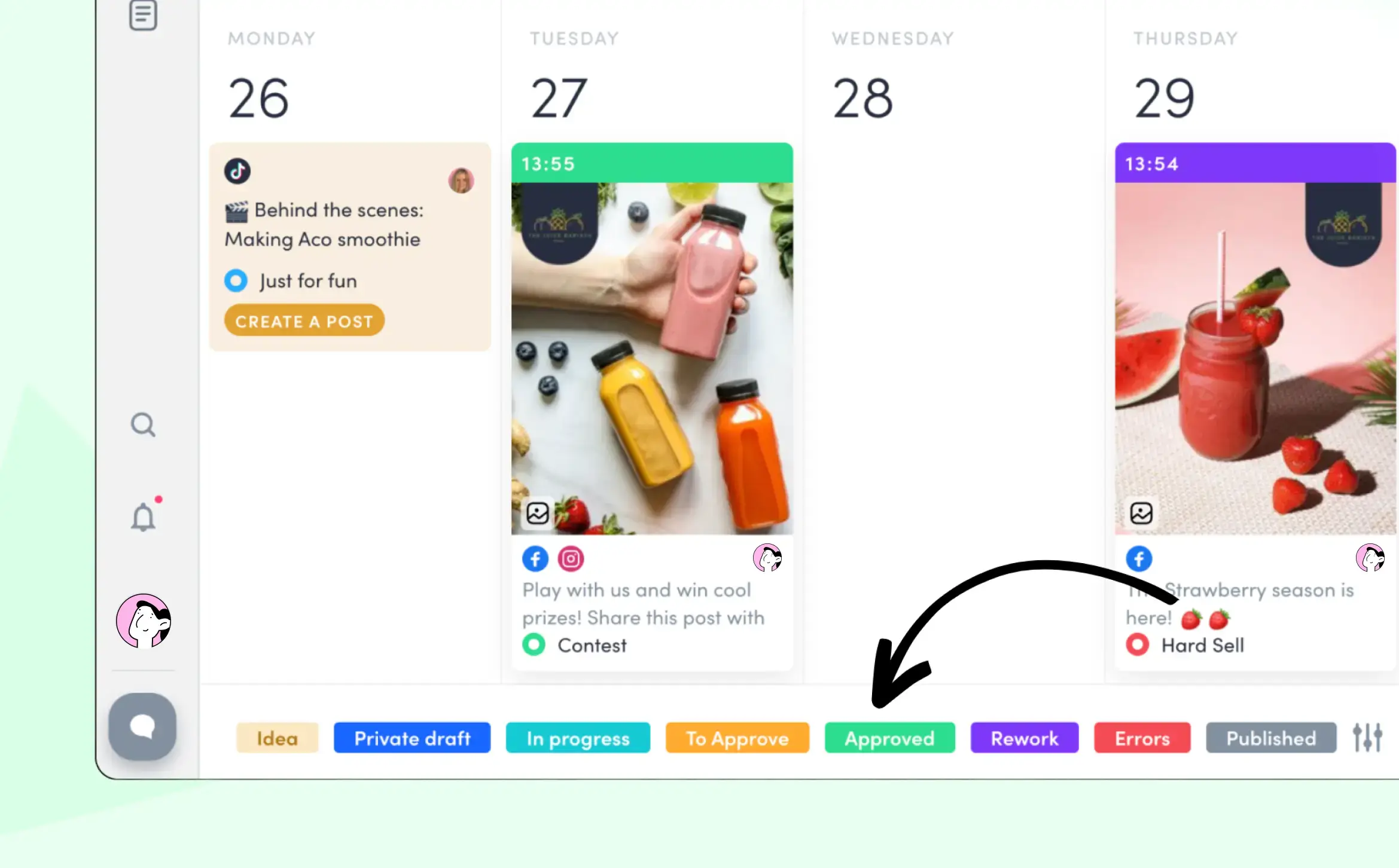
Most of the infrastructure is already built into ZoomSphere's Scheduler. The default statuses map directly to the actual stages of a review cycle: Idea, Private Draft, In Progress, Needs Review, Rework, Approved. But statuses aren't the mechanism. What matters is what each status change permanently records.
Every status change lands in the Activity Log with a name and a timestamp. When round one closes with an Approved status, the Activity Log records who changed it, from what, to what, at what time. That entry is permanent. It answers, without further searching: was this post approved, by whom, and when. Those are the three questions that matter when a new stakeholder arrives in round three.

At the post level, Post History shows each version side by side, so when a client says "go back to the version from round one," you open it directly rather than reconstructing it from email threads.

The comment structure adds a layer that most tools skip entirely. ZoomSphere separates Discussion with Client (visible to clients, editors, and admins) from Internal Comments (visible only to editors and admins). This means the team's internal context ("the brief says confident but this copy might be too blunt, flagging before client review") never surfaces in the client-facing thread. Both threads stay permanently on the post, so the decision trail includes both what the client agreed to and why the team made the choices they did.

Agencies with more complex approval chains can customise status names to reflect specific decision points. At Tricky Communications, a Budapest agency managing 15 brands including ALDI and Nikon, custom statuses include "Final Approval," "Approved by Client Name," "Tricky Review," "Brief," and "Pre-Approved." Each named status creates a specific, searchable point in the decision trail. Some of their clients communicate exclusively through ZoomSphere post comments, which means every piece of feedback is attached to the exact content it refers to, not floating in a separate thread.
Martina Vaculíková, Head of Social Media at Fragile, described the effect on how client conversations work: "Clients now have complete visibility on each post...saving us countless hours and speeding up our turnaround."

Fragile publishes around 500 posts per month across 119 channels. At that volume, a missing decision trail compounds quickly: one reopened decision per client per week is an hour of unrecoverable context reconstruction.
The status pipeline across the calendar makes this visible at a glance. When all posts are green, every post has a confirmed approval record attached.
What to Do When Revision Relapse Happens Anyway
Even with a complete system, some clients will occasionally want to revisit a previous round. The question is whether that conversation starts from a blank space or from a document.
With a locked version and a decision trail, there's a concrete starting point: open Post History, pull up the approved version from round one, share it with the client, and ask what specifically has changed in their thinking since that approval. That's not a confrontational question. It redirects the conversation from "what do we think now" to "what did we agree then, and what is different now."
When the answer is "nothing concrete changed, just second thoughts" and a client can see their own approval with a timestamp, most reconsiderations resolve quickly. When the answer is "our CEO wants to add a product message that wasn't in the original brief," that's a scope change, not a revision. Naming it accurately changes how you respond to it and how you bill for it.
For agencies managing dozens of clients simultaneously, bulk approval records are what make this scale. Positive Adamsky manages over 330 social media channels and 100+ brands with 213 users across their ZoomSphere workspace:
“The color-coded statuses in Scheduler give us complete peace of mind. The moment all of our created posts turn green, we know everything is approved, and we can confidently move on to the next project.”
At 2,955 posts published in December 2024 alone, peace of mind isn't a soft metric. It's operationally necessary.
With Bulk Actions, you approve an entire content batch in one go. Each post gets its own timestamp and its own entry in the Activity Log. When the full batch turns green, every approval is on the record.

Frequently Asked Questions
How many revision rounds should a content agency allow clients?
Two to three rounds is a workable standard for most social media content. The more important question isn't how many rounds happen, but what each round produces. An unlimited number of rounds backed by locked versions and documented decisions is less damaging than three rounds that leave no permanent record. Every round that closes without a locked version creates the conditions for revision relapse, often weeks later when the original context no longer exists.
What should happen at the end of a content revision round?
A revision round has genuinely closed when three things exist simultaneously: a locked version of the content, the name of the person who gave explicit approval, and a visible record tying that approval to that specific version. "The client approved it" doesn't meet this standard. "Version 3 was approved by [name] on [date], with the comment thread confirming the direction" does.
What is the difference between a revision and a scope change in content approval?
A revision refines execution within the agreed strategy: adjusting phrasing, copy length, a specific detail. A scope change alters the direction, objective, or brief itself. When a client asks to soften copy that was explicitly approved as "direct and confident," that's a scope change. Without a decision trail, scope changes and revisions look identical, and the agency absorbs the cost of both.
How do you stop a client from reversing content they already approved?
You can't prevent a client from sending a new message with a new opinion. You can control what you show them when they do. When an approval is tied to a locked version with a timestamped record, the conversation shifts from "let's debate whether this was approved" to "here's the exact version you approved and when." Most clients who see their own documented approval either confirm they still agree or articulate a specific new reason. Either way, the record moves the conversation forward instead of resetting it.
What is a decision trail in content approval?
A decision trail is the sequential record of approvals across all revision rounds for a piece of content. It answers: what version was approved, by whom, and when. It's most useful not when content moves smoothly, but when a new stakeholder appears mid-process and wants to restart. Each round that closed with a locked version contributes one entry to the trail. Each round that ended without one contributes a gap where revision relapse can start.
{{form-component}}
The Takeaway
A client who revisits a decision from three rounds ago isn't breaking your process. They're using the space your process left open.
Every revision round that ends without a locked version, a named approver, and a permanent record is a round that can be reopened by anyone, including the person who made the original decision. A tighter contract won't change this. More firmly worded revision limits won't either. What changes the dynamic is a process where each round closes with something concrete that both sides can access and point to later.
ZoomSphere's approval workflows are built around exactly this:
- Post History for locked versions
- Activity Log for timestamped approval records
- Separate client and internal comment threads attached permanently to each post
It's already in your Scheduler.
Open your last revised post. Without asking anyone, can you confirm which version was approved in round one, by whom, and on what date? If not, that's where the next revision loop will start.
{{cta-component}}








Heading 1
Heading 2
Heading 3
Heading 4
Heading 5
Heading 6
Lorem ipsum dolor sit amet, consectetur adipiscing elit, sed do eiusmod tempor incididunt ut labore et dolore magna aliqua. Ut enim ad minim veniam, quis nostrud exercitation ullamco laboris nisi ut aliquip ex ea commodo consequat. Duis aute irure dolor in reprehenderit in voluptate velit esse cillum dolore eu fugiat nulla pariatur.
Block quote
Ordered list

- Item 1
- Item 2
- Item 3
Unordered list
- Item A
- Item B
- Item C
Bold text
Emphasis
Superscript
Subscript


Recommended for you
%20(1).webp)
%20(1).webp)
%20(1).webp)