ZoomSphere vs. Planable: Which Tool Handles 10+ Clients Better?

Both ZoomSphere and Planable solve the same core problem: keeping content approvals from collapsing into email chains and unanswered messages. For agencies managing a small number of clients, both do that job well. This article is specifically about what happens when the client list grows past ten, where the pricing model and the workspace architecture start to matter as much as any individual feature.
The short answer: Planable is the stronger choice for agencies managing up to five clients. The approval interface is genuinely excellent, and the per-workspace pricing is competitive at that scale. ZoomSphere is built for agencies where managing the portfolio itself has become a second layer of operational work, one that a per-workspace tool charges you more for with every new client you onboard.
The inflection point is not a feature comparison. It is a pricing crossover around client six, and an architecture mismatch that becomes a daily tax on your team's time before you notice it.
{{form-component}}
Why Planable Works So Well at First
Planable has 4.6 out of 5 stars on G2 based on 1,019 reviews, and the high rating makes sense.
The feed-style approval interface is the most intuitive client-facing review experience in the category. Clients who have never used a social media management tool navigate it without a walkthrough. Multi-level approval workflows handle most agency sign-off chains without custom setup. The calendar, the list view, and the bulk scheduling all do what they are supposed to do.
For a team building its first client roster, Planable removes the exact friction that kills content quality: unclear feedback, missed revisions, and the recurring question of whether a post is actually approved or only seen. The product solves that problem cleanly.
The per-workspace model also makes sense at small scale. Below five clients, Planable is the cheaper option. That matters when you are still building the base.
The Point Where the Pricing Stops Making Sense
Planable charges per workspace. One workspace equals one client. ZoomSphere charges a flat monthly rate for unlimited workspaces and up to 50 users and 50 social accounts.
- €179/month on monthly billing
- €149/month on annual billing (billed as €1,790/year
Planable Basic pricing (source: planable.io/pricing, April 2026):
- $39/workspace/month on monthly billing
- $32.50/workspace/month on annual billing ($390/year)
Planable prices below are converted to EUR at EUR/USD 1.08 (April 2026): Basic monthly ~€36/workspace, Basic annual ~€30/workspace.
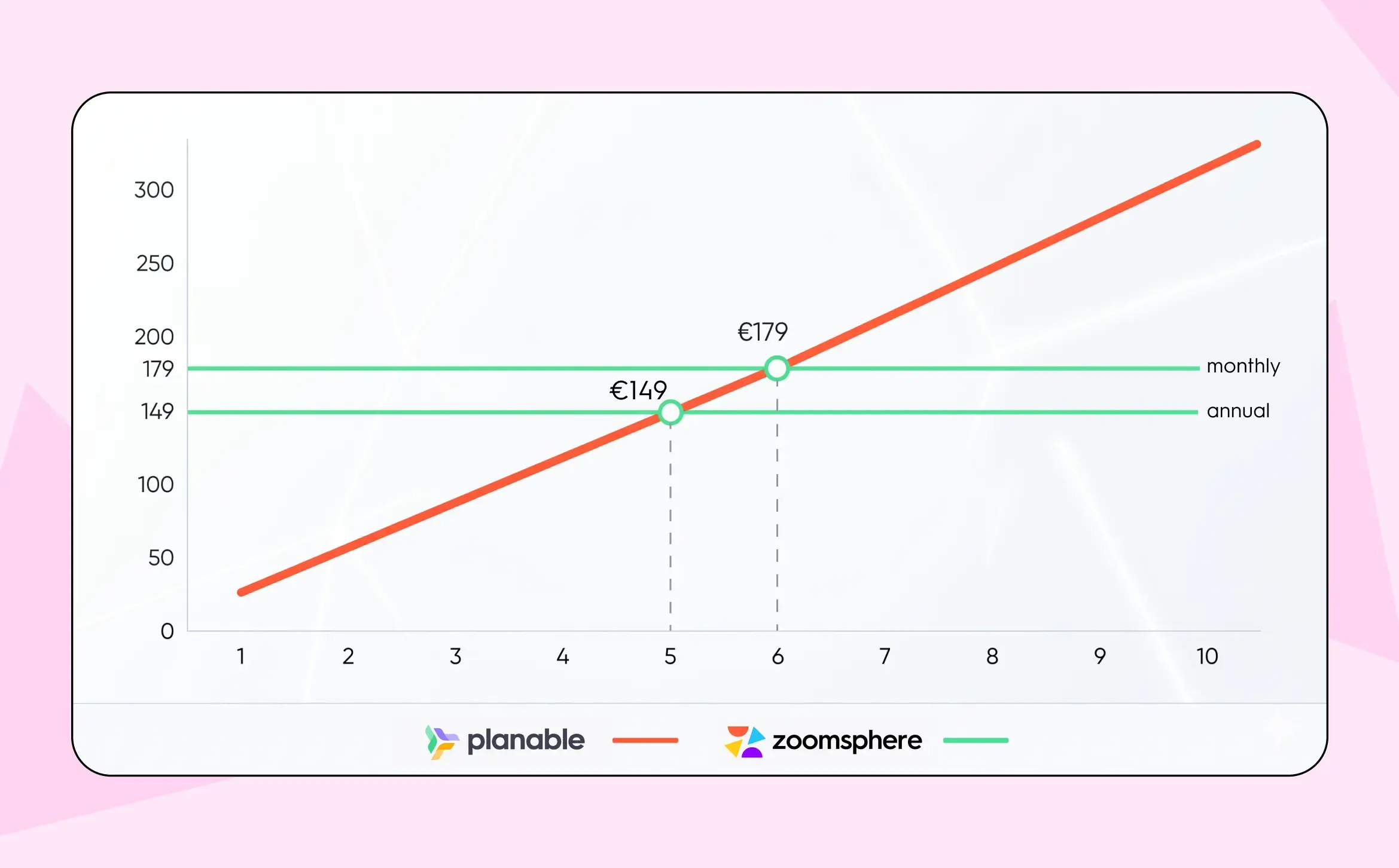
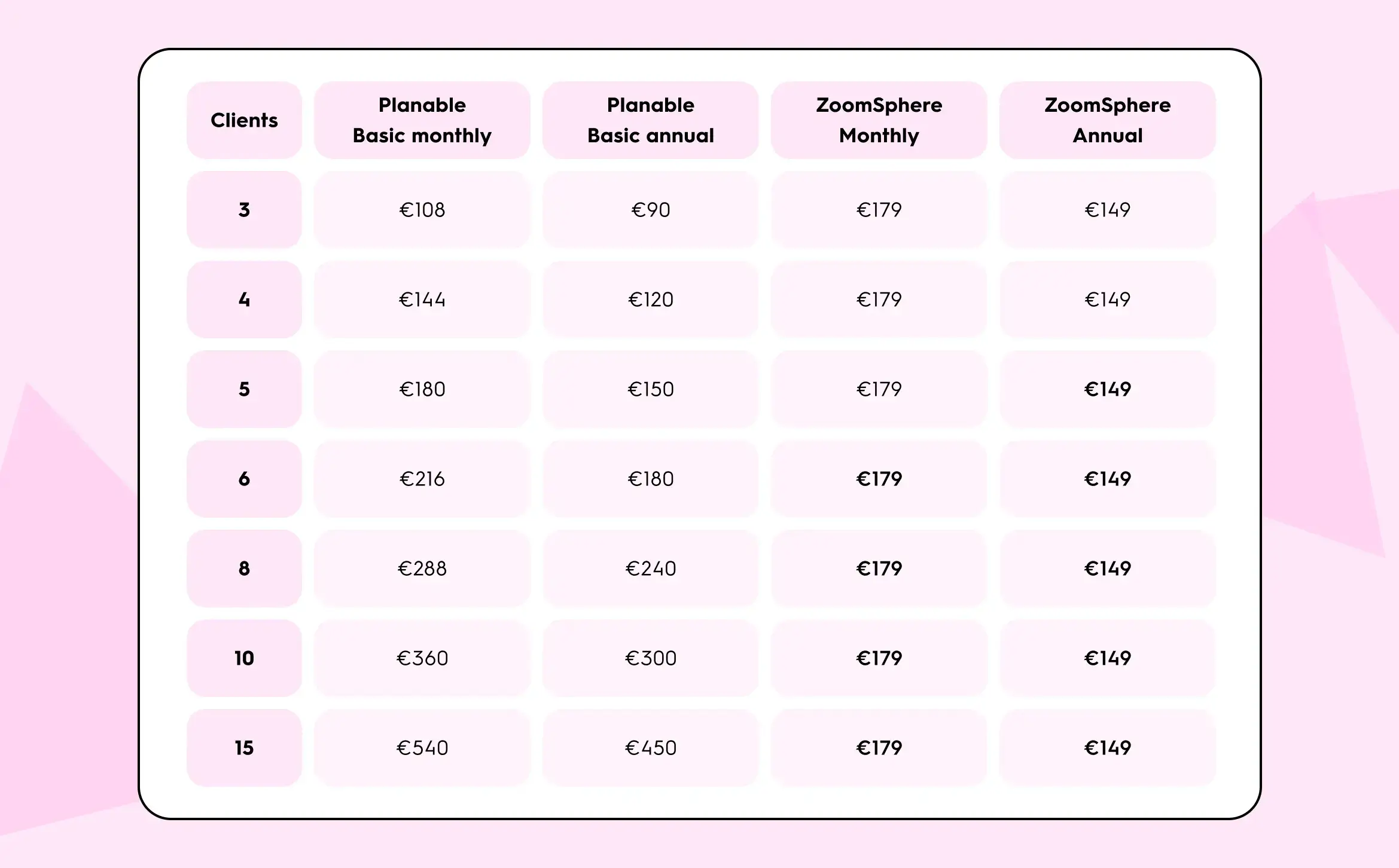
At three or four clients, Planable costs less regardless of billing cycle. This is worth saying clearly, because any comparison that skips this part is telling you what to think rather than showing you the numbers.
- On annual billing, the crossover happens at client five: Planable at five clients costs €150/month; ZoomSphere costs €149/month. From client five onward, ZoomSphere's annual plan is cheaper.
- On monthly billing, the crossover is at client six: €216 for Planable versus €179 for ZoomSphere.
From client six onward on either billing cycle, the gap grows with every new client added. At ten clients, Planable Basic on monthly billing costs €360/month against ZoomSphere's €179. At fifteen clients, the monthly difference is €361. Agencies that sign up for ZoomSphere's annual plan at ten clients pay €149/month, which is €211/month less than Planable Basic monthly at the same client count.
This is a recurring theme in Planable's G2 reviews. Multiple reviewers in the 1,019-review profile specifically note that "per-workspace pricing adds up fast with multiple clients".

One additional factor: Planable's analytics and engagement features are not included in the base plans. Analytics costs an additional ~€13 per workspace per month (the $14 rate converted at EUR/USD 1.08), engagement costs an additional ~€8 (the $9 rate converted). An agency on Planable Pro (~€45/workspace/month on annual billing, converted from $49/month at planable.io/pricing) plus analytics across ten client workspaces pays approximately €580/month for those workspaces alone, versus ZoomSphere's annual rate of €149/month.
Planable also enforces monthly post limits: the Basic plan caps at 60 posts per month, the Pro plan at 150. An agency publishing five posts per week across ten client profiles reaches 200 posts per month, which exceeds the Pro cap before the end of the month. ZoomSphere has no monthly post limit on any plan.
What the Workspace Architecture Costs You in Time
Price is the visible part of the equation. The operational overhead is what grows quietly underneath it.
User access is managed workspace by workspace, not at the account level.
In Planable, each workspace has its own Members settings. Adding a team member across ten client workspaces means navigating to Settings in each workspace and completing the invite flow ten times. Removing access when someone leaves requires the same process in reverse. This is confirmed in Planable's product structure: workspace-level membership management is how the tool is designed to work, and at two or three clients it is a minor inconvenience. At twelve clients, it is a repeating administrative task that happens every time the team changes.
There is no cross-workspace approval view.
Each client's calendar and approval queue is an independent workspace. Checking what needs approval across all clients means opening each workspace separately. For a team lead who reviews pending content before a morning standup, this is a context-switching cost that repeats every working day across the entire year.
Client comments and internal notes share the same thread unless permissions are carefully managed.
In Planable, keeping client-facing feedback visually separate from internal discussion is a permissions decision at the workspace level. In ZoomSphere, the Scheduler has a native split between discussion with client and internal comments at the post level, built into the product by default. No configuration required. The difference is small in design and large in the number of "did the client see that?" moments it eliminates.

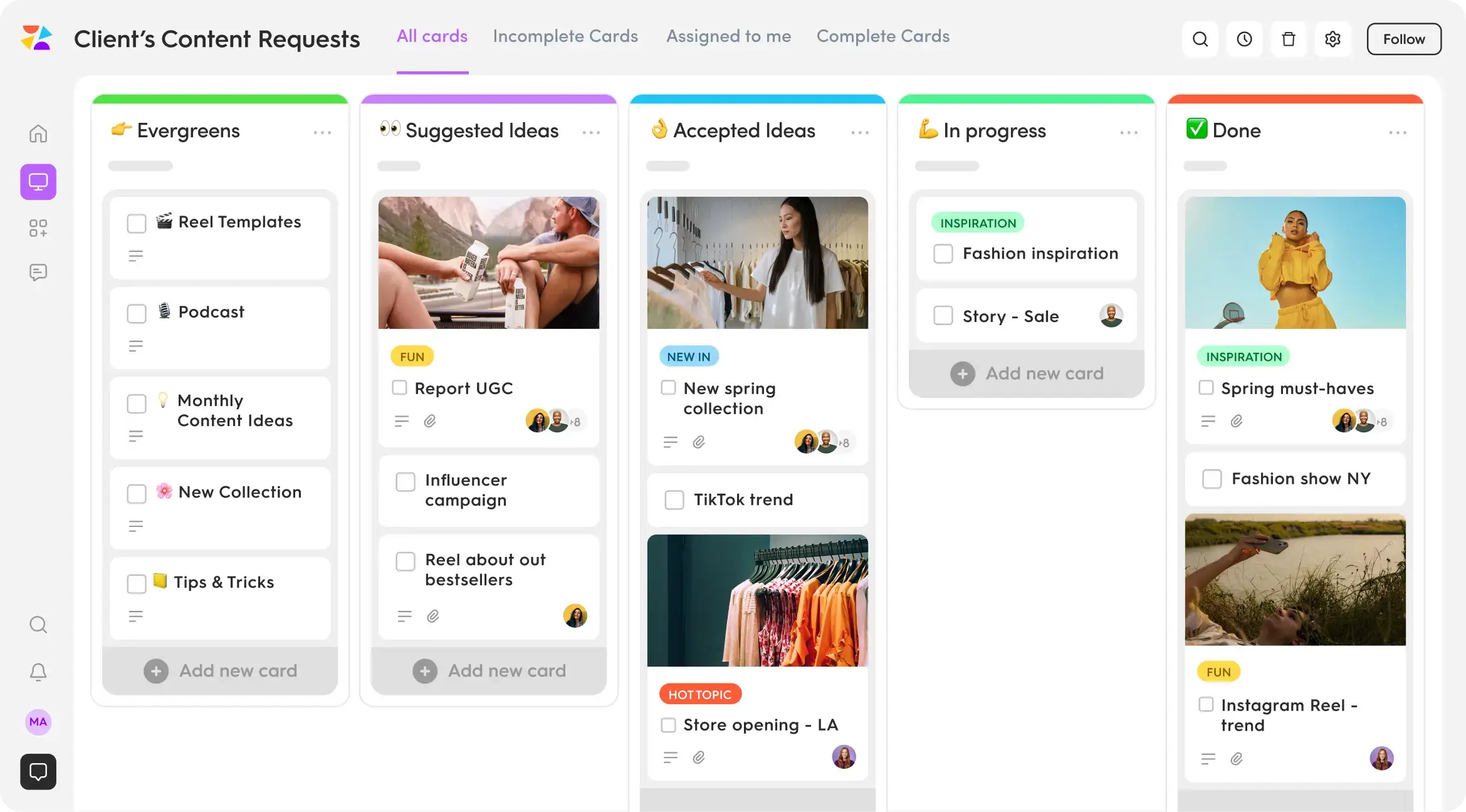
ZoomSphere's Workflow Manager gives each client workspace its own task board.
Content requests, content ideas, team tasks, and freelancer assignments all live inside ZoomSphere in a Kanban-style board with customisable columns: "Content Requests", "In Progress", "Approved", "Done" or however the agency defines them. Planable has no equivalent: there is no task manager, no idea board, and no request tracking built in. For agencies that currently run Trello or Asana alongside Planable to manage this layer, ZoomSphere removes the need for a second tool.
Five Questions That Tell You Which Tool You Actually Need
These questions are not about agency size. They are about the specific operational friction that appears when a workspace-per-client architecture starts working against you. Three or more yes answers point toward ZoomSphere
1. In the last six months, has a team member joined or left and required access changes across more than five client workspaces? In Planable, that is a multi-step process repeated for every workspace they need to enter or exit. If it happened once, it will happen again. If it happens quarterly as the team grows, it is a recurring operational cost.
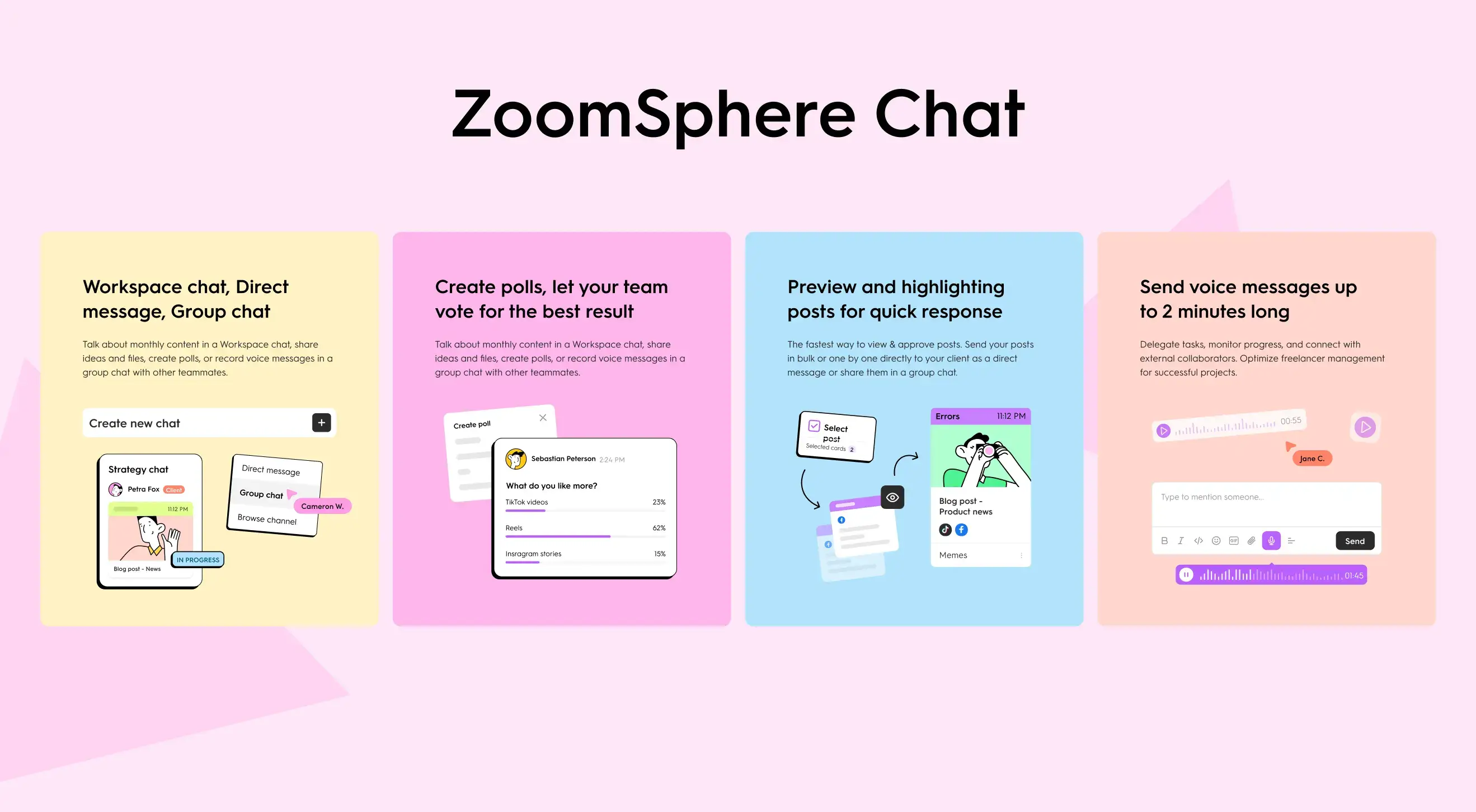
2. Do you currently use Slack, WhatsApp, or email alongside your social media tool to coordinate approvals or share post batches? If yes, your tool's native collaboration is not covering the full workflow. ZoomSphere's built-in Chat handles direct messages, group conversations, and bulk post sharing for client approval, all within the same platform as scheduling. When approval decisions happen in a separate messaging tool, there is a risk of feedback and content changes getting out of sync with what is actually scheduled.
3. Does your finance or operations team receive a separate invoice line for each client from your social media platform? At six or more clients, a per-workspace billing model produces a multi-line invoice that someone has to reconcile against the client list every month. ZoomSphere issues one invoice regardless of how many clients are active.
4. Can you see right now, without switching views or tabs, which posts across all your clients are waiting for approval? If no, you are managing approval status manually, by memory or by opening workspaces in sequence. That process repeats every working day, across every client workspace you manage.
5. When you plan to onboard two or three new clients this quarter, does the tool setup feel like a replicable process or a series of manual steps you need to remember? In a workspace-scoped architecture, each new client setup is a fresh configuration: workspace creation, team access, approval workflow, client invite. In ZoomSphere, the account-level structure means that team access and cross-client visibility are already in place before the first post is scheduled.
Feature Comparison at a Glance
For a complete side-by-side breakdown of every feature, approval workflow, and platform supported, see the ZoomSphere vs. Planable comparison page.
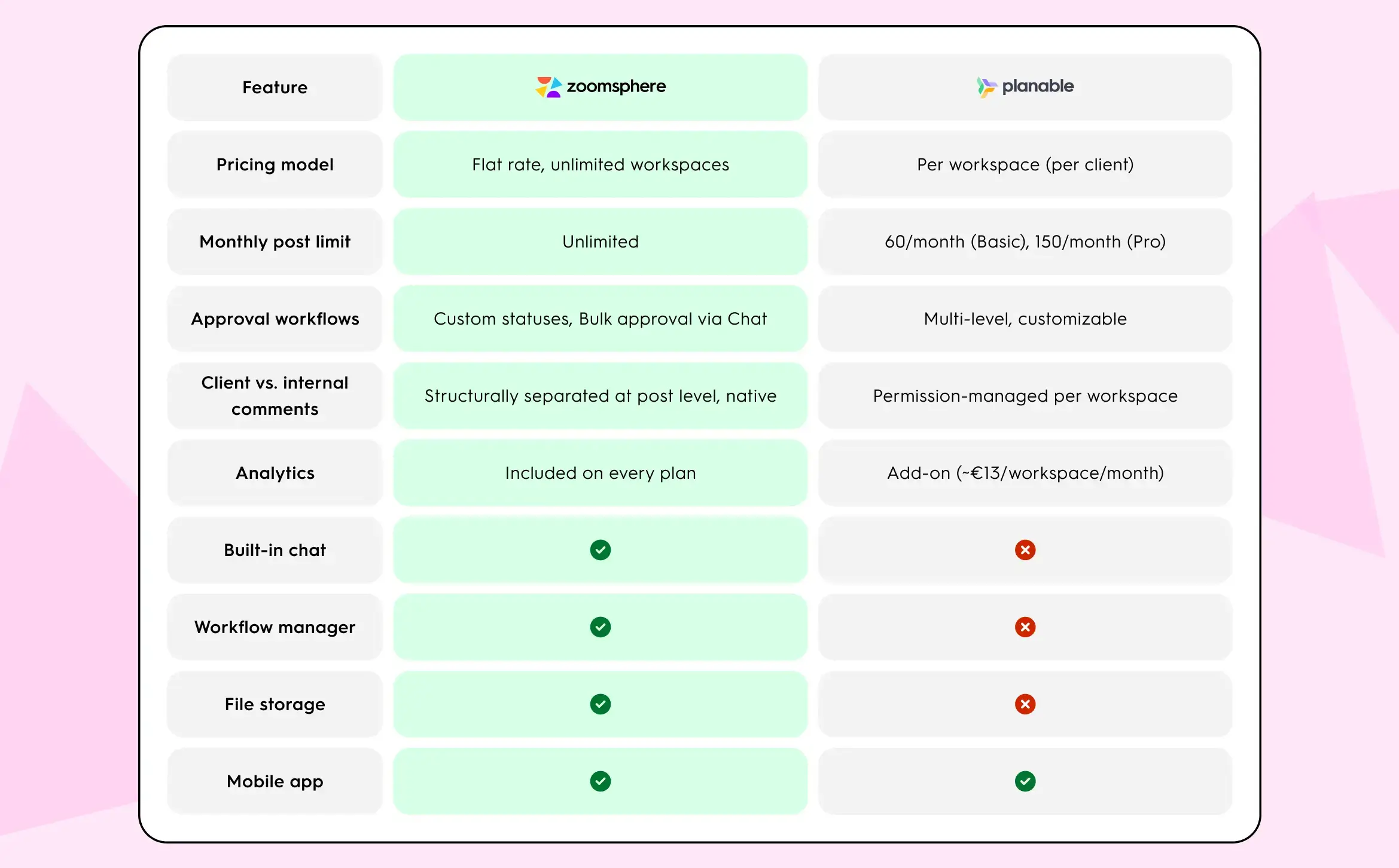
For a complete side-by-side breakdown of every feature, approval workflow, and platform supported, see the ZoomSphere vs. Planable comparison page.
When Planable Is the Right Choice
Planable is the right tool for specific, real circumstances, and it is worth naming them clearly.
- Your agency manages fewer than six clients with no significant growth planned. The per-workspace pricing is competitive at this scale and the approval interface delivers genuine value without paying for infrastructure you do not need.
- The client approval experience is a differentiator for your agency. Planable's feed-style preview is the most intuitive client-facing approval interface available. If clients who are not familiar with social media tools need to participate in reviews without training, Planable removes that friction better than most alternatives.
- You manage content types beyond social media. Planable supports blog posts, newsletters, and ad content within the workspace structure. If your scope includes written content alongside social, that unified layer has real value.
- Platform coverage matters: your clients are active on Pinterest, Google Business Profile, or Threads. ZoomSphere currently supports six platforms. Planable supports nine. If Pinterest, GBP, or Threads are part of your active publishing workflow, Planable has the broader native coverage.
When ZoomSphere Makes More Sense
ZoomSphere is built for the operational reality of running an agency where managing the portfolio is itself a full layer of work.
- The pricing model grows with the client list rather than against it. At six clients and above, ZoomSphere's flat rate is cheaper than Planable on both billing cycles. That gap compounds with every new client added.
- Team access is account-level, not workspace-level. Adding or removing a team member applies across all client workspaces in one action. For a team that changes quarter by quarter, that is a significant reduction in recurring admin time.
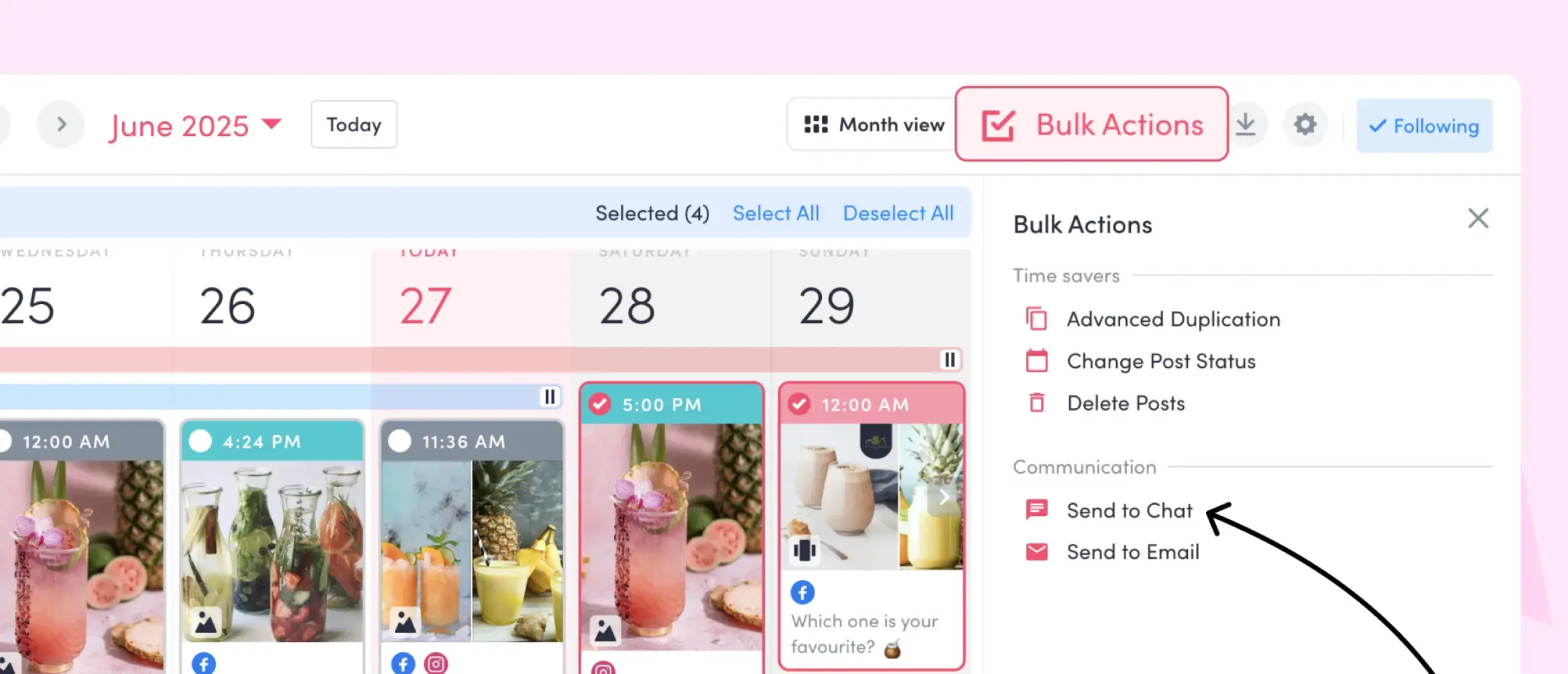
- Approval, communication, and content live in the same tool. ZoomSphere's Chat handles team and client communication, bulk post sharing for approval, and file distribution without requiring a parallel messaging tool. Teams that currently manage approvals in Slack alongside their social media platform are using two tools to complete what one should handle.
- Cross-client visibility is a built-in function. The Workflow Manager, the overall dashboard, and Chat provide a single view across all active clients. For operations leads managing ten or more accounts, that visibility is what makes a morning standup take five minutes rather than twenty-five.
{{cta-component}}
Frequently Asked Questions
At what point does Planable become more expensive than ZoomSphere?
On annual billing, ZoomSphere (€149/month) becomes cheaper than Planable Basic (~€30/workspace/month) from client five onward: five Planable workspaces cost ~€150/month, ZoomSphere costs €149/month. On monthly billing, the crossover is at client six: six Planable workspaces cost ~€216/month against ZoomSphere's €179/month. Below four clients on either billing cycle, Planable is the cheaper option. Pricing sources: planable.io/pricing and zoomsphere.com/pricing, both verified April 2026. Planable USD prices converted at EUR/USD 1.08.
Is ZoomSphere better than Planable for multi-client agencies?
It depends on client count and operational complexity. For agencies managing six or more clients, ZoomSphere's flat pricing, account-level team management, and cross-client Workflow Manager are structurally better suited to running a larger portfolio. For agencies managing fewer than five clients where client-facing approval experience is a priority, Planable's interface and per-workspace model make more practical sense.
What are the main complaints about Planable on review platforms?
Among the recurring themes in Planable's 1,019 G2 reviews, the per-workspace pricing model comes up consistently: multiple reviewers note that "per-workspace pricing adds up fast with multiple clients." Other themes include the absence of built-in analytics in base plans and the lack of a native communication layer for team-to-team coordination (g2.com/products/planable/reviews).
Does Planable support more social media platforms than ZoomSphere?
Yes. Planable publishes to nine platforms: Instagram, Facebook, TikTok, YouTube, X, LinkedIn, Google Business Profile, Pinterest, and Threads. ZoomSphere supports seven: Instagram, Facebook, LinkedIn, TikTok, YouTube, X, and Threads. If your agency manages active accounts on Pinterest, or GBP, Planable's platform coverage is broader.
Can clients approve content in both tools without creating an account?
Yes in both tools, though via different mechanisms. In Planable, guest approval links allow clients to review and approve content without logging in. In ZoomSphere, clients can approve without an account in two ways: via email approval (ZoomSphere automatically sends an email with a direct review link when a post reaches the "To Approve" status, with no login required), or via exported PDF or Excel overview of the content calendar, suitable for clients who prefer offline review or traditional approval workflows. Additionally, clients who do have a ZoomSphere account can approve posts individually or in bulk directly in Chat.
What is the core difference in how the two tools handle team permissions?
Planable manages permissions at the workspace level. Each client workspace has its own Members settings, and team access is configured per workspace. ZoomSphere manages permissions at the account level, meaning team roles, Chat access, and Workflow Manager visibility apply across all client workspaces from a single structure. As client count grows, account-level permissions reduce the administrative overhead per client.
{{form-component}}
The Bottom Line
Planable is a well-built tool for a specific stage of agency life. It solves the approval problem cleanly, the client experience is polished, and the pricing makes sense when the client list is short. The 4.6-star average on G2 from over a thousand reviewers reflects genuine quality.
The moment that changes is when managing the tool starts to feel like part of the job. Twelve separate settings pages when a new team member joins. No single view of what is waiting for approval across the full client portfolio. A per-workspace invoice that grows with every account you win.
ZoomSphere is built for the agency that has crossed that threshold. The flat rate, account-level permissions, built-in Chat, and cross-client Workflow Manager are not features added to a scheduler. They are the answer to the specific problems that reliably appear when a social media agency grows past the point where a workspace-per-client model was designed to operate.
If you are onboarding new clients this quarter, the pricing table above is the starting point. The five diagnostic questions tell you whether the architecture matters for your team right now.








Heading 1
Heading 2
Heading 3
Heading 4
Heading 5
Heading 6
Lorem ipsum dolor sit amet, consectetur adipiscing elit, sed do eiusmod tempor incididunt ut labore et dolore magna aliqua. Ut enim ad minim veniam, quis nostrud exercitation ullamco laboris nisi ut aliquip ex ea commodo consequat. Duis aute irure dolor in reprehenderit in voluptate velit esse cillum dolore eu fugiat nulla pariatur.
Block quote
Ordered list

- Item 1
- Item 2
- Item 3
Unordered list
- Item A
- Item B
- Item C
Bold text
Emphasis
Superscript
Subscript


Recommended for you
%20(1).webp)
%20(1).webp)