


AI Client Report vs. the Standard Report From Your Social Media Tool: Which Wins in 2026?

Updated October 2026.
Is a client report built by an AI agent better than the standard report from a social media tool? For client-facing reports, usually yes. A standard report shows the same charts for every client. An agent connected through the ZoomSphere MCP builds the report around this client's goals, explains why the numbers moved, combines other sources such as ads and targets, writes in the client's language and uses your agency's design. The standard report still wins for quick internal checks and fixed formats.
Key facts
- Same data, different job: a standard report lists metrics, an AI report answers the client's questions.
- Built around targets: the agent compares results with what you agreed with this client, not with a generic template.
- It explains the why and proposes next steps, which a fixed export cannot do.
- One report, many sources: organic, paid, website and targets in one story.
- Use both: keep standard reports for quick internal checks, use the AI report for anything the client reads.
{{form-component}}
What a standard report does well
A built-in report from a social media tool is fast, consistent and needs no setup. It pulls the numbers straight from the platforms, looks the same every month, and anyone on the team can export it in a minute. For an internal weekly check or a quick look at one channel, that is exactly what you want.
The problem starts when that same export goes to the client.
Where the standard report falls short
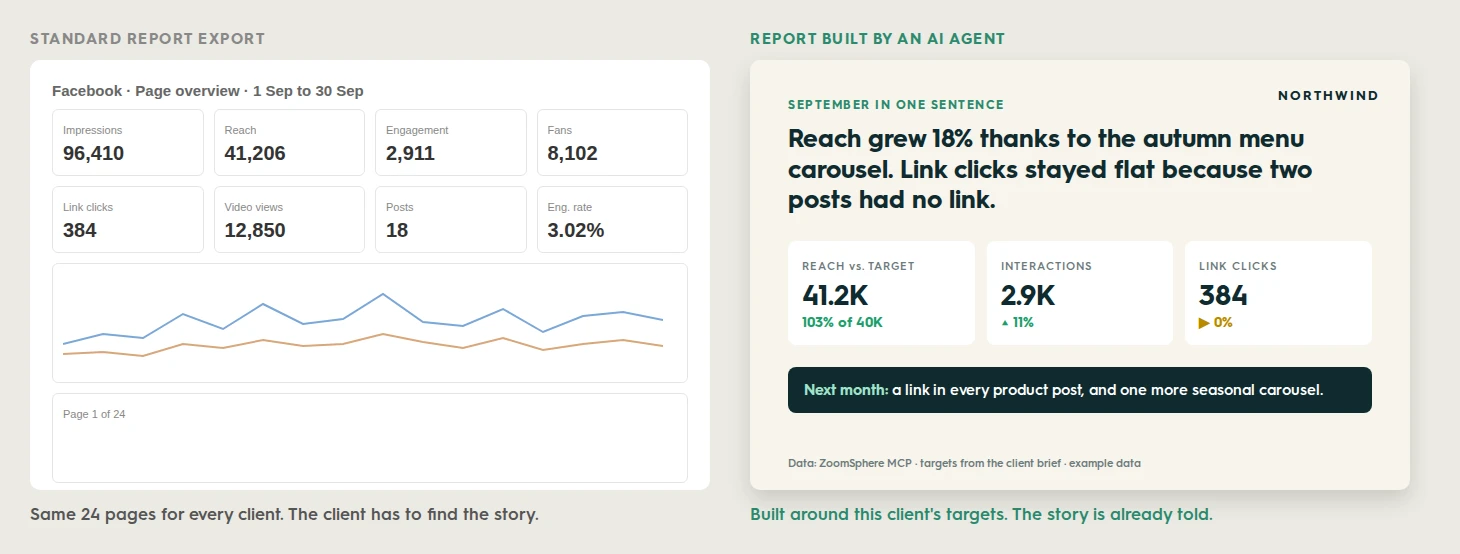
- Same template for every client. A coffee shop and a bank get the same 24 pages, although they care about completely different numbers.
- Metrics instead of goals. Impressions, fans and engagement rate, but no answer to "did we hit the target we agreed on?"
- No why. The report shows that reach dropped. It cannot say that the team published four fewer posts that fortnight.
- No next step. The client is left to decide what to do with the numbers.
- One source. Ads, website traffic and targets live elsewhere, so the agency still assembles the real story by hand.
Standard report vs. AI report, side by side
| Standard report from a tool | AI report through the ZoomSphere MCP | |
|---|---|---|
| Structure | Fixed template, same for everyone | Built from each client's brief |
| KPIs | Every available metric | The 3 to 5 numbers the client cares about, against targets |
| Explanation | None | Why the numbers moved, in plain words |
| Next steps | None | Concrete plan for next month |
| Sources | One tool | Organic, paid, targets and more in one chat |
| Design | The tool's layout, limited branding | Your agency's own template |
| Language | Usually the interface language | Any language the client reads |
| Speed | Instant export | A few minutes, or automatic on a schedule |
| Best for | Internal checks, raw numbers | Anything the client reads |
The client's question test
The fastest way to see the difference: take the last question a client asked you and try to answer it with each report.
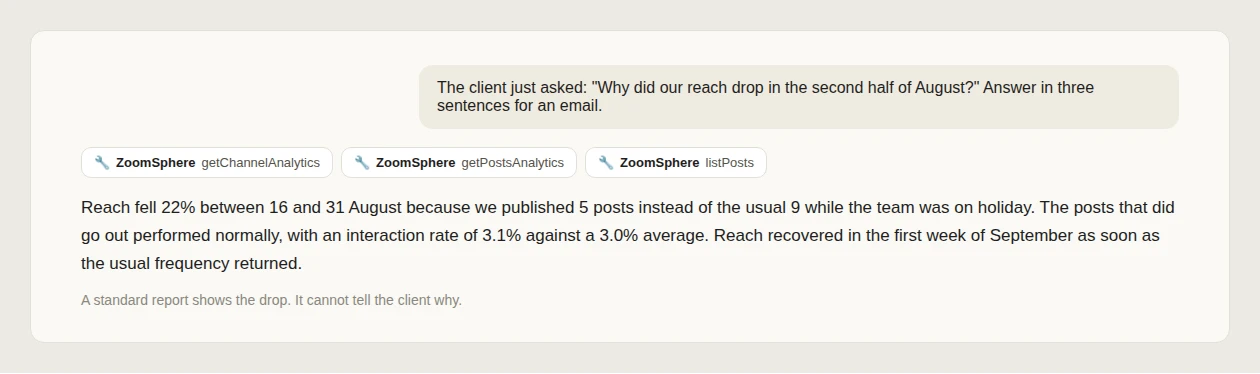
Prompt: answer the client's question
The client just asked: "[their question]". Using only the ZoomSphere workspace "[Client workspace]", find the answer in the analytics and the publishing calendar, and write it in three sentences I can paste into an email. Include the numbers that prove it.
In the client's language
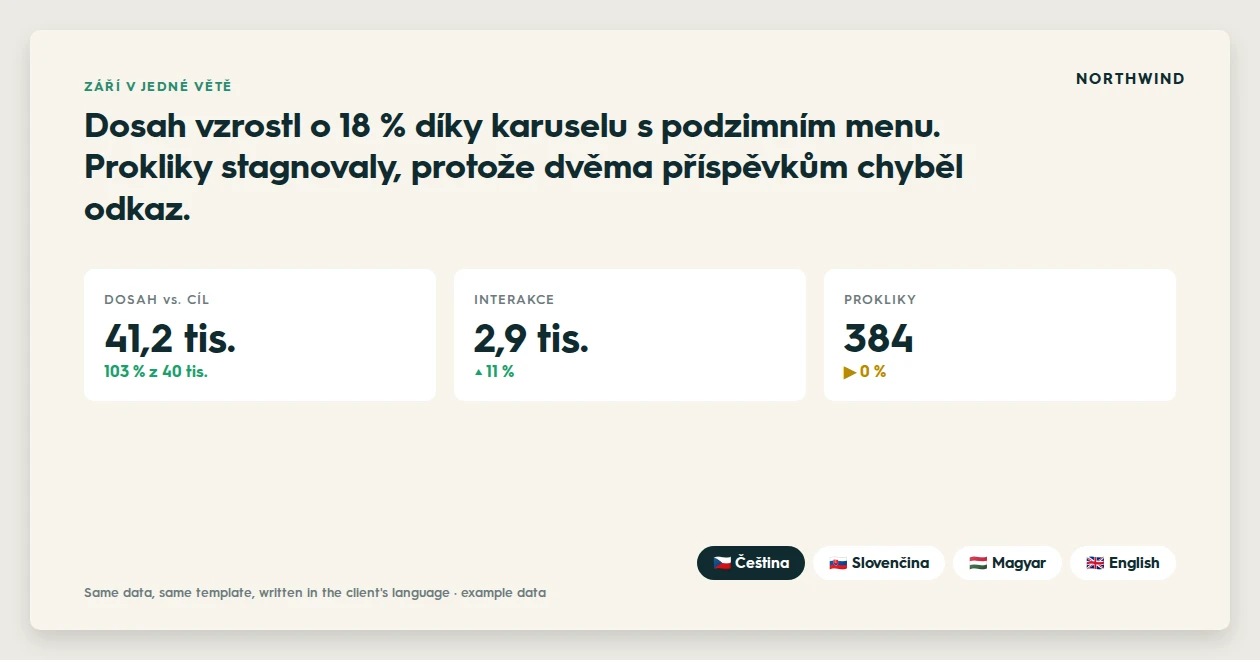
Many agencies work for clients who do not read English reports, or who forward them to a board that reads only the local language. A standard export is usually stuck in the language of the tool's interface. An agent writes the same report, on the same template, in whatever language the client reads.
Prompt: turn a standard report into a story
Read [last month]'s data for [Client] in ZoomSphere. Instead of listing every metric, write the month in one sentence, pick the 3 numbers that matter for this client's targets, explain why they moved, and end with one concrete step for next month. Write it in [Czech].
The honest risks, and how to handle them
- Wrong numbers. An agent can misread data. Keep "double-check every number before you finish" in the instructions and a source line on every slide, and read the first reports carefully.
- Inconsistency. Without a fixed brief, two months can look different. Keep the structure in a report brief, so every month follows the same order.
- Data protection. Client data goes to an AI provider. Use a business plan, or see AI with confidential client data for stricter clients.
When to use which
- Standard report: internal weekly checks, a quick look at one channel, raw numbers for a spreadsheet.
- AI report through the ZoomSphere MCP: the monthly or quarterly client report, executive summaries, anything combining social with ads or targets, and every report in a language other than English.
{{cta-component}}
Where to start
Setting up your first AI client report takes about half an hour: your first AI client report, step by step. For charts that make it worth reading, see 9 report charts worth sending, and to run it every month on its own, see how to automate client reporting.
Prompt: compare both for your client
Here is the standard report we sent [Client] last month [attach it]. Using the same month's data from ZoomSphere, build a 5-slide version that answers what this client actually cares about. Then list what the new version says that the old one did not.
Frequently asked questions
Is an AI-generated client report accurate?
The numbers come straight from ZoomSphere through the MCP, the same data a standard report uses. The risk is in reading them, so ask the agent to double-check every number and put a source line on each slide, and review the first reports yourself.
Will an AI report replace the standard report?
No. Standard reports stay useful for quick internal checks and raw numbers. The AI report replaces the part where someone at the agency turns those numbers into a story for the client.
How long does an AI client report take?
Once the client's project and brief are set up, a few minutes per month. With a scheduled task, it runs automatically.
Can the AI report use my agency's design?
Yes. The agent builds the report on your own PowerPoint template and brand manual, uploaded to the client's project.
Can the report be in a language other than English?
Yes. The agent writes the report in any language the client reads, on the same template, from the same data.
{{form-component}}








Heading 1
Heading 2
Heading 3
Heading 4
Heading 5
Heading 6
Lorem ipsum dolor sit amet, consectetur adipiscing elit, sed do eiusmod tempor incididunt ut labore et dolore magna aliqua. Ut enim ad minim veniam, quis nostrud exercitation ullamco laboris nisi ut aliquip ex ea commodo consequat. Duis aute irure dolor in reprehenderit in voluptate velit esse cillum dolore eu fugiat nulla pariatur.
Block quote
Ordered list

- Item 1
- Item 2
- Item 3
Unordered list
- Item A
- Item B
- Item C
Bold text
Emphasis
Superscript
Subscript


Recommended for you
%20(1).webp)
%20(1).webp)
%20(1).webp)