


AI With Confidential Client Data: Business Plan, Private Cloud or a Local Model? (2026 Guide)

Updated October 2026.
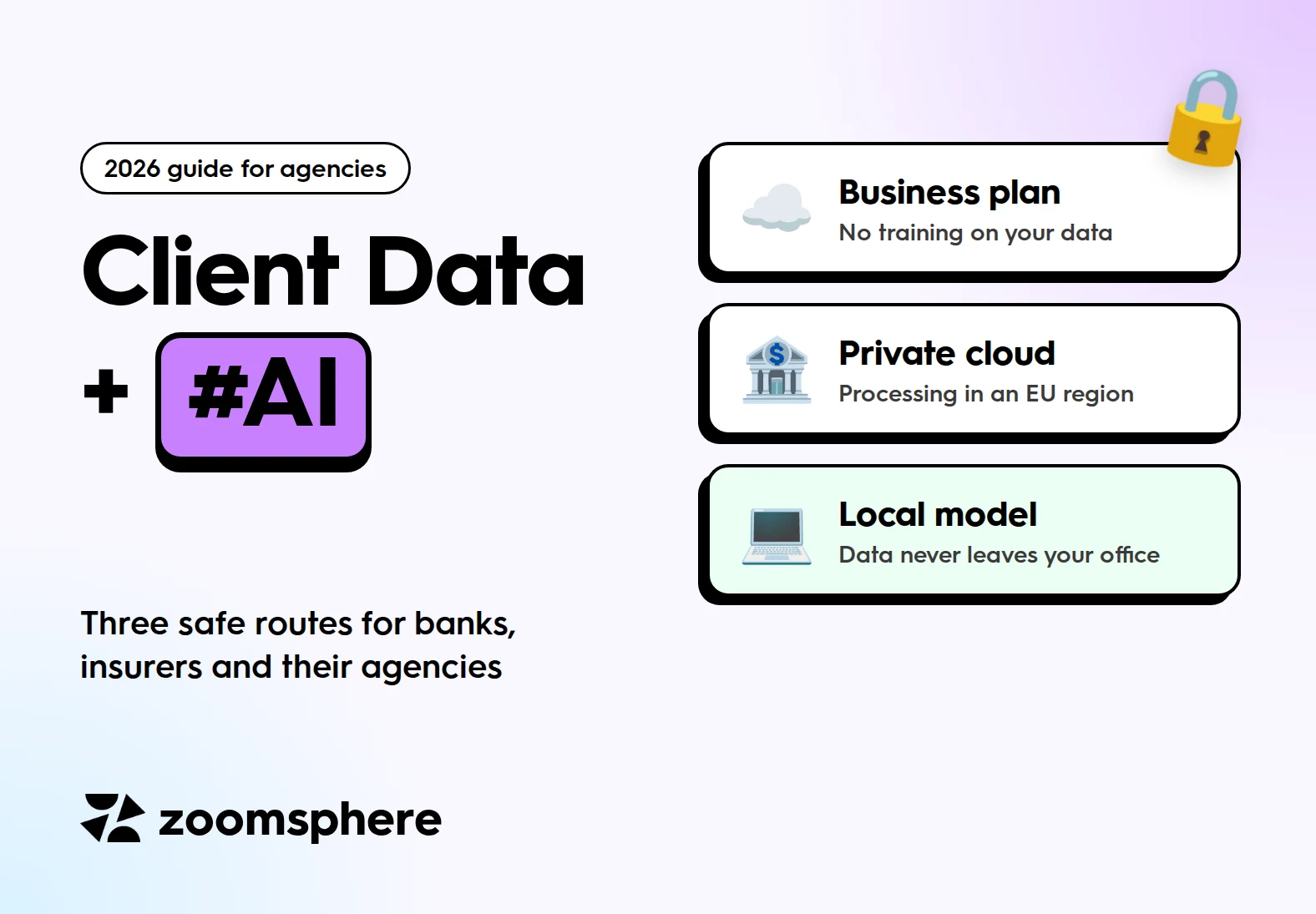
Can a bank, an insurer or their agency use AI with confidential client data? Yes, but not through free or personal chat apps. There are three safe routes: a business plan of a frontier model that does not train on your data, the same models in a private cloud in an EU region, or an open-weight model running on your own hardware. Most regulated companies start with the private cloud. A local model is the answer when data must not leave the building at all.
Key facts
- Business plans do not train on your data. ChatGPT Business, Enterprise and the API, and Claude Team, Enterprise and the API, exclude customer data from training by default. Free and personal plans follow different rules.
- Processing in the EU: OpenAI offers European data residency for Enterprise, Edu and the API. Claude's own platform processes data in the US or globally, so Claude in an EU region runs through Amazon Bedrock or Google Cloud.
- A local model keeps everything on your hardware. OpenAI's open-weight gpt-oss-20b runs in 16 GB of memory, gpt-oss-120b in about 80 GB.
- Hardware: a 128 GB workstation that runs serious local models costs roughly €3,500 to €5,900 in autumn 2026.
- Local models can work with ZoomSphere. We tested the ZoomSphere MCP in LM Studio: briefs and documents stay on your machine, only the drafts you create reach ZoomSphere.
{{form-component}}
Why banks and insurers hesitate to use AI
For most companies the worry is simple: what happens to the text I paste in? For regulated companies it is also a legal question, and four frameworks come up in almost every conversation with their compliance teams:
- GDPR. Personal data of clients needs a legal basis, a data processing agreement with every provider that sees it, and clarity about any transfer outside the EU.
- Banking and insurance secrecy, plus client contracts. Many NDAs forbid sharing client information with any third party, AI providers included.
- DORA. Since 17 January 2025, banks and insurers in the EU must manage the risks of their ICT third-party providers, keep a register of those contracts and include specific clauses in them (Regulation (EU) 2022/2554). An AI provider is an ICT third-party provider.
- The EU AI Act. Obligations for high-risk systems, such as credit scoring and parts of life and health insurance underwriting, now apply from 2 December 2027 after the Digital Omnibus (Council of the EU). Writing marketing posts is not a high-risk use, but your client's compliance team will still ask how you use AI.
What happens in practice: compliance says no to "ChatGPT" in general, and the marketing team keeps using it anyway, on personal accounts. That is the worst of both worlds, because consumer accounts are exactly where client data leaks. We covered the everyday version of this in what your social media team should never paste into an AI chat. This guide is about what to do when you need AI on confidential data anyway.
Route 1: a business plan of a frontier model
The quickest step is to move everyone from personal accounts to a business plan. The difference is mostly contractual, and that is exactly what compliance cares about.
| Plan | Trains on your data? | Where data is processed | Watch out for |
|---|---|---|---|
| ChatGPT Business, Enterprise, OpenAI API | No, by default | European data residency for Enterprise, Edu and the API. Processing (inference) in Europe only for Enterprise and Edu. | ChatGPT Business has no or only limited data residency. Free and Plus plans can train on chats unless the user turns it off. |
| Claude Team, Enterprise, Claude API | No, under Anthropic's Commercial Terms | US or global processing, storage in the US | No EU option on Anthropic's own platform. Free, Pro and Max plans fall under Consumer Terms. |
This route covers a lot of agency work: drafting posts, summarizing campaign results, preparing reports from anonymized data. It is usually not enough when the client's contract or regulator requires processing inside the EU, or forbids third parties altogether.
Route 2: the same models in a private cloud
Banks that already run on AWS, Google Cloud or Microsoft Azure usually take frontier models from there. Claude is available through Amazon Bedrock and Google Cloud Vertex AI, where the processing region is the cloud region you pick, including EU regions. OpenAI models run in Microsoft Azure. The data processing agreement is then with a cloud provider the bank has already audited, which makes the DORA paperwork far simpler.
The catch for agencies: somebody has to set it up, and you usually get access through the client's environment, not your own. Ask early who owns the account and who pays for usage.
Route 3: a local model on your own hardware
A local model means the model weights run on a computer you control: a laptop, a workstation or a server in your office or data center. Prompts, documents and answers never leave that machine. There is no AI provider in the loop, so there is no AI provider contract to negotiate.
The price is quality and effort. The best open-weight models of 2026 are good at drafting, summarizing, classifying and calling tools, but they still trail the frontier models on hard reasoning and long, nuanced writing. And you own the hardware, the updates and the access control.
| Business plan | Private cloud | Local model | |
|---|---|---|---|
| Does data leave your company? | Yes, to the AI provider under contract | Yes, to your cloud provider, in a region you choose | No |
| Model quality | Best available | Best available | Good, below the frontier |
| Upfront cost | None | Setup work | From €0 to €13,000+ for hardware |
| Running cost | Per seat or per token | Per token | Electricity and maintenance |
| Best for | Most agency work on anonymized data | Banks and insurers with an existing cloud | Data that must not leave the building |
Which local model to choose
Choose by license, size and language support. Every model below can be used commercially.
| Model | Released | Memory needed | License | Good to know |
|---|---|---|---|---|
| gpt-oss-20b (OpenAI) | August 2025 | 16 GB | Apache 2.0 | Trained for tool use, runs on a laptop |
| gpt-oss-120b (OpenAI) | August 2025 | About 80 GB | Apache 2.0 | Near o4-mini on core reasoning benchmarks, according to OpenAI |
| Gemma 4: E4B, 26B MoE, 31B (Google) | April 2026 | A few GB for E4B, about 19 to 24 GB for the larger sizes when quantized | Apache 2.0 | Trained on over 140 languages, context up to 256K tokens |
| Qwen3 family (Alibaba) | 2025 to 2026 | Many sizes | Apache 2.0 | Strong multilingual all-rounder. Check your client's policy on model origin. |
| Mistral models (Mistral AI) | Various | Various | Apache 2.0 for many models | A European provider, often preferred for digital sovereignty |
For a first test, gpt-oss-20b or Gemma 4 26B is a sensible start. Both run on a machine with 32 GB of memory and both handle tool calls, which you need to connect ZoomSphere.
What hardware you need
The rule of thumb: the model has to fit into memory with room to spare for the conversation. Speed then depends mostly on memory bandwidth, not raw compute power.
| Tier | Example hardware | Price, autumn 2026 | What it runs |
|---|---|---|---|
| 16 to 32 GB | A MacBook with 32 GB, a PC with a 16 to 24 GB graphics card | Often hardware you already own | gpt-oss-20b, Gemma 4 E4B and 26B |
| 128 GB workstation | NVIDIA DGX Spark, Mac Studio M5 Max with 128 GB, AMD Ryzen AI Max+ 395 systems | About €3,500 to €5,900 | gpt-oss-120b and other large models, for one user |
| Team server | A workstation with an NVIDIA RTX PRO 6000 (96 GB) | About €13,000 and up | Several users at once, with vLLM |
| Up to 512 GB | Mac Studio M5 Ultra | From about $5,500 (96 GB) to $18,300 (512 GB) | Very large models for one user |
Memory prices rose sharply in 2026 (the DGX Spark alone went from $3,999 to $4,699 in February), so check current prices before you budget.
The inference layer: LM Studio, Ollama or vLLM
The inference layer is the software that loads the model and serves it to your chat window and tools. Four names cover almost every setup:
| Tool | Best for | License | Good to know |
|---|---|---|---|
| LM Studio | One person, graphical app | Free for home and work since July 2025 (proprietary) | Built-in MCP support, including sign-in with OAuth |
| Ollama | Developers, a simple local API | MIT, open source | One command to run a model, desktop app available |
| vLLM | A shared server for a team | Apache 2.0, open source | Serves many users at once efficiently, needs Linux and an NVIDIA or AMD GPU |
| llama.cpp | The engine underneath many tools | MIT, open source | Runs almost anywhere, even without a graphics card |
A practical path: start with LM Studio on one machine, prove the use case, then move to vLLM on a server once more people need it.
How to connect a local model to ZoomSphere
LM Studio works as an MCP host, so a local model can use the ZoomSphere MCP the same way Claude or ChatGPT does. We tested this connection ourselves.
- Install LM Studio and download a model with tool support, for example gpt-oss-20b.
- In the right sidebar, open the Program tab, then choose Install and Edit mcp.json.
- Add the ZoomSphere server inside "mcpServers":
"zoomsphere": { "url": "https://mcp.zoomsphere.com/mcp" } - Save the file, sign in to ZoomSphere in the browser window that opens, and approve access.
- Ask in the chat, for example: "Which of my clients' posts are waiting for approval this week?" LM Studio shows every tool call for you to confirm before it runs.
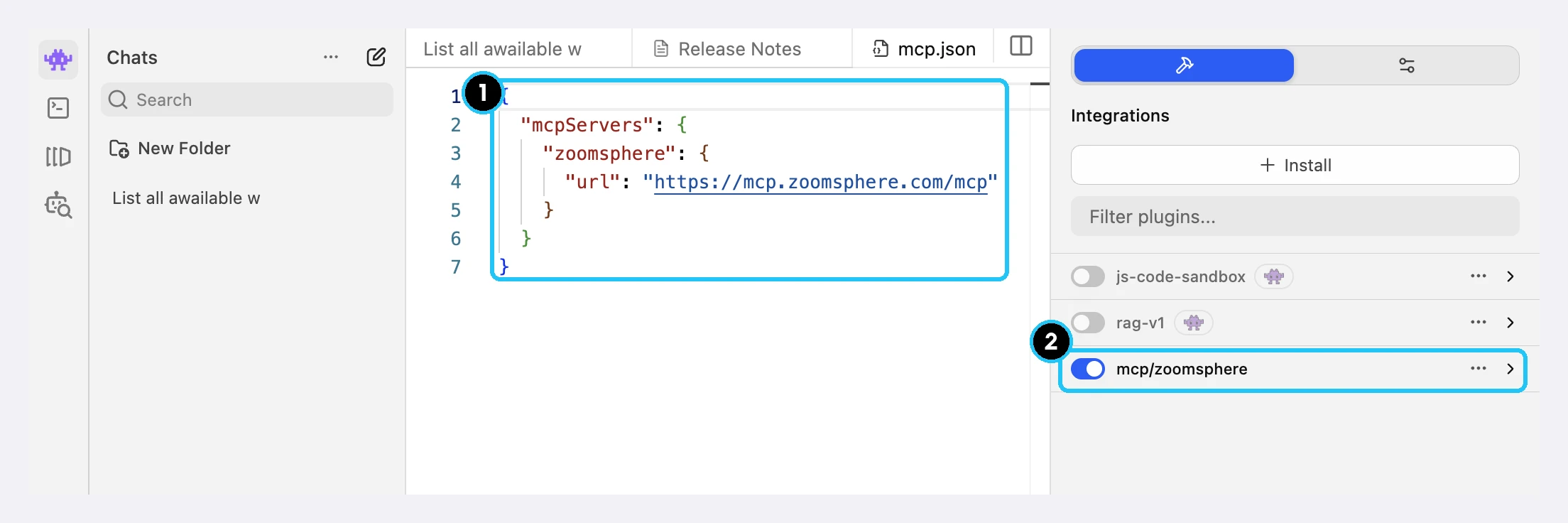
What stays where: your prompts, briefs, documents and the model's reasoning stay on your machine. ZoomSphere only receives what the agent sends it, typically a post draft, and every post is created as a draft that a person approves. Analytics the agent reads travel from ZoomSphere to your local model, not to any AI provider.
One tip from testing: local models do best with focused requests, so ask about one client and one week at a time, not everything at once. For daily client work, start with gpt-oss-20b or Gemma 4 26B, and move to gpt-oss-120b on a 128 GB workstation when you need more headroom. Ready-made requests are in our MCP prompt library, and the full setup for every client is on the ZoomSphere MCP page.
{{cta-component}}
Checklist before you use AI on a regulated client
- Ask the client, in writing, which data categories are off limits.
- Ban personal AI accounts for client work and give the team a business plan or a local setup instead.
- Sign a data processing agreement with every AI and cloud provider that sees client data.
- For banks and insurers, prepare what they need for their DORA register: provider, service and where data is processed.
- Anonymize by default: client names, account numbers and personal data stay out of prompts unless the setup is approved for them.
- Keep a person in the loop: AI drafts, a human approves before anything is published.
- Write it down: one page on which route you use and why, ready for the next audit.
Frequently asked questions
Is it safe to put client data into ChatGPT or Claude?
On business plans and the APIs, both providers do not train on your data by default and offer a data processing agreement. Free and personal plans follow consumer terms, so keep client data out of them. Whether a business plan is enough depends on your client's contract and regulator.
Do I need a local model to comply with GDPR?
No. GDPR can be met with business plans or a private cloud, given a legal basis and a data processing agreement. A local model is the right choice when a contract or internal policy forbids any third-party processing. This article is not legal advice.
How much does a local AI setup cost?
Small models such as gpt-oss-20b run on a laptop with 16 to 32 GB of memory you may already own. A 128 GB workstation for larger models costs about €3,500 to €5,900 in autumn 2026, and a team server with a 96 GB graphics card starts around €13,000.
Is a local model as good as ChatGPT or Claude?
For drafting, summarizing and classifying, the best open-weight models come close. For hard reasoning and long, nuanced writing, frontier models are still clearly ahead.
Can a local model create posts in ZoomSphere?
Yes. Connected through the ZoomSphere MCP, a local model in LM Studio can read your calendar and analytics and create posts. Posts are created as drafts and a person approves them before publishing.
Does DORA apply to marketing agencies?
DORA applies to financial entities such as banks and insurers, not directly to agencies. It reaches you through the client: they must assess and register their ICT providers, and depending on the service that can include the tools and AI providers their agency uses on their data.
Sources
- OpenAI: data residency for business customers
- Anthropic: consumer terms update (commercial terms excluded)
- Claude Platform docs: data residency
- OpenAI: introducing gpt-oss
- Google: Gemma 4
- LM Studio: use MCP servers and MCP with OAuth
- EUR-Lex: DORA, Regulation (EU) 2022/2554
- Council of the EU: AI Act simplification agreement
Prices and model availability change quickly. We review this guide regularly; the date at the top shows the last update. This article is not legal advice.
{{form-component}}








Heading 1
Heading 2
Heading 3
Heading 4
Heading 5
Heading 6
Lorem ipsum dolor sit amet, consectetur adipiscing elit, sed do eiusmod tempor incididunt ut labore et dolore magna aliqua. Ut enim ad minim veniam, quis nostrud exercitation ullamco laboris nisi ut aliquip ex ea commodo consequat. Duis aute irure dolor in reprehenderit in voluptate velit esse cillum dolore eu fugiat nulla pariatur.
Block quote
Ordered list

- Item 1
- Item 2
- Item 3
Unordered list
- Item A
- Item B
- Item C
Bold text
Emphasis
Superscript
Subscript


Recommended for you
.webp)
.webp)
%20(1).webp)