


Blog
.webp)

Some social media posts go viral because they trigger a strong emotional response that compels sharing. Others don't, not because they lack quality, but because the production process removed precisely the elements that would have triggered that response. The research is consistent on this: emotional reaction, not strategic messaging, is the strongest predictor of sharing behavior.
Every agency social media manager has a version of the same story. The post you agonized over: multiple rounds of copy, visual revisions, client sign-off, legal check. It lands quietly. Days later, someone publishes a raw photo from a shoot or a quick reaction to something that happened that morning, written without a brief and posted in ten minutes. It becomes the best-performing piece of content that month. In smaller teams running social for five or ten clients simultaneously, this pattern repeats with unsettling regularity.
The instinct is to call it luck. But if it keeps happening, it isn't luck. It's a signal.
This article defends one specific thesis: posts that "accidentally" work aren't accidents. They're symptoms of content that escaped over-correction, and thereby preserved exactly what makes people share. Understanding the mechanism doesn't just satisfy professional curiosity. It should change how you think about your production workflow.
{{form-component}}
Why Do Some Social Media Posts Perform Better Than Others?
The most direct answer comes from peer-reviewed research published in MIS Quarterly in 2026. Dr. Jeffrey Mullins, Dr. Syed Shuva, and Dr. Patrick Stewart at the University of Arkansas analyzed sharing behavior across social platforms (289 participants evaluating social content, using multilevel modeling to isolate key variables) and found that emotional response, not the content itself, is the strongest predictor of sharing behavior. Content triggering a high-arousal emotional reaction is dramatically more likely to be shared, regardless of how strategically crafted or production-polished it is.
The finding cuts against a common assumption in agency content work: that better strategy, more careful messaging, and cleaner execution compound toward better performance. The research suggests the opposite dynamic is possible. The same optimization process driving clarity and brand consistency can simultaneously degrade the emotional impact that actually drives distribution.
This doesn't mean strategy doesn't matter. It means strategy optimized exclusively for message quality, at the expense of emotional experience, produces content that communicates well but doesn't travel. These are different outputs, and conflating them is the single most common mistake the researchers identified.
The practical implication: emotional response is what the audience brings to the post, not what the brand puts into it. Two people can have entirely different reactions to the same content. This means "designing for emotion" isn't a one-step creative brief. It requires understanding the specific emotional landscape of a specific audience, and then not editing it out of the content before it reaches them.
What Is the Psychology Behind Viral Content?
Social media posts spread when they give people two things:
- a strong emotional charge
- a reason to pass it on
The emotional charge element is well-established in behavioral research. In foundational work on social transmission, Jonah Berger at the Wharton School of Business demonstrated that high-arousal emotions (awe, excitement, humor, anger, anxiety) cause content to spread significantly faster than low-arousal emotions like sadness or contentment. The mechanism is physiological before it's social: high-arousal states activate us toward action, and sharing is an action. This research, published in the early 2010s, has since been replicated and extended across platforms and content types, and continues to underpin how researchers and practitioners understand virality.
The second element, the reason to pass it on, is what Berger calls social currency. People share content that makes them look good, informed, or perceptive within their network. A post that carries a surprising observation, a counterintuitive take, or a piece of insider knowledge gives the sharer something to offer. This is why the specific, unrehearsed observation outperforms the polished brand message: specificity signals genuine perspective, and genuine perspective is worth sharing. A generalized brand statement offers nothing the sharer couldn't have said themselves.
In 2026, this dynamic has a new layer of urgency. According to the HubSpot 2026 State of Marketing Report, 56% of marketers say social feeds are now flooded with AI-generated content, and 65% report that consumers are getting better at identifying and ignoring it. Sprout Social's Q1 2026 Pulse Survey (2,000 respondents across the US, UK, and Australia) found that consumers named human-generated content as the single most important thing they want brands to prioritize on social. Posting AI-generated content without disclosure was ranked the top behavior consumers want brands to stop entirely.
In a feed saturated with algorithmically optimized content, what cuts through is what looks and sounds genuinely unoptimized. The scarcity of authentic human voice in 2026 social media has made it a performance differentiator, not just an ethical preference.
In January 2026, Ryanair CEO Michael O'Leary publicly clashed with Elon Musk on X. Within hours, Ryanair's social team turned the feud into a "Big Idiot Seat Sale," a cheeky promotional post that offered Musk a free ticket and went viral across TikTok and Instagram. No brief, no approval chain, no agency sign-off. Just a specific response to a real moment, posted in the brand's own voice while the story was still live.
This is what the Mullins et al. research looks like in practice: humor as a high-arousal emotional trigger, combined with a culturally specific moment that gave every person who shared it something to say. The post generated press coverage, drove a measurable spike in ticket searches, and cost the social team roughly ten minutes.
Why Does Authentic Content Outperform Planned Content?
Put yourself on the receiving end of a social media feed for a moment. You scroll past a branded carousel with clean design and three polished copy points. Then you stop at a post where someone from a company you follow is clearly reacting to something in real time: specific, slightly rough around the edges, and unmistakably written by a person. You engage with the second one. Most people do.
This isn't a preference for low production value. It's a preference for specificity and genuine human presence, qualities that planned, approval-heavy content systematically optimizes away.
The data on this is unusually consistent across sources. Edelman's 2025 Trust Barometer Special Report found that 73% of people say their trust in a brand increases when it authentically reflects today's culture. That's not brand love or affinity. That's trust, which Edelman found now equals price and quality as a purchase consideration. The implication for content teams: authenticity isn't a tone-of-voice choice. It's a business performance variable.
JoinBrands' Social Media Trends Report for 2026 puts performance data behind this: user-generated content (unplanned and creator-led by definition) influences 79% of purchase decisions, and 92% of consumers trust UGC and word-of-mouth recommendations more than any other form of advertising. According to Part 2 of the same report, 85% of consumers say they will unfollow accounts that seem fake or over-polished. Brands are not moving toward authentic content because of ideological preference. They're moving because the performance gap is now wide enough to be measurable in results.
HubSpot's 2026 State of Marketing Report finds the same pattern from the marketer side: 76% of marketers say authentic content outperforms highly produced content for their brand. When the report asked marketers to describe their highest-performing posts, three qualities appeared consistently: funny, real, and specific.
The through-line across all of this is the word specific. Not raw, not lo-fi, not unproduced. Specific. A post that says something particular about a particular moment, in a particular voice. That's what travels. And specificity is exactly what disappears first when content goes through extended approval.
During the 2026 FIFA World Cup, tournament rules required organizers to cover all non-sponsor branding, including the Levi's logo on Levi's Stadium in San Francisco. A giant white tarp over the stadium name became one of the most widely shared images of the opening week. Levi's responded the same day: updated their social profile picture to a mockup of their covered logo, posted a video using the viral "Nobody's Gonna Know" sound, and leaned into the absurdity rather than issuing a statement.
The post is a textbook case of specificity winning over production. Levi's didn't plan this. No campaign brief existed for "what to do if FIFA covers our building." But because someone on their team recognized the moment and moved immediately, it became arguably the sharpest brand social moment of the tournament.
How Does the Content Approval Process Affect Social Media Performance?
This is the question the industry avoids, because the honest answer is uncomfortable for anyone who runs or manages an approval workflow.
When content moves through multiple rounds (from copywriter to strategist, strategist to account manager, account manager to client, client to legal or comms) each iteration optimizes predictably for safety. If the question is who actually holds sign-off authority in your agency, and whether that structure is fit for reactive content, this article goes into the specifics. The specific observation becomes a general statement. The unusual phrasing gets corrected into brand-compliant language. The cultural reference that was timely on Tuesday becomes slightly dated by Friday's sign-off. The voice that read like a specific person gets smoothed into sounding like a brand.
By the time the content publishes, it has been improved by every measure except the one that predicts sharing: does this feel like something a real person would say, right now, to someone they trust?
There is no dataset that directly measures the correlation between approval rounds and engagement rates. What the data does show is the output pattern: the platforms and content types performing best in 2026 are dominated by specific, conversational, human-feeling content. Buffer's 2026 State of Social Media Engagement report, analyzing over 52 million posts across 10 platforms, found LinkedIn carousels hitting a 21.77% median engagement rate (the strongest format result in the dataset, roughly three times the rate of video or image posts on the same platform). Instagram, which has moved furthest toward polished visual production as its dominant content mode, saw a 26% drop in engagement year-over-year.
The mechanism connecting approval process to this pattern can be stated as a hypothesis: approval rounds systematically remove the qualities that behavioral research identifies as sharing drivers, while adding time that degrades contextual relevance. Both effects are more severe for reactive, time-sensitive content than for evergreen campaign material.
This is what might be called approval latency: the gap between when a piece of content is at its most contextually alive and when it actually reaches its audience. A reaction to something that happened yesterday lands differently than the same reaction posted a week later, once the moment has passed. The approval process doesn't create the latency problem. But when it's slow, it amplifies it at exactly the moments when speed matters most.
None of this is an argument against approval itself. Approval processes exist for legitimate reasons: legal compliance, brand consistency, client relationship management. They matter more, not less, in regulated industries or politically sensitive categories. The operational question is whether your approval structure distinguishes between content that has a short contextual shelf life and content that stays relevant regardless of timing. Most agency workflows don't make this distinction. They treat a reactive post responding to a breaking cultural moment and a planned evergreen explainer with the same process, the same timeline, and the same number of revision rounds. That's where performance is being left on the table.
.webp)
ZoomSphere's approval workflow moves posts through clear status stages, so reactive content doesn't get stuck waiting in an email chain. See how approval workflows work in ZoomSphere.
What Should Agencies Do Differently to Protect Content Performance?
Measuring approval latency as a performance variable is the starting point most agencies skip. If you don't know how many days pass between first draft and publication, and you don't correlate that with post-level engagement, you're flying blind on a variable the data suggests matters.
A few structural observations that follow from the evidence:
Not all content ages at the same rate
Reactive content (posts responding to a moment, a trend, a client event, a cultural reference) loses relevance with every hour it spends in a queue. Evergreen campaign content doesn't. Separating these into different approval tracks, with lighter and faster sign-off for time-sensitive material, preserves the contextual specificity that reactive content depends on, without removing oversight from content that genuinely needs it.
What gets removed in approval rounds is data
If you track the substantive changes between draft and published version (phrasing removed, opinions softened, specific references generalized) and then correlate those edits with engagement performance over time, you'll start to see patterns. That data gives you a factual basis for client conversations about what "brand voice consistency" costs in distribution. It changes the conversation from aesthetic preference to measurable trade-off.
Speed in the approval tool is a content performance variable, not just an operational one
Most social media tools send a separate email for every single post that needs approval. With a standard monthly content plan, that's 40 or more individual approval emails, each requiring a separate click, a separate login, and a separate decision. The same friction shows up differently when the team running that workflow is younger: how email-based approval chains break down for Gen Z agency workers is a separate problem with the same structural cause. The cumulative friction doesn't just slow down your ops: it means reactive content sits in an inbox while the moment passes.
ZoomSphere's bulk email approval lets you send up multiple posts in a single email, with previews built in and no account required for the client to review. When approval compresses from days to minutes, content reaches audiences closer to the moment it was created. In an environment where the research consistently shows human, specific, and timely content outperforming polished brand messaging, that timing gap is a structural performance variable. Treating it as a workflow detail undersells it.
{{cta-component}}
Frequently Asked Questions
Why do some social media posts go viral while others don't?
Posts go viral primarily because they trigger strong emotional reactions (humor, awe, surprise, or outrage) that compel sharing. Research from the University of Arkansas (MIS Quarterly, 2026) identified emotional response, not content quality or strategy, as the strongest predictor of sharing behavior. A secondary driver is social currency: people share content that makes them look informed or current to their network.
Why does planned content often underperform spontaneous posts in agencies?
Each approval round optimizes for safety, systematically removing the specific voice, timely references, and emotional directness that behavioral research identifies as sharing drivers. The result is content that meets every brand standard but lacks the specificity that triggers shares. Spontaneous posts skip this process and retain those qualities, which is why they often outperform campaigns that took weeks to produce.
How does the content approval process affect social media performance?
Through two mechanisms: approval rounds remove elements that predict sharing (specific voice, emotional directness, timely framing), and approval latency degrades contextual relevance, especially for reactive content that responds to a moment. Both effects are worse for time-sensitive posts than for evergreen material, which suggests routing different content types through different approval tracks as a structural fix.
Why do rushed posts sometimes outperform content that took weeks to produce?
Not because speed improves quality, but because content published quickly retains the specific, unrehearsed elements (a real reaction, a particular observation, moment-specific framing) that slow production tends to edit out. These qualities are what the research identifies as sharing drivers. Longer production cycles don't improve them; they optimize toward their opposite.
What makes social media content authentic in 2026?
Authenticity is not a production quality. It's whether content reads as if a specific person created it for a specific moment. According to Edelman's 2025 Trust Barometer, 73% of people say their trust in a brand increases when it authentically reflects today's culture. HubSpot's 2026 research found the highest-performing posts share three qualities: funny, real, and specific (all of which approval-heavy workflows tend to edit away).
{{form-component}}
Conclusion
The "accidental viral post" isn't accidental. It was published fast enough, or with few enough revision rounds, to reach the audience before the production process optimized out what makes content shareable: a specific voice, a real moment, an observation that hadn't yet been corrected into a brand statement.
This is not an argument against planning or approval. It's an argument for understanding what your production process does to content at each stage, and for building workflows that actively protect the qualities the research identifies as the actual drivers of performance.
The posts that explode aren't flukes. They're the control group.
.webp)
Content approval chains in social media agencies break down specifically when Gen Z joins the team because the process was designed around two rituals (email sign-off and synchronous review calls) that more than half of Gen Z lacks the confidence to navigate. When 51% of Gen Z workers don't know when to follow up on an unanswered work email, a four-touchpoint email approval loop produces a structural delay at every stage. The workflow was already fragile. Gen Z made the failure impossible to ignore. What that fragility costs in concrete time is here.
The fix is not training Gen Z to write better follow-up emails or show up more prepared to review calls. It is redesigning the chain so the process itself generates the signal, not people's tolerance for ambiguity.
{{form-component}}
Why Does Content Approval Break Down When Gen Z Is on Your Team?
According to the 2025 Sprout Social Index, 94% of social media practitioners agree they have to be "chronically online" to do their job. That's the baseline pressure your Gen Z social media managers are already operating under before the approval chain adds its own layer of friction.
That friction has two sources agencies rarely examine together.
The email problem.
Email-based approval runs on conventions that were never written down: you send work for review, the reviewer opens it, replies with notes, the cycle moves forward. Everyone in the chain is expected to know how formal the follow-up should be, how long to wait before chasing, and what silence from a senior actually means. ZeroBounce's Gen Z at Work 2025 report, based on nearly 1,400 Gen Z workers across the US, Canada, UK, and Europe, quantifies the gap in four numbers. As the graphic below shows, the uncertainty is pervasive.
.webp)
That last number is the specific mechanism. A Gen Z social media manager drafts a post, sends it for review, and waits. They're uncertain whether a follow-up would seem pushy. The inbox is producing enough noise that one more unanswered thread disappears. The wait extends from one day to three. On day four, something moves forward.
The call problem.
Adding a weekly review call doesn't resolve this. It moves the problem from an async channel to a synchronous one. Deloitte's 2026 Gen Z and Millennial Survey, drawing on more than 22,500 respondents across 44 countries, found that 74% of Gen Z already use AI tools in their day-to-day work, the highest adoption rate of any generation measured. Speed in the approval chain isn't just a team management question. There's direct research on what approval latency does to content performance itself. This is a generation whose professional instinct runs toward async, tool-assisted work where feedback is colocated with content. A weekly 45-minute review call asks them to abandon that mode and produce a synchronous verdict under time pressure for content that needed careful individual consideration, not a live discussion. For European agencies managing multiple client accounts simultaneously, that call often covers a fraction of the posts actually in flight. The remainder defers to the following week. The delay compounds.
The result in both cases is one of two failure modes.
- The junior sends repeated follow-ups that seniors read as pressure
- The junior proceed on silence, interpreting no reply as implicit approval
Both erode trust. One slowly. One the moment the client sees a draft they hadn't approved.
What Are the Most Common Content Approval Failures When Gen Z and Senior Staff Share a Workflow?
These failures existed before Gen Z joined the team. Previous generations learned to navigate them because the culture made it easier to absorb dysfunction than to name it. When team members arrive without having accumulated those same coping habits, the dysfunction becomes visible. That's information about the process, not a deficiency in the person.
Silence as a default approval state.
In an email-based chain, no reply carries no structural meaning. A senior who built their career in email culture develops intuitions for reading silence. A Gen Z team member operating without those intuitions has no reliable signal about whether to wait or proceed. ZeroBounce's data shows 51% of Gen Z don't know when to follow up on an unanswered work email. In a European agency running five or six client accounts simultaneously, that uncertainty compounds into a structural delay across every approval chain, every week.
Revision notes in the wrong place.
When feedback arrives in an email thread rather than directly on the post, implementing it means holding two separate things in mind at once: the content and the commentary about it. Notes get missed. Contradictory feedback from two reviewers in the same thread goes unresolved. The senior believes their note was clear. The junior was reading replies in the wrong order. Both descriptions are accurate. The process architecture created the confusion.
No visible ownership at each stage.
Gen Z social media managers don't need oversight at every step. They need a process where their responsibility has clear edges: what "approved" means at their stage, who the post moves to after them, and when the handoff triggers. Without those edges, the work itself becomes more demanding, not less. Every step requires implicit negotiation about ownership that a well-designed process would make irrelevant. That's not autonomy working. That's ambiguity with no map. The map, meaning who owns which stage and what sign-off at each stage actually means, is covered here.
Without those boundaries, every team member is either asking someone or guessing. Asking reads as incompetence. Guessing produces errors. Both are rational responses to a process that withholds the one signal needed to move forward. When a Gen Z social media manager proceeds without confirmation, that is not recklessness. It is someone working in a process that gave them no usable signal about when they had permission to act.
How Do Gen Z Communication Preferences Expose the Real Weaknesses in Agency Approval Chains?
This is the question most workflow guides skip. They describe how to fix approvals in the abstract, without asking why Gen Z specifically surfaces these failures more visibly than any previous generation.
The answer is structural. Gen Z entered the workforce after collaboration tools (Google Docs, Figma, Notion, Slack) had already established a different standard: feedback lives at the point of work, status is always visible, and you don't need to send a separate message to find out where something stands. These aren't preferences. They're the defaults that Gen Z's entire education and early career ran on. As the Deloitte 2026 data showed in H2 #1, 74% of Gen Z already use AI tools in their day-to-day work. The same generation builds workflows in Notion, annotates designs in Figma, and leaves comments directly on documents. Email-based approval asks them to abandon that model and switch to a channel where work and feedback are separated by default.
Microsoft's 2026 Work Trend Index found that organizations are moving toward fewer, more targeted meetings, and that Gen Z is adapting to AI-augmented work faster than their organizations are. An approval culture built around weekly calls and email threads runs directly against that direction for every team member, regardless of generation.
Most agency approval chains weren't designed. They accumulated. A review step got added after a client complaint. A weekly sync appeared to manage a misunderstanding that happened in email. A CC list grew until nobody was sure who held actual sign-off authority. The pattern shows up consistently across agency operations: the process became what it is because there was never capacity to question whether it needed to be.
Three questions audit the accumulation:
- Does this review step add a genuinely new perspective, or does it duplicate the one before it? If two people review the same post sequentially with no brief change between rounds, one of those reviews is inherited ritual.
- Does this weekly call or sync exist because a real-time decision needs to be made together, or because the process has no shared status layer? If everyone could see the current state of every post at any moment, would this meeting still need to happen?
- If this feedback step happened directly on the post rather than over email, would it still need to exist? If yes, it is a genuine step. If the answer is "we would just stop doing it," the email thread was substituting for process the entire time.
An async-first approval chain removes none of the reviews that add real value. It removes the email exchanges and redundant calls that were standing in for structure.
In practice, this is what that architecture looks like. Feedback lives on the post itself, work and commentary colocated by default, the same model Gen Z already uses in every other professional tool they operate. Status moves through named, visible stages (Draft, Internal Review, Client Review, Approved, Scheduled) that every team member can see without asking. Internal review and client sign-off sit in separate lanes, so a Gen Z social media manager always knows which feedback is theirs to action and which belongs to a different conversation entirely.
.webp)
Most social media management tools built approval as a layer on top of a scheduler. The review chain was added, not designed. In ZoomSphere, the approval architecture came first. That's why the stages, the comment structure, and the internal/client separation exist by default, not as add-ons but as the foundation the scheduler was built around.
{{cta-component}}
What Is the Business Cost of a Broken Approval Workflow When Gen Z Is Your Highest-Turnover Talent?
The cost appears in three places: revision cycles, senior time, and the turnover rate that makes losing a trained Gen Z team member so expensive.
Revision cycles grow when notes get missed in email threads and a round of feedback that should close the loop instead opens another one. When silence is misread as approval and a post reaches a client before it is ready, the recovery consumes senior capacity that cannot be recovered and billed. These are not catastrophic events. They are friction costs that repeat across every client account, every week.
Randstad's Gen Z Workplace Blueprint, based on 11,250 workers across 15 markets, found Gen Z's first-year attrition rate at 22%, compared to 9% for Millennials. One in three Gen Zers plans to change jobs within the next 12 months. The second biggest reason for leaving, after pay, is lack of visible career progression.
In agencies, a process with no clear feedback loop, no visible status, and no defined ownership at each stage looks identical to lack of career progression from inside a junior role. A Gen Z social media manager who completes a post, sends it for review, waits three days, and receives corrections in a reply-all thread has not seen their work move forward through a clear process. They have experienced a process that made their contribution invisible. When they leave, the onboarding investment leaves with them.
Deloitte's 2026 survey found that 58% of Gen Z already report digital fatigue from constant notifications and switching between tools. The common fix (adding another check-in call, another Slack message chasing the email, another touchpoint) increases the load without resolving the structural problem underneath it. More synchronous overhead on top of an already fragmented workflow accelerates the fatigue that drives Gen Z toward the exit.
Agencies that redesign their approval architecture do it because the operational cost of the current state exceeds the cost of the change. Fewer revision cycles mean less senior time on process management. Less senior time on process management means more capacity for the work that earns margin. That improvement is not specific to Gen Z. It benefits every generation on the team. The competitive advantage belongs to the agencies willing to make it happen.
What Should an Agency Change First When Gen Z Exposes a Broken Approval Process?
Pick one approval chain, one client, one content type. Map every step from draft to published. For each step, ask whether it adds a new perspective or duplicates the one before it. Ask whether each call or meeting exists because a real-time decision is required, or because the process has no shared status layer.
Find the one step that exists because a problem once happened in email, not because it is structurally necessary. Remove it for four weeks. Track whether revision cycles shorten, whether Gen Z team members stop proceeding on silence, and whether senior time on operational follow-up decreases.
If the chain holds (and in most cases it does), you will know where to look next.
{{form-component}}
Frequently Asked Questions
Why does content approval specifically break down in social media agencies with Gen Z employees?
Because email-based approval requires email-norm confidence (knowing when to follow up, how formal to be, what silence means) that more than half of Gen Z workers explicitly lacks. When 51% of Gen Z don't know when to follow up on an unanswered work email, a four-touchpoint email approval chain produces a structural delay at every stage. Add a weekly review call where the same content gets rushed to a live verdict rather than reviewed carefully, and both of the approval rituals most agencies rely on are failing simultaneously.
What is async-first approval and why does it work better for Gen Z-inclusive social media teams?
Async-first approval is a workflow design where every review step in a social media content chain happens without requiring real-time conversation or email exchange. In ZoomSphere, feedback lives directly on the content. Each stage has a single named owner and an explicit handoff trigger. The status of every post is visible to the whole team at any moment without asking. For Gen Z social media managers who already use colocated feedback tools in every other part of their professional life (Google Docs, Figma, Notion), async-first approval matches the structural model they already know. For senior staff, it eliminates the need to interpret silence as a communication signal.
How do you separate internal review from client approval in a social media workflow?
Internal review and client sign-off should be distinct stages with no overlap in visibility or communication channel. Internal feedback (creative direction, copy corrections, compliance checks) should be fully resolved before anything reaches the client. When both conversations happen in the same email thread, a junior team member cannot reliably distinguish which notes are theirs to implement, which belong to a different stakeholder, and what the current approved state of the post actually is. Separate stages with separate comment lanes eliminate that ambiguity for every team member, regardless of generation.
What do Gen Z social media managers need from an agency workflow to work autonomously?
Explicit process ownership, visible status at every stage, and feedback at the point of work. When a team member knows exactly what "approved" means at their stage, who receives the post after them, and where the handoff happens, they can work independently within that structure without requiring follow-up conversations or check-in calls. Randstad's research shows that lack of visible progression is the second biggest reason Gen Z leaves a role after pay. A workflow that makes status invisible and feedback unpredictable produces the same experience as a career path with no visible next step, with the same outcome.
.webp)
Client follow-up questions after a social media report are not a client problem. They are a report structure problem. Standard social media reporting for agencies shows what happened. Clients need to understand why, because they are using your monthly report to justify budget to someone above them. "Engagement was down 18%" does not give them what they need for that conversation.
You open three platforms. You copy the numbers into a spreadsheet. You format the slides, write a short summary, and send the PDF by end of week. An hour later: "Thanks. But why didn't that post work?"
Not because the numbers are missing. Not because you do not know the answer. But because the report showed outputs without the decisions behind them. And without that layer, every metric is a number waiting for a follow-up email.
This article explains where that decision context disappears in the agency client reporting workflow, how to capture it without adding hours to your month, and what a report looks like when the follow-up loop finally stops.
{{form-component}}
What does a typical social media agency report contain?
The most common failure in social media reporting for agencies is not bad strategy or wrong metrics. It is a format problem. A standard social media report answers one question: what happened?
- Reach
- Impressions
- Engagement rate
- Follower growth
- Top posts by performance
- Platform breakdowns
- Period-over-period comparison
- A recommendations section at the end
Here is what that looks like from the client's side of the table:
.webp)
The gap is not missing data. It is missing reasoning. Standard client reporting documents outputs. Clients need to understand the decisions behind those outputs. Without that context, they cannot evaluate whether the strategy is working or advocate for the budget internally.
According to HubSpot's 2026 State of Marketing Report, which surveyed more than 1,500 marketers globally, measuring ROI is the single biggest challenge in marketing today, cited by 25% of respondents. That pressure does not stay at the CMO level. It flows down to your clients, who use your monthly social media report as their primary evidence when defending the budget to their own managers. When the report does not explain the reasoning behind the social media metrics, the conversation does not end with the PDF.
.webp)
Meanwhile, according to Planable's 2026 Agency Profitability Report, which analyzed data from 186 social media and multi-service agencies, 21.5% of agencies are currently losing money, up from 13% the year before. The agencies under the most pressure are those adding complexity faster than they add capacity. Answering the same follow-up questions month after month, in emails separate from the report itself, is exactly that kind of invisible complexity.
The follow-up question is not a demanding client. It is a structural gap the report left open.
People on Reddit often ask: What's the best way to report social media results to clients?
.webp)
Why do clients ask follow-up questions after reading a social media report?
Clients ask follow-up questions when a report provides data without the reasoning behind it. If a post underperforms and the report does not explain what format was tested, what goal it was meant to serve, or what was learned, the client fills that gap themselves. The question is not about the result. It is about the missing context.
Here is the gap in concrete terms:
- Your report says: Instagram engagement was down 18% this month.
- Your client hears: Something went wrong and I do not know what.
What they actually need: We tested a new content format this month. Educational carousels underperformed on engagement but drove 2x more profile visits, which is on track for the brand awareness goal set before the Q3 launch.
Both statements use the same data. The difference is decision context: the reasoning that existed when the content was created, not when the report was written. One sentence of that context per content theme, and the follow-up question stops.
Where in the agency workflow does reporting context get lost?
It is not lost all at once. It disappears in four specific handoffs that are invisible until you look for them.
Handoff 1: Brief to scheduler. The content strategy and brief exist in a shared document: a Notion page, a Google Doc, a Slides deck. The rationale for each content theme, the hypothesis behind each format, the goal each post serves is all there. Then the post goes into the scheduling tool. None of that context travels with it.
Handoff 2: Approval conversation to record. The client approves a post, sometimes asking for a small change. That approval conversation happens in Slack or email. The reason behind the original creative decision (why that format, why that hook) stays in the thread and is never logged anywhere.
Handoff 3: Publishing to analytics. The post goes live. The platform analytics tool accumulates data about reach, engagement, and saves. But the data has no memory of what the post was trying to do. It shows what happened. It does not know why.
Handoff 4: Analytics to report. The AM opens the analytics dashboard at the end of the month and pulls the social media metrics. The brief is not open in another tab. The approval thread is not bookmarked. The month's decisions are not visible anywhere. The report describes outputs because that is all the AM has in front of them.
This is where the client reporting gap is created. Not in bad work or bad intentions. In four workflow transitions that none of the tools involved are designed to bridge.
What do clients actually want to see in a social media report?
The agencies that consistently receive fewer follow-up questions do not necessarily run better campaigns. They structure their client reports differently. Specifically, they report three things instead of one.
We call this the Decision Report structure.
Layer 1: What happened. The standard social media metrics. Reach, engagement, follower growth, top posts. This is what most reports already contain. Keep it. It is table stakes.
Layer 2: Why it happened. The decision context behind this period's content. One sentence per content theme is enough:
- "We shifted to short-form video in week two after the carousel test underperformed on saves."
- "The LinkedIn content was intentionally lighter this month to avoid competing with the product launch announcement."
- "The Facebook ad targeting was narrowed on the 14th based on the previous week's cost-per-click data."
These are not long explanations. They are the decision log the client was never shown.
Layer 3: What it means next month. Grounded recommendations. Not "we should post more videos." Instead: "Short-form video drove significantly more saves than static posts this month based on our format test. We recommend shifting 40% of next month's content toward that format, starting with the product demo series from the Q2 kickoff."
Layer 3 only becomes credible when Layer 2 is there. Without the why, a recommendation is a guess. With it, you are iterating on documented evidence.
The Decision Report structure does not require a new tool or a longer document. It requires capturing decisions when they are made and surfacing them alongside the data when the report is due.
.webp)
How do you add decision context to a client report without spending more time on it?
The objection is always time. You are managing 5+ clients. Reporting is already the part of the month you dread most.
The fix is not more time in the report. It is 30 seconds earlier in the month.
At content approval: Add one line to your content tracker per content theme: format tested, hypothesis, goal it maps to. This takes 30 seconds and becomes the raw material for Layer 2 four weeks later.
When something breaks pattern: A post dramatically outperforms or underperforms mid-month? Note it immediately. One sentence is enough. Your future self will use it.
Before writing the insights section: Pull post-level data before you open a blank document. In ZoomSphere, switch to Performance View in the Scheduler app. It is a dedicated view that shows all your published posts for the period in a spreadsheet-style table, sortable by any metric. Sort by reach, saves, or engagement and you immediately see which formats outperformed and by how much. Group posts by content type and the comparison between video, carousel, and static is right there in front of you without any manual calculation. That is the data Layer 2 of the Decision Report needs before you write a single word of insights.
.webp)
.webp)
{{cta-component}}
What to write in a social media report when results are bad
This is the scenario no agency client reporting guide addresses. You had a bad month. Numbers are down. The report is due tomorrow. What do you actually write?
Write what you tested, what you learned, and what changes next. A monthly client report that explains a bad month is more valuable than one that buries it in averages.
Here is what that looks like in practice. The numbers below are illustrative; replace them with your actual account data.
Instead of leaving this unexplained: "Engagement was down this month."
Write this: "Engagement was down this month. We shifted content mix toward educational long-form posts as part of the Q3 authority-building plan we discussed in May. These posts underperformed on immediate engagement but showed higher save rates than previous months, which indicates the content is being bookmarked for reference. We are continuing the format in July with one adjustment: shorter opening lines to reduce scroll-past rates."
Both entries report the same social media results. The second shows that the agency understands what happened, why it happened, and what is changing. Clients do not need to see that everything worked. They need to see that someone is paying attention.
Two rules for reporting a bad month:
- Rule 1: Never leave a negative metric without an attached explanation. An unexplained drop is a vacuum the client fills with their own interpretation, and their interpretation is usually "the agency is not doing their job."
- Rule 2: Every bad result should connect to a specific next step. Not "we will optimize the content." Specifically: what format, what change, what week.
If the month was genuinely bad with no clear explanation yet, say that directly: "This month's results were below target and we do not have a complete explanation for the drop yet. We are running a diagnostic analysis this week and will share findings before the next call." Honesty paired with a timeline is credible. Silence is not.
FAQ: Social media reporting for agencies
What should a social media agency include in a monthly client report?
A client-ready monthly report needs four elements beyond standard metrics: the decision context behind this period's content choices, an explanation of what underperformance or overperformance reveals about the audience, specific next-step recommendations grounded in that month's data, and an honest account of what did not work and why. The decision context layer is what stops follow-up questions. More charts do not.
Why does my client always ask why a post did not perform after reading the report?
Because the report showed the result without the decision that produced it. When a post underperforms and the report does not explain what format was tested, what goal it was meant to serve, or what was learned, the client fills that gap by asking. It is not a sign of a demanding client. It is a sign of a missing sentence. Add one line of decision context per content theme and the question stops.
How do you explain a drop in social media metrics to a client?
Start with the cause, not the number. "Engagement dropped this month because we shifted from short-form video (your strongest format last quarter) to educational carousels as part of the brand awareness plan we set in May. The carousels underperformed on engagement but increased profile visits, which is on track with that goal." Context first, data second, next step third. Never leave a negative metric in a report without an explanation attached.
What do you write in a social media report when results are bad?
Report what you tested, what you learned, and what changes next. "Engagement was down this month. We shifted to long-form educational posts as part of the Q3 plan. These underperformed on engagement but showed higher save rates, suggesting the content is being bookmarked. We continue in July with shorter opening lines to reduce scroll-past rates." Clients do not need to see that everything worked. They need evidence that you know why something did not, and that you have a specific next move.
How do you explain social media ROI to a client who does not see value in the metrics?
Anchor every metric to the client's business goal, not the metric itself. Instead of "engagement rate was 3.7%," say: "Your audience is interacting with your content at roughly twice the industry average for your category, which means the content is resonating. The next step is converting that attention into traffic." Always move from the number to the business implication. Never leave a metric standing alone.
How often should agencies send social media reports to clients?
Monthly is the industry standard for agency client reporting on ongoing retainers. It captures enough data to show meaningful trends without creating report fatigue. For clients in active campaign periods, add a short weekly pulse: three to five data points, conversational format, no PDF. The monthly report is the strategic document. The weekly update is a check-in.
{{form-component}}
The report is not the end of the month. It is the start of the conversation.
Every month there are two versions of the same moment. In the first, you send a PDF and wait for questions. In the second, you send a Decision Report that already contains the answers, because you captured the context when it existed and pulled the post data before you started writing.
The shift does not take more hours. It takes a different habit: note decisions when you make them, not when the report is due.
Before you close this tab: pull up the last social media report you sent to a client. Count how many follow-up messages came back after it. Then look at which sections those questions came from. That is where your Decision Report starts.
A social media approval process is the defined sequence of steps that moves a post from first draft to published: internal review, client sign-off, and final clearance before it goes live. In agencies managing five or more clients, this sequence determines whether content ships on schedule or spends a week in someone's inbox.
Most agencies have a version of this process. Very few have it written down, and almost none apply it consistently across every client. The gap between "we have a process" and "we apply the same process every time" is where most approval chaos actually lives.
Why social media approvals stall: four scenarios that repeat across every agency
The post is done. The creative who built it thinks it was internally signed off. The account manager thinks the client gave the green light. The client is waiting for the account manager to confirm they are ready to publish. And the social media manager assumed someone else had already moved it forward.
Nobody dropped the ball deliberately. Nobody communicated badly. The post simply never got approved, because everyone was waiting for someone else to make the call.
This is the pattern that repeats itself across agencies regardless of team size, client type, or tool stack. And it plays out in a few recognizable variations:
The creative review loop
The client gets a draft. They send back comments that partially rewrite the concept. The social media manager revises. The client revises the revision. By post five, the content sounds nothing like what the brief said, and the account manager is rewriting captions at 9pm. Nobody set a boundary on what client feedback could address. When rounds keep reopening even after roles are assigned, the issue is usually that no version gets formally locked. That's a separate fix.
The silent queue
It is Wednesday. The post was due Monday. Nobody is wrong. Nobody said anything. It just did not happen. The account manager assumed the client would review it. The client assumed the account manager already approved it internally. The process had a gap nobody named.
The last-minute override
The post was approved two weeks ago. Three hours before publish, the client messages with changes. Because approval was not locked, the team scrambles. Nobody is sure which version went live, and if something goes wrong, there is no trail.
The creative veto
The creative director or senior designer has never been formally assigned an approval role. But they also never formally gave it up. So when a post goes live with a visual they did not see, or a caption that does not match the concept, they push back, after publish, or just before, or at a point where changing anything creates another delay. The approval chain has an informal node nobody mapped.
These are not personality problems and they are not bad clients. They are structural problems. Each one has a structural cause.
{{form-component}}
Why social media approval processes fail in agencies: the assumption nobody names
According to the Content Marketing Institute's 2026 B2B Research, 95% of B2B marketers say their organizations now use AI-powered applications, and 89% specifically use AI for content creation. More posts are being produced faster than ever. But the approval infrastructure in most agencies has not changed at the same pace.
Metricool's 2026 Well-Being in Social Media Professionals report, based on surveys of more than 1,000 social media professionals, found that 75% feel like they are wearing too many hats at once. In a small agency, that is precisely how approval roles collapse: the same person who wrote the post on Monday is expected to review it on Wednesday and present it to the client on Friday. Three roles, one person, zero documentation of which hat they are wearing when they "approve" something.
And this is the part most workflow guides miss: approval chaos is not caused by a bad process. It is caused by the absence of an agreed process, combined with the assumption that someone else has it covered. The account manager assumes the creative signed off internally. The creative assumes the account manager checked with the client. The client assumes approval means the agency is ready to publish. Everyone assumes. Nobody confirmed.
According to Swydo's 2025 workflow research, each extra approver added to a content chain roughly doubles the total approval time. Schedulethreads reports that the average approval cycle for a simple 100-word post can take eight days and involve more than three separate versions before anyone gives it the final nod.
That math is driven entirely by undefined authority, not by the difficulty of the content. The time cost of that undefined authority across a month of client content is documented here.
Who should approve social media posts? The three-role model
A workable social media approval process for an agency comes down to three clearly defined roles. Not job titles: roles. In a five-person agency, one person will hold more than one. That is fine. What matters is that each role has a name, an owner, and a boundary.
.webp)
Role 1: The creator
This is the person who writes the copy, assembles the visual, and puts the post together. Their job ends at delivery. They are not the person who decides whether the post is ready; that is someone else's call. In a small agency this is often a junior social media manager or a content specialist. In a very small team it may be the account manager themselves, and that is where roles start to blur when nothing is written down.
One thing worth naming explicitly: the creative who builds a post has opinions about it, and rightly so. But "I made this" is not the same as "I approved this." If your agency does not have a documented handoff point between creation and review, your senior creative will fill that gap informally, sometimes usefully, sometimes at 11pm before a deadline.
Role 2: The internal quality gate
This is typically the social media manager or account manager. Their job is to catch the problems that should never have left the building: does this match the brief, is the tone right, did anyone spot the typo in the headline? They are a quality check, not a creative director. They do not rewrite the post; they decide whether it is ready to move forward.
This role is the most commonly skipped one in small agencies. When someone is managing seven clients and running out of time, the internal review disappears first. And when unfinished drafts reach the client directly, you spend twice as long managing their feedback as you would have spent reviewing it yourself.
Role 3: The final approver
For agency work, this is the client, specifically, one named person on the client side with actual authority to say yes. Not the marketing team. One person. Their role is to confirm that the content is factually accurate, brand-appropriate, and legally safe to publish. That is all.
Creative direction stays with the agency. If you hand that to the client, you have not set up an approval process; you have outsourced your judgment. The most effective agencies are direct about this during onboarding: ""Your sign-off confirms the content is factually accurate, brand-appropriate, and legally safe to publish. Creative decisions (tone, format, angle) are our responsibility. If something fundamentally does not work for you, tell us and we will rework it. But the revision process does not replace the strategy."
Note on smaller agencies: in a team of four or five people, the creative director often holds informal veto power that nobody formally assigned. When you document the three roles above, you are also implicitly documenting that the creative director's input happens inside the "quality check" stage, not as a separate approval gate after the client has already signed off.
What should a client approve in social media content?
The line between client input and agency ownership is where most approval conflicts happen. Not because clients are difficult, but because nobody drew the line before the first post.
The client's scope covers three things:
- Factual accuracy (product names, prices, dates, any specific claims)
- Brand-sensitive language (anything that touches their identity in a way only they can judge)
- Anything with legal or compliance implications
Everything else stays with the agency: caption length, platform-specific formatting, creative angle and concept, tone, and publishing time.
.webp)
Performante, a remote-first agency working across Warsaw and Bogotá, made this explicit in their client onboarding: clients are given access to review posts directly in ZoomSphere, with clear context about what kind of feedback is useful. When clients understand exactly what they are being asked to look at, the review cycle is faster and the feedback is more actionable. You can read how they structured this in their full case study.
Social media client approval at onboarding: who decides what
The single highest-leverage change most agencies can make to their approval process costs nothing. It happens before the first post is created: a short, explicit conversation about who owns what.
Two questions that need a named answer before the relationship starts:
Who on the client side has approval authority? Not the marketing team. One named person with the actual authority to say yes. If that person is unavailable, who is their backup? This question alone prevents the "I need to check with my colleague" loop that adds three to five days to every content cycle. It also clarifies for the agency team who they are writing for and who has the final word.
What happens when that person does not respond? A clear response window prevents silent queues. "We send content by Thursday. We need your sign-off by Monday. If we do not hear back by Monday, we treat the content as approved." That last clause sounds bold. It also ends most missed deadlines.
Planable's 2026 Agency Profitability Report, based on data from 186 social media and multi-service agencies, found that 21.5% of agencies are currently losing money, up from 13% the previous year. The agencies with the healthiest margins built for operational leverage instead of absorbing complexity. Approval authority that gets renegotiated per post, per client, per month is the opposite of leverage.
.webp)
How to build a social media approval process that holds
The agencies that manage high content volumes without chaos do not have simpler processes. They have documented ones.
Visibility SK is a Bratislava-based digital marketing agency with over 60 specialists, managing Ford Slovakia, Toyota Material Handling, and Geberit. They built their workflow around named custom statuses, a different set for each client.
Some of their statuses include:
- Assigned to Team Leader
- Rework from the Team Leader
- Approved by Team Leader
- Assigned to Graphic Designer Jane / John
- Done by Graphic Designer
- Assigned to Client
- Rework from Client
- Approved by Client
- Published Manually
Every status tells the team exactly where a post stands. No guessing. No "did you check with the client?" In 2024, Visibility SK published 2,694 posts for 27 brands. In the first half of 2025 alone, 1,641 posts for 25 brands. Read the full Visibility SK case study.
.webp)
Zaraguza is a creative agency in Bratislava working with clients including Slovenská sporiteľňa, BMW Motorrad, and Budiš. They use a simpler base flow (In Progress, Approved, Publish, Published) while adding client-specific statuses like "Approved (Do Not Publish)" for posts waiting on specific timing, and "Blocker" when something needs to stop entirely. The statuses make the state of every post visible without requiring anyone to ask. Read the full Zaraguza case study.
Performante is a remote-first agency running between Warsaw and Bogotá. They adapt the approval chain per client: sometimes Team to Account Manager to Client, sometimes directly Account Manager to Client, sometimes straight to publish. The flexibility works because everything lives in one place with a clear activity log. Adjusting the process does not mean losing control. Read the full Performante case study.
What all three have in common: the approval flow is built around roles, not around individuals. When someone is on holiday, the next status tells the team what happens next. And when a new client starts, there is a documented template to copy from, not a blank page.
.webp)
If you want to see what this looks like in practice, the Approval Flow is already in your ZoomSphere Scheduler. You set it up once per client and stop chasing green lights.
{{cta-component}}
FAQ: Social media approval roles and responsibilities
Who has final approval authority on social media posts in an agency?
In agency work, the client holds final approval, but only for brand accuracy and factual correctness. Creative direction stays with the agency. When both parties try to own the same decisions, approvals stall. The resolution is a conversation at the start of the client relationship about which decisions belong to whom, not a different tool.
How many approvers should a social media post have?
Most posts need exactly two: one internal reviewer (the social media manager or account manager) and one named client contact. According to Swydo's 2025 workflow research, each additional approver roughly doubles total approval time. More than three approvers on a single post is almost always a sign of unclear role ownership, not a genuine quality requirement.
What should a client be asked to approve in a social media post?
Three things:
- Factual accuracy (claims, product names, prices, dates)
- Brand-sensitive language (anything that touches their identity in a way only they can judge)
- Legal or compliance implications
Everything else (caption structure, creative angle, tone, visual format, publishing time) stays with the agency. Clients asked to approve everything approve nothing on time.
What is the social media client approval process for agencies?
At its core, it is three named people with three defined scopes: whoever built the post, whoever reviews it internally before the client sees it, and one named contact on the client side who confirms brand accuracy. Those three people need to be identified by name at the start of every client relationship. The process works when each of them knows their scope and does not wait for someone else to make the call.
How do you speed up the social media post approval process?
Three changes have the most impact:
- Fewer approvers: one internal reviewer, one named client contact with a designated backup
- A defined response window agreed at onboarding, with an explicit "no reply by deadline = approved" clause
- A single platform where all content, feedback, and approvals live, so nothing gets lost between email, Slack, and WhatsApp
Schedulethreads reports that over 52% of companies regularly miss publishing deadlines because of messy collaboration. The fix is not more speed. It is named responsibility.
{{form-component}}
The social media approval conversation every agency keeps skipping
The approval conversation is uncomfortable to have with a new client. It requires you to say: here is where your input matters, and here is where it does not. That is harder than handing over a draft and seeing what comes back.
But agencies that skip it pay for it in the same ways, every time: revision rounds that stretch into evenings, posts that go live in the wrong version, creatives who push back after publish, and account managers who cannot explain to the client why something took two weeks when the content was ready in two days.
Defining who owns each decision is a one-time investment. You have it once at onboarding and it pays back every week for the duration of the relationship.
Whether you're currently using Metricool and starting to feel the friction, or evaluating it as a Metricool alternative for the first time, the question is the same: does this tool solve the actual problem your agency has right now?
What Is the Core Difference Between ZoomSphere and Metricool?
Metricool is a social media management tool built around analytics. Its core value is data:
- best-time-to-post heatmaps
- competitor benchmarking across up to 100 profiles
- ad campaign reporting across Meta and Google
- a Looker Studio connector
If the question clients pay you to answer is "what's working and what isn't," Metricool was built for that answer.
ZoomSphere is a social media management tool built around workflow. Its core value is process:
- structured sequential approval stages
- dedicated client workspaces separated by default
- color-coded status tracking so every team member sees exactly where a post stands
- collaboration layer for teams where multiple people touch every piece of content before it goes live
If the question your team asks every Monday is "where is this post in the approval process and who still needs to sign off," ZoomSphere was built for that answer.
Both tools schedule content. Both support major social platforms. The difference is structural: Metricool is optimized for what you learn after content publishes; ZoomSphere is optimized for the process that happens before it does.
{{form-component}}
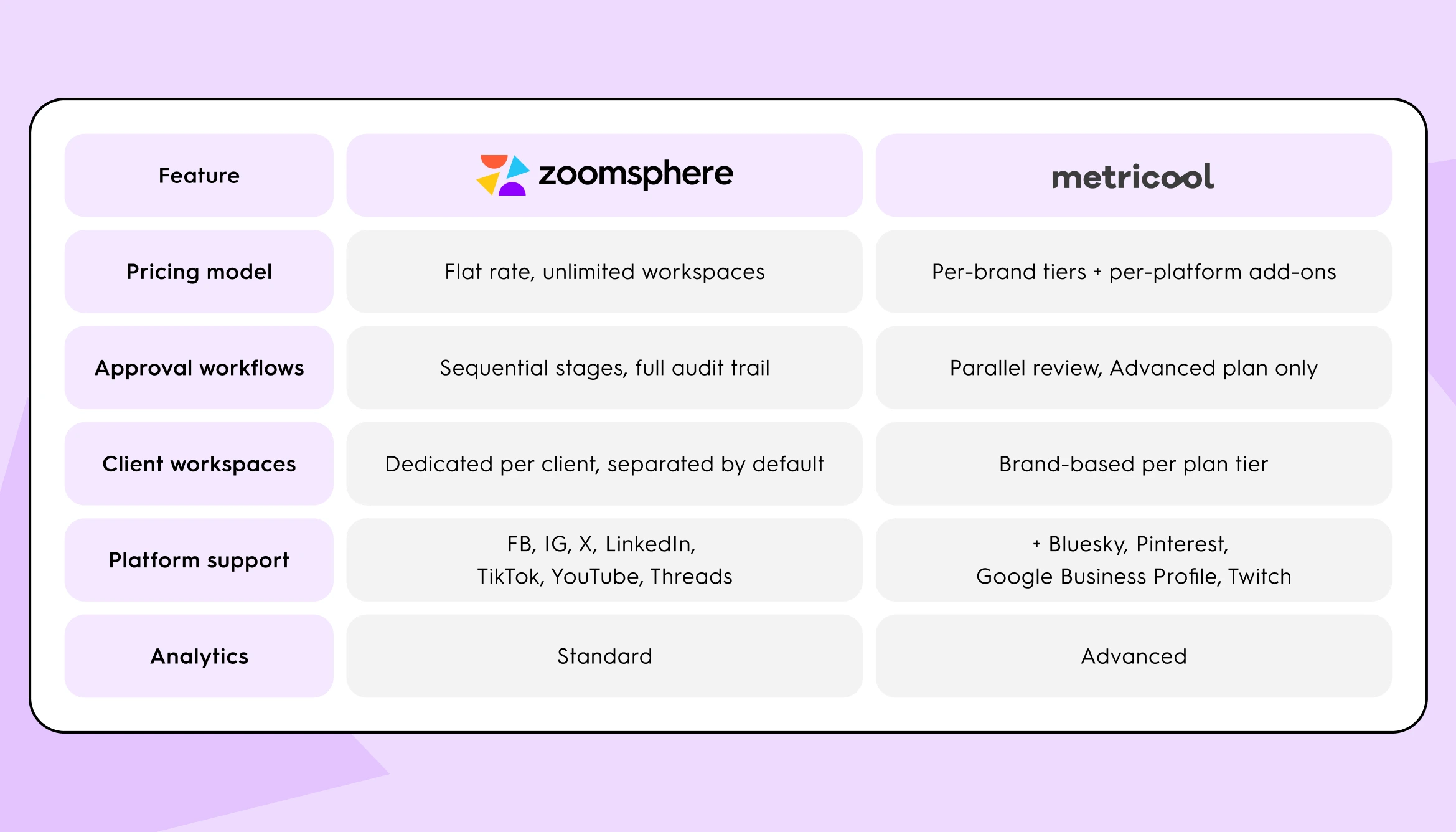
ZoomSphere vs. Metricool: Full Feature Comparison
How Do ZoomSphere and Metricool Handle Content Approvals?
Metricool's approval system (Advanced and Custom plans) supports multiple reviewers assigned simultaneously. You can configure who must approve: no reviewer, at least one reviewer, or all reviewers; rejection by any single reviewer blocks publication regardless of who else has approved. This is a genuinely functional system for teams where all stakeholders can review content in parallel.
What it does not support is a sequential multi-stage workflow: content must clear Stage 1 (internal review) before it becomes visible to Stage 2 (account manager), before reaching Stage 3 (client sign-off). All assigned reviewers receive the post at the same time, in one round. For teams where the order of sign-off matters: where legal must approve before the client sees it, or where a senior editor must sign off before the post moves to a client, the absence of sequential stages is a meaningful constraint.
One specific gap is documented in Metricool's own notification article: approved posts generate no notification. When a post is sent for review, reviewers with Metricool accounts are notified automatically via My Tasks; the post creator can also enable an email notification per request. Reviewers added via external email always receive an email. When a post is rejected, the creator receives an automatic email (this cannot be disabled). But when a post is approved, no notification is sent to anyone. The creator must check the Planner or My Tasks manually to confirm that approval has been completed.
ZoomSphere's sequential approval workflow moves content through defined stages in order. Each stage is assigned to a specific person or role, every action is logged with a full audit trail, and email notifications can be configured per status so the right person is alerted when content reaches their stage automatically.
How Do ZoomSphere and Metricool Compare on Per-Platform Pricing?
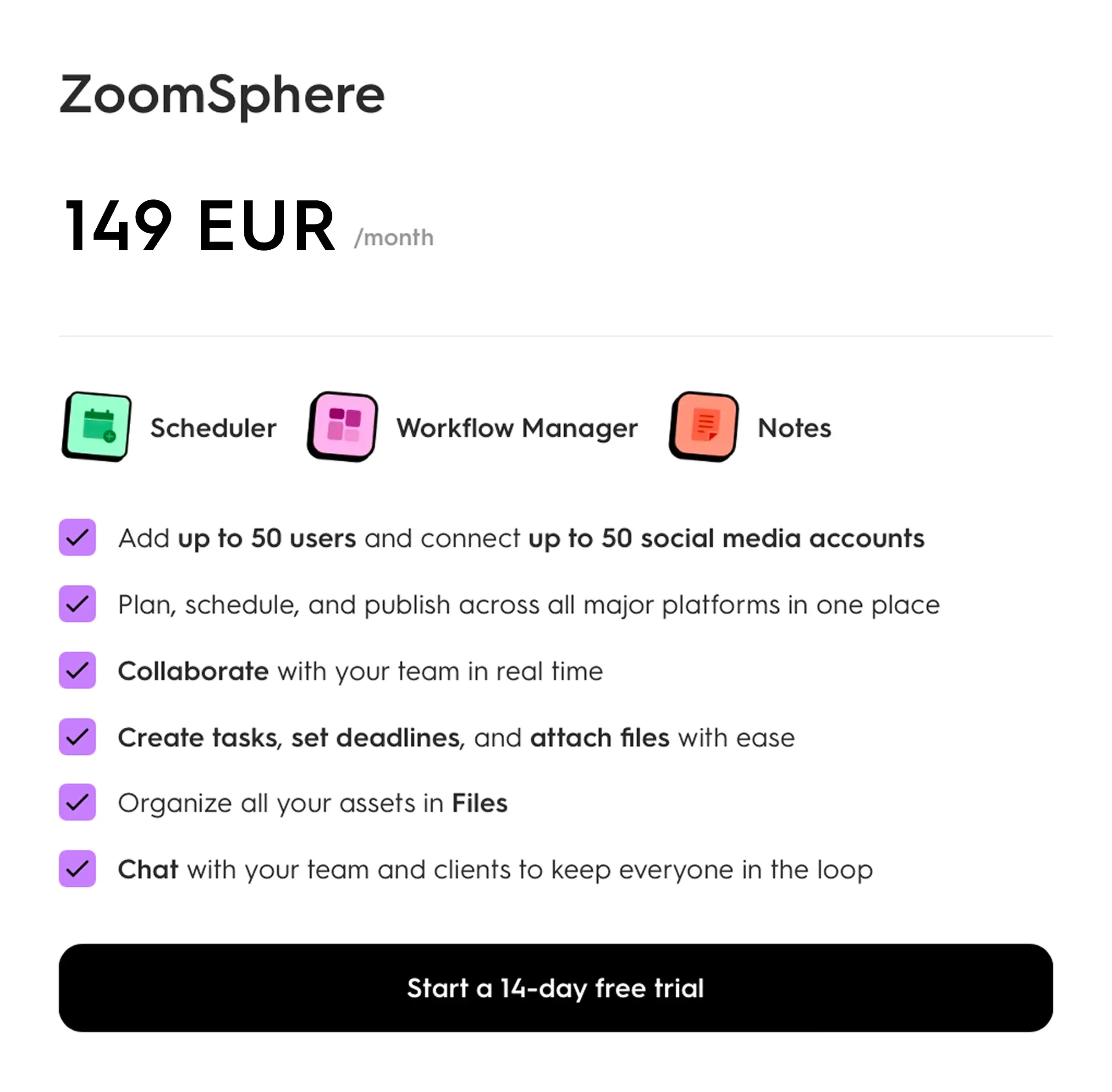
ZoomSphere's flat-rate plan includes all supported platforms (Facebook, Instagram, X (Twitter), LinkedIn, TikTok, YouTube, and Threads) within the 50-account limit, with no per-platform add-on fees. If you connect 20 LinkedIn accounts and 20 X accounts across your client portfolio, the cost is the same as connecting 40 Instagram accounts.

Metricool's pricing structure differs. LinkedIn is included from the Starter plan (from €16/month annual, up to 10 brands). However, Twitter/X is a paid add-on: +$5/month per connected X account, billed monthly with no annual discount on the add-on. For agencies managing X accounts across multiple clients, this add-on cost compounds regardless of which base plan tier you're on. At 10 clients with active X management: $600/year in platform add-ons on top of the base subscription.
The practical decision point: if Twitter/X management is standard across most of your client portfolio, Metricool's total cost is higher than the base plan price suggests. If X is irrelevant to most of your clients, the add-on is not a factor.
How Do ZoomSphere and Metricool Compare on Analytics?
Metricool is the stronger analytics tool. Its reporting suite includes best-time-to-post heatmaps, competitor benchmarking across up to 100 profiles (available from the Starter plan), ad campaign reporting across Meta and Google, a Looker Studio connector for custom client dashboards (Advanced and Custom plans), and granular audience demographic insights per platform. If performance reporting is the primary client deliverable, ZoomSphere does not replicate this depth.
ZoomSphere provides standard cross-platform analytics: reach, engagement, and post performance per channel. Sufficient for internal content reporting. Not sufficient as a standalone analytics and strategy product.
Which Social Media Platforms Does Each Tool Support?
Both tools cover the major platforms: Facebook, Instagram, X (Twitter), LinkedIn, TikTok, YouTube, and Threads. The difference is in the edges: Metricool additionally supports Bluesky, Pinterest, Google Business Profile, and Twitch. ZoomSphere does not. For agencies with clients in retail, local business, or gaming where these platforms are standard deliverables, this is a hard constraint, not a feature trade-off.
When Is Metricool the Right Choice for Agencies?
Metricool is the stronger choice when analytics is your primary deliverable, your team has simple parallel approval needs, Twitter/X is not widespread across your portfolio, or your clients require platforms ZoomSphere doesn't support.
Your core deliverable is analytics and reporting.
Metricool's analytics depth is hard to match at its price point. The heatmap-based posting time recommendations, competitor benchmarking across up to 100 profiles (from Starter), and the Looker Studio connector give reporting-focused teams a toolkit ZoomSphere does not replicate. If clients pay you primarily for data-driven strategy, campaign performance analysis, and competitor insights, Metricool was built for that use case. ZoomSphere's analytics are standard, not specialized.
Your team is small and approval isn't a bottleneck yet.
Metricool's Advanced plan includes an approval system sufficient for small teams with simple parallel sign-off needs. If one person creates, one reviews, and the client approves via a shared link, all in a single review round, a sequential multi-stage workflow system solves a problem you don't yet have. At one to three people with a simple review chain, Metricool Advanced at €54/month (monthly), or €43/month on annual billing, covers the basics without paying for infrastructure you won't use.
Twitter/X is not a standard channel for most of your clients.
Metricool's per-account add-on cost for X is irrelevant if X management is not part of your standard service package. Metricool charges $5/month per connected X account, with no annual discount on add-ons, but if you manage primarily B2C clients in food, retail, hospitality, or lifestyle where X is not a core deliverable, that cost simply doesn't apply. LinkedIn is included from the Starter plan, with no per-account add-on fee. Without X add-ons across most of your portfolio, Metricool's total cost at modest agency scale is meaningfully lower than ZoomSphere's flat rate.
Your clients need Pinterest, Google Business Profile, or Twitch.
Metricool supports these platforms natively. ZoomSphere supports Facebook, Instagram, X, LinkedIn, TikTok, YouTube, and Threads. If your client mix relies on Pinterest, Google Business Profile, or Twitch, this is a hard constraint that ends the comparison.
How Do You Know When to Switch from Metricool to ZoomSphere?
These aren't opinions. They're operational signals that the tool's architecture is creating friction rather than removing it.
Sign 1: Approval now happens in more than two places at once.
When the approval process for a single piece of content leaks across multiple channels (Metricool for drafting, email for feedback, WhatsApp for client sign-off, Slack for internal notes), the tool is no longer functioning as your workflow hub. That's the signal. Metricool's approval system (Advanced and Custom plans) supports assigning multiple reviewers simultaneously, but it does not support sequential stages. Where a brand manager, a legal reviewer, and a regional director each need to sign off in order (not simultaneously), Metricool's parallel review model requires a workaround.
One gap documented in Metricool's own notification article is relevant here: when a post is approved, Metricool generates no notification. Reviewers are notified automatically via My Tasks when a post arrives for review, and the creator receives an automatic email when a post is rejected. But when a post is approved, no one is alerted. The creator must check the Planner or My Tasks manually to confirm that approval has been completed. At team scale, when multiple posts are in review simultaneously, this manual check-in becomes a recurring overhead.
Sign 2: Adding a new client forces a pricing tier jump.
Every time Metricool's brand-count ceiling is hit, your software cost increases by a fixed amount, regardless of how much revenue the new client brings in. Metricool's Advanced plan covers 15 brands at €54/month (monthly) or €43/month (annual); the next tier covers 25 brands at €87/month (monthly) or €69/month (annual). Adding a 16th client forces a ~€26/month increase on annual billing, or ~€312/year from a single account. This tier structure means software cost scales non-linearly with agency growth. At 15 or more clients, the pricing model starts working against an agency that is actively trying to grow.
Sign 3: Twitter/X add-ons are compounding as your client roster grows.
Twitter/X is not included in any Metricool plan. It costs $5/month per connected X account, billed monthly with no annual discount. If you manage X for 10 clients: $50/month extra, or $600/year. For 15 clients: $75/month extra. For 20 clients: $100/month extra. This cost does not exist in ZoomSphere's pricing model: all supported platforms, including X, are included in the flat rate. For agencies where X management is standard across a significant portion of the portfolio, Metricool's true cost diverges from the headline price.
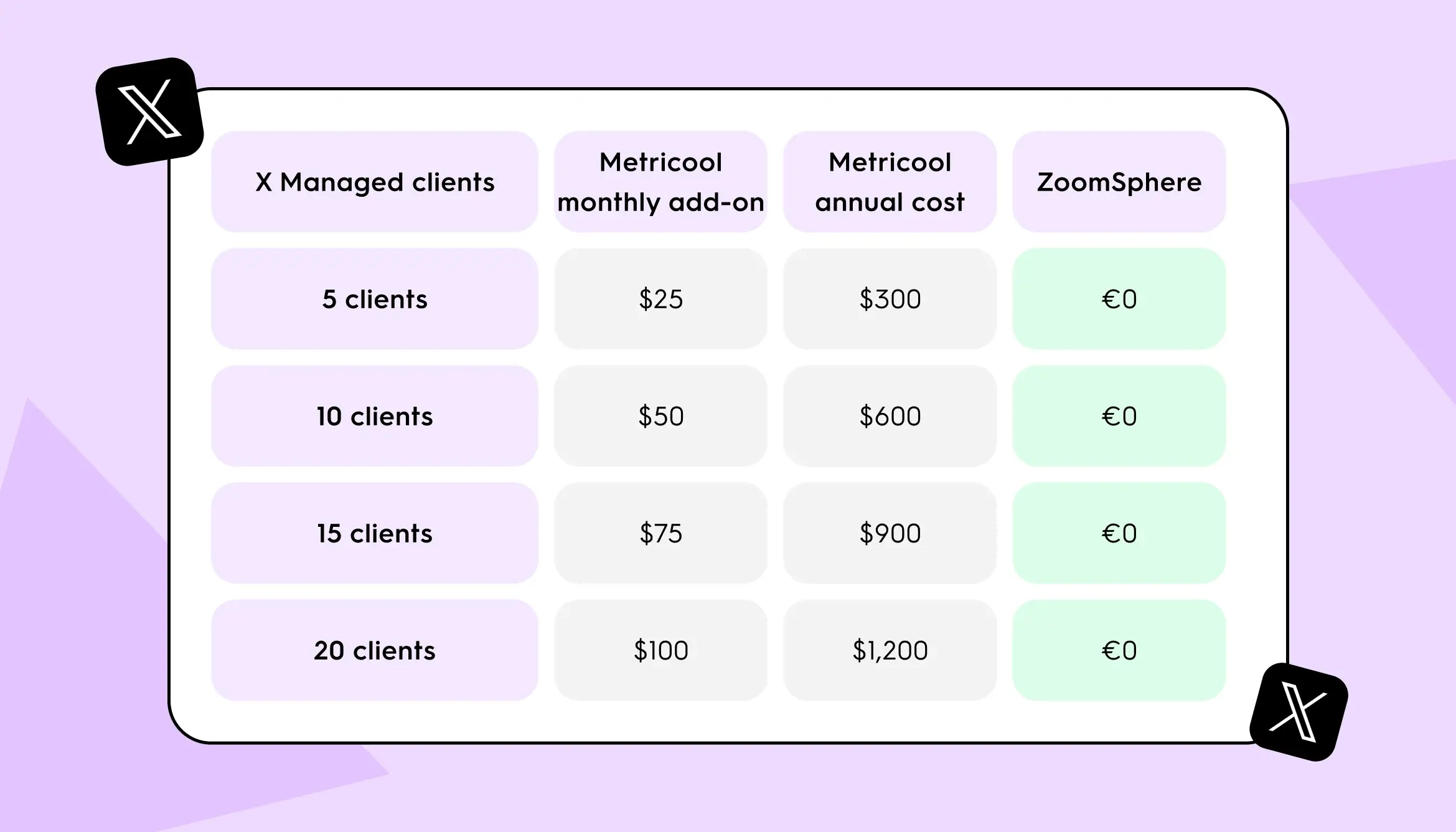
If two of the three signs apply to your agency right now, the section below and the pricing scenarios that follow are written for you. If only one applies, or none, the Metricool section above is the more relevant read.
When Is ZoomSphere the Right Choice for Agencies?
ZoomSphere is the stronger choice when workflow overhead (not analytics gaps) is the primary constraint on your agency's efficiency. Specifically, it fits when team size, client volume, sequential approval requirements, or platform coverage within the flat rate make Metricool's architecture work against you.
Your team has grown past the point where informal approval works.
At five or more people with defined roles, content stops moving cleanly without a system. A content creator, an internal reviewer, an account manager, and a client-facing approver each touching the same post means four opportunities for something to stall or get lost, and for many agencies, the order of those approvals matters. ZoomSphere's sequential approval workflow moves content through defined stages in order: each stage is assigned to a specific person, access to the next stage requires completing the previous one, and every action is logged with a full audit trail. ZoomSphere's Scheduler allows email notifications to be configured per status; once configured, the relevant person is alerted when content reaches their stage, rather than having to check manually.
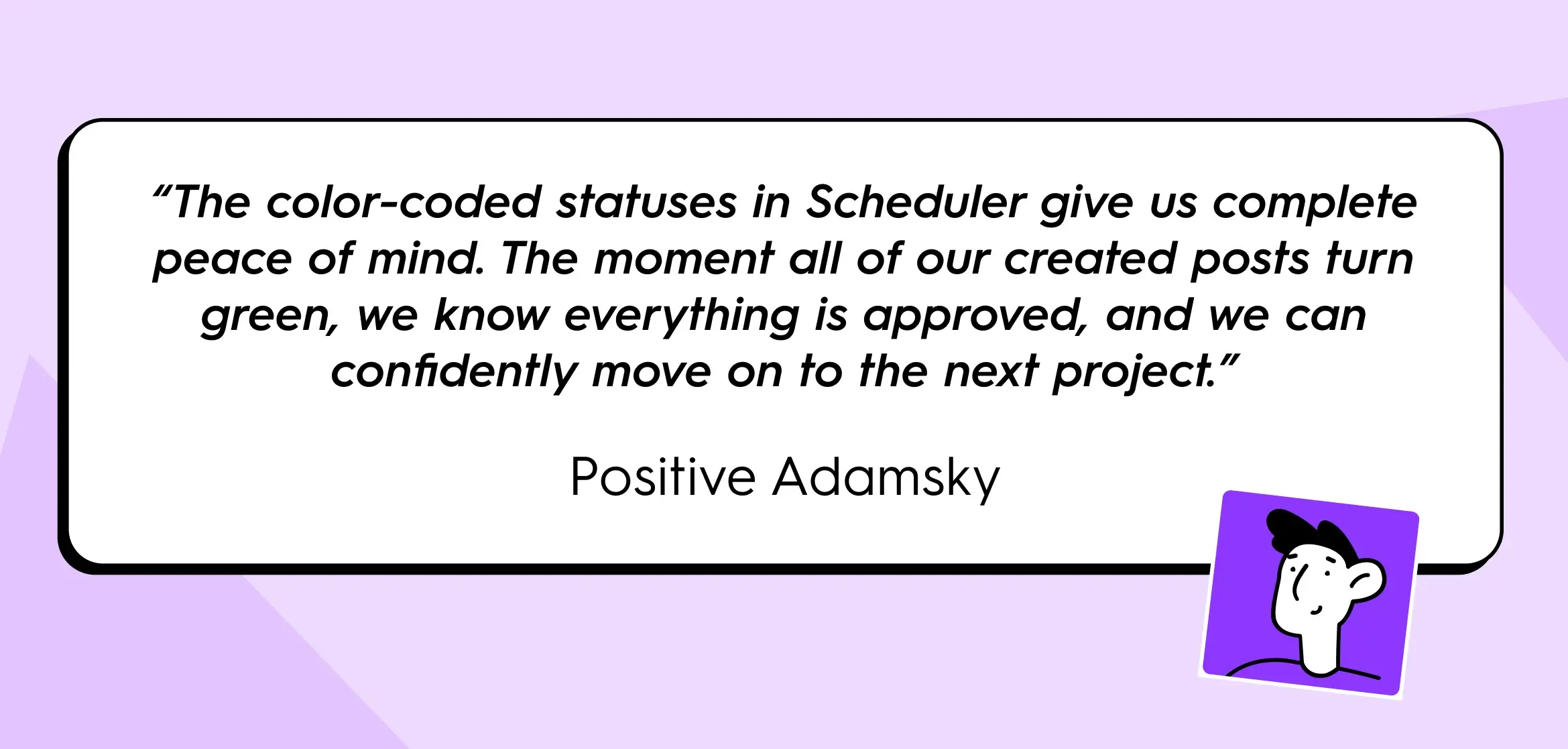
What that looks like at scale: Positive Adamsky, one of the largest social media agencies in Central Europe, manages 330+ social channels across 100+ brands with 213 users on ZoomSphere. In January 2025, the team published 2,207 posts: 92% of them fully auto-published after the approval process completed. A team member put it directly: "The color-coded statuses in Scheduler give us complete peace of mind. The moment all of our created posts turn green, we know everything is approved, and we can confidently move on to the next project."
Your platform mix includes Twitter/X across most of your portfolio.
ZoomSphere's flat-rate plan includes all supported platforms (Facebook, Instagram, X, LinkedIn, TikTok, YouTube, and Threads) with no per-platform fees. Metricool charges $5/month per connected X account, billed monthly with no annual discount on add-ons. At 10 clients with active X management: $600/year in add-ons on top of the base subscription. At 15 clients: $900/year. At 20 clients: $1,200/year. This cost does not exist in ZoomSphere's pricing model. For agencies where X is a standard deliverable across most of the client portfolio, ZoomSphere's total cost over time is lower despite the higher base price, once X add-ons are included.
Your client count is approaching or has passed 15 on a Metricool plan.
For agencies within ZoomSphere's standard plan limit of 50 social accounts, the flat rate of €149/month (annual) does not increase as you add clients. When you sign a new client within that limit, your software cost stays the same. This matters most in the 12-to-45 client range where Metricool's per-brand tier structure would otherwise trigger multiple cost jumps. For agencies managing more than roughly 25 clients with 2 channels each, account volume will likely exceed ZoomSphere's standard plan limit and require a custom pricing conversation.
Client workspace separation is a requirement, not a preference.
Clients need to see their own content, approve it, and leave feedback, without any visibility into other clients' work. ZoomSphere's workspace architecture makes this the default. Each client workspace is independently contained with its own permissions, channels, and access controls.
You're operating in the EU and care about where your data lives.
ZoomSphere is built and hosted in the Czech Republic. Metricool is also GDPR-compliant following its 2024 acquisition by Belgian company team.blue, so the distinction is less sharp than it was two years ago. For agencies with specific data residency requirements in client contracts, ZoomSphere's EU infrastructure is a verifiable, documentable fact.
How Much Does Metricool vs. ZoomSphere Cost for a Growing Agency?
The entry price of any social media management tool tells you almost nothing about what a growing agency actually pays. Below are three modeled scenarios for a 20-client agency.
Methodology: All figures use public pricing from both platforms as of May 2026. Metricool annual billing reflects the annual subscription rate shown on Metricool's pricing page in EUR; no annual discount applies to X add-ons. ZoomSphere annual billing: €149/month, billed as €1,790/year. Both tools offer EUR billing for their base plans. Metricool's Twitter/X add-on is billed in USD at $5/month per connected account, regardless of base plan currency. Scenario totals below show Metricool base costs in EUR and X add-on costs in USD, as they appear on Metricool's pricing page. The 50-account ceiling on ZoomSphere's standard plan is a real constraint reflected honestly in Scenarios B and C.
Scenario A: 20 clients, X not a core channel (2 channels per client: Facebook + Instagram = 40 total accounts)
Relevant for: B2C agencies in retail, food, lifestyle where X management is not part of the standard package.
- Metricool Advanced 25 brands (annual): €69/month. No X add-ons. Annual total: ~€828.
- ZoomSphere flat rate (annual): €149/month. 40 accounts within the 50-account limit. Annual total: €1,790.
Metricool is the more cost-effective choice in this scenario, and the analytics depth is stronger. For agencies at this profile, switching to ZoomSphere means paying roughly twice as much for workflow infrastructure they don't need, and giving up analytics capabilities their clients pay for.
Scenario B: 20 clients, X standard for all clients (3 channels per client: Facebook + Instagram + X = 60 total accounts)
Relevant for: Agencies managing X as a standard deliverable: news, sports, entertainment, tech, or political clients.
- Metricool Advanced 25 brands (annual): €69/month base + X add-on for 20 accounts ($100/month, billed in USD). Annual total: ~€828 base + $1,200 in X add-ons.
- ZoomSphere: 60 accounts exceeds the standard 50-account flat-rate plan. Custom pricing applies; the €149/month figure does not apply at this volume. A direct quote from ZoomSphere's team is required before a meaningful cost comparison is possible.
Metricool's cost is fully calculable at this profile; ZoomSphere's requires a quote. The X add-on has no annual discount, so $1,200/year is a fixed per-account cost regardless of tier. If ZoomSphere's custom pricing comes in below the combined Metricool total, the decision rests entirely on workflow and analytics fit.
Scenario C: 20 clients, X for 10 clients, 2 channels for remaining 10 (10 clients × 3 channels + 10 clients × 2 channels = 50 total accounts)
Relevant for: Agencies with a mixed client base: some in sectors where X matters, others where it doesn't.
- Metricool Advanced 25 brands (annual): €69/month base + X add-on for 10 accounts ($50/month, billed in USD). Annual total: ~€828 base + $600 in X add-ons.
- ZoomSphere flat rate (annual): €149/month. 50 accounts exactly at the standard plan limit. Annual total: €1,790.
In this scenario, Metricool is the lower-cost option. At €828 base + $600 in X add-ons (approximately €1,370 combined at current exchange rates), Metricool comes in below ZoomSphere's €1,790. At this level of cost difference, the decision should be based on workflow fit, not price. The right question: how much time per week does your team spend tracking approval status outside the tool? If that number is climbing, the tool's cost is not your real constraint.
Which Type of Agency Should Use ZoomSphere vs. Metricool?
The right social media management tool depends on agency size, client mix, and where operational friction actually lives. Here are three concrete profiles.
The reporting agency: 6 clients, 2 people, analytics is the product.
This agency's core deliverable is performance data: monthly dashboards showing reach, engagement, competitor benchmarking, and ad performance. The team is small enough that approval is one email and one reply, all in a single round. Most clients are in food and retail; X and Pinterest aren't part of the standard package.
At this profile, Metricool is the right tool. The analytics depth matches the deliverable. The team size matches the parallel approval model. Switching to ZoomSphere would mean paying €149/month for sequential workflow infrastructure that serves no current function, and giving up the competitor benchmarking and Looker Studio integration that clients pay for.
The multi-client workflow agency: 18 clients, 6 people, sequential approvals required.
This agency runs on volume. Content moves through an internal review, then a senior review, then a client approval, then a legal check at two of the eighteen clients. The order of these stages matters: the legal team must not see unapproved copy. The team spends real time every week tracking who approved what and chasing status updates across email and Slack. X management is standard for twelve of the eighteen clients.
At this profile, ZoomSphere is the stronger fit. The sequential approval architecture, the client workspace separation, and the flat-rate pricing without X add-ons all directly address the documented operational bottlenecks. The analytics gap is real. If data-driven reporting is also a core deliverable at this agency, that gap will matter. For agencies where workflow is the primary constraint and analytics is secondary, the fit is strong.
The agency at the inflection point: 13 clients, 4 people, growing fast.
This agency is using Metricool Advanced 15 brands and has two slots left before the pricing tier jumps. X matters for seven clients. The approval process is mostly working, but the team is handling sequential approval steps informally across email. Someone on the team is spending meaningful time each week on approval-related messages that happen outside the tool.
At this profile, the honest answer is: run a real trial before deciding. The annual cost difference at this scale is not the deciding factor. The question to answer in the trial is specific: does ZoomSphere's sequential approval workflow reduce the overhead of chasing approvals to a fraction of what it currently is? If yes, the switch pays for itself quickly. If the friction comes from client relationship complexity rather than tool limitations, switching platforms won't fix it.
Frequently Asked Questions
How many client brands can Metricool handle?
Metricool's Advanced plan covers up to 15 brands at €43/month (annual) or €54/month (monthly); up to 25 brands at €69/month (annual) or €87/month (monthly); up to 50 brands at €130/month (annual) or €172/month (monthly). Beyond 50 brands, pricing is custom. Each tier jump is a fixed cost increase regardless of how many clients within the tier you're currently using.
What are Metricool's main limitations for agencies managing multiple clients?
Three limitations come up most consistently in agency contexts: the absence of a sequential multi-stage approval workflow (Metricool supports parallel review by multiple reviewers, but not ordered stages); per-brand pricing that scales non-linearly with client growth; and Twitter/X as a paid add-on ($5/month per account) that compounds as the portfolio grows. A fourth limitation is documented in Metricool's own notification article: when a post is approved, no notification is generated; neither the creator nor any team member is alerted. Status must be checked manually. For agencies where these constraints are not active problems, Metricool's analytics and reporting capabilities are strong.
Does ZoomSphere have competitor benchmarking?
Basic analytics are available, but competitor benchmarking across multiple profiles is not a primary ZoomSphere feature. If competitor tracking at depth (up to 100 profiles, with historical data and heatmaps) is a core deliverable for your clients, Metricool holds a meaningful advantage here. This feature is available from Metricool's Starter plan
Can external clients access and approve content in both tools?
Yes, in both. Metricool's Advanced plan includes collaborator roles that allow clients to access and approve content within a specific brand without seeing other brands' data. ZoomSphere includes client workspace access within its flat-rate plan, with each client workspace separated by default.
How does ZoomSphere handle high-volume content operations?
ZoomSphere's sequential approval architecture is designed for high-volume, multi-client operations. Positive Adamsky, managing 330+ social channels across 100+ brands with 213 users, published 2,207 posts in January 2025 alone: 92% fully auto-published after completing the approval process. The platform's color-coded approval status system gives teams clarity at that scale: only posts marked "Approved" are auto-published, so a fully green Scheduler view means all content has cleared every configured sequential approval stage.
What platforms does ZoomSphere support?
ZoomSphere supports Facebook, Instagram, X (Twitter), LinkedIn, TikTok, YouTube, and Threads. It does not currently support Bluesky, Pinterest, Google Business Profile, or Twitch. If your clients require those platforms, Metricool is the right choice.
ZoomSphere or Metricool: How to Choose the Right Tool for Your Agency
Metricool is the right social media management tool if: your primary deliverable is analytics and reporting; your team has simple parallel approval needs without sequential stages; Twitter/X is not standard across most of your client portfolio; or your clients require Bluesky, Pinterest, Google Business Profile, or Twitch.
ZoomSphere is the right tool if: your team requires sequential multi-stage approvals where order matters; Twitter/X is standard across most of your portfolio and add-on costs are compounding; your client count is within the range where ZoomSphere's flat rate applies and Metricool's tier jumps are creating cost pressure; or the time your team spends tracking approval status outside the tool is measurable in hours per week.
If you recognize two of the three signs from the section above in your agency's current workflow, the ZoomSphere trial is worth one specific test: run a real client approval cycle through the tool, from brief to published post. That is enough to know whether the sequential approval architecture changes your team's week in a meaningful way.
{{cta-component}}
LinkedIn's algorithm cannot detect AI-written content. What it detects is whether anyone cared enough to finish reading.
That distinction is what most agencies are missing when they try to diagnose a client's falling reach. The issue is not that LinkedIn flags AI posts. The issue is that AI-generated content without a specific professional insight at its core creates near-zero dwell time, earns no saves, and triggers no real discussion.
The algorithm reads that behavioral signal and stops distributing the content. The result looks like a penalty. The mechanism is simpler: nobody actually read it.
This got significantly worse in March 2026, when LinkedIn replaced its entire feed ranking system. According to Richard van der Blom's Algorithm Insights 2025 Report, the most widely cited independent benchmark of LinkedIn performance:
- Views fell roughly 50% year-over-year
- Engagement dropped 25%
- Follower growth declined 59% in the period leading up to and following this change
Understanding what replaced the old system, and what it now rewards, explains the numbers your clients are asking about.
{{form-component}}
What Changed in LinkedIn's Feed Algorithm in 2026
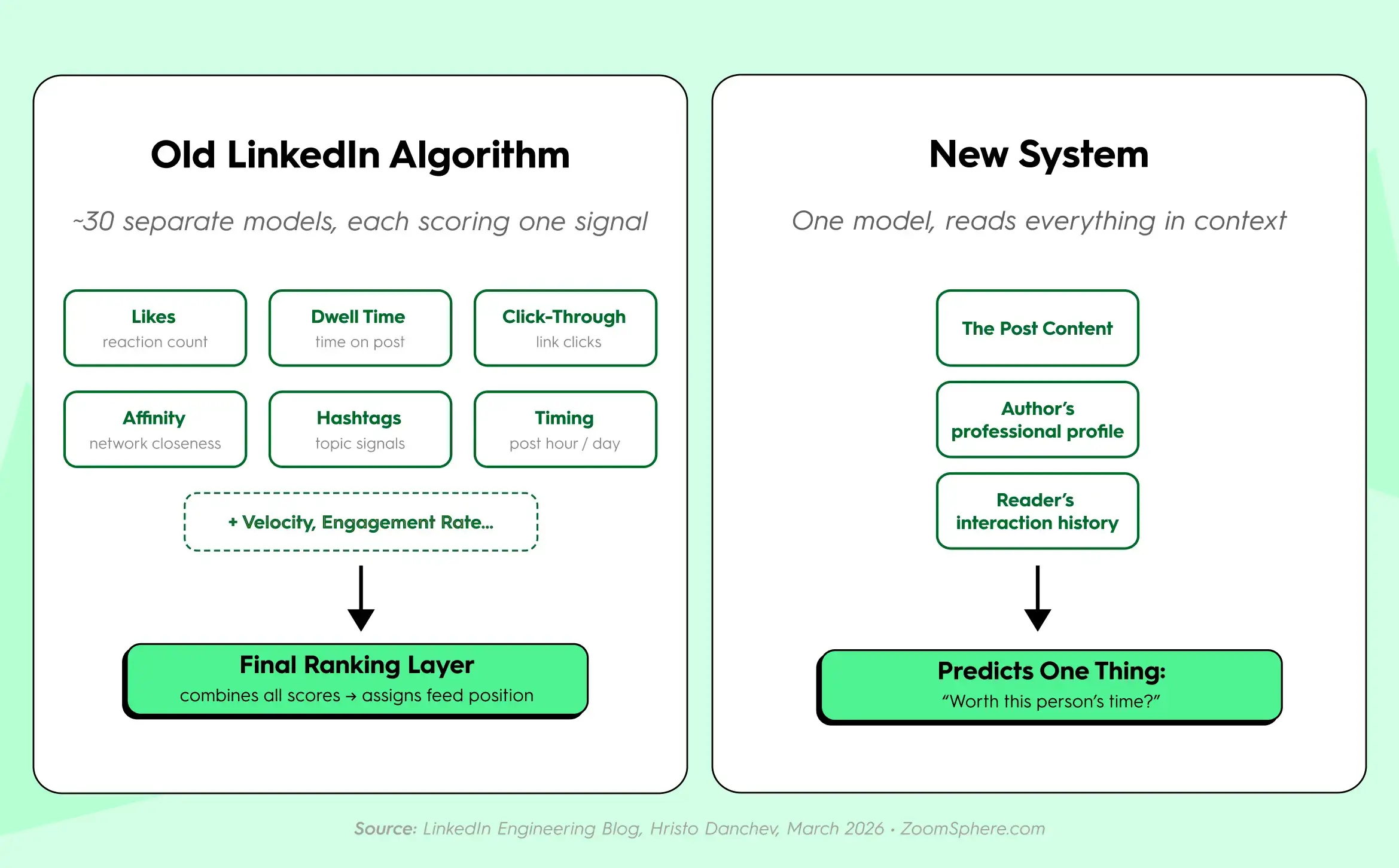
On March 12, 2026, LinkedIn's engineering lead Hristo Danchev published an update to the LinkedIn Engineering Blog announcing the next generation of the platform's feed: a unified retrieval and ranking system powered by large language model embeddings, replacing the previous fragmented architecture of separate specialized models. Search Engine Land's March 2026 coverage confirmed the shift to LLM-powered ranking and retrieval. This was not a minor algorithm tweak. It was a rebuild of how the feed decides what to show.
LinkedIn's previous system was a chain of specialized models, each responsible for one signal.
- One counted likes
- One measured dwell time
- One tracked click-through rates
- One evaluated network proximity
A final layer combined all of these into a ranking score. The system was gameable: stack enough signals in the right order and reach would follow. This is why tactics like engagement pods, early-hour posting windows, and hashtag optimization could reliably move numbers. The system was counting behaviors, not evaluating meaning.
The new system replaced that chain with a unified LLM-powered model. Instead of adding up separate scores, it reads a post together with the author's professional profile and the potential reader's professional history, then predicts one outcome: would this specific person find this worth their time?
The old system rewarded posting behavior. The new system evaluates whether a post contains something specific, professionally credible, and worth finishing. Most agency workflows were built to produce content that performed well on the old system. They are not producing content that performs on the new one.
What LinkedIn Now Rewards: Understanding the Depth Score
The cluster of behavioral signals that now determines distribution on LinkedIn is what practitioners call the depth score — a term used in third-party analyses, not an official LinkedIn metric. It describes what the algorithm is now measuring: sustained professional attention rather than passive reactions. LinkedIn has been signaling this direction since at least February 2024, when Senior Director of Engineering Tim Jurka outlined the platform's move away from engagement-bait content — posts prompting "Comment YES if you agree," recycled thought-leadership, content designed to game distribution rather than serve readers — toward expertise-first distribution. The March 2026 feed update enforced these principles at model level.
The clearest evidence of this shift is in format performance. Dataslayer's April 2026 analysis shows document posts averaging 6.60% engagement, the highest of any content type on the platform, precisely because swiping through slides forces sustained attention and extends time-on-post. A post someone reads for thirty seconds outperforms one that collects fifty quick likes. This is the depth score in practice: the algorithm rewards posts that hold people long enough to mean something.
Saves are the highest-intent signal the depth score can measure. A save requires conscious effort and signals future value. LinkedIn has not published exact signal weights, but this is consistent with how modern LLM-based recommendation systems distinguish genuine interest from passive scrolling — weighting interactions by the amount of intent they reveal rather than their raw count.
Comment quality registers differently than comment quantity. Because the current system reads language semantically, a thread where three professionals add distinct perspectives from their own work is a stronger signal than ten "great post" replies. On the subject of artificial engagement: Whitehat's April 2026 B2B Algorithm Guide cites research placing LinkedIn's coordinated pod detection accuracy at 97%. Engagement pods do not produce genuine distribution gains under the current system and represent a risk rather than a lever.
Why LinkedIn Changed the Rules: The Microsoft Context
LinkedIn is part of Microsoft. Microsoft is building Copilot. Copilot needs high-quality professional knowledge, not engagement bait.
This context explains why the 2026 algorithm shift is a platform strategy change, not just a content quality update. ZoomSphere founder Jakub Mach laid this out directly in his LinkedIn article on the subject. LinkedIn is building a professional knowledge graph that serves both human readers and AI systems. Generic, formulaic content has no value in a knowledge graph. Specific, credible, author attributed professional observations do.
For agencies, this has one practical consequence: every post that could have been written by anyone is now competing against posts that could only have been written by someone with direct professional experience. The depth score does not reward polish. It rewards specificity. And a brief passed to an AI tool without any client-specific context will never produce specificity, regardless of how well the output is edited.
Why LinkedIn Company Page Reach Dropped in 2026
Company page organic posts now represent approximately 2% of what appears in LinkedIn users' feeds, according to Whitehat's 2026 analysis of Socialinsider platform benchmarks. Personal profiles generate five times more engagement than company pages. Employees with 46% fewer followers than the brand account consistently outperform it when posting as individuals.
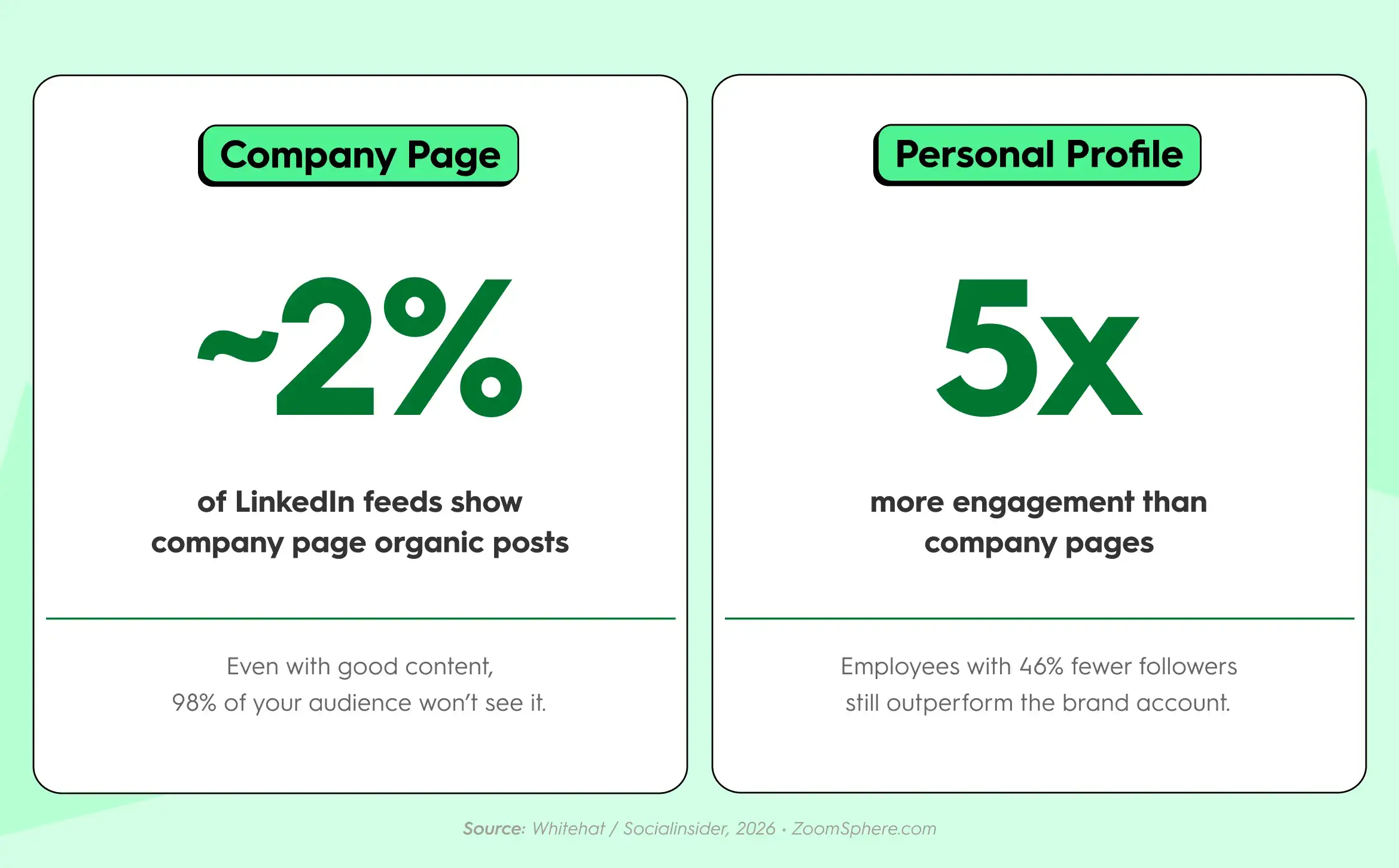
This is a structural channel problem, not a content quality problem. A company page has no career history, no professional associations, no point of view the model can match against a reader's professional profile. LinkedIn's ranking system is designed to find the right professional knowledge for the right professional reader. A brand page posting "Excited to share our latest case study" provides nothing for the algorithm to work with.
The agency implication is direct. If a client's LinkedIn strategy runs primarily through their company page, that strategy runs on a channel that accounts for roughly 2% of what their target audience sees. More content on that channel does not fix this. Posting better content on that channel does not fix this. The reach strategy needs to run through people: the founder, the subject matter experts, the team members whose professional background aligns with what the company sells. The company page still earns its place for ads, recruitment, and brand credibility. It is no longer a reliable organic reach engine, and presenting it as one sets up a conversation with the client that will happen anyway when the numbers do not move.
Does LinkedIn Penalize AI-Generated Content?
LinkedIn does not penalize AI-generated content. It deprioritizes content that holds no one's attention, and AI-generated posts without a specific professional insight at the center consistently fail on every behavioral signal that now determines reach.
The content industry has a word for this category: slop. Technically coherent, grammatically clean, professionally empty. The kind of post where every sentence is true of any company in any industry at any moment. Slop fails the depth score not because of how it was produced but because readers scroll past it in under three seconds. There is nothing to stop on, nothing specific enough to remember, nothing worth saving for later. The algorithm reads the resulting behavioral pattern, near-zero dwell time, no saves, generic or absent comments, and reduces distribution. The post reaches fewer people, generates even less engagement, and gets pushed further down. The client sees the numbers and asks what changed.
Here is what the difference looks like in practice.
A post generated by passing a client brief to an AI tool without any additional context:
"In today's competitive landscape, authentic content is more important than ever. Brands that invest in thought leadership are seeing real results. If you want to succeed on LinkedIn in 2026, focus on sharing genuine expertise, engaging with your community, and posting consistently. The algorithm rewards value."
No specific context. No data. No professional point of view that belongs to a person with an actual job and real experience. Nothing the reader has not seen in exactly this structure before. Dwell time: roughly three seconds. This is slop. The depth score registers nothing worth distributing.
A post where AI drafted and refined, but the central observation came from the client's actual work:
"We onboarded a client last month who had been posting three times a week for two years. Strong copy, consistent schedule, flatlined reach. The first thing we changed was not the format or the cadence. We asked what the founder knew about their industry that nobody in their space had said out loud yet. That became the first post. The numbers moved. Same account. Same schedule. Different raw material."
This is illustrative and contains no fabricated engagement figures. What makes it work is professional context, a specific observation about what changed, and a conclusion the reader can apply. It creates dwell time because it says something recognizable from real work that does not exist in that form anywhere else.
The brief for a strong LinkedIn post in 2026 is not "be authentic." It is: find one thing the client specifically knows from direct professional experience that is not available anywhere else in exactly this form. Build the post around that. AI earns its place in the process when it works with that raw material. It produces slop when it substitutes for it.
Why Is Your LinkedIn Reach Dropping? And How to Find the Actual Cause
Before changing your content strategy, the more useful question is which of three distinct problems is actually driving the decline, because each has a different cause and a different fix.
- If reach has dropped uniformly across all posts regardless of format, topic, or effort, and the pattern holds across all client accounts, the most likely variable is the company page structural disadvantage. The approximately 2% feed visibility applies regardless of content quality. Improving the content does not solve a channel architecture problem. The fix is redistributing the LinkedIn strategy toward individual profiles: founder content, employee advocacy, and subject matter expert voices, with the company page as a secondary amplification surface.
- If reach is inconsistent, with some posts performing and others not without an obvious format or timing pattern, the more likely variable is content depth. Posts with specific professional context and experience-based observations are surviving the depth evaluation. Posts with generic framing are not. The fix is a content brief process that captures one experience-based insight per post before any writing starts.
- If reach declined sharply in a window around March to April 2026 and has not recovered, the timing aligns directly with LinkedIn's March 2026 feed update. Tactics that reliably moved numbers in 2024, including engagement optimization, hashtag stacking, and peak-hour posting, provide minimal lift under the new system. The recovery path is topic consistency and content depth, not tactical refinement of the old approach.
Most agencies facing client reach declines in 2026 are dealing with some combination of all three. This is why changing the format or adjusting the posting schedule produces no improvement: each fix addresses the wrong variable.
How to Fix Your Agency's LinkedIn AI Workflow
The fix is not to stop using AI. The fix is to use it at the right steps.
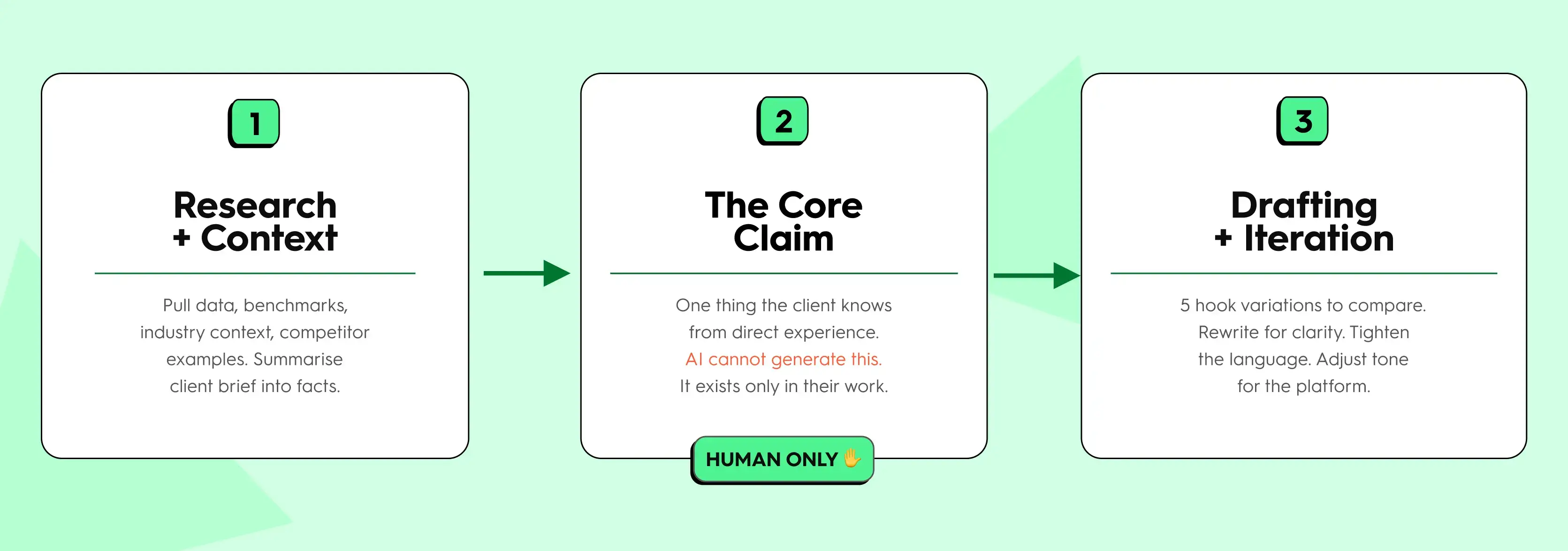
Most agency AI workflows for LinkedIn look like this: receive the client brief, pass it to an AI tool, receive a draft, lightly edit, schedule. This is fast. It produces slop. Not because the tool is bad at writing, but because the brief contains no information that only the client could provide. Without raw material that exists only in the professional experience of the person or team posting, the output is always a version of content that already exists everywhere.
The workflow that produces content LinkedIn's algorithm will distribute starts differently. Before any writing happens, the brief captures one observation that could only come from the client: a specific result from a recent project, a decision made and the reasoning behind it, a pattern the team has noticed across months of real work that they have not said publicly. Something that is not in any training data because it happened in a client meeting last Thursday.
From that raw material, AI has a clear and useful role. Research supporting data points that strengthen the claim. Generate five different hook variations to compare. Rewrite a clunky draft sentence without losing the original observation. These are tasks where AI improves work. Generating the original observation is not one of them.
For agencies, this means the brief is the most valuable deliverable in the workflow, not the post. Thirty minutes extracting the right insight from a client call is worth more to the algorithm, and to the client relationship, than sixty minutes polishing a draft that started from nothing.
Does Scheduling LinkedIn Posts Affect Organic Reach?
No, scheduling LinkedIn posts doesn't affect your organic reach. LinkedIn's ranking system evaluates content quality and post-publication engagement behavior, not the publishing method. LinkedIn has not introduced any mechanism that penalizes posts sent through third-party scheduling tools, and the March 2026 feed update does not change this.
The confusion is understandable. Reach declined for many accounts in the same period LinkedIn updated its feed, and some teams noticed the correlation while using schedulers. The causal variable is the content evaluation model change, not the tool used to publish. A post with strong depth signals scheduled a week in advance will outperform a post with weak depth signals published manually in real time.
For agencies managing multiple client LinkedIn accounts, the scheduling workflow does not disadvantage the content. The depth score is earned by what the post contains, not how it reaches the platform.
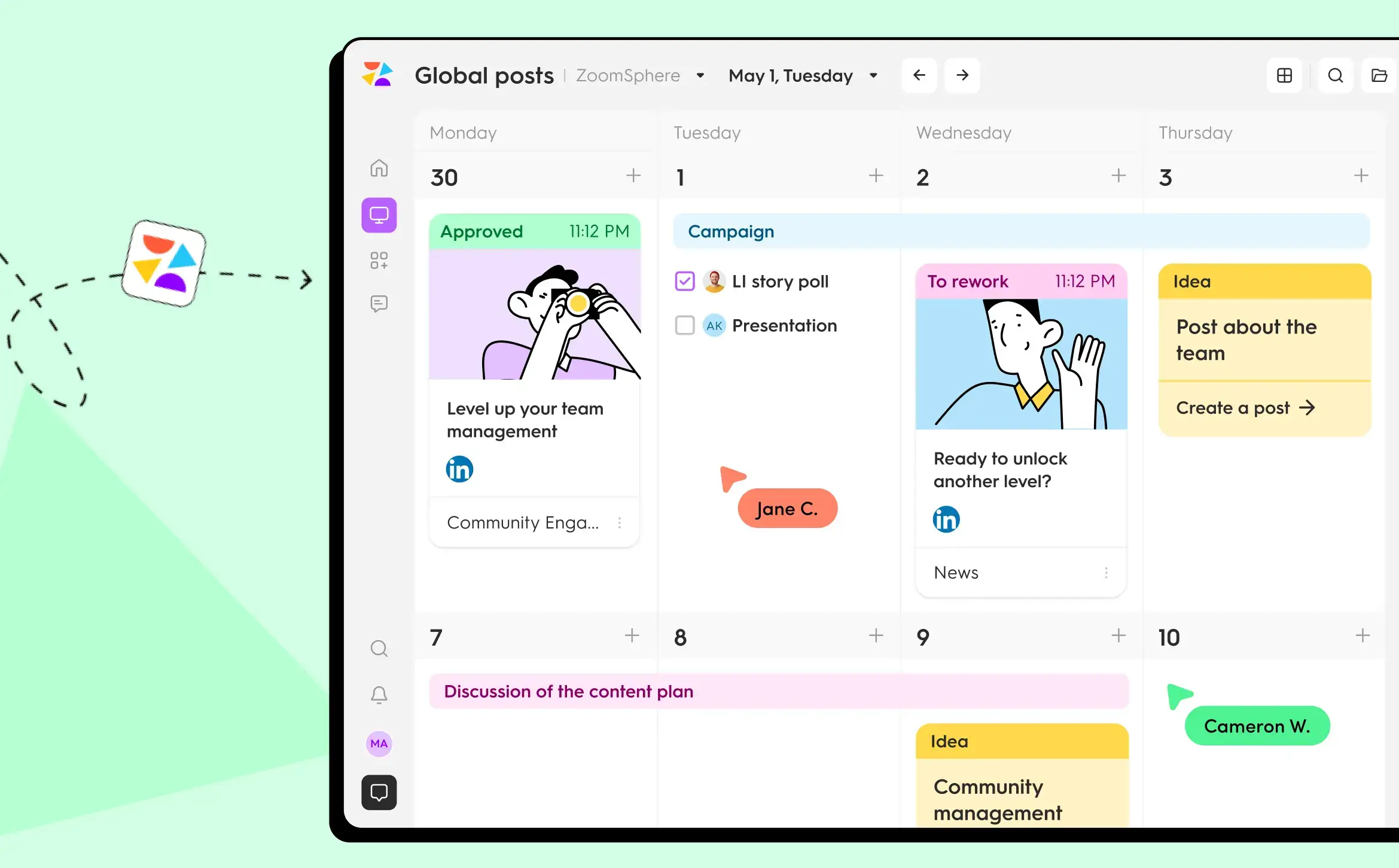
If managing LinkedIn across multiple clients currently means navigating separate logins, email approval chains, and performance data across spreadsheets, ZoomSphere's Scheduler brings all of it into one workflow. The raw material still has to come from the client. Everything that happens with it after that is already there.
{{cta-component}}
Frequently Asked Questions
What changed in LinkedIn's feed algorithm in 2026?
In March 2026, LinkedIn's engineering lead Hristo Danchev announced in a LinkedIn Engineering Blog post that the platform was replacing its fragmented architecture of specialized ranking models with a unified LLM-powered retrieval and ranking system. Search Engine Land confirmed the shift to LLM-powered ranking and retrieval. The new system evaluates posts alongside the author's professional profile and the reader's interaction history to predict relevance for a specific person, rather than scoring a list of separate engagement signals. LinkedIn's previous system was gameable by stacking behavioral signals; the new system evaluates meaning and professional relevance.
Does LinkedIn penalize AI-generated content?
Not directly. LinkedIn's algorithm does not classify posts as AI-generated and reduce their reach. What it measures is behavioral engagement: how long someone reads a post, whether they save it, and whether it generates substantive professional discussion. AI-generated content without specific professional context consistently scores low on all three signals because it lacks the author-specific insight and concrete experience that create dwell time. The suppression comes from reader behavior, not text detection.
Why did LinkedIn company page reach drop in 2026?
Company page organic posts now represent approximately 2% of what appears in LinkedIn users' feeds, according to Whitehat's 2026 analysis of Socialinsider platform data. Personal profiles generate five times more engagement than company pages. This is a structural algorithm issue: LinkedIn's ranking system is built to surface individual professional voices, not brand broadcasts. Improving the content on a company page does not close this structural gap.
How do I recover LinkedIn organic reach in 2026?
The recovery path depends on which of three problems is causing the decline. If reach has dropped uniformly across all company page content, the fix is structural: move thought leadership to individual profiles. If reach is inconsistent across posts, the fix is a content brief process that captures one experience-based insight per post before any AI drafting begins. If reach dropped sharply around March to April 2026, the tactics that worked in 2024, such as engagement optimization and hashtag strategies, no longer produce the same results. Sustained recovery requires topic consistency, post-level specificity, and patience as the algorithm builds a topic association for the account.
Are LinkedIn engagement pods still effective in 2026?
No. Coordinated engagement groups are recognized as a behavioral pattern by LinkedIn's current system. Because it reads comment language, generic pod comments are identifiable as a coordinated pattern and do not produce genuine distribution gains. Whitehat's April 2026 B2B algorithm guide cites research placing LinkedIn's pod detection accuracy at 97%.
Does LinkedIn penalize posts with external links in 2026?
Platform analyses are contradictory on this specific point. Dataslayer's April 2026 analysis shows posts with external links receiving approximately 60% less reach than posts without them. Whitehat's April 2026 guide cites separate research suggesting external links now see a modest positive effect. LinkedIn has not published definitive guidance on link treatment under the current system. The more reliable variable to optimize is content depth rather than link placement.
Does using a scheduling tool reduce LinkedIn organic reach?
No. LinkedIn's ranking system evaluates content quality and engagement signals, not publishing method. Scheduling posts through third-party tools does not affect reach. This was true under the previous system and remains true under the current one.
What should agencies change about their LinkedIn AI workflow?
Use AI for research, for generating and comparing hook options, and for rewriting drafts after the core professional insight already exists. Do not use AI to generate the post's central claim. The claim must come from direct professional experience: a specific result, a pattern observed across real client work, a decision and its reasoning. That raw material cannot be produced by AI. The writing around it can be.
Don’t #miss out


