


ZoomSphere MCP + Meta Ads MCP: One Client Report for Organic and Paid Social (2026)

Updated October 2026.
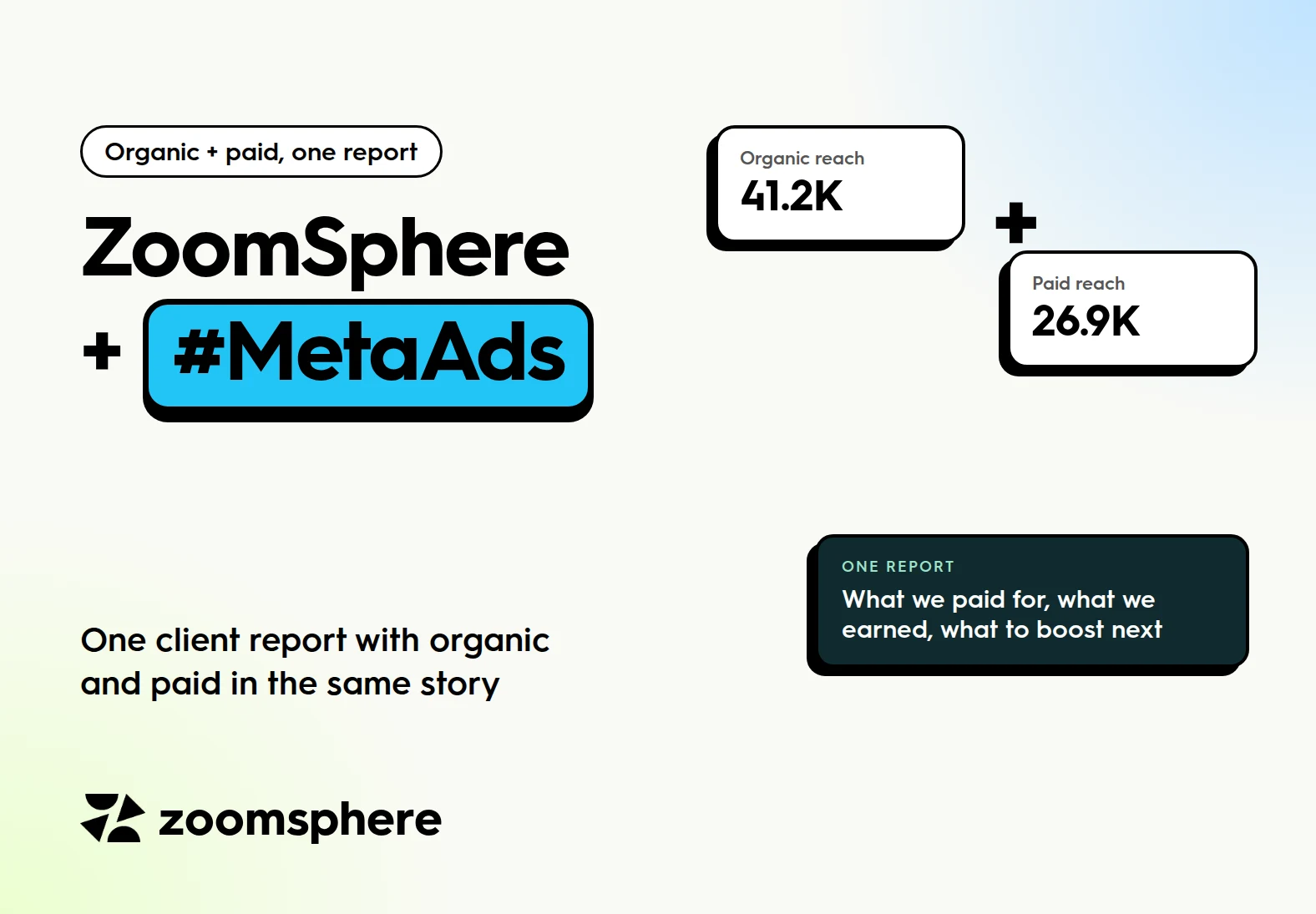
Can AI put organic and paid social into one client report? Yes. Connect the ZoomSphere MCP for organic posts, channels and the content calendar, and Meta's own ads connector for campaigns, spend and results, in the same Claude project. Then one prompt builds one report that answers what the client really asks: what did we earn, what did we pay for, and what should we boost next.
Key facts
- Two connectors, one chat: ZoomSphere brings organic performance and the calendar, Meta's ads connector brings campaigns, spend, cost per result and benchmarks.
- Seven analyses only the combination can answer, each with a copyable prompt and the report slide it produces.
- The slide clients forward: what organic reach would have cost at this month's paid price.
- Boost candidates on autopilot: organic posts that already beat your ads and were never promoted.
- Read-only by instruction: Meta's connector can also draft campaigns, so tell the reporting project never to create or change ads.
{{form-component}}
This guide builds on your first AI client report, step by step. If you have not set up a client project yet, start there, then come back to add the paid side.
Why organic and paid belong in one report
Clients do not think in channels. They think in money and results: "We spent 600 euros on ads this month. Was it worth it, and did the posts we did not pay for do anything?" Answering that with two separate reports, one from the social media tool and one from Ads Manager, leaves the client to connect the dots. Most never do.
When the agent reads both sources in the same chat, it can tell one story: which weeks paid reach carried the account, which organic posts grew on their own, and where the next euro should go.
What each connector brings
| ZoomSphere MCP | Meta's ads connector |
|---|---|
| Organic post analytics: reach, interactions, saves, shares, clicks | Campaigns, ad sets and ads with spend and results |
| Channel analytics, including organic and paid reach of the page | Cost per result, cost per click, CPM and ROAS where tracked |
| Content pillars and tags across all networks | Benchmarks against similar advertisers |
| The content calendar and approvals, including next month's plan | Alerts on unusual drops or spikes in performance, and ad previews |
Set it up in five minutes
- Connect Meta's ads connector in Claude. It appears in the connector directory as Facebook Ads, by Meta. Sign in with the Facebook account that has access to your clients' ad accounts.
- Open the client's project from your reporting setup and add one paragraph to the project instructions:
Project instructions
Paid data for this client is in the Meta ad account "[Client ad account name]". Use only this ad account. This project is for reporting only: never create, edit, pause or activate campaigns, ad sets or ads.
The second sentence matters. Meta's connector can also prepare campaigns and ads, and a reporting project should never touch live budgets.
Seven analyses only the combination can answer
Each one comes with the prompt and the report slide it produces. All slides show example data.
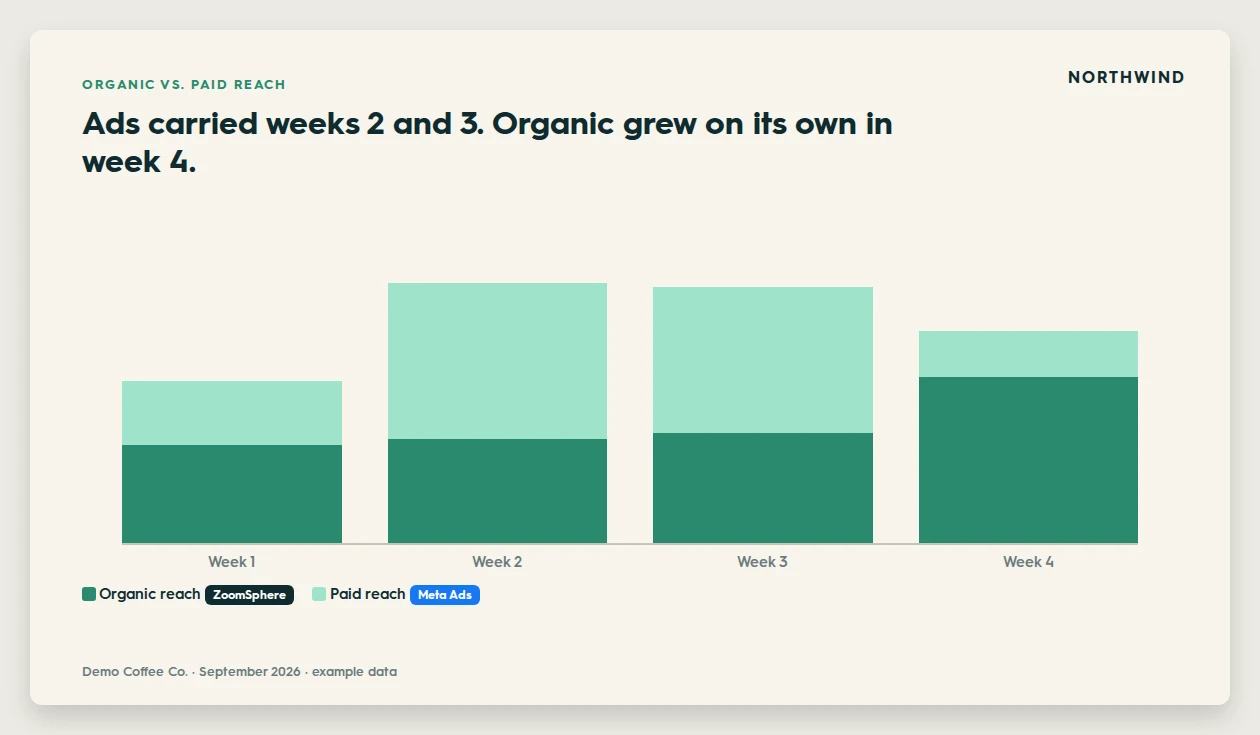
1. Organic vs. paid reach, week by week
The first question of every combined report: which part of the month did the ads carry, and which grew on its own?
Prompt 1
For [September 2026], show organic reach from ZoomSphere and paid reach from the Meta ad account, week by week, as a stacked bar chart. In one sentence, say which weeks were carried by ads and which grew on their own.
2. What did we get for the money
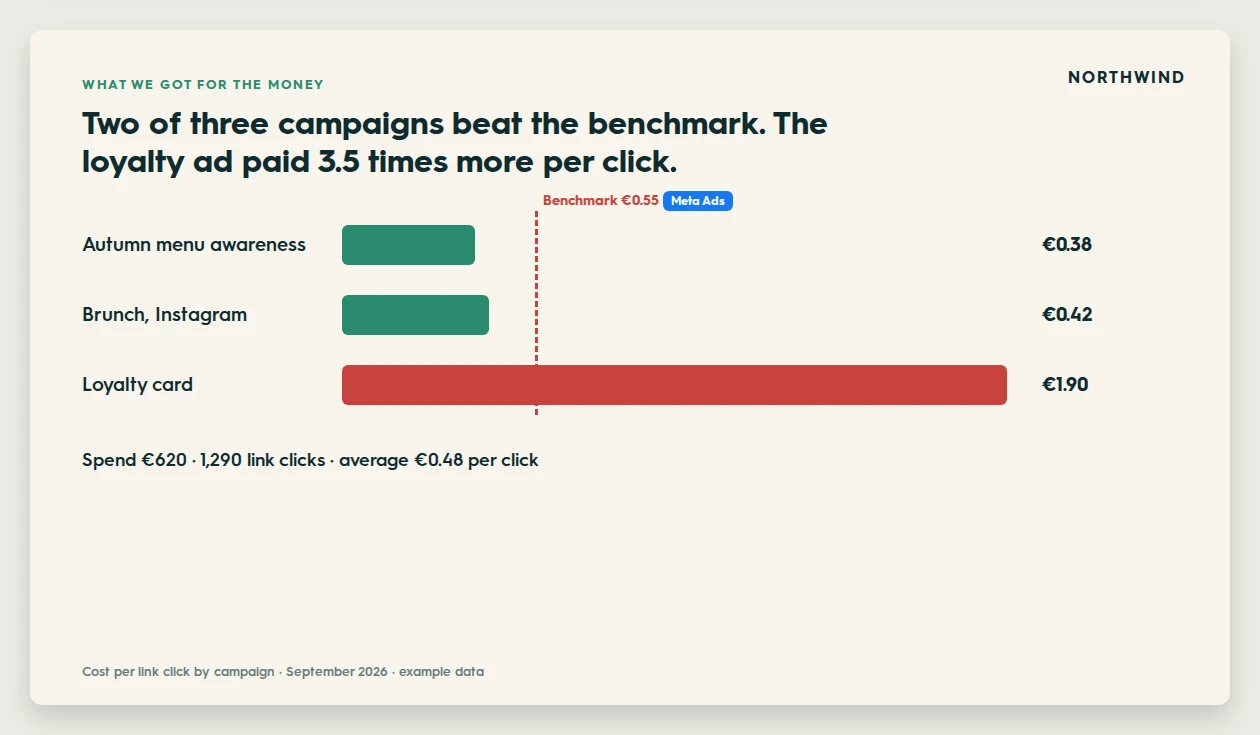
Spend and cost per result from Meta, set against Meta's own benchmark for similar advertisers, so the client sees which campaigns paid off.
Prompt 2
List every campaign that ran in [September] with spend, results and cost per result. Compare the cost per result with Meta's benchmark for similar advertisers, show it as one bar per campaign with the benchmark as a line, and say plainly which campaigns paid off.
3. Boost candidates
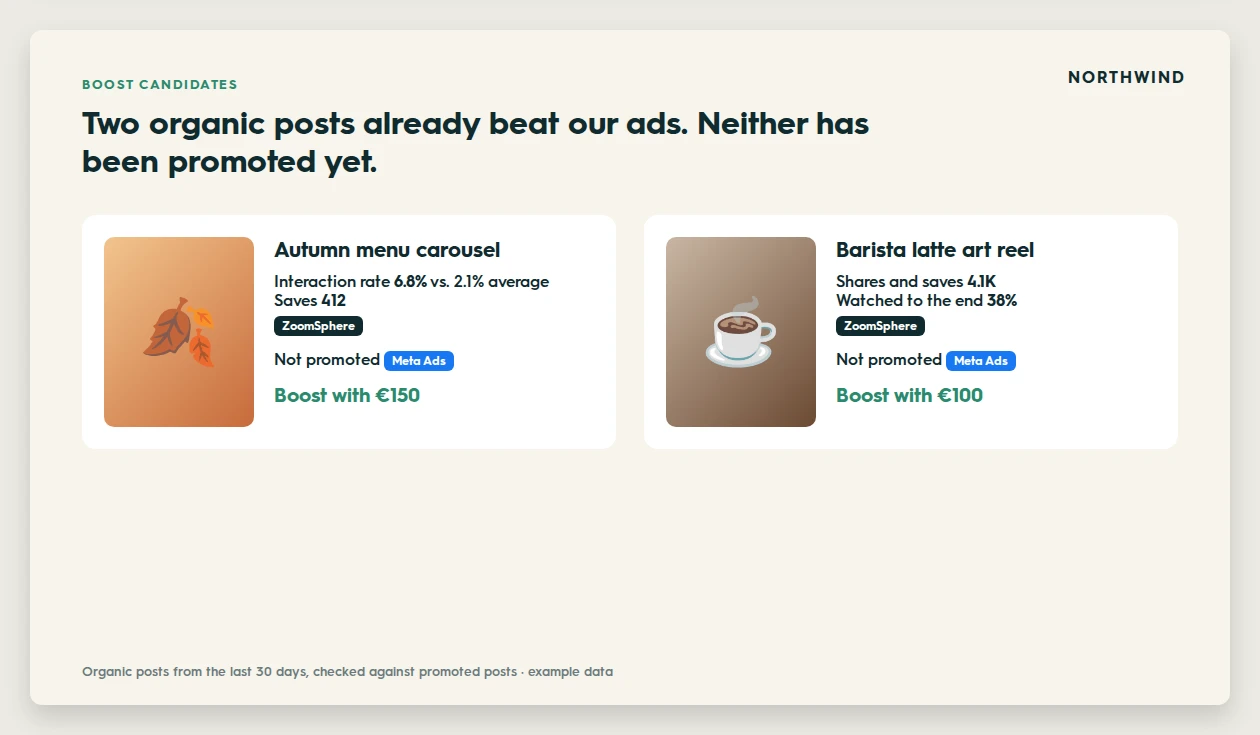
ZoomSphere knows which organic posts perform, Meta knows which posts were already promoted. Together they show where paid budget would work hardest.
Prompt 3
Find the 5 organic posts from the last 30 days in ZoomSphere with the highest interaction rate and saves. Check which of them were already promoted in the Meta ad account. For the rest, suggest which 2 are worth boosting and a starting budget for each, and show them as cards with the picture and the numbers.
4. Why did paid results drop
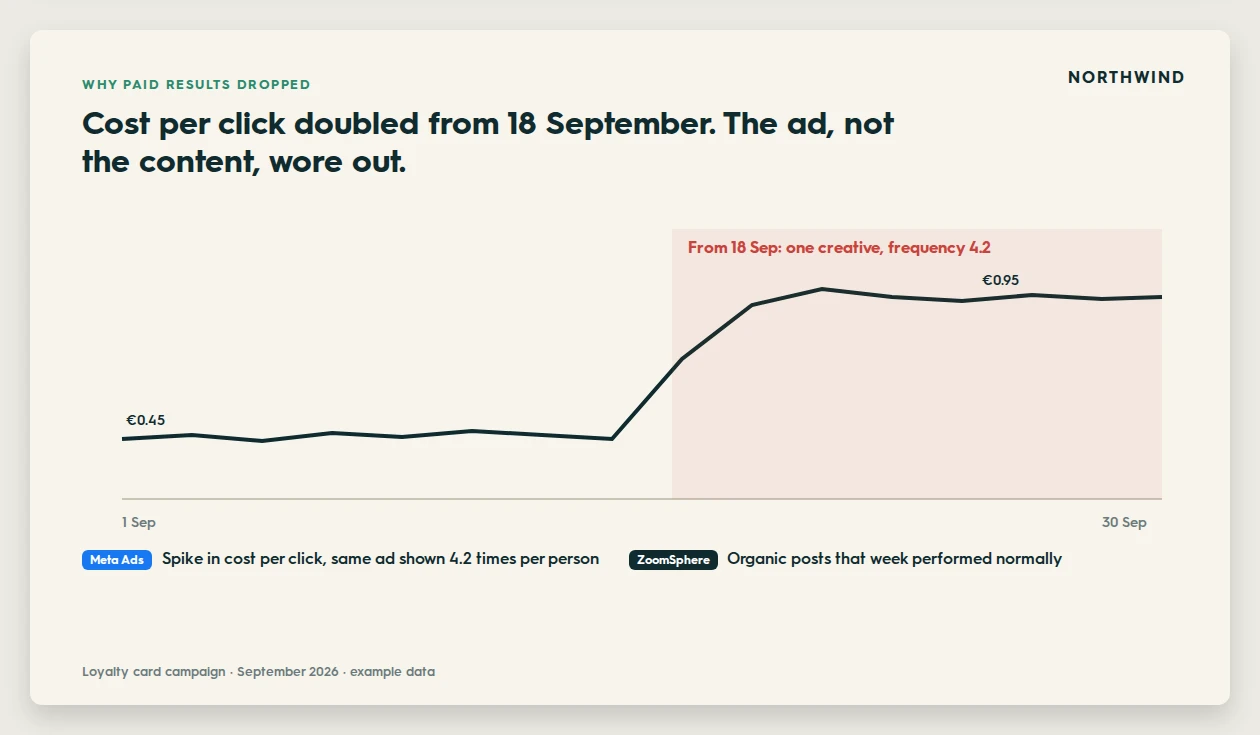
When cost per click jumps, the client asks whether the content got worse. Checking both sources answers it in one slide.
Prompt 4
Check the Meta ad account for unusual drops or spikes this month. For each one, look at how organic posts in ZoomSphere performed in the same days and tell me whether the cause is more likely the ads or the content. Show the daily cost per click as a line with the problem period marked.
5. What works in paid vs. what works in organic
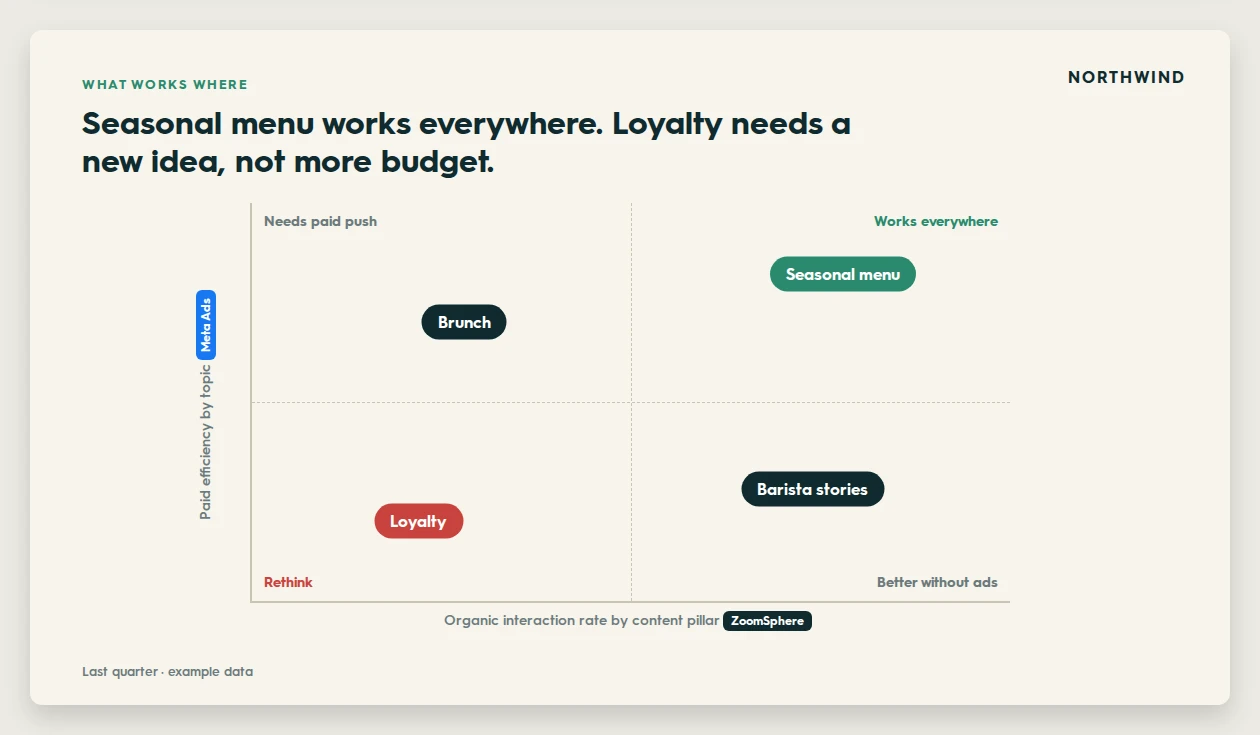
Content pillars from ZoomSphere against ad topics from Meta show where to spend and where organic does the job alone.
Prompt 5
Group last quarter's organic posts by content pillar in ZoomSphere and the ads by topic in Meta. Place each topic on a 2x2 matrix: organic interaction rate across, paid efficiency up. Name the quadrants: works everywhere, needs a paid push, better without ads, rethink.
6. Budget pacing against the plan
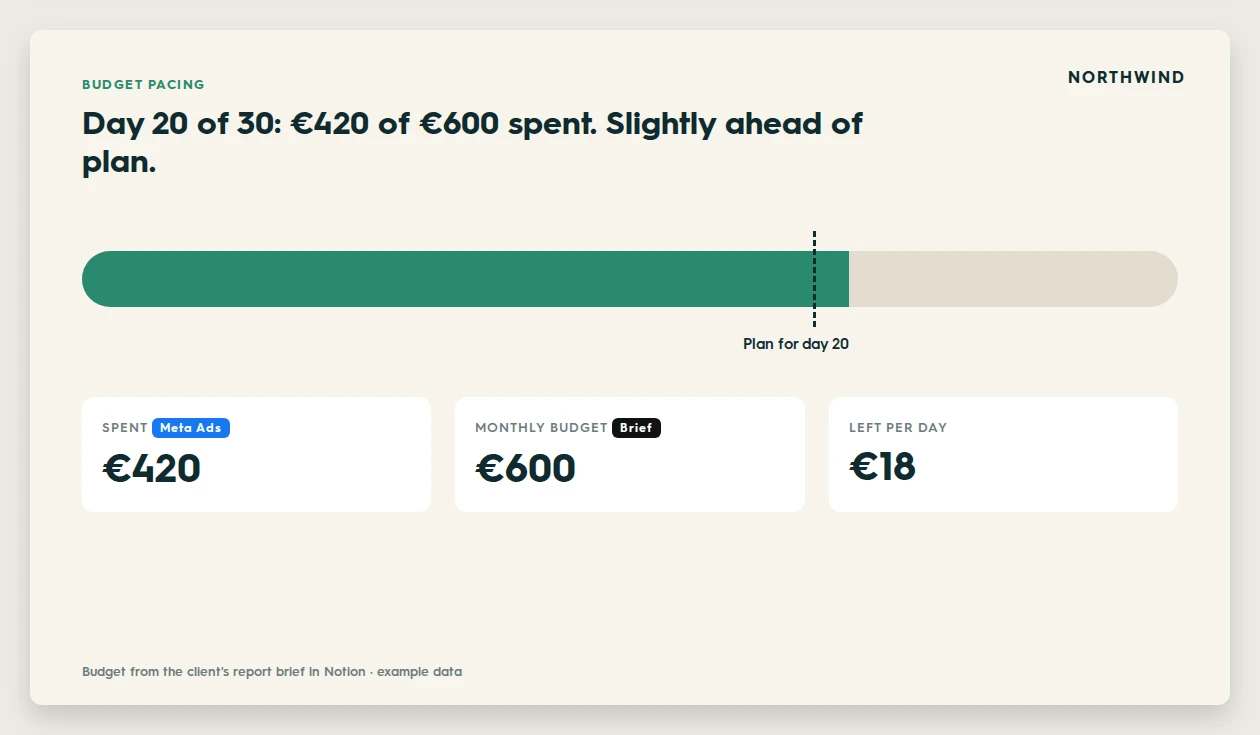
The planned budget sits in your report brief, the actual spend in Meta. Mid-month, the agent tells you whether to slow down or push.
Prompt 6
Read the monthly ad budget from the client's report brief. Compare it with what the Meta ad account has spent so far this month and tell me if we are on pace, over or under, with the amount left per day until the end of the month.
7. What organic reach is worth in money
The slide clients forward to their boss. Organic reach from ZoomSphere, priced at the cost of reach the client actually paid for in Meta that month.
Prompt 7
Take total organic reach for [September] from ZoomSphere. From the Meta ad account, calculate what we paid per 1,000 people reached in the same month. Multiply the two and show what our organic reach would have cost if we had bought it, as one simple equation slide.
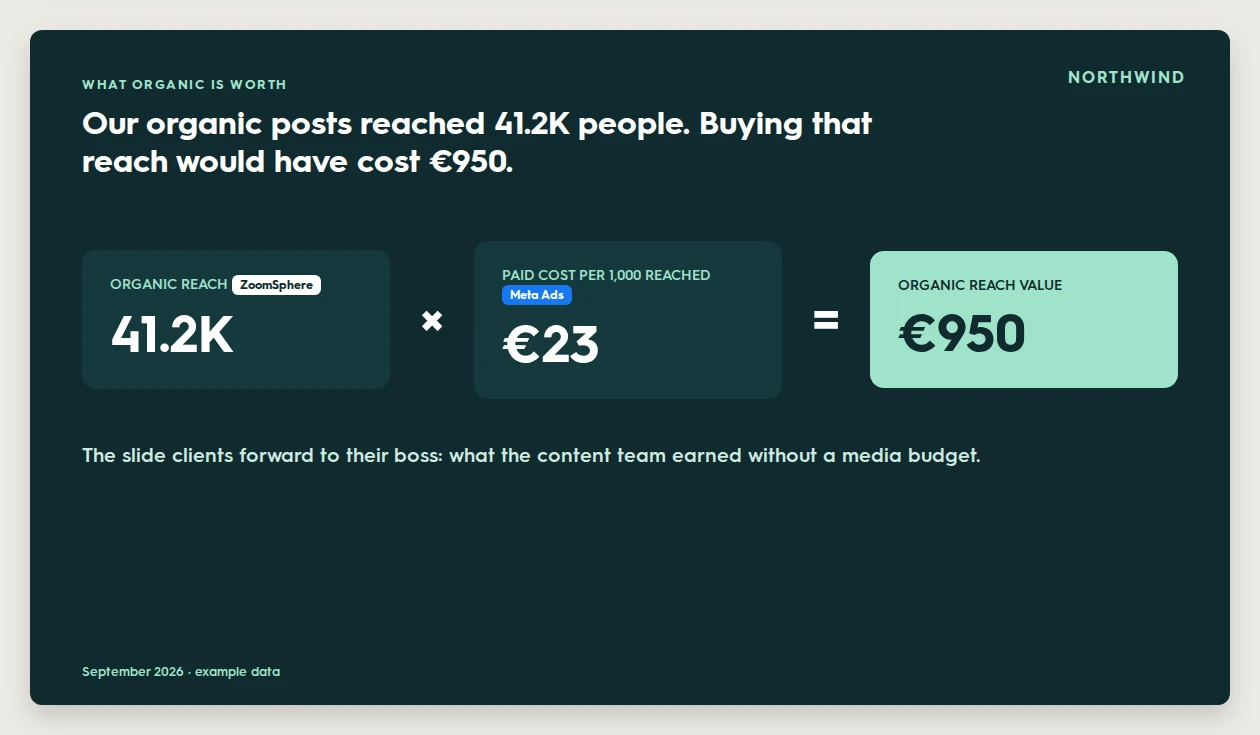
Present it as an estimate, not as revenue: it shows what the content team earned without a media budget, at today's prices.
{{cta-component}}
Put it into the monthly report
Add a paid section to your report brief, and the monthly one-sentence prompt builds it every time:
Report brief: paid section
Paid section, after the top posts: - Organic vs. paid reach by week, with one sentence on what carried the month - Cost per result per campaign against Meta's benchmark - Boost candidates: organic winners not yet promoted - What organic reach is worth at this month's paid price Always state the currency on every money slide.
Keep clients separate on the paid side too
- Name one ad account per client project. Agencies often see dozens of ad accounts through one Facebook login, so "Use only this ad account" is as important as "Use only this workspace".
- Keep the read-only line in every reporting project. Campaign changes belong in Ads Manager or in a separate project with its own approval step.
- Check the currency. Ad accounts can report in different currencies, so the brief asks the agent to state it on every money slide.
Frequently asked questions
Can Claude read Meta ads data and ZoomSphere data in the same chat?
Yes. Claude can use several connectors in one conversation. With the ZoomSphere MCP and Meta's ads connector both connected, one prompt can combine organic and paid data into one report.
Is there an official Meta Ads MCP?
Yes. Meta provides its own ads connector for AI assistants. In Claude it appears in the connector directory as Facebook Ads.
Can the AI change my clients' ad campaigns?
Meta's connector can prepare campaigns and ads as drafts, so a reporting project should say clearly that it must never create, edit, pause or activate anything. Keep campaign changes in Ads Manager.
How do I show the client what organic content is worth?
Multiply organic reach from ZoomSphere by what the client paid per 1,000 people reached in Meta in the same month. It is an estimate of what that reach would have cost to buy, not revenue, and clients understand it at a glance.
How do I find posts worth boosting?
Ask the agent to rank organic posts by interaction rate and saves in ZoomSphere, check which ones were already promoted in Meta, and suggest the best remaining candidates with a starting budget.
{{form-component}}








Heading 1
Heading 2
Heading 3
Heading 4
Heading 5
Heading 6
Lorem ipsum dolor sit amet, consectetur adipiscing elit, sed do eiusmod tempor incididunt ut labore et dolore magna aliqua. Ut enim ad minim veniam, quis nostrud exercitation ullamco laboris nisi ut aliquip ex ea commodo consequat. Duis aute irure dolor in reprehenderit in voluptate velit esse cillum dolore eu fugiat nulla pariatur.
Block quote
Ordered list

- Item 1
- Item 2
- Item 3
Unordered list
- Item A
- Item B
- Item C
Bold text
Emphasis
Superscript
Subscript


Recommended for you

%20(1).webp)
.webp)