


20 Questions Your AI Can Answer About Your Social Media

What can AI actually tell me about my social media? Far more than a summary of likes. Once your AI assistant is connected to your ZoomSphere workspace through the MCP, it reads your real posts, analytics, calendar and approvals, and answers the questions you would otherwise spend an afternoon in spreadsheets on: why reach dropped, which topic you have worn out, which posts deserve a second life, where client approvals get stuck. Here are 20 of those questions, grouped by what they help you decide, each with a prompt you can copy. Six of them come with a real example of what the answer looks like in Claude.
{{form-component}}
Key facts
- 20 questions in five groups: performance, content, repurposing, audience and timing, and the agency workflow with clients and approvals.
- Every answer is read live from your own ZoomSphere data through the MCP. No exports, no screenshots of dashboards, no copy and paste.
- Works in Claude, ChatGPT and any MCP client. The prompts are plain English.
- The best answers come from three habits: name the period, give a benchmark from your own history, and ask for an action, not just a description.
- The AI can draft posts from its findings, but they land as Private Drafts. A person still approves before anything goes live.
Before you ask: one connection, three habits
Connect ZoomSphere to your AI assistant once. In Claude it is one click from the connector directory, in ChatGPT and other clients it is a custom connector; both paths are on our MCP page. From then on the assistant can read the workspaces your login can see.
Then three habits make the difference between a vague summary and an answer you can act on:
- Name the period. "September" or "the last 90 days", never "recently". The AI pulls exactly that window and compares it with the one before.
- Give it a benchmark from your own history. Your median, last month, the same month last year. A number with nothing to compare it to is decoration.
- Ask for an action. End every question with "and tell me what to do about it". That turns analysis into a decision.
Performance: what actually happened
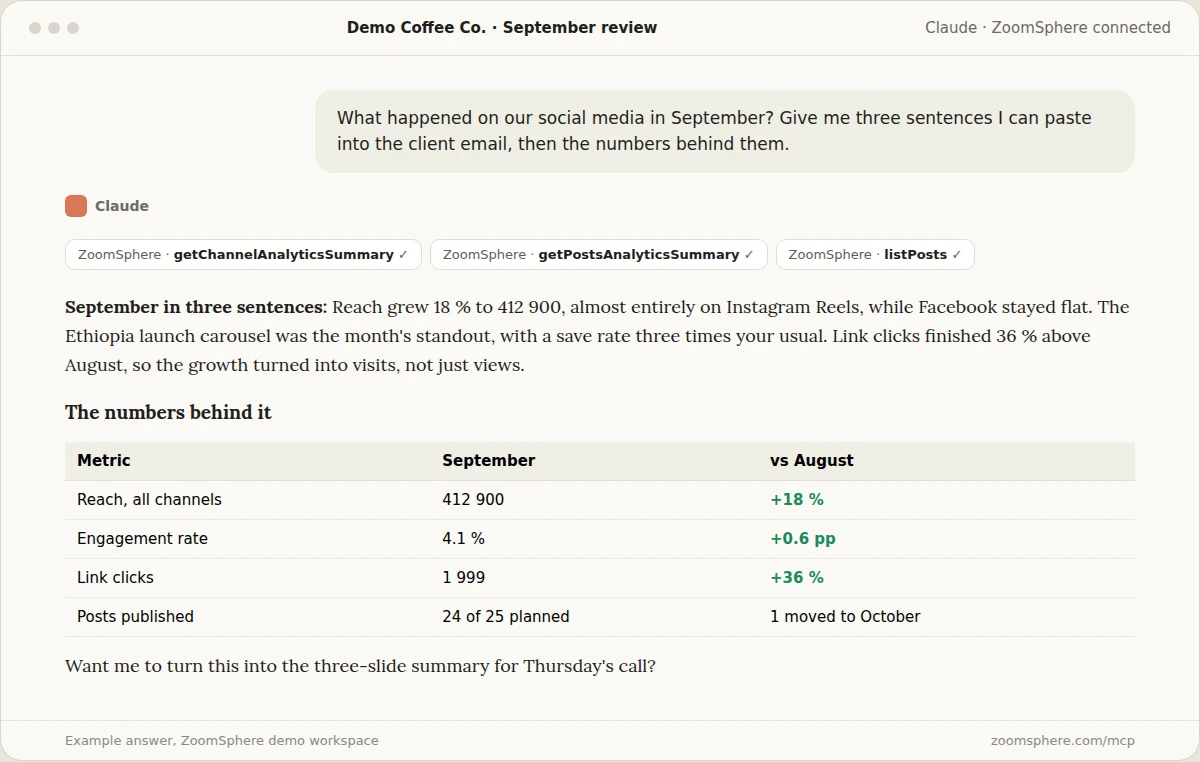
1. What happened this month, in three sentences?
The question every client email starts with. Asking for exactly three sentences forces the AI to pick what matters instead of listing every metric it can find.
Prompt 1
What happened on our social media in [month]? Give me three sentences I can paste into the client email, then a small table with the numbers behind them, compared with the previous month. Name the one post that made the biggest difference.
2. Which posts beat our own average, and what do they have in common?
Top posts lists are easy. The useful part is the pattern behind them: format, length, topic, time, whether a person was on camera.
Prompt 2
List the posts from the last 90 days whose engagement rate beat our own median by at least 50 %. Then tell me what they have in common: format, topic, caption length, posting time, whether a person appears in the visual. Finish with three rules for next month based on that pattern.
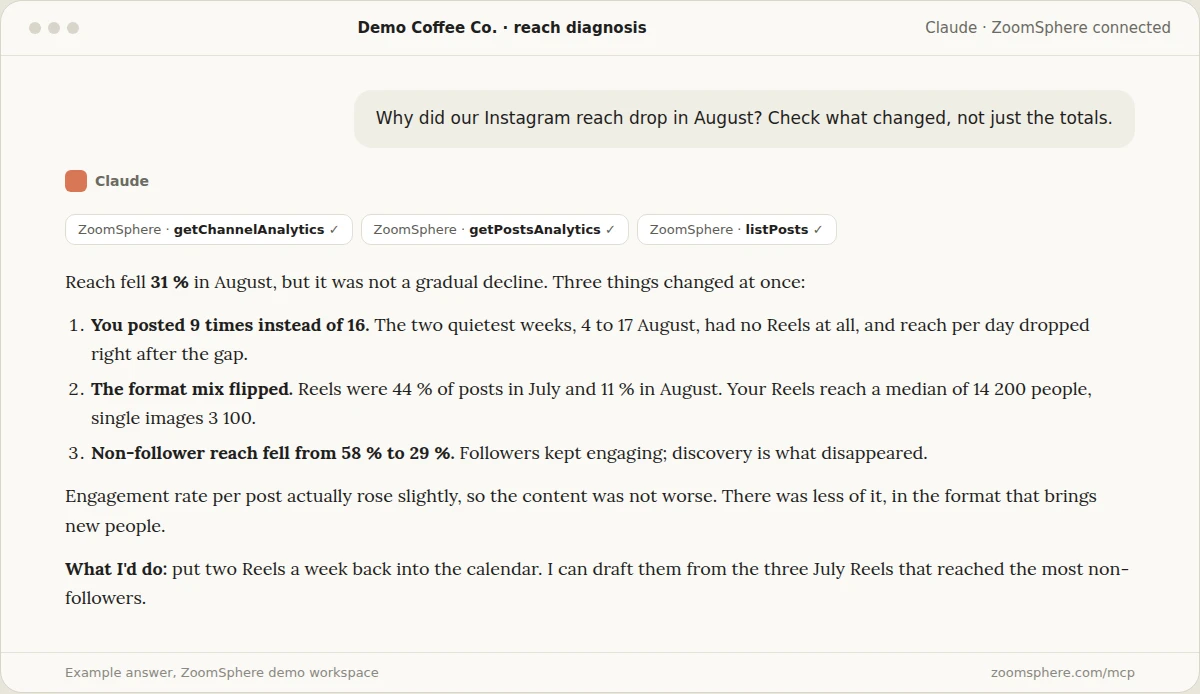
3. Why did reach drop?
The question clients ask most nervously. A good answer separates what you did (fewer posts, a different format mix) from what happened to you, and checks which audience disappeared.
Prompt 3
Why did our [network] reach drop in [month] compared with the month before? Check what changed, not just the totals: number of posts, format mix, posting gaps, reach to followers versus non-followers, and engagement per post. Rank the causes by how much they explain, then tell me what to change.
4. Which channel is worth the effort, and which is not?
Every channel costs time. This question puts the effort (posts, formats, production) next to the result, so the conversation about dropping or doubling a channel starts from data.
Prompt 4
For the last quarter, compare our channels side by side: number of posts, share of video, reach, reach to non-followers, engagement rate and link clicks. Calculate results per post for each channel. Which channel gives the most for the effort, which gives the least, and what would you do with the time we spend on the weakest one?
Content: what to make next
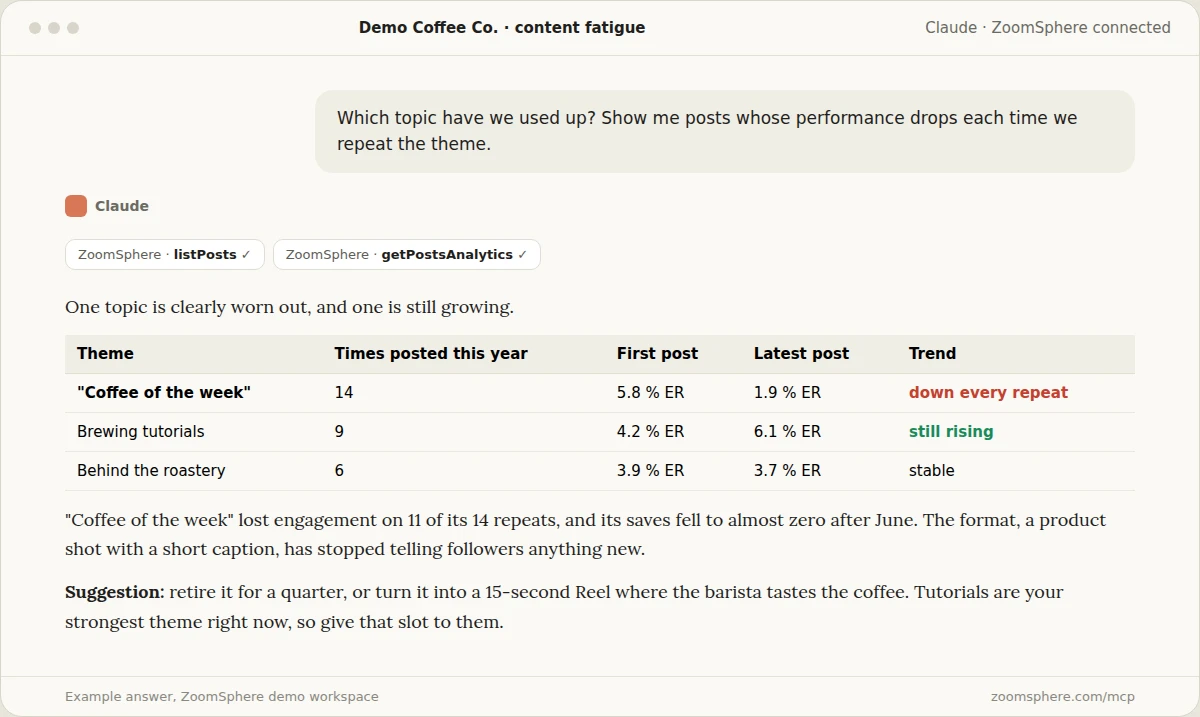
5. Which topic have we used up?
Recurring formats feel safe and quietly die. This question finds the themes whose performance drops with every repeat, before your client notices it first.
Prompt 5
Group this year's posts into recurring themes. For each theme posted at least five times, show how engagement rate and saves developed from the first post to the latest. Which theme have we used up, which is still growing, and what should replace the worn-out one?
6. What worked last year that we have not posted this quarter?
Good ideas get forgotten when the team or the season changes. The AI remembers everything you published.
Prompt 6
Find the topics and formats that performed above our median in the same quarter last year but have not appeared at all this quarter. For each, show the best example from last year and suggest how to bring it back in a fresh way.
7. Which content pillar earns its slots?
Pillars get equal space in the plan and very unequal results. Comparing the share of posts with the share of results shows which pillar deserves more of the calendar.
Prompt 7
For the last 90 days, compare our content pillars: what share of posts each pillar took and what share of total interactions and saves it earned. Show the ratio of result to effort for each pillar and suggest how to split next month's slots.
8. Which format is winning this month?
Reels, carousels, single images, text posts: the balance shifts every few months. This question catches the shift while it is still useful.
Prompt 8
Compare engagement rate and reach to non-followers by post type (Reel, carousel, single image, video, text) for this month and last month. Which format gained the most, which lost the most, and what format mix do you recommend for next month?
{{cta-component}}
Repurposing: get more from what already worked
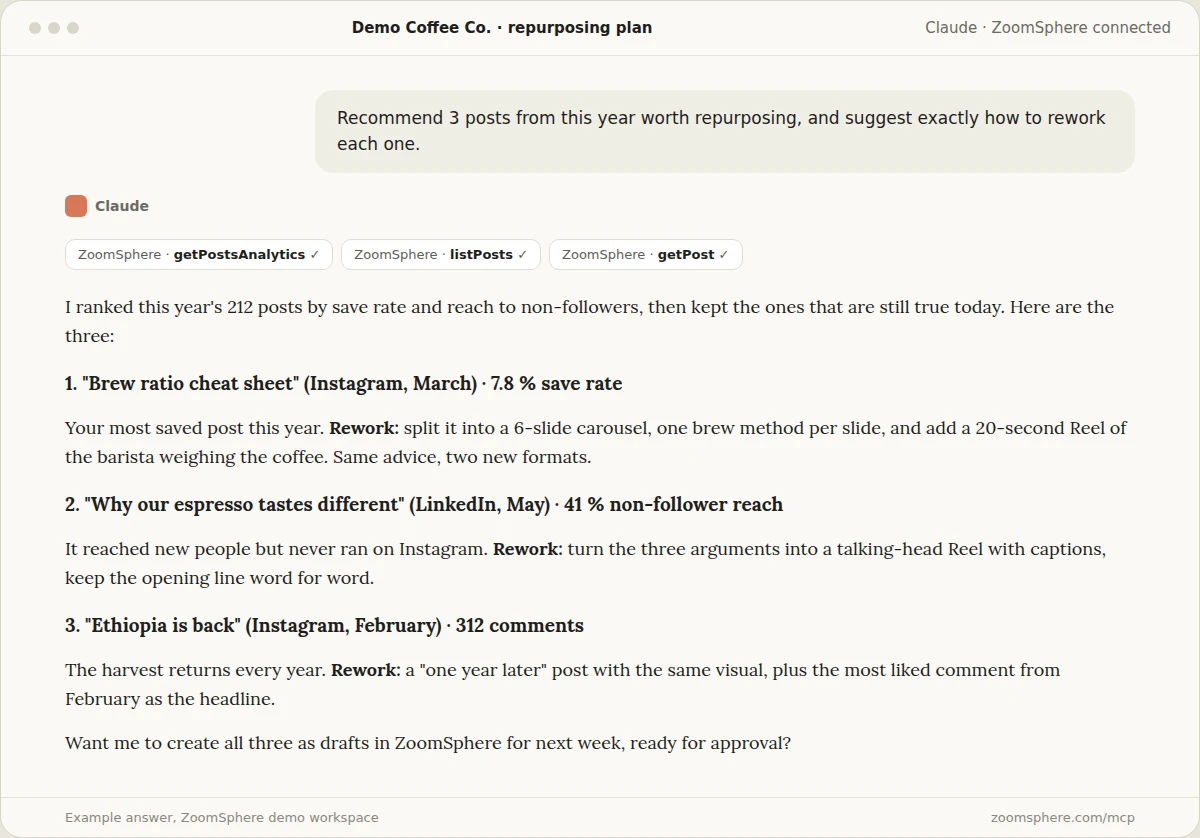
9. Which three posts from this year should we repurpose, and how?
The cheapest good content is the content you already proved. The trick is choosing by the right signal: saves and reach to new people, not raw likes.
Prompt 9
Recommend 3 posts from this year worth repurposing. Rank by save rate and reach to non-followers, and skip anything that is no longer true. For each one, say why it worked and exactly how to rework it: new format, new network, new opening line. Then offer to create them as drafts.
10. Which posts had lots of saves but little reach?
A high save rate with low reach means the content was useful and the algorithm simply did not show it. These are the safest posts to boost or post again.
Prompt 10
Find posts from the last six months with a save rate above our median but reach below our median. These are useful posts the algorithm under-delivered. Rank them and tell me which to boost with a small budget and which to repost in a new format.
11. Turn our best LinkedIn post into an Instagram carousel
Here the AI stops analysing and starts working. It reads the original, rewrites it for the new format, and leaves the result in the calendar for approval.
Prompt 11
Take our best performing LinkedIn post from the last quarter. Rewrite it as a 6-slide Instagram carousel: a hook on slide 1, one idea per slide with at most 20 words, a call to action on the last slide, and a caption in our usual tone. Create it in ZoomSphere as a Private Draft for next Tuesday at 11:00 and send me the link.
12. Which evergreen posts can we republish?
Some posts are as true today as the day they went out, and most of your current followers never saw them. The AI can find them and check they have not been reposted already.
Prompt 12
Find posts older than six months that performed above our median and contain no dates, prices, seasonal references or expired offers. Check they have not been reposted since. List the five best candidates with a suggested new caption for each.
Audience and timing
13. When should we post next month?
Generic best-time-to-post articles describe someone else's audience. This answer is built from yours.
Prompt 13
Using our posts from the last 90 days, find the days and time windows with the highest median reach for each network. Ignore slots with fewer than three posts. Give me the three best slots per network and tell me which of our current regular slots to move.
14. Are we reaching new people, or the same fans?
Growth depends on reach outside your followers. This question shows which channel actually brings new people in.
Prompt 14
For [month], split our reach on every channel into followers and non-followers. Which channel reached the most new people, which mostly talked to existing fans, and which three posts brought in the most new people? What do those three have in common?
15. Who actually follows us on LinkedIn?
For B2B clients, the question is not how many followers, but whether they can sign a contract.
Prompt 15
Break down our LinkedIn followers by seniority and job function. What share are decision makers (director level and above), how did that share change over the last six months, and which of our posts attracted the most senior followers?
16. What does our audience save, and what do they share?
Saves and shares are different signals. Saves mean "useful to me", shares mean "says something about me". Knowing which posts get which tells you what to make for each goal.
Prompt 16
For the last 90 days, list our five most saved posts and our five most shared posts, each relative to reach. Describe what the saved posts have in common and what the shared posts have in common, and suggest one post idea for each kind.
Workflow, approvals and the client
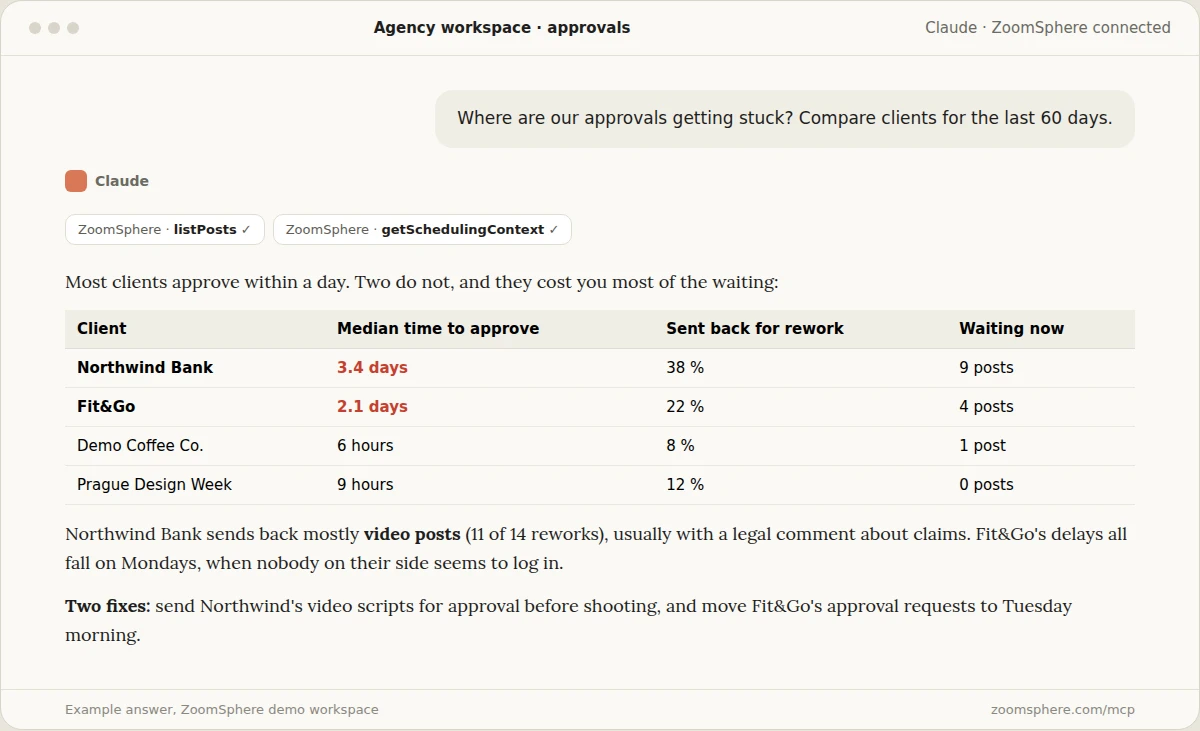
17. Where are our approvals getting stuck?
Analytics tools look at results. ZoomSphere also knows how the work moved: who approved what, how long it waited and what came back for rework. That makes questions like this one possible.
Prompt 17
Compare our clients for the last 60 days: median time from sending a post for approval to approval, the share of posts sent back for rework, and how many posts are waiting right now. Which clients cost us the most waiting, what kind of posts get sent back, and what two changes would speed things up?
18. What is planned for next week, and where are the gaps?
The Monday morning check, done in one sentence: empty days, missing visuals, posts still waiting for approval.
Prompt 18
Show me everything planned for next week in the [client] workspace, by day and network. Flag days with nothing planned, posts without a visual, posts still waiting for approval and Ideas that have no post yet. Suggest how to fill each gap.
19. Which client needs attention this month?
For agencies with many workspaces, the hardest part is noticing the account that is quietly slipping. One question across all clients catches it early.
Prompt 19
Go through all my client workspaces and compare this month with each client's own six-month median: reach, engagement rate, posts published against plan, and approval delays. List the clients that are slipping on two or more of these, with the likely reason and one action for each.
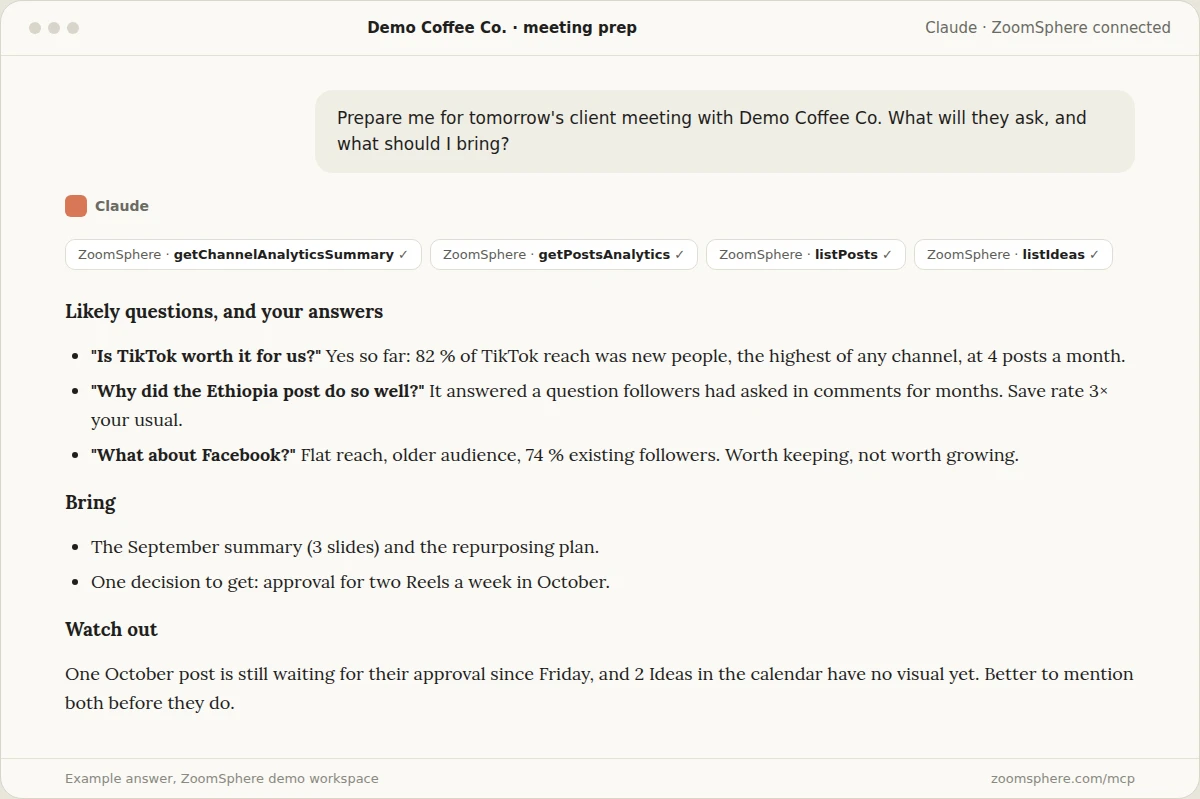
20. Prepare me for tomorrow's client meeting
The question that saves the most stress. The AI anticipates what the client will ask, prepares the answers from data, and flags what you should mention before they do.
Prompt 20
Prepare me for tomorrow's meeting with [client]. Based on the last month of data and what is in the calendar, list the three questions they are most likely to ask with a short answer to each, what I should bring, one decision I should ask them for, and anything open (unapproved posts, gaps, drops) I should mention before they do.
What your AI cannot answer (yet)
The answers are only as good as the data behind them, so it helps to know the edges:
- Exact algorithm causes. The AI can show what changed in your content and audience, but nobody outside the platforms knows precisely why a single post was or was not shown.
- Data that is not in ZoomSphere. Sales, website conversions or CRM data need their own connection. Connect them next to ZoomSphere and you can ask questions across both.
- Channels that are not connected. If a network is missing from your workspace, ask the AI to say so rather than leave it out silently. All the prompts above work best with that instruction.
- Taste. The AI can tell you which post worked and suggest the next one. Whether it fits the brand is still your call, which is exactly why its drafts wait for approval.
Turn the best questions into a routine
Once a question proves useful, stop asking it by hand. Questions 1, 18 and 19 make excellent scheduled tasks: a summary every first Monday, a gap check every Friday, a client health check once a month. Our guide to putting your social media on autopilot with scheduled AI tasks shows how to set them up.
When the answer needs to become a slide, our article on report charts worth sending has the prompts that turn these numbers into a client deck. And more than 30 ready prompts live in the ZoomSphere MCP prompt library.
Frequently asked questions
Which AI assistants can answer these questions?
Any assistant that supports MCP connectors: Claude, ChatGPT and others. Connect ZoomSphere once and the same prompts work everywhere.
Does the AI see all my clients' data?
It sees the workspaces your ZoomSphere login can access, through the MCP connection under your own account. If you only want it to look at one client, name the workspace in the prompt.
Are the example answers real?
They come from the ZoomSphere demo workspace with fictional clients, so the numbers are illustrative. The questions, prompts and the shape of the answers are exactly what you get on your own data.
Can the AI publish posts based on its answers?
It can create drafts, and we recommend keeping it that way. Posts land as Private Drafts in your calendar and go through your normal approval before anything is published.
How far back can the AI look?
As far back as your analytics in ZoomSphere go. For comparisons, ask for a specific window, such as the last 90 days or the same month last year, so the answer stays precise.
Do I need to know which metrics to ask for?
No. Ask the question in plain language. The AI chooses the metrics from what ZoomSphere offers and tells you which ones it used.
{{form-component}}








Heading 1
Heading 2
Heading 3
Heading 4
Heading 5
Heading 6
Lorem ipsum dolor sit amet, consectetur adipiscing elit, sed do eiusmod tempor incididunt ut labore et dolore magna aliqua. Ut enim ad minim veniam, quis nostrud exercitation ullamco laboris nisi ut aliquip ex ea commodo consequat. Duis aute irure dolor in reprehenderit in voluptate velit esse cillum dolore eu fugiat nulla pariatur.
Block quote
Ordered list

- Item 1
- Item 2
- Item 3
Unordered list
- Item A
- Item B
- Item C
Bold text
Emphasis
Superscript
Subscript


Recommended for you
%20(1).webp)
.webp)
%20(1).webp)