ZoomSphere badges › MCP Builder

Open now · for a person or a company

Built something on the ZoomSphere MCP? Get it #Verified

The MCP Builder badge is for people and companies with a working automation on the ZoomSphere MCP, running in a real workspace. A person reviews it, your profile becomes the showcase, and anyone can check it is real.
Free · Reviewed within 10 working days · Valid 12 months · No public write-up needed
ZoomSphere MCP Builder badge 2026
Who it is for

Three kinds of #Builders

You do not have to be a developer. If something you built talks to ZoomSphere through the MCP and has been doing real work for a month, this is your badge.

🧑‍💻

Marketers and freelancers

You automated your own routine: a Monday report, drafts from your content pillars, a weekly status for a client. Runs in Claude, ChatGPT or any MCP client.

🏢

Agencies

A build that runs across client workspaces: analytics summaries per client, drafting into an approval status, a dashboard the account team opens every morning.

🛠️

Developers and no-code builders

Apps and flows for other people: an n8n or Zapier workflow, a Lovable app, a scheduled agent, a custom tool that uses ZoomSphere MCP tools under the hood.

The criteria

Three things we #Check

Every criterion below says what it means, how we verify it and what passes. If you can tick all three, you already qualify.

1

A working build, running for 30 days or more in a real workspace

A scheduled task, a dashboard, an app or an agent workflow that calls ZoomSphere MCP tools and has been doing real work, with real posts, for at least a month. Not a demo in an empty test workspace.

How we checkWith your permission we look at the workspace: the posts, ideas or reports the build created and their dates. On the walkthrough we ask you to run it.
Passes
  • Weekly analytics summary sent to a client every Monday since June
  • Draft posts created from an RSS feed into a Waiting-for-approval status
  • A dashboard the team opens daily, fed by getPostsAnalyticsSummary
Does not pass
  • A one-off chat session that created a few posts
  • A build that ran for a week and was switched off
  • A sandbox workspace with no real content
2

You can describe it: what it does, which tools, what broke

In the application you describe the build in your own words: the trigger, the MCP tools it calls, the prompts or the flow, and what went wrong along the way. Nothing has to be published anywhere first; after the review we write your public profile from it together.

How we checkWe read the description, then do a 20-minute walkthrough, live or recorded. We may ask to see the prompt or the flow.
Passes
  • "Reads last week via getPostsAnalytics, drafts with createPost into status X"
  • A screenshot of the flow plus a two-minute screen recording
  • An honest "it hit the request limit, so I split it per workspace"
Does not pass
  • "It uses AI to manage our social media"
  • A build you cannot show running
  • A build made for you by someone else that you cannot explain
3

A human in the loop

The build writes to a working status and leaves publishing to people. If it does publish on its own, it documents its safeguards: what it may post, how much, and who watches it.

How we checkWe look at which statuses the build writes to in the workspace and, for self-publishing builds, at the safeguards you describe.
Passes
  • Drafts land in Waiting for approval; a person schedules them
  • Client approval by email or the approval page before anything goes out
  • Auto-publishing only for one channel, capped per day, with a daily check by a named person
Does not pass
  • An agent that publishes to every client channel with nobody reading the output
  • No way to tell what the build posted and when

Self-check before you apply

  • The build has been running for at least 30 days in a workspace with real content.
  • I can name the ZoomSphere MCP tools it uses.
  • I can show it running, live or in a recording.
  • People approve before publishing, or the safeguards are written down.
  • I am fine with a public profile at zoomsphere.com/verified/my-name describing the build.

Five ticks: apply below. Four ticks: apply anyway and say which one is missing; we often say yes with a small change.

What you get

A profile that is the #Showcase

After the review we write your profile together: who you are, what the build does, which tools it uses, what broke and since when it runs. It is the page you link from proposals, LinkedIn and your email signature, and it is how anyone checks the badge is real.
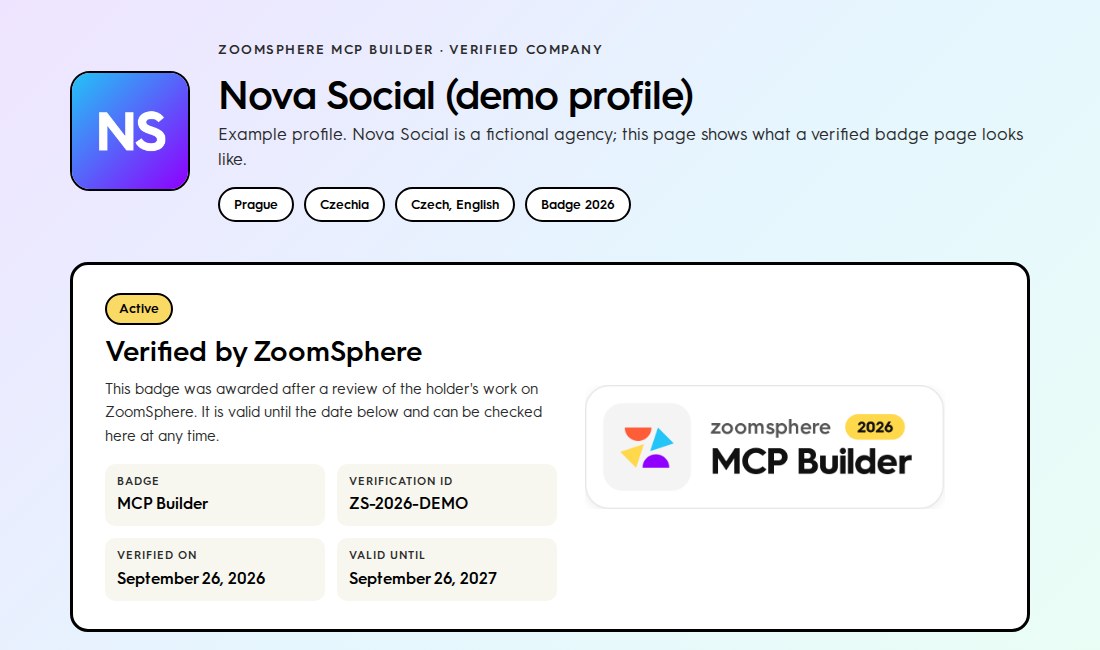
  • Public profile at zoomsphere.com/verified/your-name, listed in the badge directory
  • Badge files for light and dark backgrounds and an embed code that links to the profile
  • A feature of new holders on ZoomSphere channels and in the newsletter
  • Badge-holder role in our Discord and early access to new MCP tools
Open the demo profile
Example of a verified MCP Builder profile on zoomsphere.com
How it works

Four steps, one #Reviewer

1

Apply

Ten minutes with the form below: describe the build, add a screenshot or a short video, give us permission to look at the workspace.

2

Walkthrough

A person from ZoomSphere reads it within 10 working days and books a 20-minute call, or asks for a recording if you prefer.

3

Profile

We draft your profile from the application and the call. You approve every word before it goes live.

4

Badge

Badge files, embed code, the profile goes live. Valid 12 months; renewal is a lighter check that the build still runs.

Using the badge

Link it, do not #Restyle it

  • Always link the badge to your verification page. That is what makes it worth something.
  • Use the files as provided. No recolouring, stretching, cropping or adding your own text.
  • Remove the badge when it expires or is withdrawn; the verification page shows the status anyway.
  • A badge says we reviewed your build. It does not make you a partner, reseller or representative of ZoomSphere.
<a href="https://www.zoomsphere.com/verified/your-profile"><img src="https://cdn.prod.website-files.com/64b533c4a1aa81384b8ec501/6ab83c24274b9663fab93243_badge-mcp-builder-2026.png" alt="ZoomSphere MCP Builder 2026" width="300"></a>
Application

Apply for #MCPBuilder

Ten minutes. We reply to every application, including the ones we decline, with what was missing; you can reapply after 60 days.

Thank you! Your submission has been received!
Oops! Something went wrong while submitting the form.
FAQ

Questions builders #Ask

Does the build have to run in Claude?

No. Any MCP client counts: Claude, ChatGPT, Cursor, a local model, n8n, Zapier, Lovable, or your own app calling the ZoomSphere MCP server.

I built it for a client. Who applies, me or the client?

Either. The badge goes to whoever operates the build: you as a person, or the company whose workspace it runs in. Both can hold it for the same build.

My build publishes on its own. Can it still qualify?

Yes, if the safeguards are written down: which channels it may post to, how much, and who checks it. We look for a human who would notice if it went wrong.

Does the build have to be public or open source?

No. Your prompts and code stay yours. The profile describes what the build does and which tools it uses, at the level of detail you approve.

My integration uses the ZoomSphere API, not the MCP.

Then this is not the right badge; MCP Builder is specifically about the MCP. API integrations will count towards the Agency badge once it opens. Join the waiting list.

Do I have to publish anything before applying?

No. Describe the build in the form and walk us through it on the call. The public profile is written together after the review: see a demo.

What happens after 12 months?

We send a reminder a month before the badge expires and check that the build still runs. The year on the badge changes with renewal.

Show the build. Pass the #Review

Ten minutes to apply, one 20-minute walkthrough, a badge and a profile anyone can verify.