


#ZoomSphere or Buffer
Is Buffer's simplicity actually holding your team back? We analyzed real user reviews from G2, Capterra, and Trustpilot, combined with hands-on feature comparisons, to help you decide whether Buffer or ZoomSphere is the right fit for agencies and growing teams.
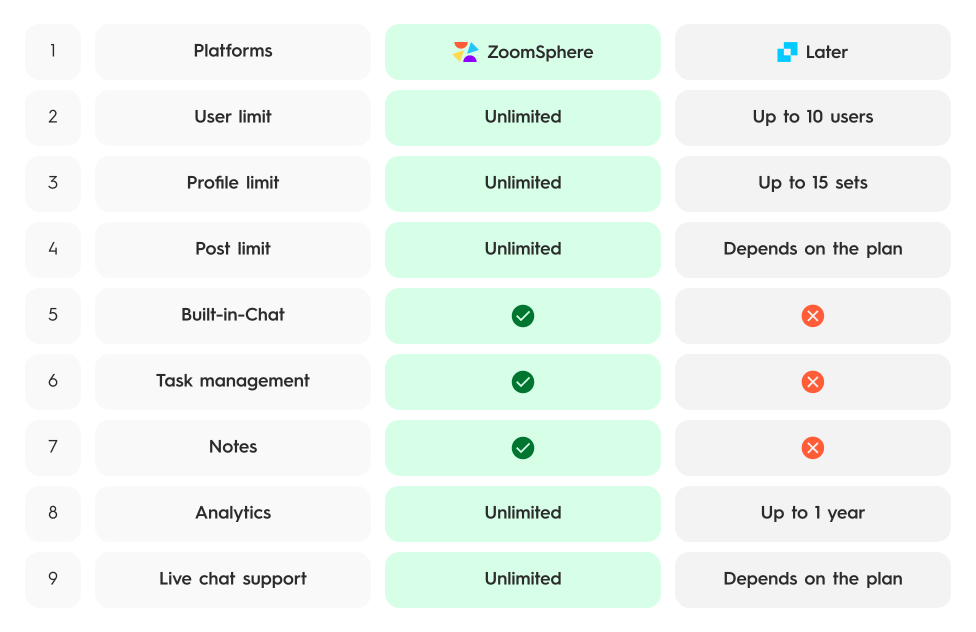


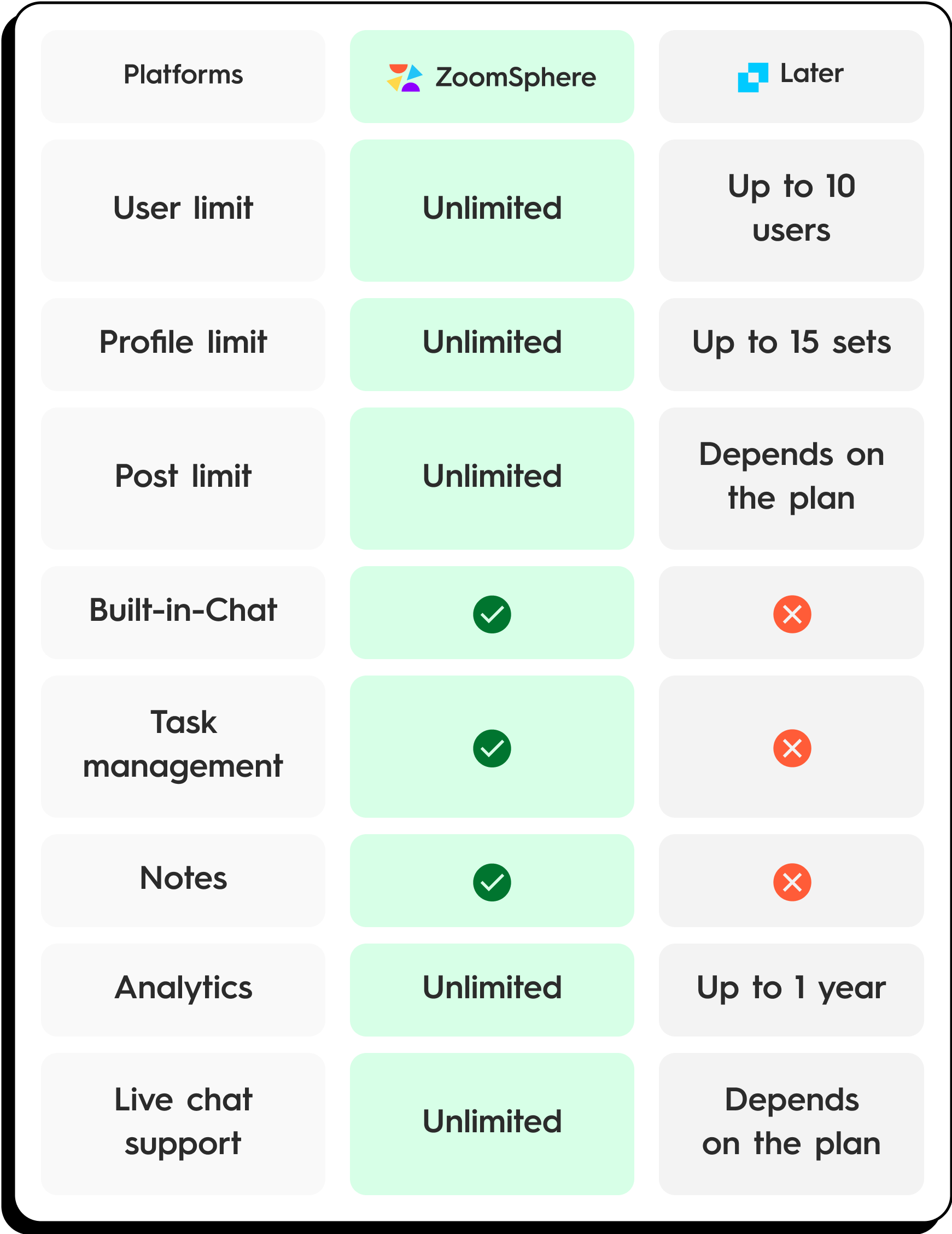
Common Pain Points with Buffer
- Per-channel pricing adds up fast. Buffer charges $6–12 per channel per month. An agency managing 20 social profiles pays $120–240/month — and that's before adding team features. (Source: Buffer pricing page)
- No built-in team workspace. Buffer has no chat, no file storage, no notes app, no task manager. Your team still needs Slack, Google Drive, Notion, and Trello alongside it. (Source: G2 reviews)
- Approval workflows only on Team plan. The free and Essentials plans have zero approval functionality. Even the Team plan's approval workflow is basic — no custom statuses, no role-based permissions per status. (Source: Buffer Help Center)
- Surface-level analytics. Buffer's analytics are consistently described as "limited" and "basic" compared to competitors. Deep reporting and competitor benchmarking are missing entirely. (Source: G2 reviews, Capterra reviews)
- Harsh free plan limits. Only 3 channels and 10 scheduled posts per channel. You'll hit the ceiling within your first day of serious content planning. (Source: Buffer pricing page)
- No content pillars or advanced calendar features. The calendar lacks color-coded content pillars, custom tags, bulk operations, and advanced duplication. It's a basic scheduler, not a strategic planning tool. (Source: G2 reviews)
Quick Verdict
| Category | Winner | Why |
|---|---|---|
| Approval Workflow | ZoomSphere | 6 default + custom statuses with role-based permissions on every plan. Buffer has basic approvals on Team plan only. |
| Team Collaboration | ZoomSphere | Built-in Chat, DMs, groups, voice messages, @mentions, polls. Buffer has no team communication tools. |
| Scheduling Calendar | ZoomSphere | Content pillars, bulk operations, drag & drop, post history. Buffer's calendar is minimal. |
| Analytics & Reporting | Tie | Both offer basic analytics. Neither is an analytics powerhouse — but ZoomSphere includes content export with filters. |
| Pricing Value | ZoomSphere | €179/month for 50 users, all features. Buffer's per-channel model scales unpredictably for agencies. |
| All-in-One Workspace | ZoomSphere | Chat, Files (20 GB), Notes, Tasks, AI Copywriter all built in. Buffer is scheduling only. |
Feature Comparison
Approval & Workflow
| Feature | ZoomSphere | Buffer |
|---|---|---|
| Post approval workflow | ✓ All plans | Team plan only ($10–12/ch/mo) |
| Custom post statuses | ✓ 6 default + custom | ✗ |
| Role-based permissions per status | ✓ Read/Write per role | Basic roles (Team plan only) |
| Bulk status changes | ✓ | ✗ |
| Activity log (post-level) | ✓ Unlimited history | ✗ |
| Post version history (visual diff) | ✓ Unlimited | ✗ |
| Content export (PDF + Excel) | ✓ | ✗ |
Team Collaboration
| Feature | ZoomSphere | Buffer |
|---|---|---|
| In-app team chat | ✓ DMs, groups, channels | ✗ |
| Voice messages | ✓ Up to 2 min | ✗ |
| File sharing in chat | ✓ Up to 70 MB | ✗ |
| @mentions in posts | ✓ | ✗ |
| Client vs. internal threads | ✓ Separated | ✗ |
| In-app polls | ✓ | ✗ |
| Users included | Up to 50 | Unlimited (Team plan only) |
Scheduling & Calendar
| Feature | ZoomSphere | Buffer |
|---|---|---|
| Visual content calendar | ✓ | ✓ |
| Auto-publishing | ✓ | ✓ |
| Content pillars (color-coded) | ✓ Filterable | ✗ |
| Custom tags | ✓ Filterable & exportable | ✗ |
| Bulk scheduling | ✓ | ✗ |
| Best time to post | ✓ | ✓ |
| Monthly post limit | Unlimited | 10 (Free) / Unlimited (Paid) |
Workspace & Additional Apps
| Feature | ZoomSphere | Buffer |
|---|---|---|
| Built-in task manager | ✓ Workflow Manager | ✗ |
| Notes app | ✓ Free, unlimited | ✗ |
| Files app (asset storage) | ✓ 20 GB with comments | ✗ |
| AI Copywriter | ✓ Custom AI Persona | ✓ AI Assistant |
| Browser extension | ✗ | ✓ Popular extension |
Analytics & Reporting
| Feature | ZoomSphere | Buffer |
|---|---|---|
| Cross-platform analytics | ✓ | ✓ Essentials+ only |
| Competitor analysis | Basic | ✗ |
| Content export with filters | ✓ PDF + Excel | ✗ |
| Team performance reports | ✓ | ✗ |
Platform Support
| Feature | ZoomSphere | Buffer |
|---|---|---|
| Facebook & Instagram | ✓ | ✓ |
| ✓ | ✓ | |
| TikTok | ✓ | ✓ |
| X / Twitter | ✓ | ✓ |
| YouTube | ✓ | ✓ |
| Threads | ✓ | ✓ |
| ✗ | ✓ | |
| Google Business | ✗ | ✗ |
Pricing Comparison
| Feature | ZoomSphere | Buffer |
|---|---|---|
| Starting price | From €179/month (€149/mo annual) | Free (3 channels, 10 posts each); Paid from $6/channel/mo |
| Pricing model | Flat fee — all users included | Per-channel pricing |
| Users included | Up to 50 users | 1 user (Free/Essentials); Unlimited (Team plan) |
| Cost for 20 channels (Team) | €179/month | $200–240/month |
| Approval workflows | Included on every plan | Team plan only ($10–12/channel/mo) |
| Team Chat | Included (DMs, groups, voice) | Not available |
| File storage | 20 GB included | Not available |
| Notes & Tasks | Included | Not available |
| All features included | ✓ Yes, on every plan | ✗ No — features gated by tier |

Your agency waiting for Buffer to add built-in chat, file storage, task management, and proper approval workflows.
What Real Users Say
ZoomSphere Reviews
★★★★★ — Agency Owner, Digital Marketing
"We switched from Buffer because our team needed approval workflows and internal communication in one place. ZoomSphere replaced Buffer, Slack, and Trello for us."
Source: G2
★★★★★ — Social Media Manager, Agency
"Buffer was fine when I worked solo, but once we grew to a 10-person team, the per-channel costs and lack of collaboration tools became a dealbreaker. ZoomSphere's flat pricing changed everything."
Source: Capterra
★★★★☆ — Marketing Coordinator, Mid-size Company
"The content pillars and custom tags in ZoomSphere's calendar are features I didn't know I needed until I had them. Buffer's calendar feels empty by comparison."
Source: G2
★★★★★ — Content Lead, E-commerce
"Having 20 GB file storage built into the same tool where we schedule posts means no more digging through Google Drive for assets. Buffer doesn't offer anything like this."
Source: Software Advice
Buffer Reviews
★★☆☆☆ — Social Media Manager, Agency
"Buffer is great for solo creators but terrible for teams. No approval workflow on the free plan, no internal chat, no file storage. We were paying for 4 extra tools just to fill the gaps."
Source: G2
★★☆☆☆ — Marketing Team Lead, Startup
"The analytics are so surface-level it's frustrating. We couldn't generate any meaningful reports for our clients. Ended up exporting everything to spreadsheets manually."
Source: Capterra
★★★☆☆ — Digital Marketing Manager, Agency
"Per-channel pricing sounds cheap at first — $6/channel — but with 25 client profiles it adds up to $150/month for just basic scheduling. No collaboration tools included at that price."
Source: G2
★★★☆☆ — Freelancer, Content Creator
"The 10-post limit on the free plan is a joke. I hit it within an hour of setting up. And even on paid plans, there are no content pillars, no bulk actions, no visual diff."
Source: Trustpilot
Which Tool Is Right For You?
Choose Buffer if:
- You're a solo creator or freelancer managing 1–5 social profiles
- You value simplicity above all else and need only basic scheduling
- You want a free tier to get started with minimal features
- You use the Buffer browser extension for quick sharing
- You manage Pinterest accounts (ZoomSphere doesn't support Pinterest)
- You don't need approval workflows, team chat, or file storage
Choose ZoomSphere if:
- You're an agency or team that needs multiple users without per-channel pricing
- Approval workflows with custom statuses and role-based permissions are essential
- You want built-in Chat, Notes, and Task Manager in one workspace
- You manage many social profiles across multiple clients
- You're tired of paying for Slack + Notion + Trello + your scheduler separately
- You want all features included — no feature-gating by plan tier
Frequently Asked Questions
Does Buffer have an approval workflow?
Yes, but only on the Team plan ($10–12 per channel per month). The Free and Essentials plans have no approval functionality. Even the Team plan's approvals are basic — no custom statuses, no role-based permissions per status, no visual diff for tracking changes.
Can Buffer replace team communication tools like Slack?
No. Buffer has no built-in chat, messaging, or communication features. Teams using Buffer need separate tools like Slack, Microsoft Teams, or email for all internal communication. ZoomSphere includes built-in Chat with DMs, groups, voice messages, and file sharing.
Is Buffer cheaper than ZoomSphere?
For solo users with few channels, yes. Buffer's free plan and $6/channel Essentials plan are cheaper for individuals. For teams managing 15+ channels, the per-channel pricing adds up quickly: 20 channels on Team plan costs $200–240/month, similar to ZoomSphere's €179/month — but without chat, files, notes, or task management.
Which tool has better analytics?
Neither is an analytics powerhouse. Buffer offers engagement analytics on paid plans. ZoomSphere provides cross-platform analytics with content export (PDF + Excel) and team performance reports. For deep analytics, both tools are comparable with moderate capabilities.
Does ZoomSphere support Pinterest?
No. ZoomSphere currently supports Facebook, Instagram, X/Twitter, LinkedIn, TikTok, YouTube, and Threads. Buffer supports Pinterest in addition to these platforms.
How many users can I add to each tool?
ZoomSphere includes up to 50 users on every plan at no extra cost. Buffer's Team plan includes unlimited team members but charges per channel — so while users are "free," the per-channel cost is the limiting factor.