


How to Vibe-Code Your Own Agency Tools: The Complete Guide to ZoomSphere AI Apps (2026)

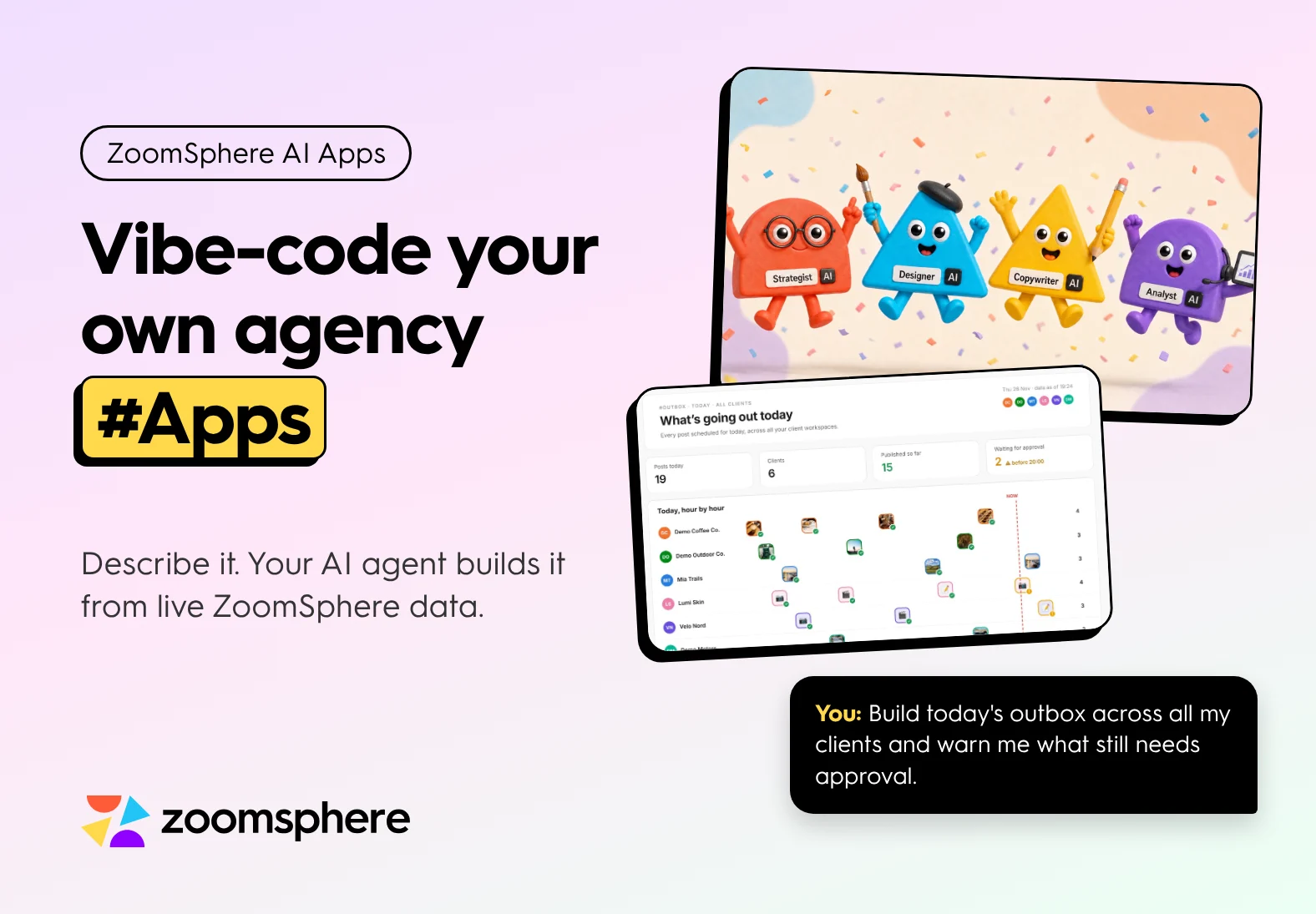
What are AI Apps in ZoomSphere? AI Apps are your own small tools that live inside your ZoomSphere workspace, right next to the Scheduler. You don't pick them from a catalogue and you don't write a line of code. You describe what you need in plain language, your AI agent (Claude, ChatGPT, Grok, Cursor or any other MCP client) builds it from live ZoomSphere data through ZoomSphere MCP, and saves it as a new module. A client report, an approval radar across all clients, a team workload board, a sentiment analysis or a game. If you can describe it, you can have it in minutes. This is vibe coding, made for social media teams, and no other social media management tool lets you do anything like it.
Key facts
- Your tool, not ours: AI Apps are not ready-made features. Every app is built by your AI agent from your own description.
- No code: you write a prompt like a brief for a colleague. To change the app, you simply ask again.
- Live data: ZoomSphere metrics inside an app refresh every time someone opens it. No exports, no stale numbers.
- One client or all of them: an app can read one workspace or every workspace you have access to, and mix in other MCPs like Meta Ads.
- Shareable: send a client a zoomsphere.page link that works without a ZoomSphere account.
- Built for teams: access rights follow your workspaces and every app has the familiar comments panel.
{{form-component}}
Why we built AI Apps
Every agency we talk to has the same drawer full of workarounds. A spreadsheet for team workload. A screenshot collage for the monthly report. A Slack message every morning asking who still has posts in approval. Each one exists because the tool never had exactly the view that one agency needed, and no product team can build a separate feature for every agency's way of working.
So we stopped trying to guess. AI agents can now write good software in seconds, and ZoomSphere MCP already gives them access to your posts, statuses, comments and analytics. AI Apps add the missing piece: a home for what the agent builds. A real module in your workspace, with your access rights, your team and live data, instead of a file that disappears in a chat history.
What "vibe coding" means here
Vibe coding is building software by describing the result instead of writing the code. You say what the app should show, for whom and how it should feel. The AI agent writes everything else. In ZoomSphere it works like this:
- You describe the app in your AI agent: what data, which clients, which charts, what should happen when something is wrong.
- The agent reads your ZoomSphere data through ZoomSphere MCP and writes the app around it.
- The agent saves it as an AI App in your workspace. It appears as a new tile next to the Scheduler, ready for your whole team.
- You keep shaping it with follow-up messages: bigger chart, another client, a red warning when a post waits too long.
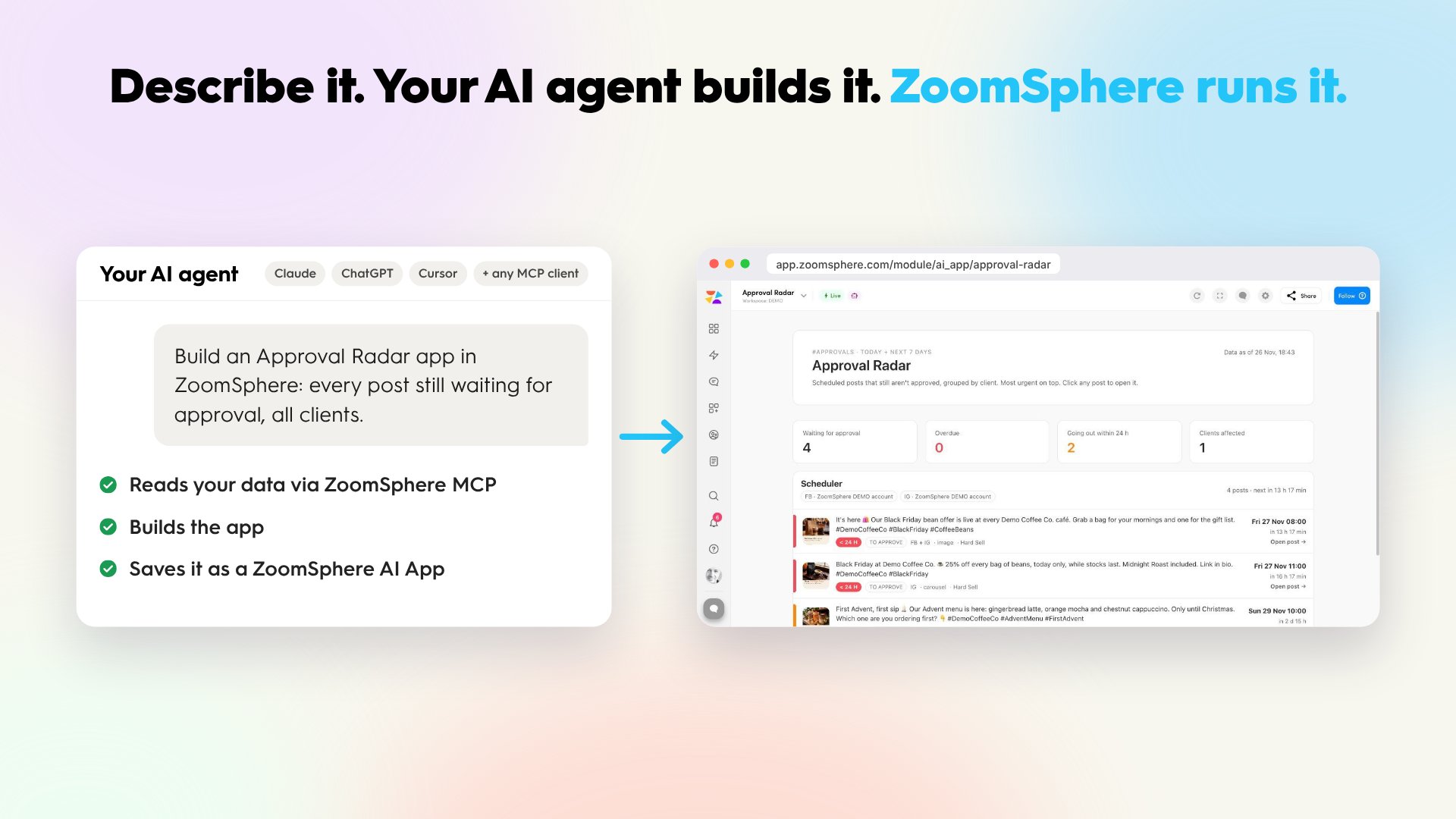
The important part: the result is not a static picture. ZoomSphere knows which data the app uses and refreshes it whenever someone opens the app. Build it once, use it every day.
How to create your first AI App
There are two ways in, and both end in the same place.
Option 1: just ask your AI agent
- Connect ZoomSphere MCP to your AI agent. In Claude it is one connector, ChatGPT, Grok, Cursor and other MCP clients work too. Here is how to connect it.
- Paste a prompt that describes the app (you will find eight ready-made ones below).
- Wait a minute. The agent builds the app and saves it as a new AI App tile in your workspace.
Option 2: start with a click in ZoomSphere
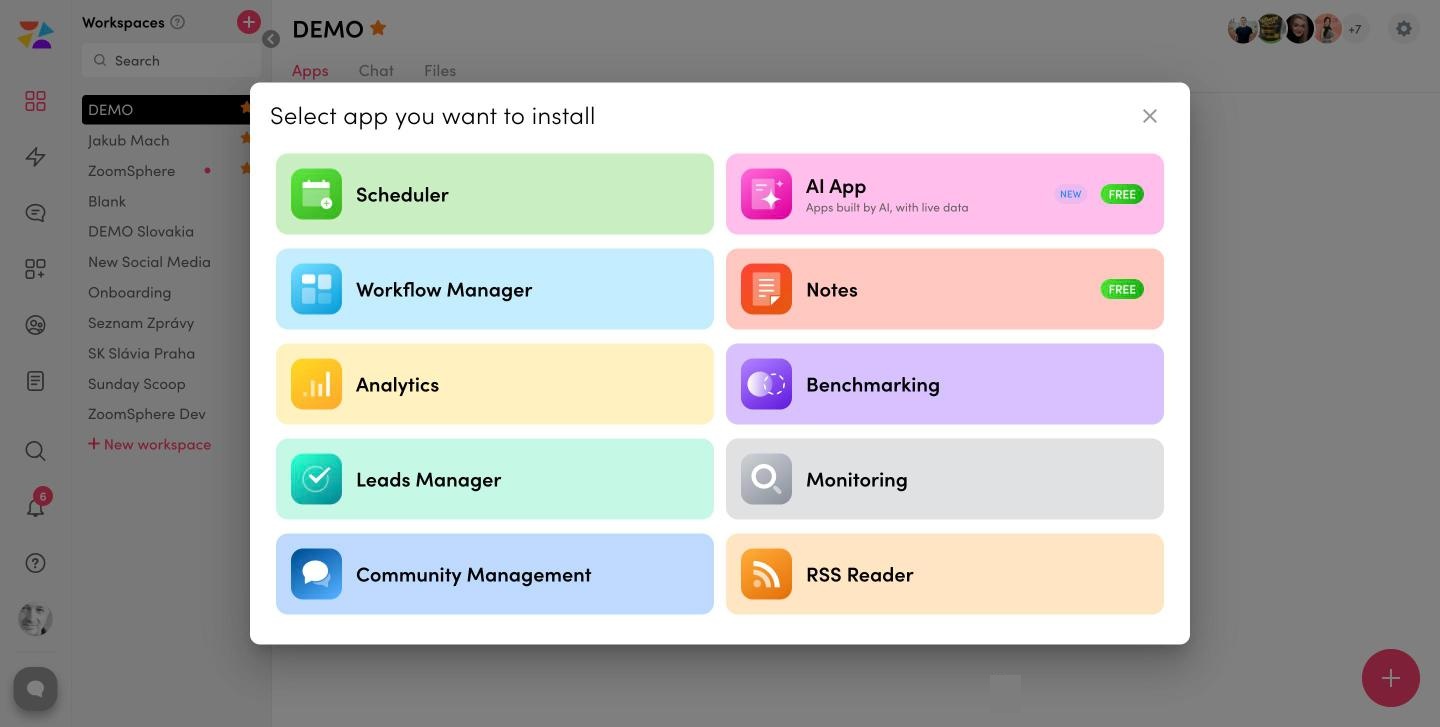
- In your workspace, click + and pick AI App.
- Give it a name, an icon and a tile color, then save.
- Ask your AI agent to fill the new tile. The empty app even comes with template prompts to get you started.
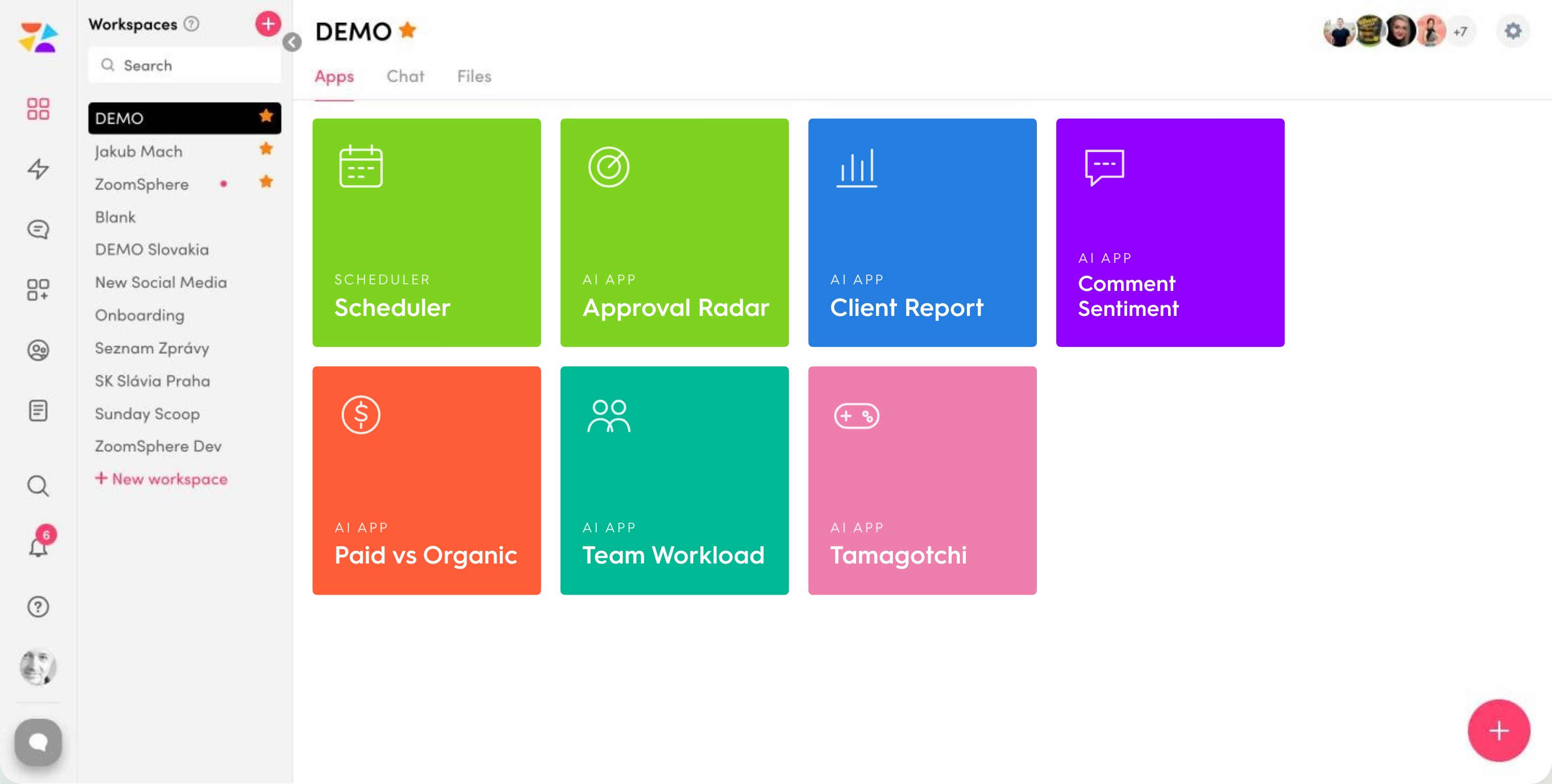
8 AI Apps you can build today, with prompts
These are apps we use ourselves. Each one was built from exactly the prompt below it, so what you see in the screenshot is what you will get. Copy the prompt, paste it into your agent, and adjust the details for your agency.
1. Monthly client report
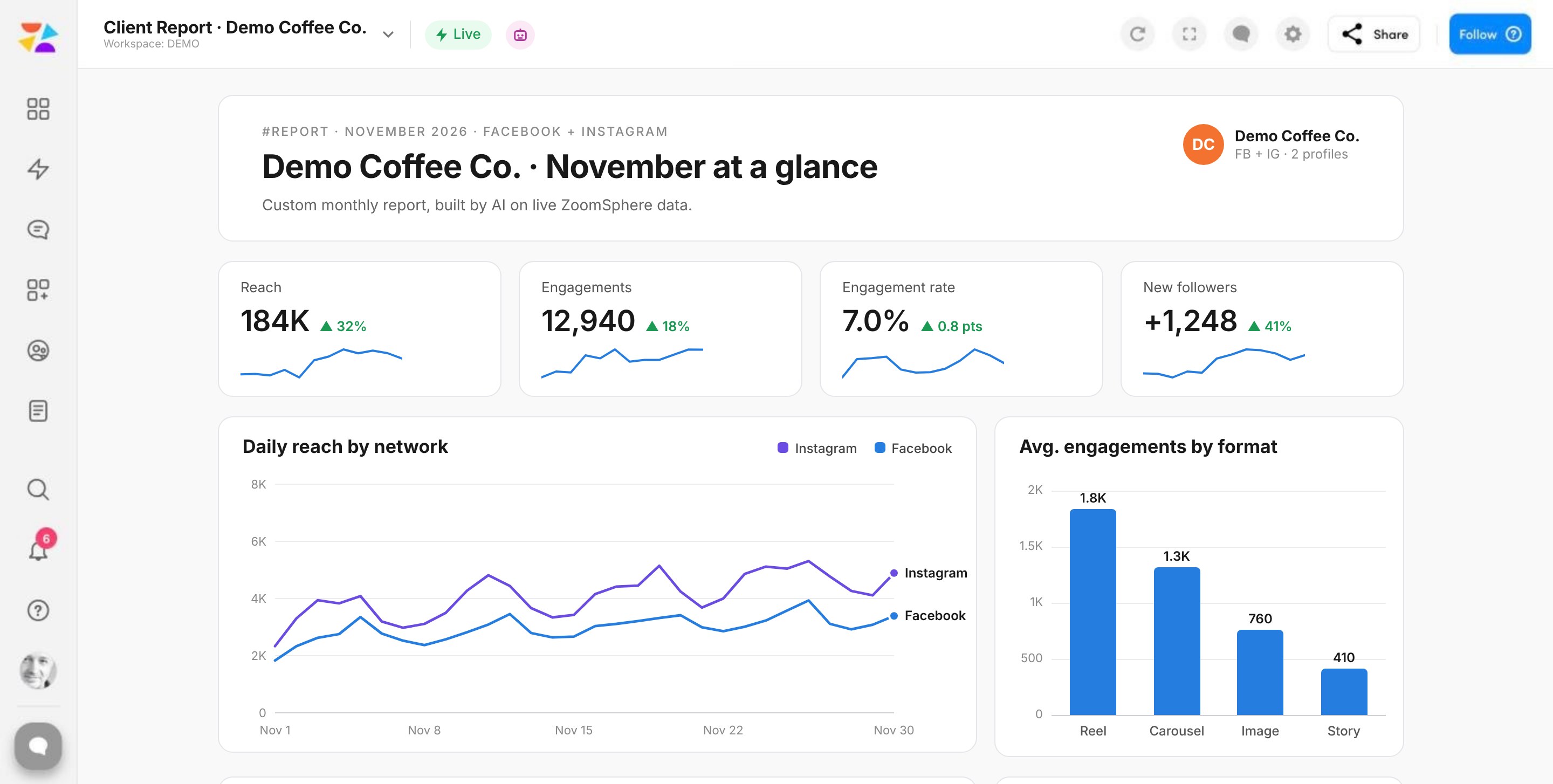
One client. The report you used to assemble from five exports and three screenshots at the end of every month. KPI tiles with sparklines, reach per network, engagement by format, the top posts and the best time to post, all in one page you would happily send to the client.
Prompt: Monthly client report
Build last month's report for the client in this workspace, with charts I'd be proud to send. KPI tiles for reach, engagements, engagement rate and new followers, each with a sparkline and the change vs. the month before. A daily reach line chart per network, average engagement by format as a bar chart, the top 4 posts with thumbnails and numbers, a best-time-to-post heatmap and three takeaways in plain language. Put it in my "AI App" module in ZoomSphere.
2. Today's outbox, all clients
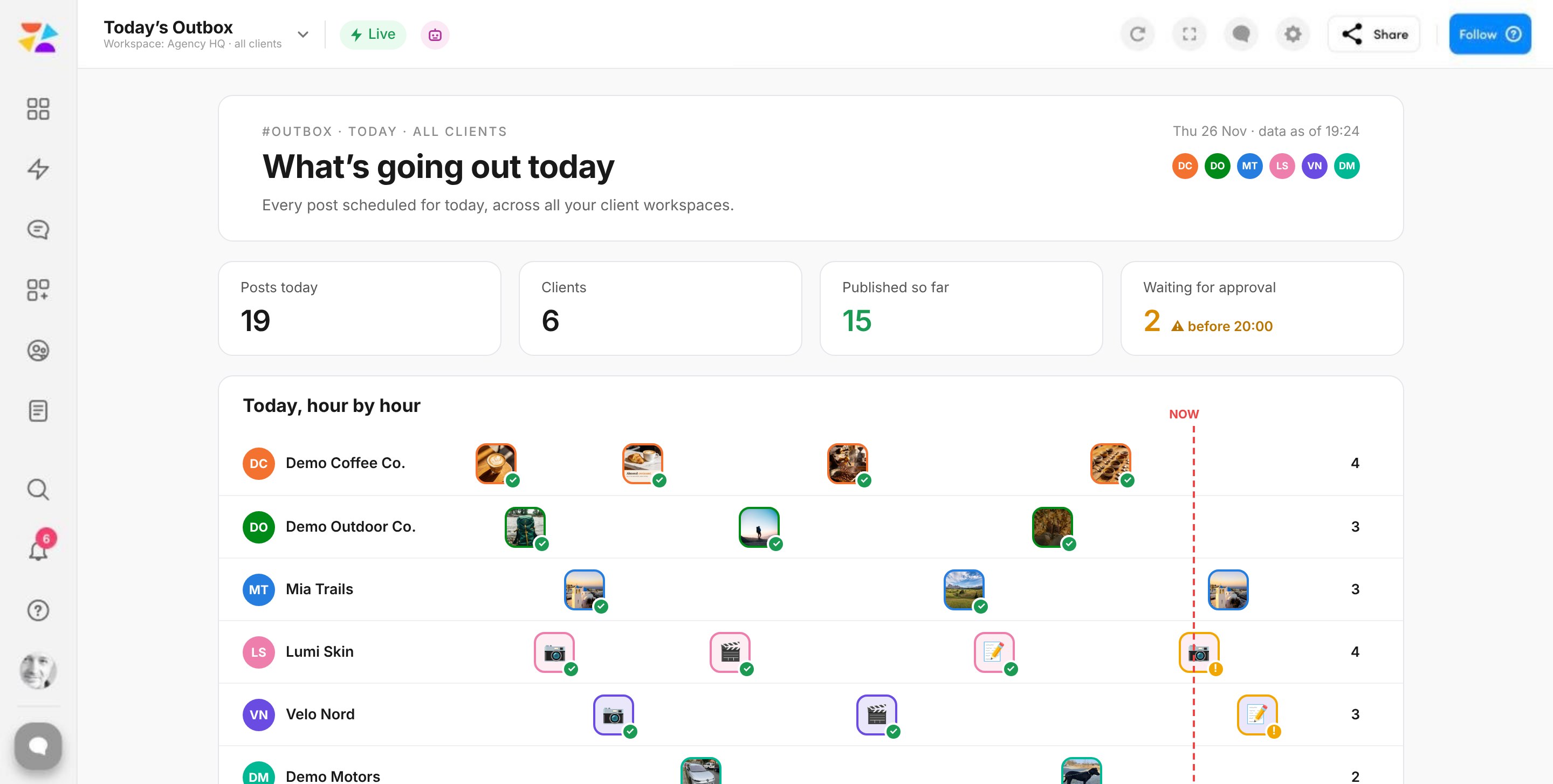
All workspaces. The morning question of every account manager: what goes out today, and is anything still stuck? One timeline across every client workspace, hour by hour, with a warning if something still needs approval before evening.
Prompt: Today's outbox, all clients
Build "Today's outbox" across all my client workspaces. KPI tiles: posts today, clients, published so far and waiting for approval, with a warning if anything still needs approval before 20:00. Below, a timeline from 7:00 to 21:00 with one row per client and every post as a thumbnail at its publish time, marked published, scheduled or waiting for approval, plus a red "now" line. Put it in my "AI App" module in ZoomSphere.
3. Client comments waiting for us
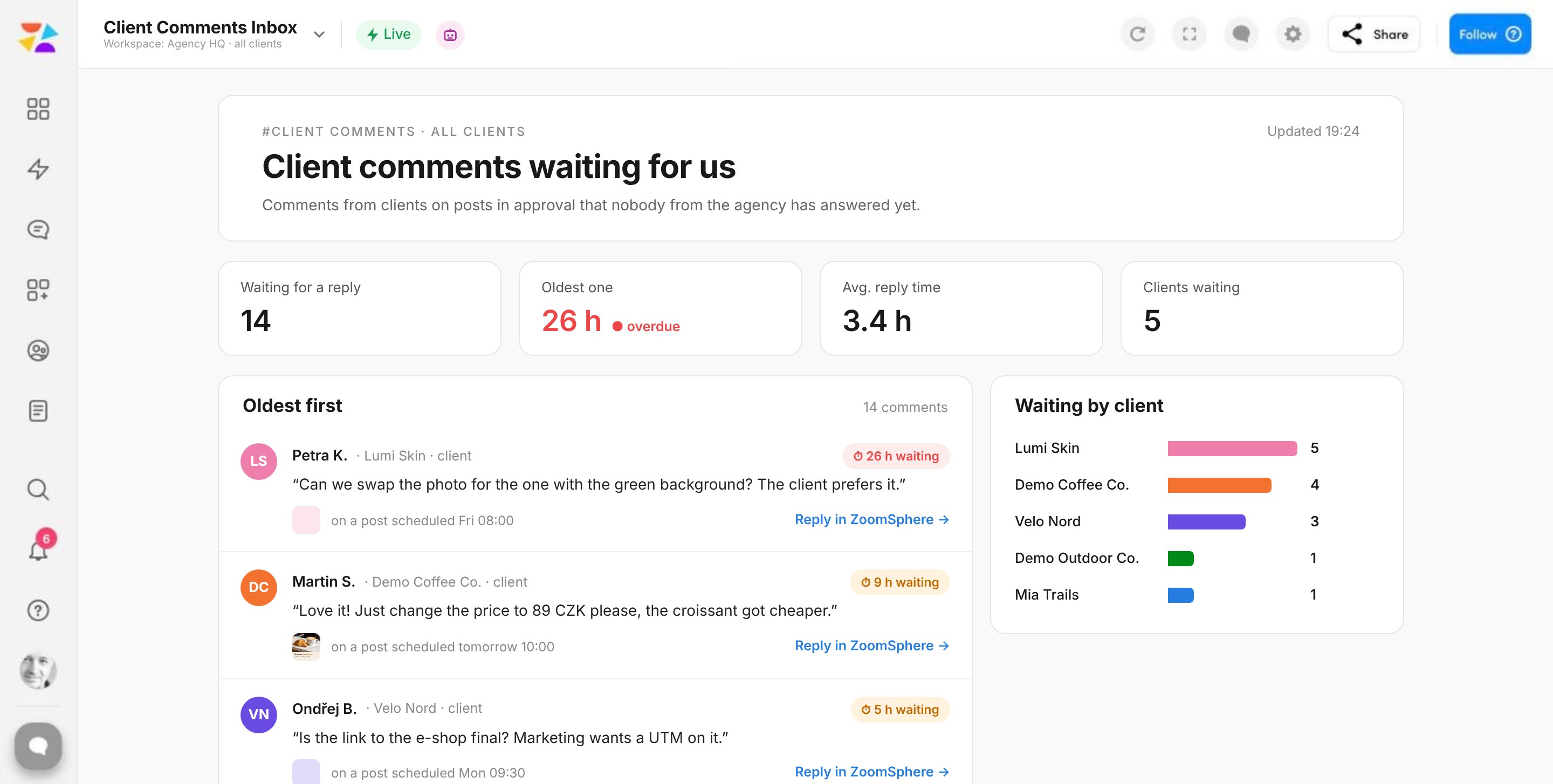
All workspaces. Clients leave comments on posts in approval, and in a busy week some of them wait for days. This app lists every unanswered client comment, oldest first, with a direct link to reply in ZoomSphere.
Prompt: Client comments waiting for us
Build an app that lists every comment my clients left on posts in approval that nobody from our team has answered yet, across all client workspaces. KPI tiles: comments waiting for a reply, the oldest one, average reply time and clients waiting. Below, the comments oldest first with client, author, the comment, how long it has been waiting and a "Reply in ZoomSphere" link, and next to it a bar chart of waiting comments by client. Put it in my "AI App" module in ZoomSphere.
4. Team workload
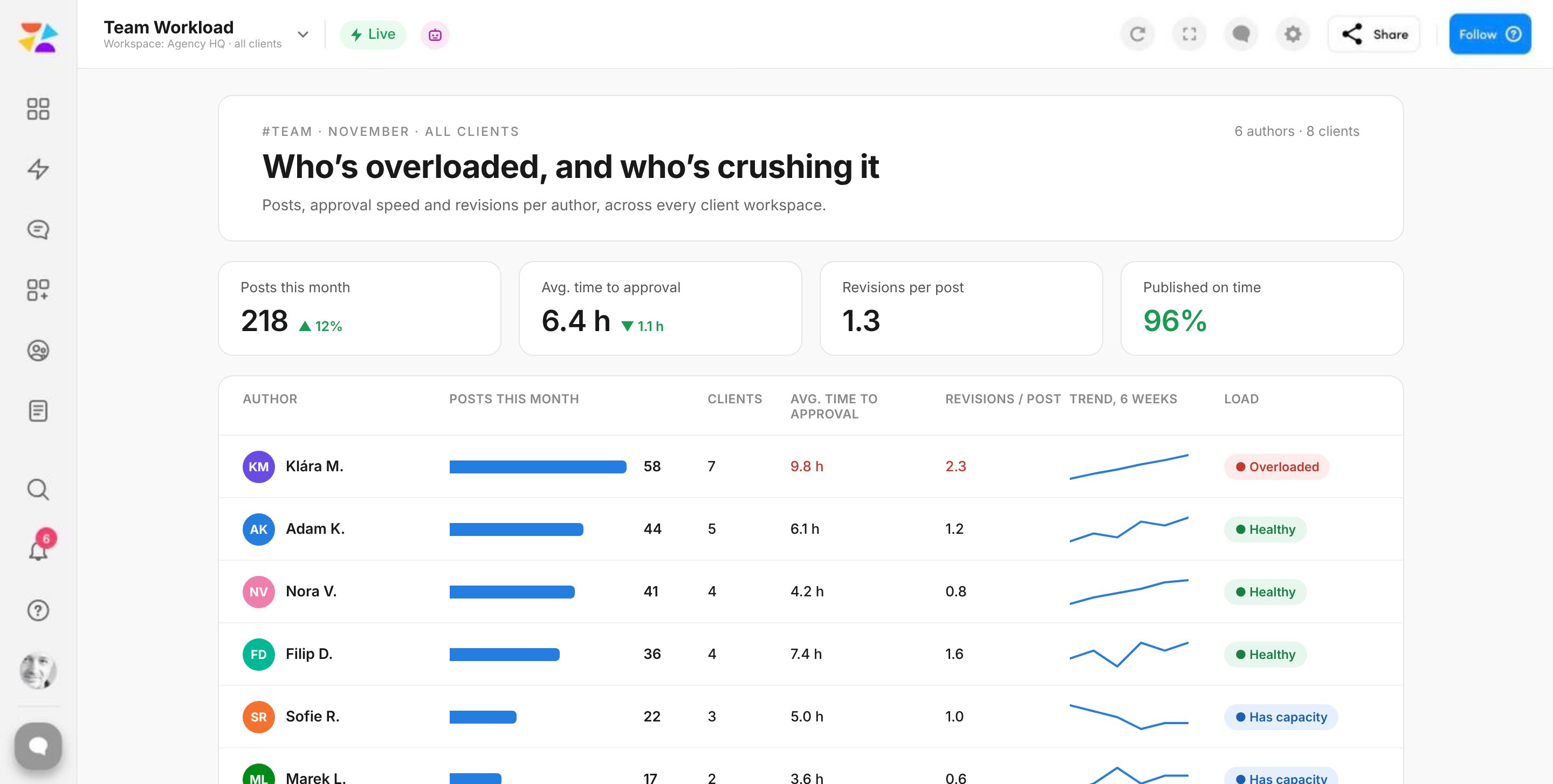
All workspaces. Who is drowning and who has room for the new client? Posts per author, time to approval, revisions per post and a load badge for every person on the team.
Prompt: Team workload
Build a team workload app across all client workspaces for this month. KPI tiles: posts this month, average time to approval, revisions per post and published on time. Below, a table with one row per author: posts created, clients covered, average time to approval, revisions per post, a 6-week trend sparkline and a load badge (overloaded, healthy, has capacity). Sort by load, busiest first. Put it in my "AI App" module in ZoomSphere.
{{cta-component}}
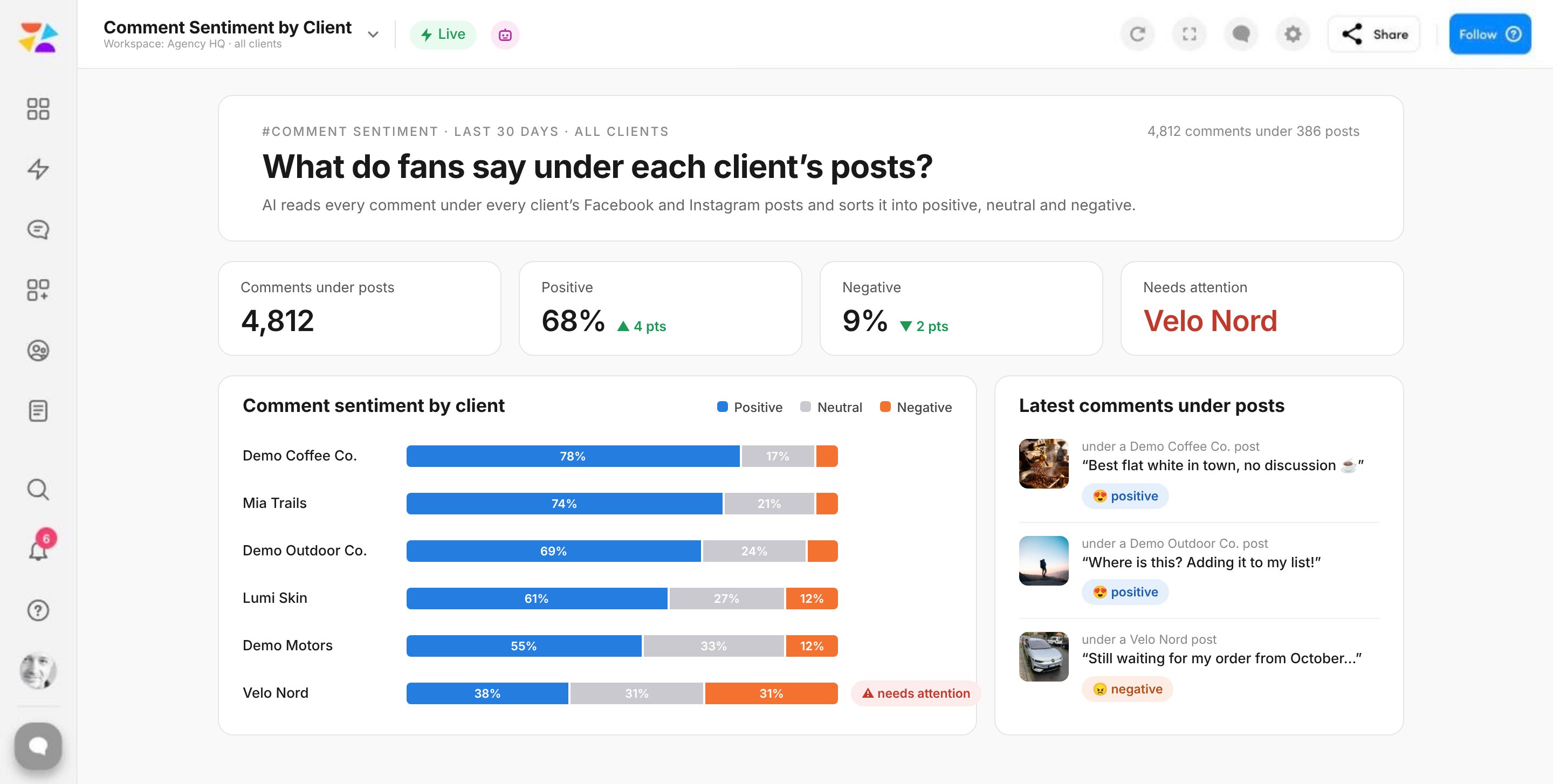
5. Comment sentiment by client
All workspaces. Your agent reads every comment under your clients' posts and sorts it into positive, neutral and negative. You see whose audience is turning sour before the client calls you about it.
Prompt: Comment sentiment by client
Build an app that reads every comment under the Facebook and Instagram posts of all my clients from the last 30 days and sorts them into positive, neutral and negative. At the top, KPI tiles: comments analysed, positive share, negative share and the client that needs attention. Below, a stacked sentiment bar per client and the latest comments under posts with a sentiment label, each linking to its post. Put it in my "AI App" module in ZoomSphere.
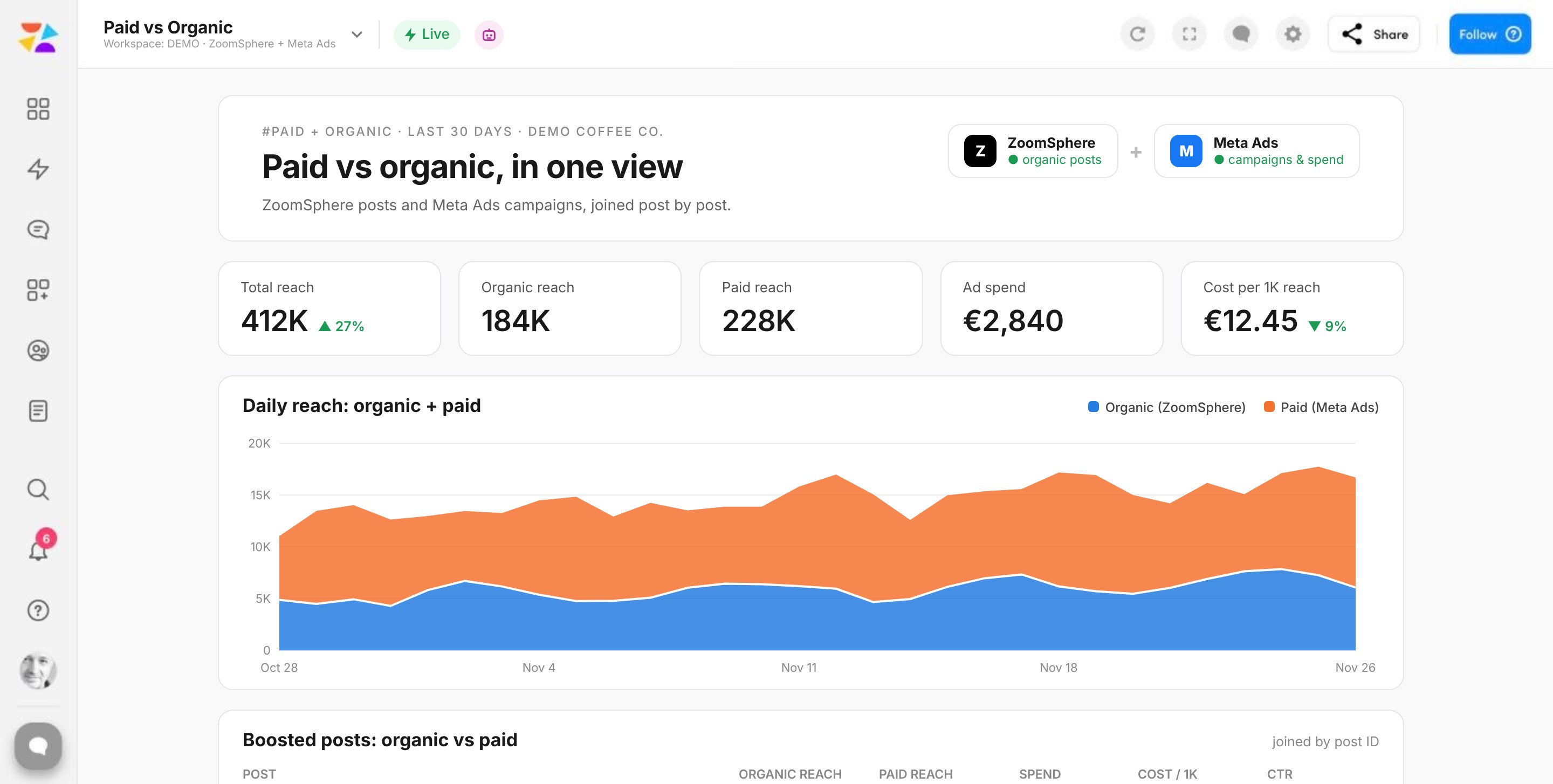
6. Paid vs. organic in one view
ZoomSphere + Meta Ads. An AI App is not limited to ZoomSphere data. Connect the Meta Ads MCP to the same agent and it joins your posts with your campaigns, post by post: organic reach, paid reach, spend and cost per 1,000 people reached.
Prompt: Paid vs. organic in one view
Combine our ZoomSphere posts with Meta Ads results for [client] over the last 30 days. KPI tiles: total reach, organic reach, paid reach, ad spend and cost per 1,000 reached. A stacked area chart of daily organic and paid reach, and a table of boosted posts with organic and paid results side by side. Put it in my "AI App" module in ZoomSphere.
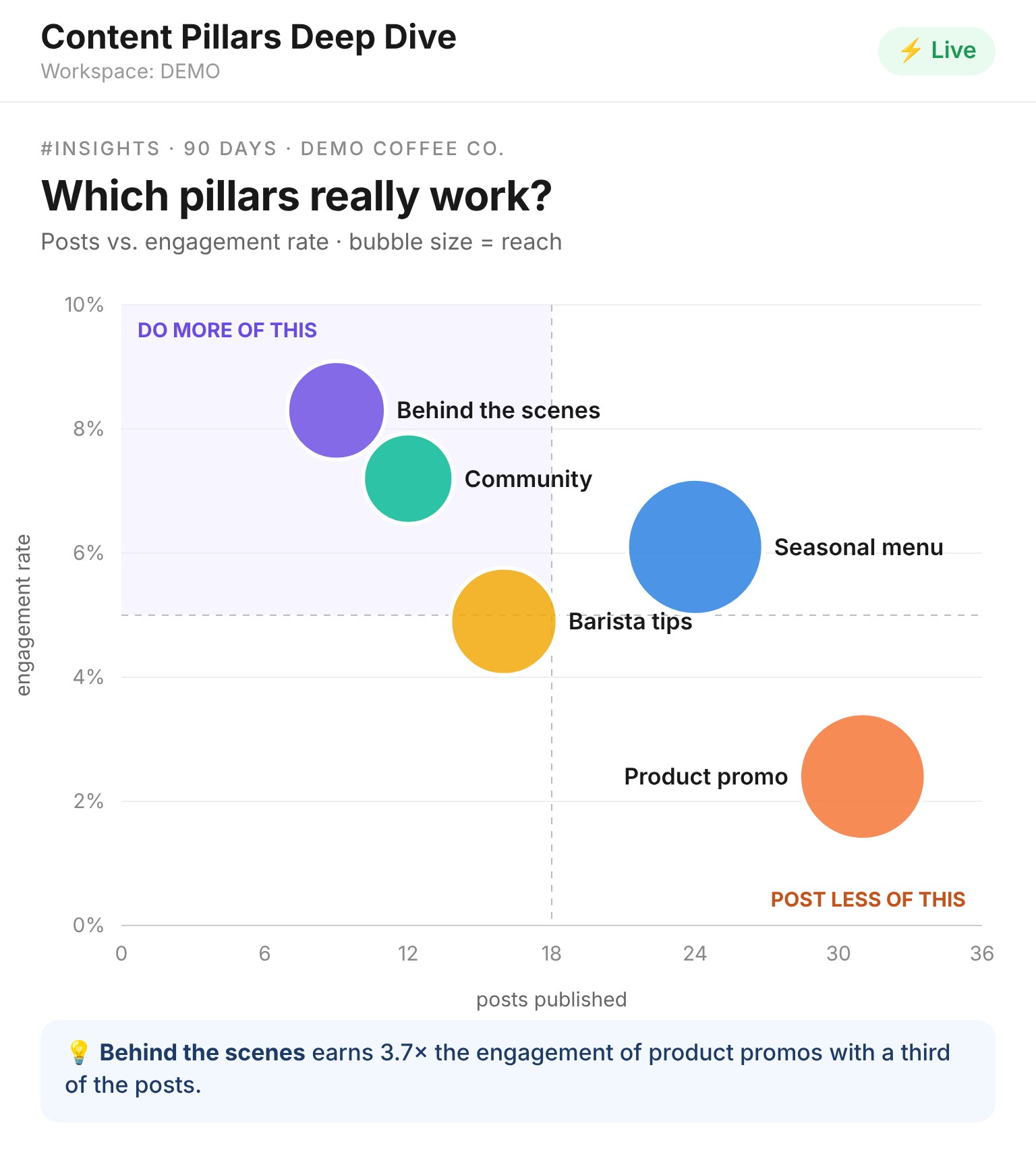
7. Content pillars deep dive
One client. Which topics actually work? A bubble chart of posts, engagement and reach per content pillar, with a clear "do more of this" and "post less of this" zone and three recommendations for next month.
Prompt: Content pillars deep dive
Analyze our content pillars for the last 90 days as a bubble chart: posts published on the x-axis, engagement rate on the y-axis, bubble size = reach, one color per pillar, with "do more of this" and "post less of this" zones. Next to it, the best and the weakest post of each pillar with thumbnails, one headline insight in a single sentence and three recommendations for next month. Put it in my "AI App" module in ZoomSphere.
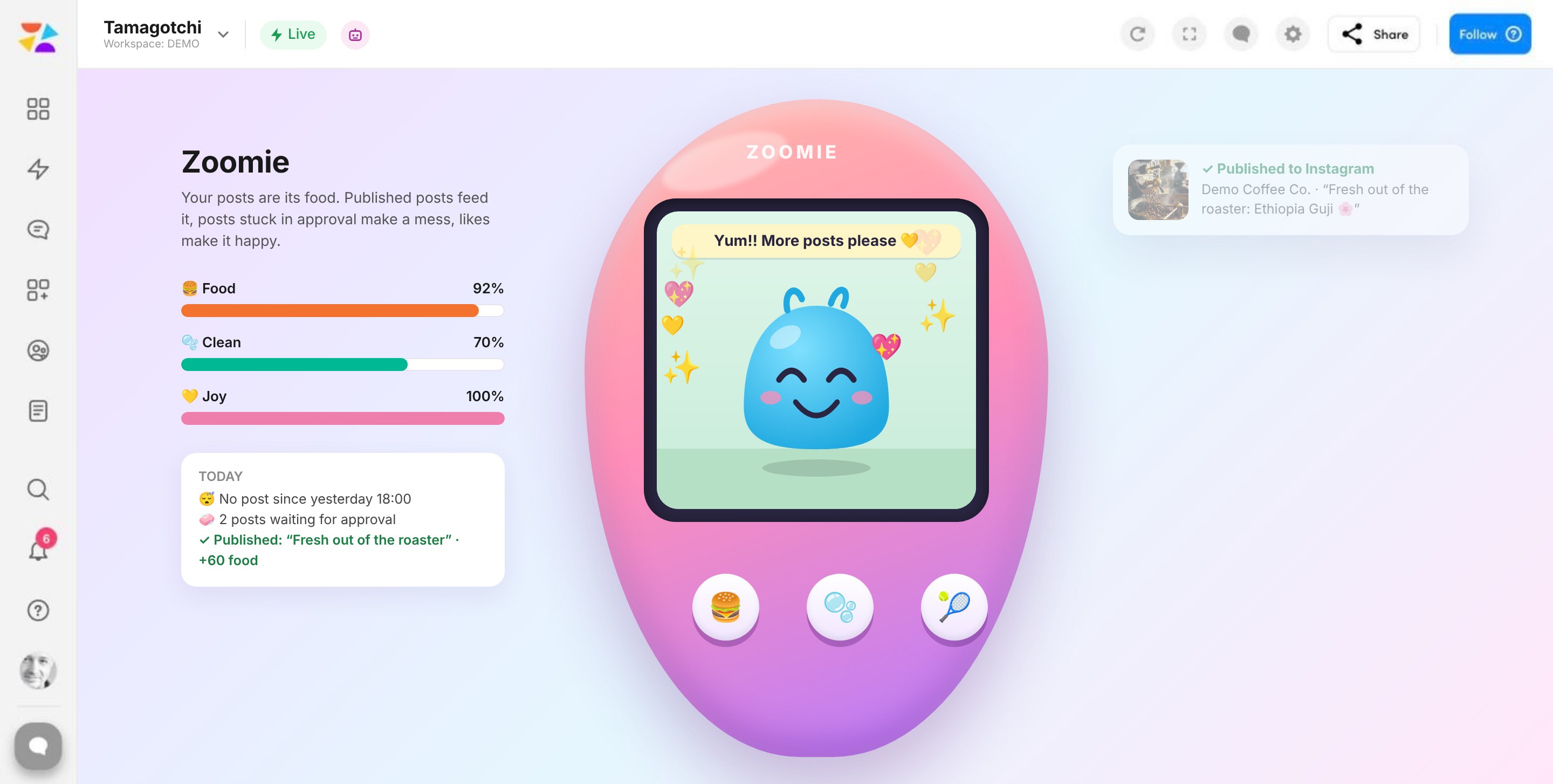
8. Tamagotchi that eats your posts
Just for fun. Yes, really. Published posts feed it, posts stuck in approval make it messy and likes make it happy. It sounds silly until you notice the whole team suddenly cares about an empty approval queue.
Prompt: Tamagotchi that eats your posts
Turn our posts into a Tamagotchi: a cute animated creature inside a glossy toy device, with Food, Clean and Joy meters. Published posts feed it, posts stuck in approval make it messy and likes make it happy. When it's hungry it looks sad and asks for a post; when a new post goes out, it eats it, hops around and shows hearts. Add a short log of today's posts and gentle sounds. Put it in my "AI App" module in ZoomSphere.
Looking for more? The ZoomSphere MCP Prompt Library has a whole AI Apps section, and the AI Apps page shows all the examples in one place.
One client or all of them
An AI App decides its own scope, based on what you ask for:
- One workspace: a monthly report, a content pillar analysis or a campaign recap for a single client.
- Every workspace you can access: the approval radar, today's outbox, unanswered client comments or team workload for the whole agency.
- ZoomSphere plus other tools: the agent can combine ZoomSphere data with any other MCP it is connected to, such as Meta Ads, web analytics or your CRM.
Access follows your ZoomSphere structure. An app saved in a client workspace is visible to the people who have access to that workspace, exactly like the Scheduler next to it.
Share an AI App with your client
Hit Share, choose how long the link should work (24 hours, 7 days, 30 days or never) and send it by e-mail or WhatsApp. Your client opens it at zoomsphere.page, no account and no login needed. You can revoke the link at any time and it stops working immediately.
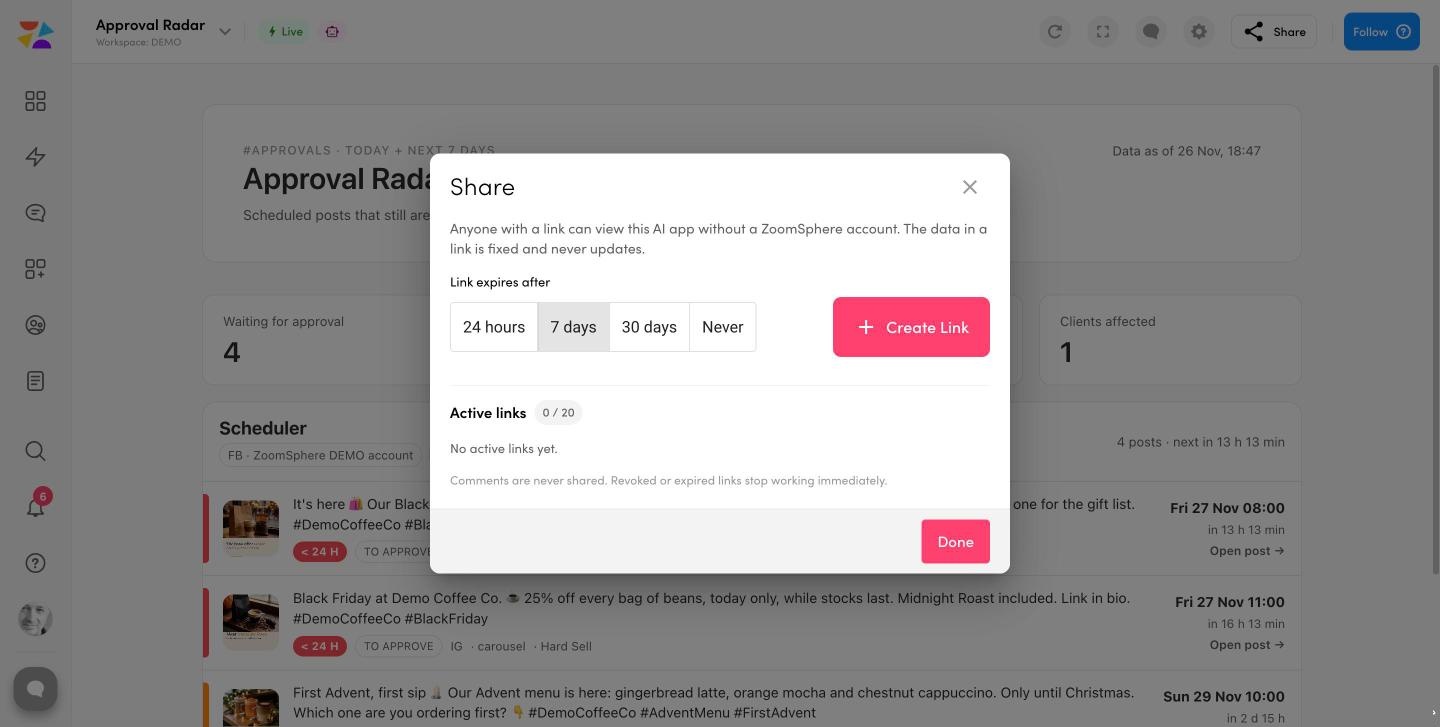
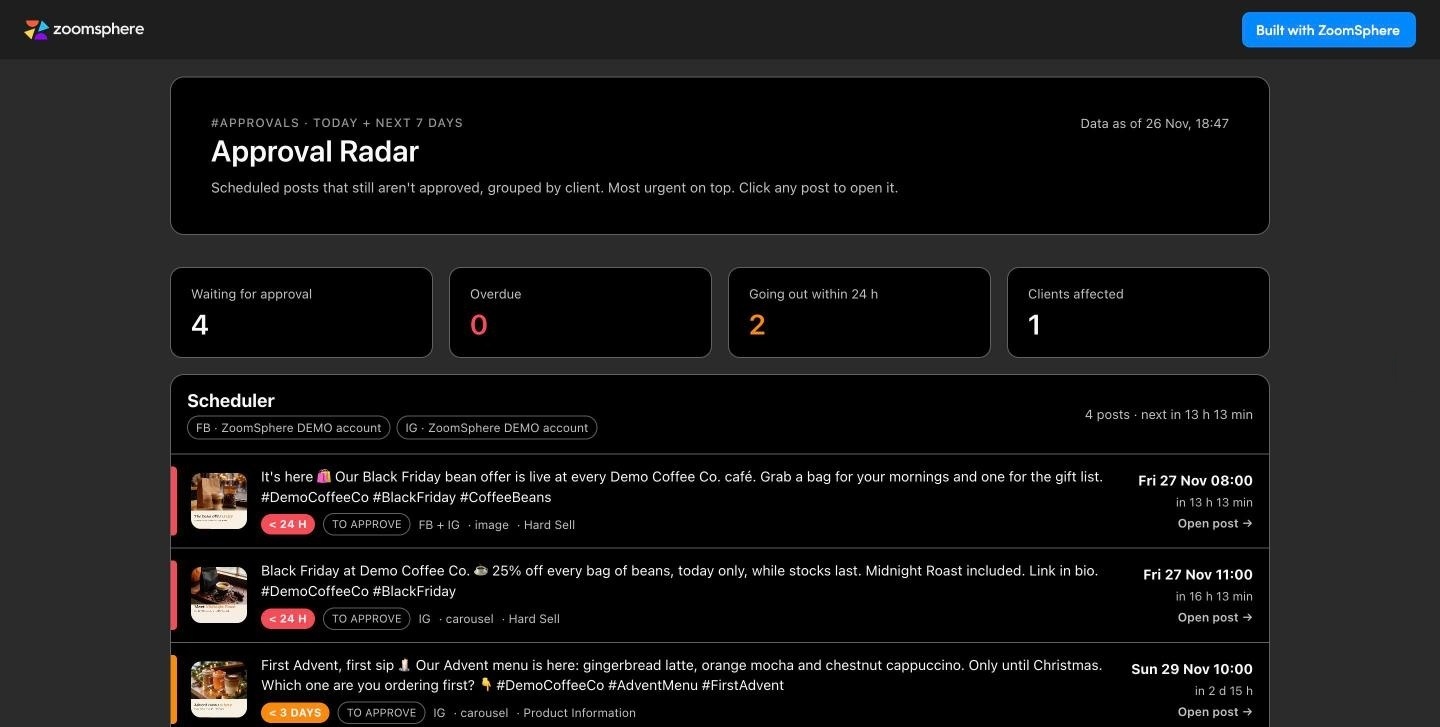
Two things to know: the shared page is a snapshot from the moment you created the link, and comments are never shared, so your internal discussion stays internal. Inside ZoomSphere, your team always sees live data.
Discuss the numbers right next to them
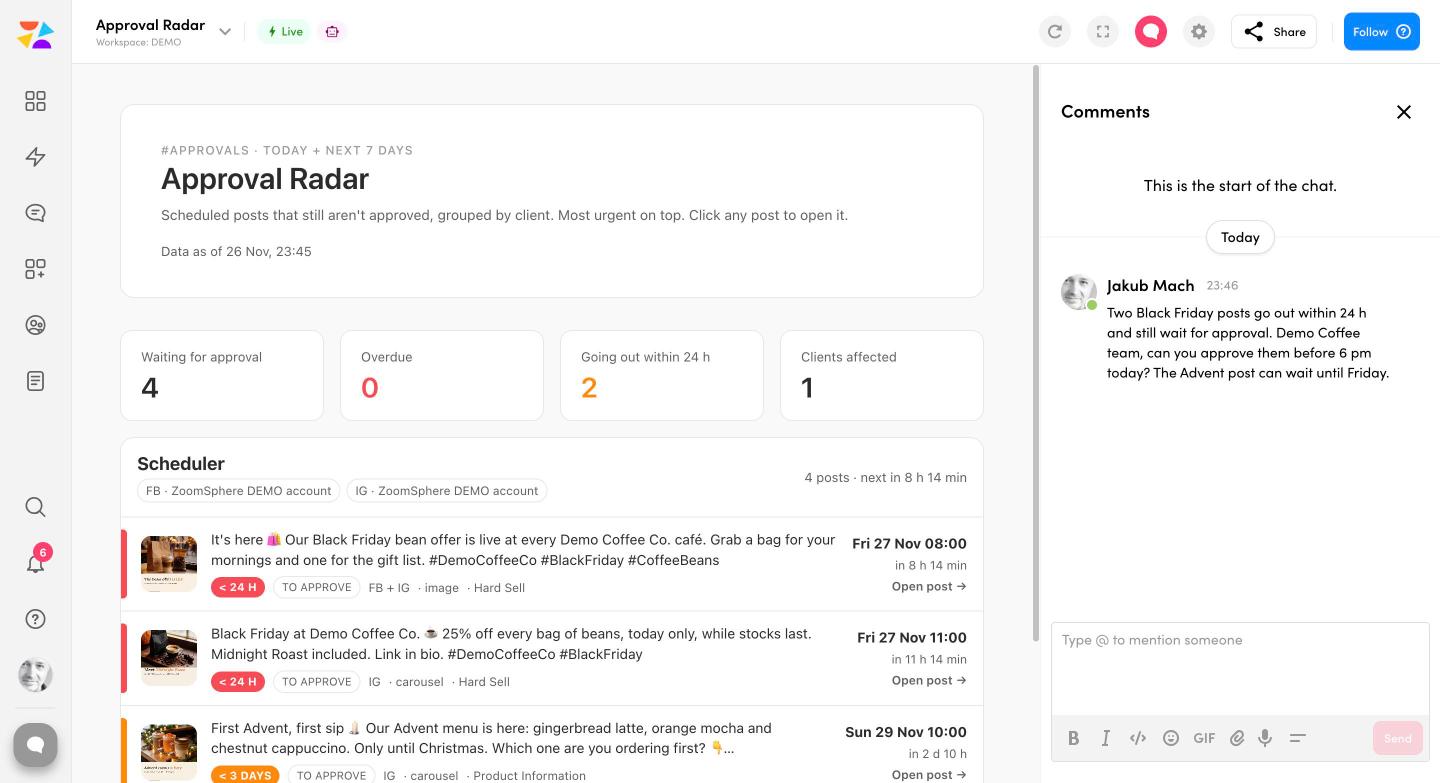
Every AI App has the same comments panel you know from posts. Your team and your clients discuss the report right next to the charts, mention colleagues with @, and your AI agent can read and write those comments through ZoomSphere MCP too. Ask it to summarise what the client said about last month's report, and it will.
Tips for great AI Apps
After building dozens of apps ourselves, these are the habits that make the difference between "nice" and "we use it every day".
1. Write the prompt like a brief, not like a search query
"Make a report" gives you a generic report. Describe the reader, the decisions they need to make and the exact blocks you want: KPI tiles at the top, which charts, which table, what to highlight. The prompts above all follow the same structure: what, for whom, which blocks, and where to save it.
2. Always say where to save it
End every prompt with "Put it in my AI App module in ZoomSphere", or name a specific tile you created. Otherwise some agents happily show you the result in the chat and stop there.
3. Start small, then iterate
Your first version does not need to be perfect. Get something on screen, open it in ZoomSphere and refine it in follow-up messages. Each change takes seconds.
Iterate on an existing app
Open my "Today's outbox" AI App and make three changes: add a filter by client at the top, show posts waiting for approval in orange instead of grey, and add a small counter of posts that failed to publish today. Keep everything else as it is.
4. Turn rules of thumb into warnings
Your agency already has rules: approvals at least 24 hours before publishing, replies to clients within one working day, no more than 40 posts a month per person. Write them into the prompt and the app will flag what breaks them. That is where an app turns from a dashboard into a colleague.
Add your own rules
Update my team workload app: mark anyone with more than 40 posts this month as overloaded, highlight every post that got approved less than 24 hours before its publish time, and show a red badge next to clients whose comments waited longer than one working day.
5. Keep your best prompts where the team can find them
A good prompt is a reusable asset. Keep your favourites in Notion or a shared Google Doc, so anyone on the team can create the same monthly report for a new client in a minute.
6. Mix in other MCPs
The most impressive apps combine sources. ZoomSphere for organic posts, Meta Ads for paid, your web analytics for conversions. One prompt, one view, no copy-pasting between tabs.
7. Have some fun
The Tamagotchi is a joke that works. A playful app on the team's home screen gets more attention to the approval queue than any reminder e-mail. Leaderboards, quizzes about your best posts, a countdown to the next campaign: all fair game.
Mistakes to avoid
- Treating AI Apps as a catalogue. The examples are a starting point. The real value is in the app only your agency would think of.
- Sharing internally via public links. For your team, use workspace access. Public links are for clients and they show a snapshot.
- Asking for everything at once. Ten charts in one prompt make a crowded app. Build the core, then add.
- Forgetting the scope. Say whether the app is for this client or for all of them, otherwise the agent has to guess.
Frequently asked questions
What is an AI App in ZoomSphere?
A module in your workspace that shows whatever you describe: a report, an alert, an analysis, a dashboard or a game. Your AI agent builds it through ZoomSphere MCP and it reads your ZoomSphere data.
Do I need to know how to code?
No. You describe the app in plain language and your AI agent writes it. To change it, you ask the agent again.
Which AI agents can build AI Apps?
Any MCP client connected to ZoomSphere MCP, including Claude, ChatGPT, Grok and Cursor. You can also add an empty AI App tile in ZoomSphere and let the agent fill it.
Are the numbers in an AI App up to date?
Yes. ZoomSphere metrics in an AI App refresh every time someone opens it. A public link is the exception: it shows a snapshot from the moment you created it.
Can one AI App show data from all my clients?
Yes. An app can use one workspace or every workspace you have access to, and it can combine ZoomSphere data with other MCPs your agent uses, such as Meta Ads.
Can my client see an AI App without a ZoomSphere account?
Yes. Share it as a zoomsphere.page link that expires after 24 hours, 7 days, 30 days or never. You can revoke it at any time.
Does any other social media tool offer something similar?
No. Other tools give you a fixed set of reports and dashboards. ZoomSphere is the only social media management platform where you vibe-code your own modules from live data and keep them in your workspace.
How much does it cost?
AI Apps are part of ZoomSphere. You can try them in a 14-day free trial together with ZoomSphere MCP.
{{form-component}}










Recommended for you


