


Por qué la aprobación del cliente está consumiendo el tiempo de su agencia (y cómo solucionarlo)

Su cliente no cree que sea lento. Ese es todo el problema.
Respondieron. Puede que haya sido un visto bueno en WhatsApp, un mensaje de «se ve bien» oculto en una cadena de correo electrónico del martes pasado o un mensaje de Slack que llegó cuando estabas en la reseña de otro cliente. En su opinión, la pelota regresó a tu cancha de inmediato.
Lo que no ven es que su aprobación llegó a tres lugares diferentes, ninguno de los cuales es tu planificador. No hay nada que rastrear, ningún estado que comprobar, no hay confirmación de que haya sucedido algo. Entre encontrarlo, confirmar que cuenta e informar del cambio, el martes pasó a ser jueves, y la publicación que debía publicarse el miércoles por la mañana ya es oficialmente tarde.
Creen que eres lento. Sabes que no responden. Ninguno de los dos está equivocado acerca de lo que ha experimentado. Pero uno de ustedes está perdiendo un cliente por eso, y no es el cliente.
La Q2 es cuando esto se rompe visiblemente. La captación de clientes en primavera se traduce en más cuentas, más calendarios de contenido y más cadenas de aprobación que funcionan en paralelo, en un proceso que ya estaba registrando problemas con tres clientes. Si has añadido nuevos clientes desde enero y tu bandeja de entrada es cualitativamente diferente, no es una coincidencia. El problema no empeoró. Se hizo más grande.
Este es el problema de aprobación en su esencia: no es que las personas no respondan lo suficientemente rápido, sino que el proceso no tiene un estado compartido. Ninguna de las partes puede ver dónde está realmente el contenido. Y cuando la visibilidad es cero, la suposición predeterminada en ambos extremos es que la demora pertenece a la otra persona.
{{form-component}}
Por qué la aprobación del contenido del cliente lleva tanto tiempo
La explicación que dan primero las agencias suele ser la equivocada: el cliente está demasiado ocupado, demasiado indeciso, demasiado desorganizado. A veces eso es cierto. Más a menudo, el cliente no es lento. Están operando sin ninguna señal de que es necesario actuar en este momento.
Cuando el contenido viaja por correo electrónico, ninguna de las partes tiene una imagen completa. El cliente no sabe si lo que has enviado es un borrador provisional o una versión final lista para publicarse. Tu equipo no sabe si el cliente lo ha abierto, lo ha reenviado a un colega o ha empezado a formarse opiniones sin decírtelo. Cuando el cliente responde, los comentarios llegan en fragmentos: un comentario por correo electrónico, una idea diferente en Slack, una nota verbal de una llamada que nadie escribió.
Nadie reunió estos fragmentos en un solo lugar. Nadie ha confirmado a qué versión se aplican. Antes de poder actuar al respecto, tienes que reconstruir una conversación que tuvo lugar en cuatro canales. Esa reconstrucción es un trabajo invisible que no aparece en ninguna parte de la hoja de tiempo.
Por qué el correo electrónico y Slack hacen que la aprobación sea más difícil, no más fácil
El correo electrónico y Slack no se diseñaron para hacer un seguimiento de las decisiones, sino para enviar mensajes. Cuando la aprobación pasa por una herramienta de envío de mensajes, ambas partes pueden leer el mismo hilo y llegar a conclusiones diferentes: tú ves una solicitud sin respuesta, el cliente ve una conversación que considera finalizada. Ninguna de las dos personas está haciendo un mal uso de la herramienta. La herramienta simplemente no tiene el concepto de «pendiente», «revisado» o «aprobado». Un emoji con el pulgar hacia arriba no es un registro de auditoría. Una respuesta completa con tres opiniones nuevas no es una decisión.
Cada canal que añadas a una cadena de aprobación multiplica este problema. El cliente lo aprueba en WhatsApp. Un compañero añade contexto al correo electrónico, otro deja una nota en Slack y los comentarios se transmiten a los tres. La aprobación no existe en ninguno de ellos. Reconstruir una decisión desde tres canales no es señal de que el cliente tenga dificultades. Es una señal de que el proceso no tiene un único lugar donde resida el estado.
Esto es lo que cuesta, específicamente. El cliente revisa una publicación en 90 segundos. Un ciclo de aprobación en torno a esos 90 segundos cuesta a tu equipo una media de 35 a 45 minutos por publicación: redacta el mensaje de traspaso, hace un seguimiento cuando se silencia, encuentra la respuesta oculta en el hilo incorrecto, concilia los comentarios y confirma qué versión está realmente aprobada. Cuando cinco clientes aprueban dos publicaciones cada semana, eso equivale a más de seis horas. No en el contenido. Sobre el seguimiento del contenido.
58% del tiempo de trabajo se dedica a tareas de coordinación más que a tareas especializadas: actualizaciones de estado, búsqueda de contexto, seguimiento de quién tiene que hacer qué a continuación. La búsqueda de la aprobación es una versión concentrada de esto en el trabajo de agencia. La diferencia con la mayoría de los trabajos de conocimiento radica en lo que impulsa el crecimiento: en la mayoría de las organizaciones, los gastos generales de coordinación aumentan con el número de empleados. En las agencias, estos escalan en función del número de clientes. Y el número de clientes es la variable que estás intentando aumentar activamente.
Qué está experimentando el cliente mientras espera
Esta es la parte que rara vez se nombra: mientras compruebas las bandejas de entrada y escribes mensajes de recordatorio, tu cliente no experimenta ningún retraso. Están experimentando el silencio.
Enviaron sus comentarios. Asumen que lo has recibido. Por su parte, las cosas parecen estar avanzando. La brecha entre su suposición y tu realidad es invisible para ellos. Y las brechas invisibles, con el tiempo, no crean tanto frustración como dudas.
El cliente empieza a preguntarse si la agencia está al tanto de las cosas. No lo dicen en voz alta. Se preguntan «¿cómo estamos con las publicaciones de la semana que viene?» como una forma de comprobar. Cuando esa pregunta se convierte en un hábito semanal, la relación ya ha cambiado. Ya no son socios en un proceso compartido. Son un cliente que administra una agencia en la que no están seguros de confiar.
La mayoría de las relaciones de agencia que terminan no terminan por una mala publicación o un resumen perdido. Terminan después de varios meses de lunes en los que el cliente no estaba muy seguro de lo que estaba pasando y empezó a recibir llamadas de otras agencias que parecían tener todo el proceso arreglado.
Qué es realmente la fatiga por la aprobación
La fatiga por la aprobación no tiene que ver con el volumen. Un cliente que revisa diez publicaciones a la semana no está necesariamente más cansado que uno que revisa dos. La fatiga proviene del costo de la decisión: cuánto trabajo se necesita para llegar a un sí o un no.
Cuando un cliente recibe una publicación como un archivo adjunto de correo electrónico sin el contexto de la versión o una solicitud de aprobación clara, se ve obligado a reconstruir todo el historial antes de poder empezar a evaluar el contenido. Este proceso requiere que busquen el hilo anterior, recuerden los acuerdos anteriores y comparen manualmente las versiones para comprobar si sus comentarios han sido abordados, todo ello antes de que hayan visto la propia publicación.
Un flujo de trabajo estructurado elimina la mayor parte de este costo antes de que el cliente abra la publicación. El contenido aparece en su contexto, con el estado visible y la solicitud explícita. El trabajo del cliente es una decisión, no una investigación. Esa diferencia es la razón por la que un mismo cliente que tarda cuatro días en responder por correo electrónico puede obtener una aprobación en dos horas cuando el proceso termina con las obras de reconstrucción.
Cuando los comentarios tienen un lugar donde vivir y ambas partes pueden verlo, la duda desaparece. No porque el contenido haya mejorado. Porque el proceso se hizo legible.
Cómo se ve un flujo de aprobación estructurado en la práctica
La solución no es un proceso más elaborado. Es visible: cada publicación tiene un estado definido y ambas partes pueden verla sin enviar un mensaje para averiguarlo.
Así es como se ve la misma semana cuando el proceso tiene estructura. El flujo usa Estados reales del flujo de trabajo de ZoomSphere.
La etapa 1 es suya.
Los borradores del redactor los revisas internamente. Una comprobación rápida: la copia es correcta, el formato se ajusta a la plataforma, nada hará que el cliente se estremezca. La publicación se encuentra en #Draft, invisible para el cliente. No está pidiéndoles su opinión sobre un borrador de trabajo. Estás preparando un trabajo terminado antes de que llegue a ellos. Esa distinción por sí sola cambia la forma en que los clientes interactúan con el contenido cuando lo ven.
La fase 2 es el traspaso.
Cuando la publicación esté lista, cambias el estado a #ToApprove. Ese es el detonante. La forma en que el cliente lo reciba depende de lo que haya configurado y de cómo funcionen realmente.
La configuración más común consiste en conectar la dirección de correo electrónico del cliente a #ToApprove estado. Ese es el detonante. ZoomSphere te da seis maneras para entregar el correo desde allí, y el que utilices depende de cómo funcione el cliente y de lo que hayas configurado:
- Chat de ZoomSphere: Selecciona las publicaciones del calendario y envíalas como mensaje directo a tu cliente o administrador. Con la aplicación móvil ZoomSphere, el cliente recibe una notificación automática y puede revisarla y aprobarla desde cualquier lugar.
- Estados de publicación: Cambiar el estado a #ToApprove es en sí mismo una señal visible. Tu cliente ve las publicaciones agrupadas según el estado de aprobación y sabe exactamente qué contenido está esperando su atención.
- Notificación por correo electrónico: Conecta la dirección de correo electrónico del cliente al estado #ToApprove. Cuando el estado cambie, recibirá un correo electrónico automático con un enlace directo a la publicación tal y como aparecerá, incluidos los detalles de la programación. No es necesario que envíes ningún mensaje aparte.
- Correo electrónico de Bulk Actions: Para lotes más grandes, selecciona varias publicaciones e ideas, haz clic en «Enviar a correo electrónico» y agrega una nota personal. El cliente recibe un único correo electrónico que cubre todo lo que necesita aprobación en un solo lugar.
- Publica comentarios con @mentions: Etiquete al cliente directamente en los comentarios de la publicación con @. Reciben una notificación instantánea y sus comentarios llegan a la publicación en lugar de a un hilo secundario. Esto también funciona para los traspasos internos: permite que un compañero de equipo responda a una pregunta específica sin salir de la herramienta.
- Exportar como PDF o Excel: Para los clientes que prefieren una visión general completa, exporte el plan de correos y envíelo como un archivo PDF o Excel. Ideal para revisiones mensuales o semanales en las que el contexto importa más que la velocidad.
Para las agencias con un ritmo de publicación regular, los métodos 1, 2 y 3 son los más prácticos del día a día: el cliente recibe un enlace directo en el momento en que la publicación está lista, sin ningún esfuerzo adicional por tu parte.
La fase 3 son los dos minutos del cliente.
El cliente revisa la publicación y la aprueba (lo que la mueve a #Approved y lo borra para programarlo) o deja un comentario directamente en él si es necesario cambiar algo.
A lo largo de esta cadena, cada publicación tiene un estado visible. Tanto tu equipo como el cliente lo ven y nadie tiene que preguntar dónde está algo, porque la respuesta está siempre a un clic de distancia.
flujo de trabajo de aprobación es la primera función que configuran las agencias cuando configuran ZoomSphere. Antes del programador, antes de la analítica. También es el tema que genera más preguntas en nuestras conversaciones de soporte durante las dos primeras semanas de una cuenta nueva. ¿No «cómo programo una publicación» o «¿dónde están mis análisis?» ¿Cómo consigo que mi cliente apruebe más rápido? La respuesta es siempre la misma: estructura la transferencia de manera que el cliente sepa exactamente lo que está buscando y exactamente lo que se le pide que haga.
Antes y después: el mismo proceso, hecho visible
Antes de leer la tabla, dedique treinta segundos a su propio proceso. Piensa en tu última semana como cliente. Cuenta cuántas conversaciones de aprobación tuvieron lugar fuera de tu herramienta de contenido: cadenas de correo electrónico, respuestas de WhatsApp, mensajes de Slack en el canal equivocado. Cuenta el número de publicaciones que necesitaron un empujón de seguimiento antes de recibir respuesta. Ese número es tu punto de referencia. Es lo que elimina la columna de la derecha de esta tabla.
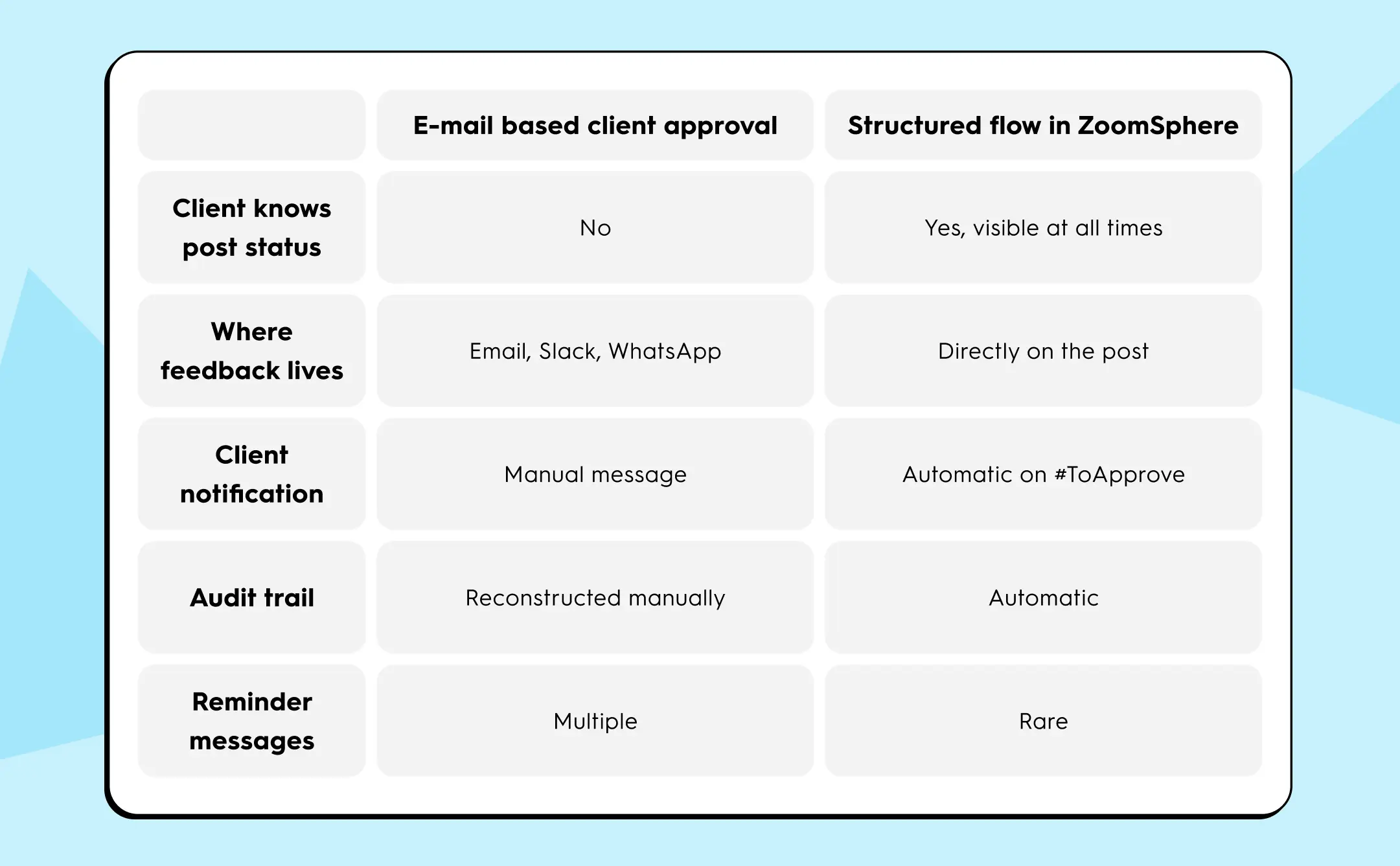
La última fila es la que cambia la forma en que se siente la relación día a día. Cuando un cliente ya no necesita preguntar cómo están las cosas, deja de ver tu agencia como algo que tiene que gestionar. Ese cambio no es cosmético. Es la diferencia entre un cliente que renueva y otro que comienza a atender otras llamadas sin hacer ruido.
Cómo configurar las reglas de aprobación de los clientes antes de tu próxima publicación
No necesita un nuevo documento de proceso. Necesitas dos cosas: un aprobador designado por parte del cliente y un plazo de respuesta acordado antes de que el contenido comience a transferirse.
Empieza con un cliente. Pregúnteles quién da la aprobación final: una persona, no «el equipo». Ponte de acuerdo en 48 horas como punto de referencia para recibir comentarios. Nómbralo en tu conversación de incorporación, no en el contrato. Los clientes respetan las normas que han aceptado en una conversación mucho más que las cláusulas que han hojeado en un PDF.
A continuación, configure el flujo de estado en ZoomSphere: defina #ToApprove para que notifique automáticamente a esa persona cuando el contenido llegue a la fase de aprobación. A partir de ese momento, los correos electrónicos de recordatorio se detienen porque el sistema envía la notificación. Tu equipo tiene un registro de lo que se aprobó, quién lo aprobó y cuándo.
Cuando ambas partes pueden ver el mismo estado en la misma publicación, la ambigüedad que generaba todos los gastos generales no tiene dónde vivir.
{{form-component}}
Cómo establecer las expectativas de los clientes en cuanto a los plazos de aprobación
El momento más efectivo para establecer una expectativa de respuesta es antes de que sea necesaria. Introduce el plazo de 48 horas durante la incorporación del cliente, no después de la primera fecha límite incumplida. Enmárquelo como un compromiso mutuo:
- tu equipo publica publicaciones listas para ser revisadas en un cronograma predecible
- el cliente se compromete a una ventana de respuesta
Ambas partes tienen una obligación visible antes de que se mueva el primer poste.
Tres factores determinan si el acuerdo se mantiene en la práctica. En primer lugar, la autoridad de decisión necesita un nombre. «El equipo de marketing lo revisará» no es un aprobador. Una persona, a la que puedas contactar a través del canal que hayas acordado, con la autoridad para decir que sí. En segundo lugar, la ventana debe ajustarse al funcionamiento real del cliente. Cuarenta y ocho horas por defecto son viables; si el cliente viaja con frecuencia o tiene patrones de trabajo irregulares, negocie 72 horas por adelantado en lugar de perseguirlo repetidamente con un cronograma que nunca fue realista para él. En tercer lugar, deja que la herramienta lleve el recordatorio. Cuando ZoomSphere envía al cliente un enlace directo en el momento en que la publicación cambia de estado, la notificación no proviene de usted. Proviene del proceso. Eso cambia la forma en que el cliente recibe la solicitud: se trata de un aviso del sistema, no de una persona que hace el seguimiento.
No es necesario perseguir a los clientes que entienden lo que se les pide y reciben un aviso claro y oportuno para actuar en consecuencia.
Concluir
El caos de aprobación no vive en tus clientes. Vive en el proceso. En las cadenas de correo electrónico que acumulan respuestas nadie las encuentra, en los mensajes de Slack que sirvieron como comentarios pero no como registros, en la pregunta del lunes por la mañana («¿Dónde estamos con esas publicaciones?») su cliente ha empezado a preguntar todas las semanas.
La brecha entre «el cliente dio su opinión» y «la aprobación se registra» siempre ha existido. Lo que lo encarece ahora es la escala. Con tres clientes, puede administrarlo manualmente. A los cinco años, conseguir las aprobaciones se convierte en tu trabajo. A los siete, empieza a costarte clientes. No por una mala publicación o por un resumen perdido. Debido a varios meses de lunes en los que el cliente no estaba muy seguro de lo que estaba sucediendo.
Nombre un aprobador por cliente. Acuerde 48 horas. Configura el flujo de estado para que el cliente reciba un enlace directo a la publicación en cuanto esté lista, no un correo electrónico reenviado con un archivo adjunto que tendrá que buscar. Hazlo una vez, para un cliente. Vea lo que cambia para el viernes.
El proceso de aprobación es visible para el cliente o no lo está. Uno de ellos genera confianza. El otro lo erosiona silenciosamente.
{{cta-component}}










Te puede interesar

%20(1).webp)
%20(1).webp)